@ChipMonkMedia@MattNavarra Hi Lisa, you don't have to buy the extension to use Screely. You can upload any screenshot to Screely and generate mockups for free; the extension just makes it easier to create screenshots and opens them in Screely instantly
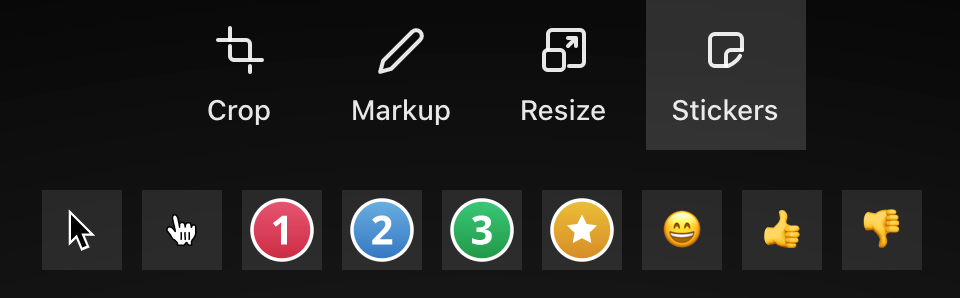
Added some new stickers! 2 cursors, numbers and a star. Perfect for when you are creating a walkthrough, tutorial or documentation and you need to highlight certain elements or create a step-by-step explanation
@pootlepress Thanks for the suggestion, you are not the first one to ask for a highlighting tool!
It's on the list of things to add but it's a very long list already..
Just added some cool new features 🚀
Resize: you can now crop, adjust the aspect ratio or resize your image
Annotate: draw, add text, arrows or shapes to your screenshots (or emojis!)
Replace: You can now replace uploaded screenshots without leaving the editor
If you are having problems with the Chrome extension, make sure you are using the latest version by going to Chrome:extensions and check if you are using version 1.1
If you are on version 1.0.2 or lower, please update the extension manually https://t.co/hzUmYv6MLE
As this was a big update affecting a lot of the existing code you might experience some issues if you are not using the latest version.
Make sure to empty your cache if you are not seeing the new features or experiencing issues with them.
Today's featured Stacker is @marie_dm_ founder of @women_make_ 👩💻
She uses @getScreely to make beautiful screenshots, The Roost Stand as her laptop stand and @LeaveMeAloneApp to manage her email subscriptions. 💌
https://t.co/YGPd6oamds
@BlaserBradley It is. The update for editing mockups was accidentally deployed with another bug fix but wasn't supposed to go live yet.
Rolled it back and hopefully deploying it soon once the bugs are ironed out!
@philippfromme I don't think GIFs will be supported anytime soon. It would require a complete rewrite of the image export system and I'd like to focus on other features first. Sorry!