4 GitHub Repositories to Prepare for 4 Different Types of Software Engineering Interviews:
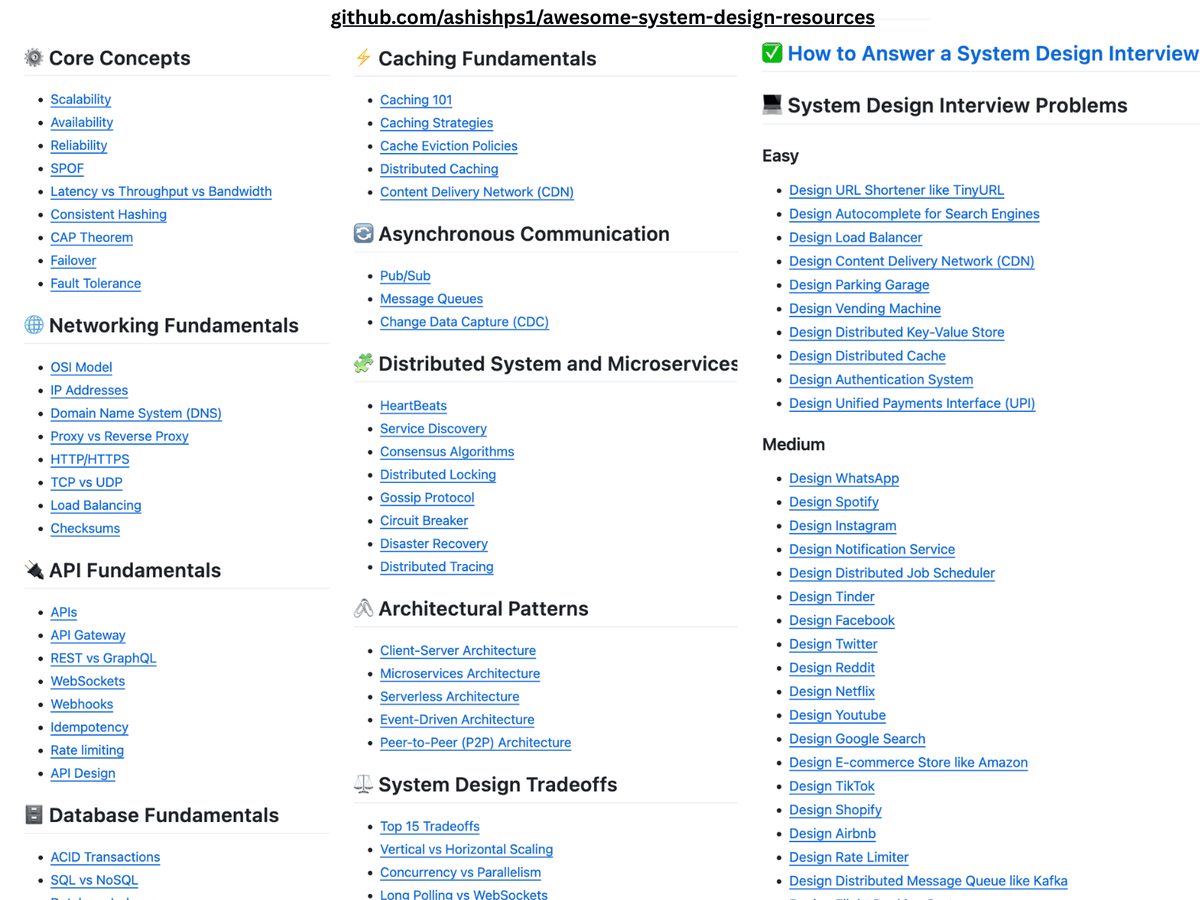
1. System Design Interviews: https://t.co/pkVpi6LxSV
2. Low Level Design Interviews: https://t.co/ewnEgFdlfF
3. Coding Interviews: https://t.co/oTez9H4sGh
4. Behavioral Interviews: https://t.co/NsN4Ki0wlz
♻️ Repost to help others in you network
Developers think Software Architects have the easiest highly paid job.
Well... not quite 👇
Here's what devs imagine an Architect does:
- Doesn't write code
- Draws diagrams all day
- Just makes decisions in meetings
- Gets to choose the "cool" tech stack
- Always says "yes" or "no" with confidence
- Doesn't have to deal with bugs
- Works only 4 hours a day
- Has a high salary
But here's what actually happens:
- Writes the core code everyone else will build on
- Spends hours reviewing pull requests for critical changes
- Explains the same architecture to 5 different teams
- Balances business needs with technical debt
- Makes trade-offs nobody will be happy about
- Deals with production issues at 2 AM
- Handles conflicting opinions from stakeholders
- Documents decisions so future devs understand why
- Manages tech stack upgrades without breaking things
- Tracks performance, security, and scalability risks
- Mentors developers while staying hands-on
- Negotiates scope and timelines under pressure
- Reads endless RFCs and framework updates
- Constantly defends architecture choices with data
- Stays accountable when things go wrong
- Learning new things each week to keep up with changing technology
Being a Software Architect is rewarding — but it's far from easy.
It's not just about drawing boxes; it's about owning the outcomes.
What's the biggest misconception you've heard about Software Architects?
——
♻️ Repost to help others learn the truth about Software Architects
➕ Follow me ( @AntonMartyniuk ) to improve your .NET and Architecture Skills
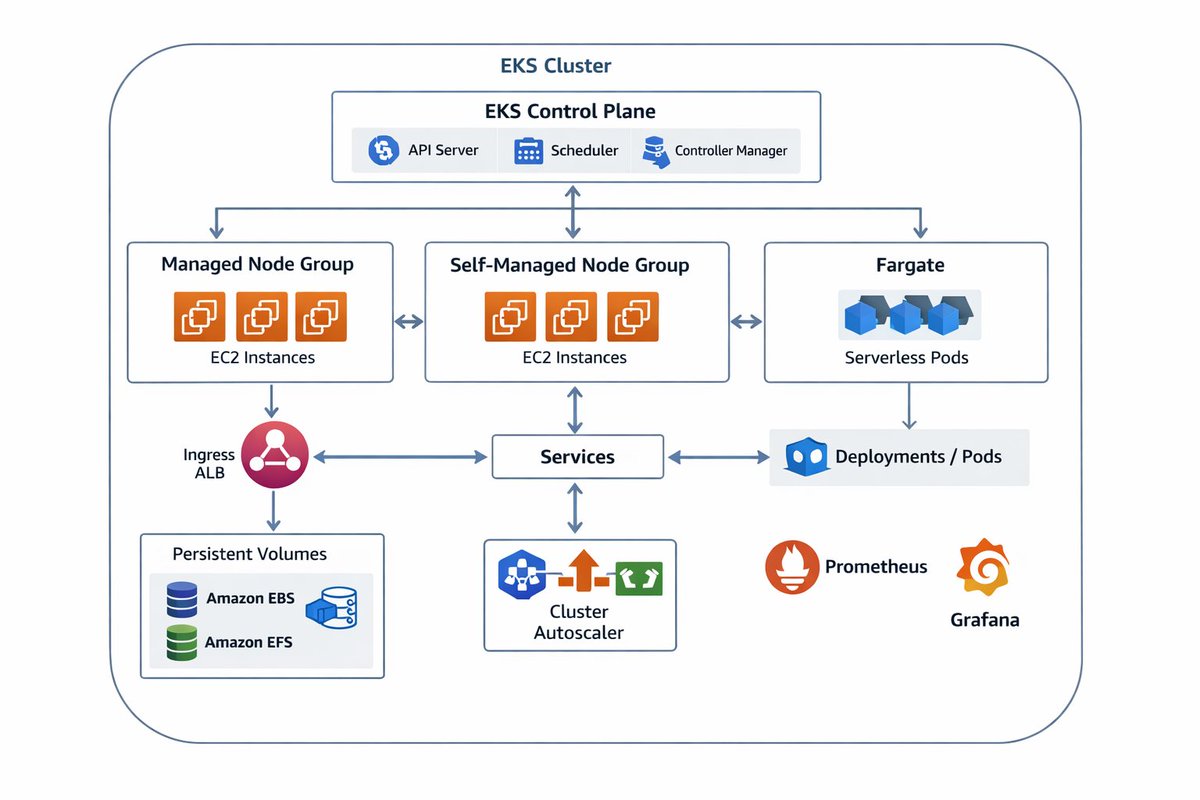
AWS EKS High-Level Architecture
→ Amazon EKS (Elastic Kubernetes Service) is a managed Kubernetes service in AWS.
→ It simplifies running Kubernetes clusters by offloading control plane management to AWS.
→ EKS integrates Kubernetes with AWS networking, security, and scaling services.
Control Plane
→ AWS provisions and manages the Kubernetes control plane across multiple Availability Zones.
→ The control plane includes:
→ API Server → accepts and validates Kubernetes requests.
→ etcd → distributed key-value store for cluster state.
→ Controller Manager & Scheduler → maintain cluster desired state and schedule workloads.
→ AWS ensures high availability and automatic backups of etcd.
Worker Nodes
→ Worker nodes run your containerized workloads (pods).
→ They can be either:
→ Managed Node Groups → EC2 instances managed by EKS for upgrades and scaling
→ Self-Managed Nodes → EC2 instances you manage manually
→ Nodes join the EKS control plane using secure authentication.
AWS Fargate for Serverless Compute
→ EKS integrates with AWS Fargate to run pods without managing servers.
→ AWS provisions compute capacity automatically.
→ Ideal for workloads that benefit from serverless container execution.
Networking Layer
→ EKS uses Amazon VPC to provide networking for pods and services.
→ Pods can receive unique IP addresses using VPC CNI plugin.
→ AWS Security Groups and Network ACLs control pod traffic.
→ EKS integrates with Elastic Load Balancers for service exposure.
Load Balancing
→ When a Kubernetes Service of type LoadBalancer is created, AWS provisions:
→ Application Load Balancer (ALB) → for HTTP/HTTPS workloads
→ Network Load Balancer (NLB) → for TCP/UDP workloads
→ These load balancers distribute traffic to pods across AZs.
Storage Integration
→ EKS supports persistent storage using:
→ Amazon EBS → block storage for individual pods
→ Amazon EFS → shared file storage across pods
→ Storage is mounted via Kubernetes Persistent Volume and Persistent Volume Claim APIs.
IAM & Security
→ EKS uses IAM for authentication and RBAC for authorization.
→ IAM Roles for Service Accounts (IRSA) → map IAM roles to Kubernetes service accounts.
→ Ensures least privilege access from pods to AWS resources.
Autoscaling
→ EKS supports multiple scaling mechanisms:
→ Cluster Autoscaler → adds or removes worker nodes based on pod demand
→ Horizontal Pod Autoscaler → scales pods based on metrics (CPU, memory)
→ AWS Auto Scaling → scales resources using CloudWatch metrics
Monitoring & Logging
→ EKS integrates with AWS observability services:
→ Amazon CloudWatch → metrics and logs
→ AWS X-Ray → distributed tracing
→ Container Insights → pod and node performance dashboards
High-Level Workflow
→ Developer deploys Kubernetes manifests to EKS.
→ EKS control plane schedules pods onto worker nodes or Fargate.
→ Pods communicate through VPC CNI and Security Groups.
→ Load balancers route external traffic to Kubernetes Services.
→ Persistent volumes provide storage as required.
Quick Tip
→ AWS EKS manages Kubernetes control plane, integrates networking, scaling, storage, and security.
→ This allows teams to run resilient Kubernetes clusters without managing infrastructure.
Grab the AWS Handbook:
https://t.co/G3pdEOq4DK
Hexagonal Architecture (Ports and Adapters)
→ Hexagonal Architecture is designed to isolate the core business logic from external systems.
→ It is also called Ports and Adapters Architecture.
→ The goal is to make the application independent of UI, databases, frameworks, and external services.
Analogy: A Phone Charging Hub
→ Imagine a phone as your application’s core logic.
→ The charging ports on the phone are the ports.
→ Different chargers and cables (USB-C, wireless pad, power bank) are the adapters.
→ No matter which charger you use, the phone still works the same.
→ You can change the charger without redesigning the phone.
That is exactly how Hexagonal Architecture works.
Core Concepts
→ Core Application (The Phone)
→ Contains business rules and domain logic.
→ Completely independent of frameworks, UI, and databases.
→ Knows what to do, not how the outside world works.
→ Ports (Charging Ports)
→ Interfaces defined by the core.
→ Describe how the outside world can interact with the core.
→ Examples: UserRepository, PaymentService, NotificationPort.
→ Adapters (Chargers & Cables)
→ Implement the ports.
→ Connect the core to external systems.
→ Examples: REST API controllers, database repositories, message queues.
Flow
→ External input (UI / API / Message) → Adapter → Port → Core Logic
→ Core Logic → Port → Adapter → External system (DB, email, API)
Benefits
→ Strong separation of concerns.
→ Business logic is easy to test (no external dependencies).
→ Frameworks and databases can be swapped with minimal impact.
→ Cleaner, more maintainable codebases.
→ Perfect fit for domain-driven design.
Drawbacks
→ More abstraction and initial setup.
→ Can feel complex for small applications.
→ Requires discipline to maintain clean boundaries.
Best Practices
→ Keep the core pure and dependency-free.
→ Define ports based on business needs, not technical tools.
→ Treat frameworks as plugins, not foundations.
→ Use dependency injection to connect adapters to ports.
When to Use
→ Applications with complex business logic.
→ Systems expected to evolve over time.
→ Projects requiring high testability and flexibility.
→ Teams practicing clean architecture or DDD.
📘 Grab the Software Architectures Ebook; https://t.co/rQ5uqOjgfE
𝟭𝟮 𝗘𝗙 𝗖𝗼𝗿𝗲 𝗔𝗻𝘁𝗶-𝗣𝗮𝘁𝘁𝗲𝗿𝗻𝘀 𝗞𝗶𝗹𝗹𝗶𝗻𝗴 𝗬𝗼𝘂𝗿 𝗔𝗦𝗣.𝗡𝗘𝗧 𝗖𝗼𝗿𝗲 𝗔𝗽𝗽𝘀
I've optimized over 20 enterprise .NET applications and seen the same mistakes in EF Core repeatedly.
Many teams blame EF Core when performance drops.
But most problems come from how EF Core is used, not from EF Core itself.
👉 Here are 12 EF Core anti-patterns killing your .NET apps in production.
❌ 1. Not Disposing DbContext
→ DbContext is not thread-safe and keeps tracked entities forever.
→ This causes memory leaks, race conditions, and stale data bugs.
Fix: Register DbContext as Scoped or dispose manually.
❌ 2. Ignoring AsNoTracking() for read-only queries
→ Tracking every entity increases memory usage and CPU cost.
Fix: Use AsNoTracking() for read-only queries
❌ 3. Using Lazy Loading
→ Lazy loading often creates N+1 queries without you noticing.
→ At scale, this quietly destroys database performance.
Fix: avoid lazy loading
❌ 4. Overusing Include() everywhere
→ Include() loads entire object graphs even when unnecessary.
→ Most endpoints only need a small subset of related data.
Fix: Load only required relationships or use projections instead.
❌ 5. Calling SaveChanges() inside loops
→ Each call creates a separate database roundtrip.
→ This kills throughput and increases transaction overhead.
Fix: Batch changes and call SaveChanges() once per unit of work.
❌ 6. Missing indexes and blaming EF Core
→ Slow queries are often missing indexes, not ORM problems.
→ Always inspect execution plans before blaming EF Core.
Fix: Analyze query plans and add proper database indexes.
❌ 7. Not using projections
→ Returning full entities forces EF Core to materialize everything.
→ Select only the fields you actually need.
Fix: Use Select() to project only needed fields into DTOs.
❌ 8. Overfetching too many rows
→ Extra rows waste memory, CPU, and network bandwidth.
→ This hurts every single request under load.
Fix: Fetch minimal data required for each use case.
❌ 9. Ignoring concurrency handling
→ Without concurrency tokens, updates overwrite each other silently.
→ This leads to data loss and hard-to-debug production issues.
Fix: Use concurrency tokens like RowVersion or timestamps.
❌ 10. Not using migrations
→ Manual schema changes drift over time and break deployments.
→ Migrations keep database evolution predictable and safe.
Fix: Use EF Core migrations to version and evolve schemas safely.
❌ 11. Skipping async APIs
→ Blocking threads limits scalability under traffic spikes.
→ Async database calls are mandatory for modern .NET apps.
Fix: Use async EF Core APIs end to end.
❌ 12. Using EF Core for bulk updates blindly
→ EF Core is not optimized for large bulk operations.
Fix: use Entity Framework Core Extensions library
👉 Get .NET interview questions for free here:
↳ https://t.co/W1jLMI7Wvl
——
♻️ Repost to help others avoid common EF Core mistakes
➕ Follow me ( @anton-martyniuk ) to improve your .NET and Architecture Skills
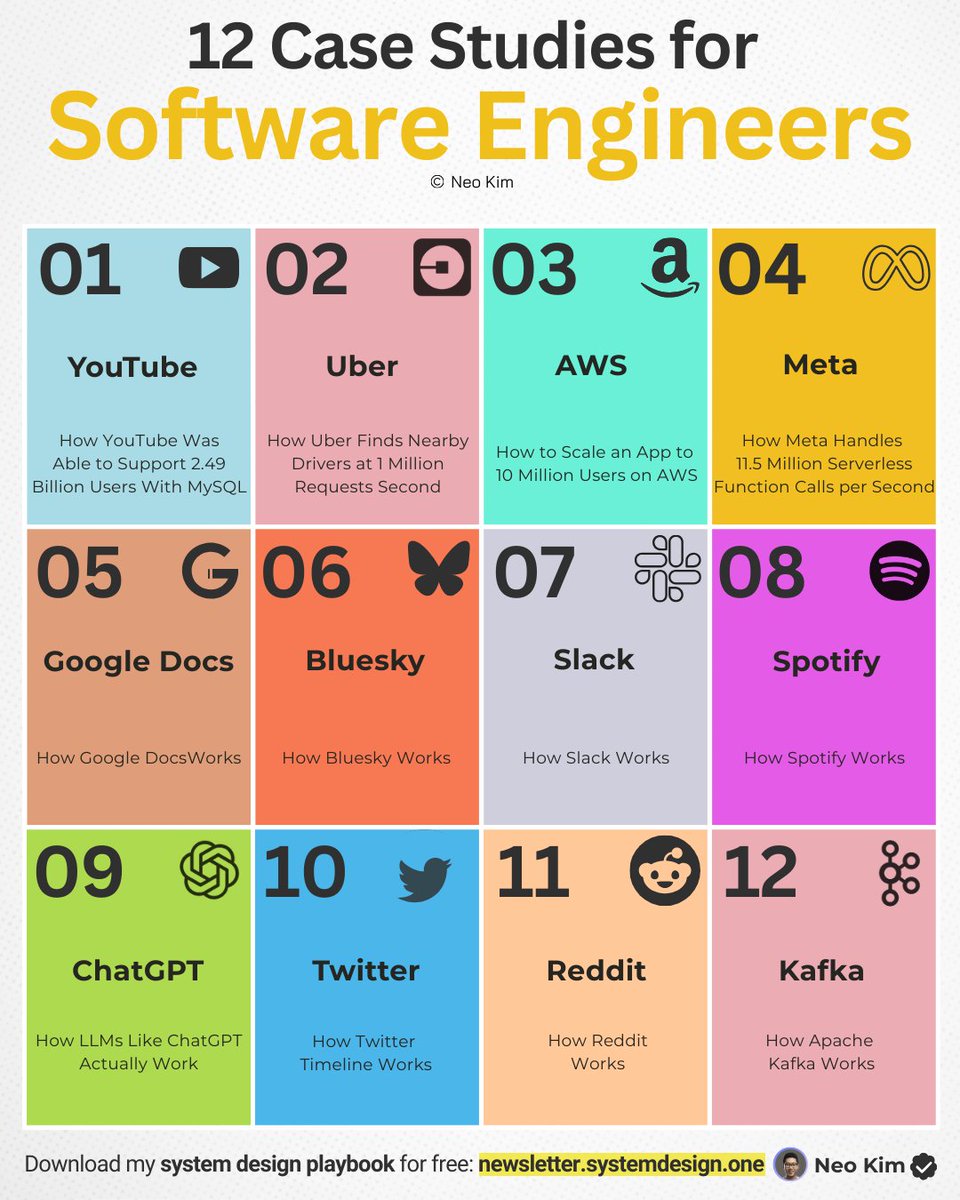
If you're serious about SYSTEM DESIGN (in 2026), learn these 12 case studies:
1. How Google Docs Works
↳ https://t.co/W57IkAjXpT
2. How Spotify Works
↳ https://t.co/BxrH3oHIFS
3. How Reddit Works
↳ https://t.co/o6Pw2hhj3T
4. How Bluesky Works
↳ https://t.co/2rLYlRlky0
5. How ChatGPT Works
↳ https://t.co/5lCKxq2g4N
6. How Kafka Works
↳ https://t.co/8rOy9KgCMo
7. How Slack Works
↳ https://t.co/eIo29uOQOJ
8. How Meta Handles 11.5M Serverless Function Calls per Second:
↳ https://t.co/NSt6jovxu5
9. How Uber Finds Nearby Drivers
↳ https://t.co/kJ2t8dtmch
10. How Twitter Timeline Works
↳ https://t.co/pF2RYmPaIG
11. How YouTube Was Able to Support 2.49 Billion Users With MySQL
↳ https://t.co/4VDJ5cs6fL
12 How to Scale an App to 10 Million Users on AWS
↳ https://t.co/RozCGli0r8
(What else should make this list?)
——
👋 PS - Want my System Design Playbook for free?
Join my newsletter with 200K+ software engineers:
→ https://t.co/ByOFTtOihX
———
💾 Save this for later, and RT it to help others master system design.
👤 Follow @systemdesignone + turn on notifications.
API Documentation Standards
Creating Clear, Reliable, and Developer-Friendly API Docs
1. Purpose of API Documentation
→ API documentation explains how developers interact with your API
→ It acts as a contract between the API provider and consumers
→ Good documentation reduces onboarding time and integration errors
→ Poor documentation increases support cost and developer frustration
2. General Documentation Principles
→ Clarity and Simplicity
Write in clear, simple language
Avoid ambiguity and unnecessary jargon
Explain concepts before showing usage
→ Consistency
Use consistent terminology across all sections
Keep naming conventions, formats, and examples uniform
Ensure endpoint descriptions follow the same structure
→ Accuracy and Currency
Documentation must always match the actual API behavior
Update docs immediately when endpoints change
Deprecate outdated endpoints clearly
3. Standard API Documentation Structure
→ Introduction Section
Explain what the API does
Define the target users and use cases
Describe the base URL and API versioning strategy
→ Authentication & Authorization
Explain authentication methods such as API keys, OAuth, or JWT
Show how to include credentials in requests
Describe permission scopes and access levels
→ Endpoints Overview
List all available endpoints clearly
Group endpoints by resource or functionality
Provide short summaries for each endpoint
4. Endpoint Documentation Standards
→ HTTP Method and Endpoint URL
Clearly specify the HTTP method and full endpoint path
Example: GET /users/{id}
→ Request Parameters
Describe path parameters, query parameters, and request body fields
Include data types, required fields, and validation rules
→ Request Examples
Provide clear and realistic request examples
Show headers, body, and authentication usage
→ Response Structure
Document all response fields and their meanings
Include data types and optional fields
Show successful and error responses
5. Error Handling Documentation
→ HTTP Status Codes
Clearly explain all possible status codes
Include success and error scenarios
→ Error Response Format
Use a consistent error structure
Document error codes, messages, and possible causes
→ Common Error Scenarios
Explain frequent mistakes and how to fix them
Help developers debug faster
6. Examples and Use Cases
→ Provide real-world usage examples
→ Show complete request–response flows
→ Include common integration patterns
→ Demonstrate pagination, filtering, and sorting
7. Versioning and Change Management
→ Clearly document API versions
→ Explain breaking vs non-breaking changes
→ Provide migration guides for new versions
→ Mark deprecated endpoints clearly
8. Developer Experience Best Practices
→ Include quick-start guides
→ Add FAQs and troubleshooting sections
→ Provide SDKs or client libraries if available
→ Keep documentation searchable and well-structured
Tip
→ High-quality API documentation is as important as the API itself
→ Clear standards improve adoption, trust, and long-term maintainability
→ Well-documented APIs scale better with growing developer communities
Recommended Resource
Grab the API Mastery Ebook https://t.co/NDhPt2nklK
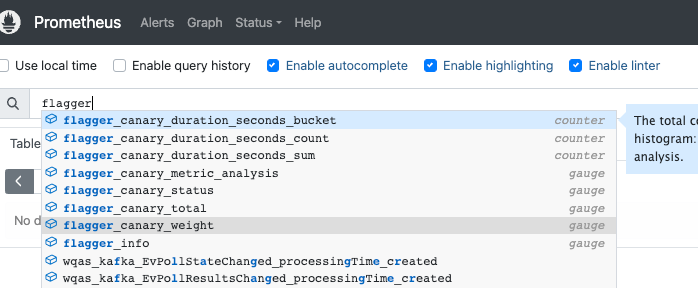
This tutorial shows how to use Flagger to roll out updates gradually (canary style) in Kubernetes, automating traffic shifts, metric checks, rollbacks, and webhooks
➤ https://t.co/BPf3O1Cx0p
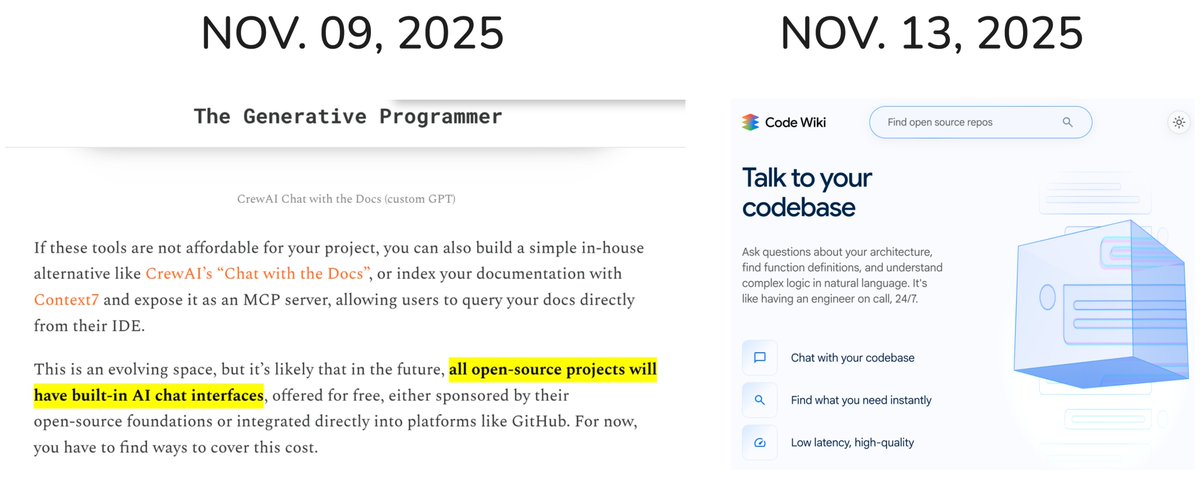
Exactly as I predicted 5 days ago:
"all open‑source projects will have built‑in AI chat interfaces"
@googledevs announced Code Wiki 👏👏👏
Code Wiki scans the full codebase and regenerates the documentation after each change, so that you can chat with your codebase.
https://t.co/JcuUpHrPNq
https://t.co/mzaxF0jirT
NEW POST
Legacy Modernization is hard, especially when we've lost the source code. Thiyagu Palanisamy and Chandirasekar Thiagarajan describe how AI helped them reverse engineer.
https://t.co/ffWTM8ujKe
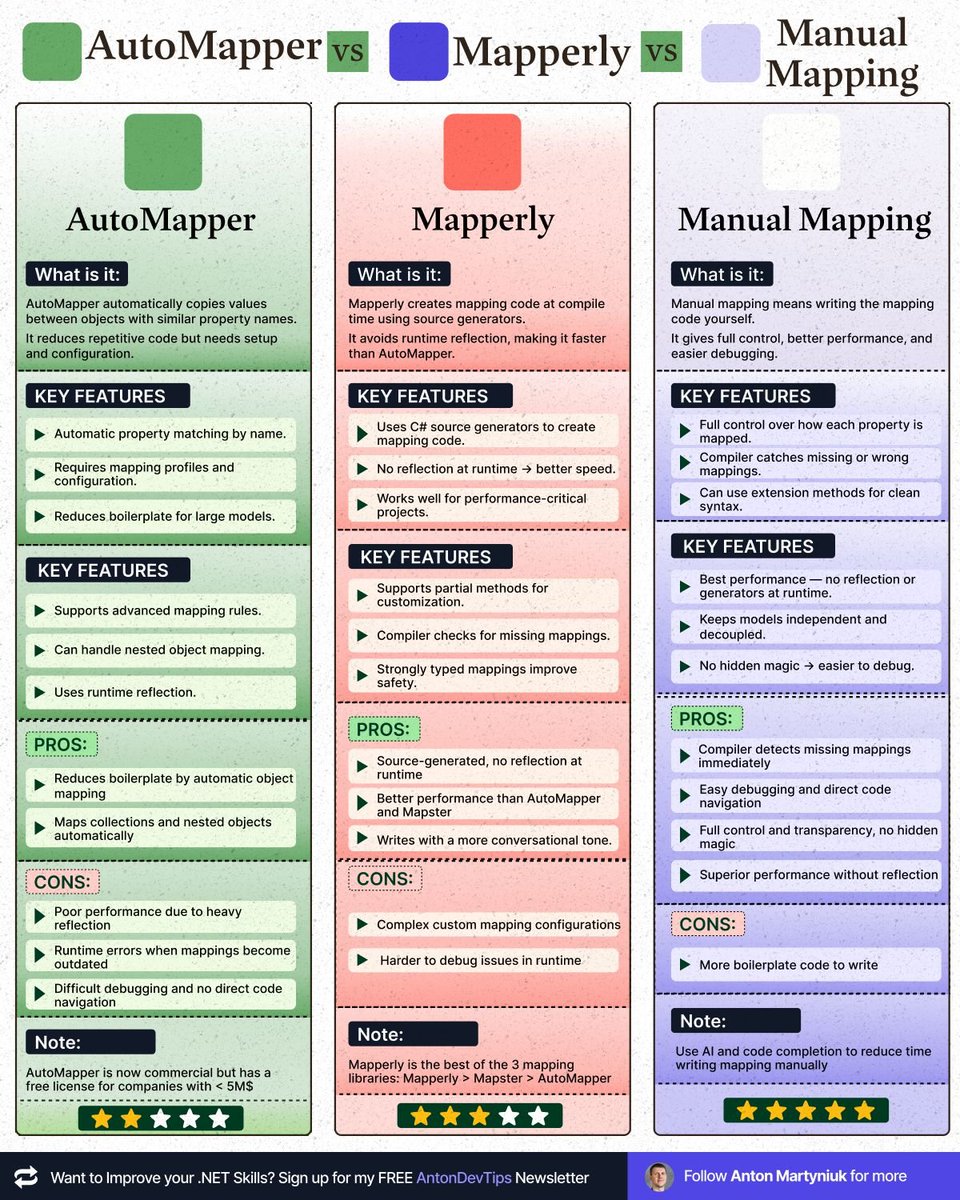
𝗧𝗵𝗲 𝗕𝗲𝘀𝘁 𝗪𝗮𝘆 𝘁𝗼 𝗠𝗮𝗽 𝗢𝗯𝗷𝗲𝗰𝘁𝘀 𝗶𝗻 .𝗡𝗘𝗧 𝗶𝗻 𝟮𝟬𝟮𝟱
And it's not AutoMapper or Mapperly
Here are the available options for mapping objects in .NET:
- AutoMapper
- Mapster
- Mapperly
- Manual mapping with extension methods
- Manual mapping with constructors
𝗔𝘂𝘁𝗼𝗠𝗮��𝗽𝗲𝗿
�� Reduces boilerplate by automatic object mapping
❌ Complex setup and configuration
❌ Runtime errors when mappings become outdated
❌ Poor performance due to heavy reflection
❌ Difficult debugging and no direct code navigation
𝗠𝗮𝗽𝘀𝘁𝗲𝗿
✅ Faster than AutoMapper
✅ Easier configuration than AutoMapper
❌ Still uses reflection, causing performance hits
❌ Difficult debugging and no direct code navigation
𝗠𝗮𝗽𝗽𝗲𝗿𝗹𝘆
✅ Source-generated, no reflection at runtime
✅ Better performance than AutoMapper and Mapster
❌ Complex custom mapping configurations
❌ Harder to debug issues in runtime
𝗠𝗮𝗻𝘂𝗮𝗹 𝗠𝗮𝗽𝗽𝗶𝗻𝗴 𝘄𝗶𝘁𝗵 𝗘𝘅𝘁𝗲𝗻𝘀𝗶𝗼𝗻 𝗠𝗲𝘁𝗵𝗼𝗱𝘀 (𝗥𝗲𝗰𝗼𝗺𝗺𝗲𝗻𝗱𝗲𝗱)
✅ Compiler detects missing mappings immediately (required keyword in C#)
✅ Easy debugging and direct code navigation
✅ Full control and transparency, no hidden magic
✅ Superior performance without reflection overhead
❌ More boilerplate code to write
𝗠𝗮𝗻𝘂𝗮𝗹 𝗠𝗮𝗽𝗽𝗶𝗻𝗴 𝘄𝗶𝘁𝗵 𝗖𝗼𝗻𝘀𝘁𝗿𝘂𝗰𝘁𝗼𝗿𝘀
✅ Provides clear and explicit mappings
✅ Compiler-level safety checks
❌ Creates tight coupling between different models
❌ Violates model independence, especially problematic if models are shared across NuGet packages or external contracts
📌 My Recommendation:
Manual Mapping with Extension Methods is the clear winner for 2025.
Why?
➡️ Compiler catches errors, making mappings reliable
➡️ Easier to debug, navigate, and maintain
➡️ Improved performance without reflection
➡️ Models remain decoupled, respecting clean architecture principles
I've personally switched to manual mapping years ago and found it significantly boosts software quality, maintainability, and clarity.
Note: you can use AI and code completion to create manual mapping in minutes, reducing the need write every line yourself.
Do you still use mapping libraries, or have you moved to manual mapping? 👇
—
♻️ Repost to help your network learn about mapping
➕ Follow me ( @AntonMartyniuk ) for more
📌 Save this post for future reference!
#dotnet
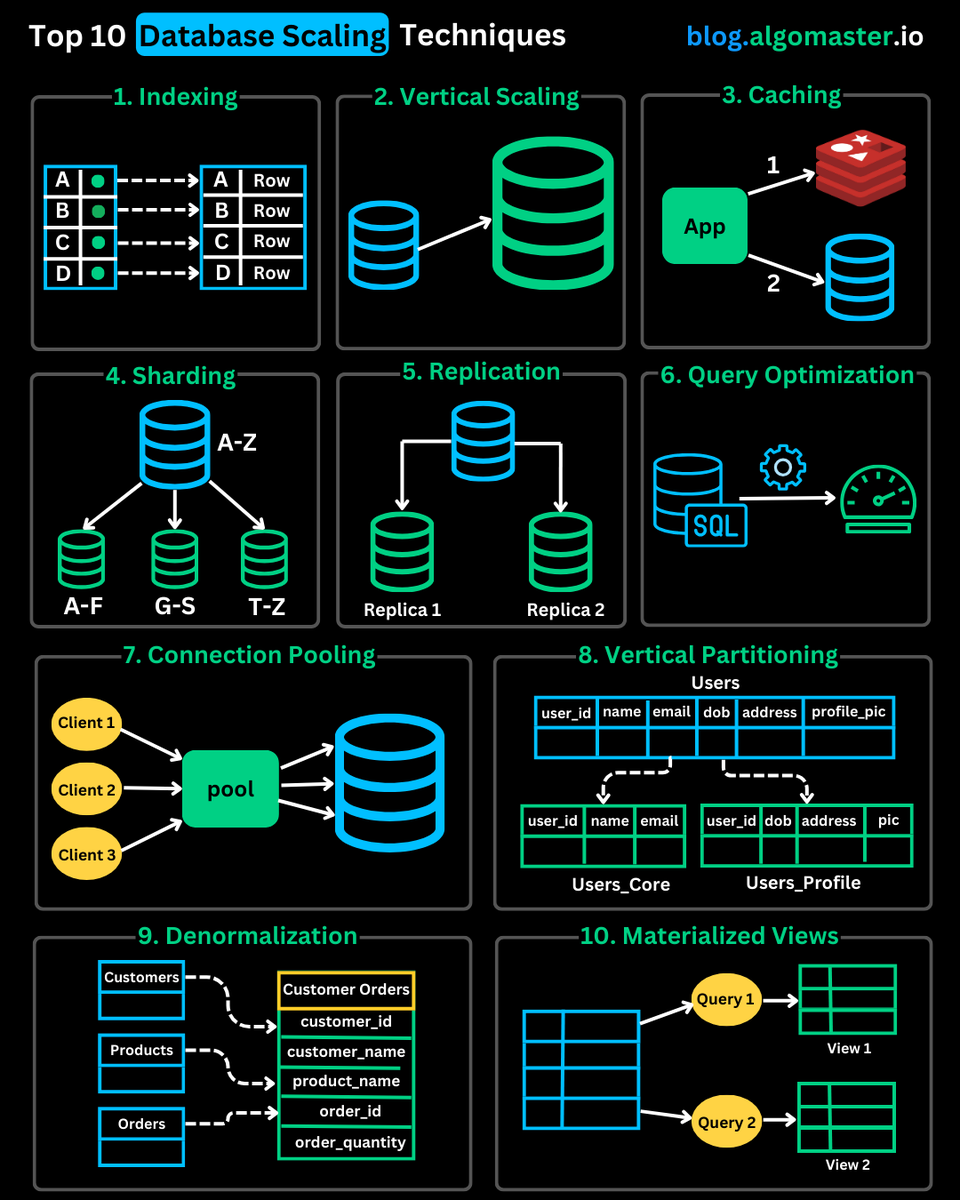
Top 10 Database Scaling Techniques You Should Know:
1. 𝐈𝐧𝐝𝐞𝐱𝐢𝐧𝐠: Create indexes on frequently queried columns to speed up data retrieval.
2. 𝐕𝐞𝐫𝐭𝐢𝐜𝐚𝐥 𝐒𝐜𝐚𝐥𝐢𝐧𝐠: Upgrade your database server by adding more CPU, RAM, or storage to handle increased load.
3. 𝐂𝐚𝐜𝐡𝐢𝐧𝐠: Store frequently accessed data in-memory (e.g., Redis) to reduce database load and improve response time.
4. 𝐒𝐡𝐚𝐫𝐝𝐢𝐧𝐠: Distribute data across multiple servers by splitting the database into smaller, independent shards, allowing for horizontal scaling and improved performance.
5. 𝐑𝐞𝐩𝐥𝐢𝐜𝐚𝐭𝐢𝐨𝐧: Create multiple copies (replicas) of the database across different servers, enabling read queries to be distributed across replicas and improving availability.
6. 𝐐𝐮𝐞𝐫𝐲 𝐎𝐩𝐭𝐢𝐦𝐢𝐳𝐚𝐭𝐢𝐨𝐧: Fine-tune SQL queries, eliminate expensive operations, and leverage indexes effectively to improve execution speed and reduce database load.
7. 𝐂𝐨𝐧𝐧𝐞𝐜𝐭𝐢𝐨𝐧 𝐏𝐨𝐨𝐥𝐢𝐧𝐠: Reduce the overhead of opening/closing database connections by reusing existing ones, improving performance under heavy traffic.
8. 𝐕𝐞𝐫𝐭𝐢𝐜𝐚𝐥 𝐏𝐚𝐫𝐭𝐢𝐭𝐢𝐨𝐧𝐢𝐧𝐠: Split large tables into smaller, more manageable parts (partitions), each containing a subset of the columns from the original table.
9. 𝐃𝐞𝐧𝐨𝐫𝐦𝐚𝐥𝐢𝐳𝐚𝐭𝐢𝐨𝐧: Store data in a redundant but structured format to minimize complex joins and speed up read-heavy workloads.
10. 𝐌𝐚𝐭𝐞𝐫𝐢𝐚𝐥𝐢𝐳𝐞𝐝 𝐕𝐢𝐞𝐰𝐬: Pre-compute and store results of complex queries as separate tables to avoid expensive recalculation, reducing database load and improving response times.
♻️ Repost to help others in your network
I really resonated with: "I think I’m less interested in my own happiness (whatever that means) than I am interested in doing work that feels worth doing." - @mipsytipsy reflects on her career
https://t.co/5TPDuCMZoN
Informative interview about a company that's leaned heavily into AI Augmented software development. Interesting to hear that this is leading them to increase the hiring of grads.
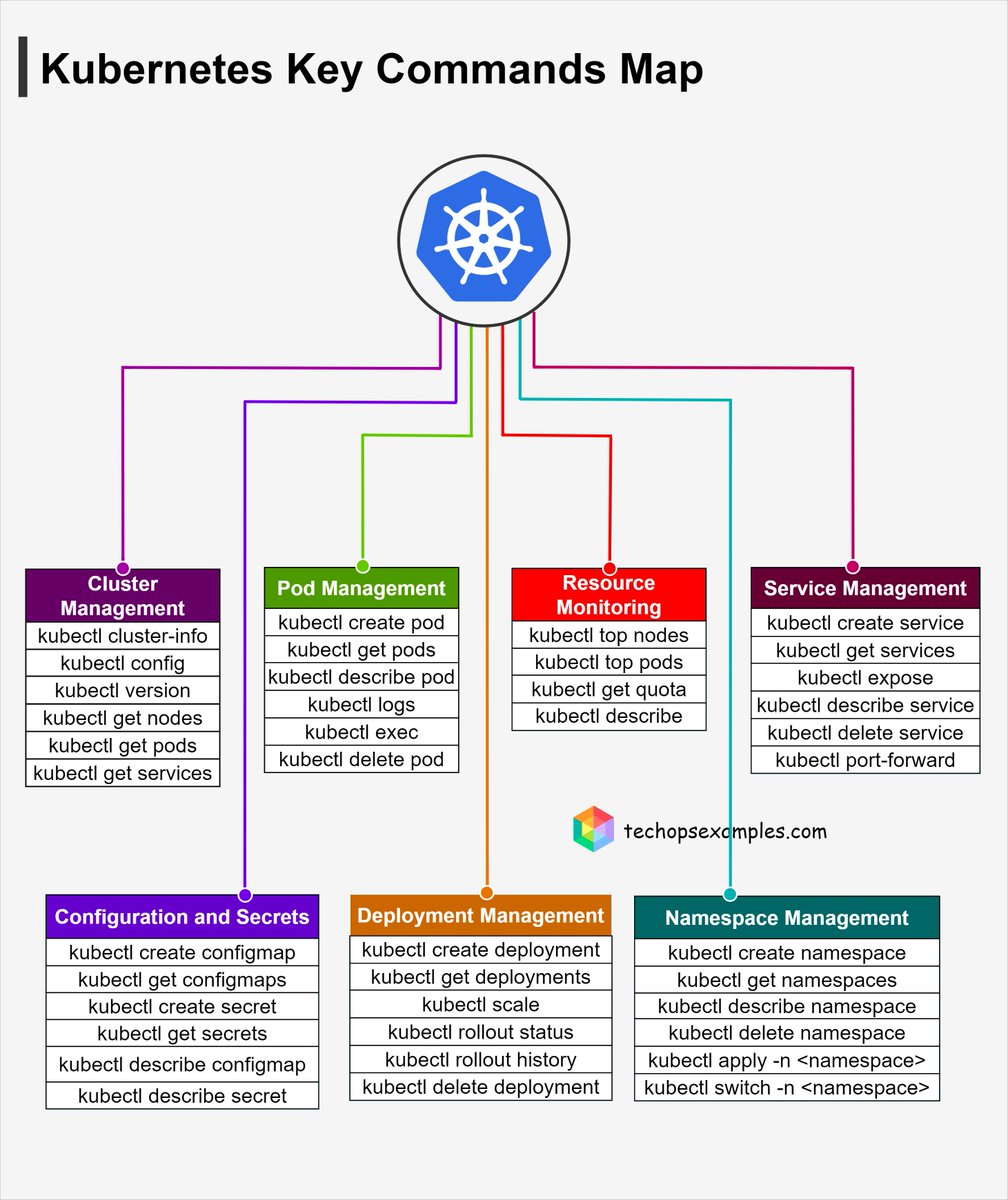
Kubernetes Key Commands Map 👇
Covering aspects of:
1. Pod Management
2. Cluster Management
3. Service Management
4. Resource Monitoring
5. Namespace Management
6. Deployment Management
7. Configuration and Secrets
Note:
This is not a complete list; it includes only the key commands
48K+ read our TechOps examples newsletter: https://t.co/wwkI6UOSo4
What do we cover:
DevSecOps, Cloud, Kubernetes, IaC, GitOps, MLOps
🔁 Consider a Repost if this is helpful