Anonymous git commits via ring signatures. Prove a commit came from one of N trusted contributors, without revealing which. Ship code, leave no trace. 👻
Coming soon: anonymous governance for the GitGhost community. 👻
Proposals will live on the platform, and members will be able to vote on them anonymously. Each vote is signed with a ring signature, so it can be verified as coming from a real ring member, and a built-in cryptographic fingerprint stops anyone from voting twice in the same proposal.
What you get: a record everyone can audit, voters nobody can identify, and a way to participate in the project's direction without putting your name on every position you hold.
Same primitives, new use case. Governance you can verify, with privacy that actually holds.
Shipped: multi-member ring management, fully in the browser.
Everything you needed the terminal for now lives in the dashboard:
• Create a ring at https://t.co/6dmJhwH7yW
• Add members by GitHub username.
• Toggle each ring public or private.
• Set one public and it auto-appears in the public index at /rings for anyone to discover.
No SSH key setup, no CLI. It all happens in your browser.
Rings are what give a ghost commit its anonymity, the 1-of-N set a signature could've come from, so making them this easy to build and share is a big step toward GitGhost being collaborative by default.
Spin one up and invite people: https://t.co/a0M2QneNj6
Ship code. Leave no trace. Now with AI.
GitGhost dashboard is live:
ㆍDescribe what you want in plain English
ㆍAI generates the code (8 providers)
ㆍLive preview the result
ㆍOne click → commits as ghost to your repo
ㆍLSAG ring signature verifiable on-chain
ㆍAnchored to Base mainnet
ㆍZero identity leak - not your username, not your repo
Login with GitHub. Enter a repo name. We do the rest. Prompt → Preview → Ghost commit. That's it.
https://t.co/QeKG1qdUB5
The GitGhost extension for VS Code [v0.1.0] is officially out.
This is the one that makes it click for us. GitGhost was never just a privacy narrative, it's real tooling, and now it lives right inside the editor you already use.
Initialize, build your ring, and ghost-commit straight from VS Code. There's a ring panel in your sidebar, a status indicator that tells you when you're ready, and a one-click ghost commit button in Source Control. You can even verify commits and leave anonymous PR reviews, all signed, all provable, all without revealing who you are.
Get it: https://t.co/lLjcDtyqOk
Our Telegram group is now open for everyone.
It's a place to talk about all of it: $GTG, the tech, the how-it-works, and whatever you're building or curious about. Ask questions, swap ideas, learn how anonymous verifiable commits actually work under the hood, or just lurk and follow along.
We're building GitGhost in the open, and the community is part of that.
Join here : https://t.co/LJMbQQQIFL
The GitGhost extension for @code drops in a few moments. 👻
Here's why this one matters to us. A lot of projects talk about privacy. We'd rather hand you something you can actually use. The CLI was step one. On-chain anchoring was step two. Now anonymous, verifiable commits live right inside your editor, no terminal needed.
GitGhost isn't a privacy narrative. It's privacy tooling you can install and run today.
Sign a commit, prove it came from your ring, never reveal who. Right from VS Code.
the GitGhost Dashboard. An agent-driven way to ship verifiable ghost commits straight from the browser. [COMING SOON]
The flow: log in with GitHub, connect a repo, describe the change in plain language.
The agent writes it, you review the diff, and on approval it opens a PR as a ghost commit with Ghost-* trailers attached. Same verification model as the CLI, every commit provably from a declared ring.
What it unlocks beyond just coding: verified commits land in a public feed, repos rank by ghost activity, you keep iterating on the same work, and rings let teams build shared reputation over time.
One honest note: dashboard signing is a different trust model than the CLI. Local signing keeps the key on your machine. A hosted agent that commits for you necessarily handles more on the server side. We'll be clear about exactly what that means as we build it, because for a privacy tool, that distinction matters.
the GitGhost Dashboard. An agent-driven way to ship verifiable ghost commits straight from the browser. [COMING SOON]
The flow: log in with GitHub, connect a repo, describe the change in plain language.
The agent writes it, you review the diff, and on approval it opens a PR as a ghost commit with Ghost-* trailers attached. Same verification model as the CLI, every commit provably from a declared ring.
What it unlocks beyond just coding: verified commits land in a public feed, repos rank by ghost activity, you keep iterating on the same work, and rings let teams build shared reputation over time.
One honest note: dashboard signing is a different trust model than the CLI. Local signing keeps the key on your machine. A hosted agent that commits for you necessarily handles more on the server side. We'll be clear about exactly what that means as we build it, because for a privacy tool, that distinction matters.
A few things that trip people up the first time, and how to dodge them.
"My commit isn't anonymous." Most common one. If your ring has only one member, there's nothing to hide behind. Anonymity needs a crowd, so add at least one more contributor before you sign.
"Verify fails on another machine." The verifier rebuilds the ring from your repo's ring config, so that file has to be committed. If it's gitignored or missing, others can't reconstruct the set. Commit the ring, keep the secret key out.
"ring add can't find someone." It pulls from their public GitHub keys, so the person needs a key on their account, and you need the right username.
Get those three right and it just works. Sign your work, leave no trace.
Your first ghost commit takes three commands. Here's the whole thing.
First, set up your identity and an empty ring:
↳ gitghost init my-team
Then build the ring, the trusted group your signature could've come from. Add yourself, then pull others straight from their GitHub keys:
↳ gitghost ring add-self
↳ gitghost ring add torvalds
Now commit like normal. GitGhost signs on behalf of the whole ring and tucks the proof into the commit:
↳ gitghost commit -m "fix: critical CVE"
That's it. Anyone can verify it later, in the terminal or the browser, and never learn which member signed. (Needs Node 18+.)
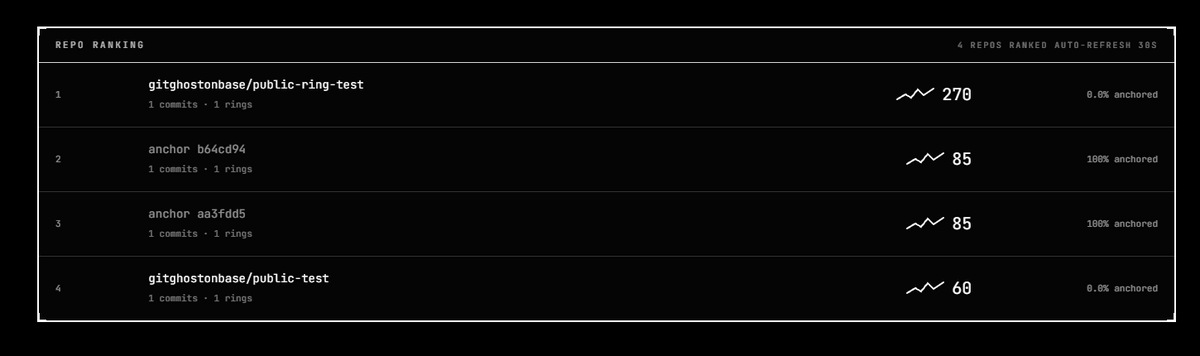
New on gitghost: repo activity ranking, live at https://t.co/GXuJn4tQS9
Every repo gets scored from public verification + anchor events:
• 30% verified ghost commit volume
• 25% anchored commit rate
• 20% ring diversity
• 15% recency
• 10% seven-day freshness
Proof activity never identity.
How GitGhost ChatBox will fit into @github, at a glance.
The flow: a PR lands from a fork with ghost trailers on the commit. GitHub fires a webhook. ChatBox parses the public trailers, runs the same LSAG verification engine as the CLI and web verifier (so the result is consistent everywhere), and posts a readable summary on the PR: signature valid or not, which ring, ring root match, anonymity status. Then it stays in the thread to answer follow-ups.
The boundary is the whole design. ChatBox only reads what's already public in the commit. It never has access to identity.json, and it never de-anonymizes a signer. A bot in the loop doesn't weaken the privacy model, because the bot only ever sees what any verifier could already see.
Most privacy tools ask you to trust them. GitGhost lets you check for yourself instead. 👻
Here's what that means in plain terms. When you use GitGhost to sign your work, everything happens right on your own computer. Nothing gets sent off to some company's server. Your secret key, the thing that proves it's you, never leaves your machine.
And the proof it creates? Anyone can double-check it themselves, either on their computer or just in a web browser, and they'll always get the exact same answer. No company in the middle. No "just take our word for it." It's built on security tools that experts have already reviewed for years, so we're not inventing our own and hoping it holds.
That's the whole point. You don't have to trust us. You can verify it.
$GTG : 0x83a83a85351f61c36e4752dc9f0fade58f803b07
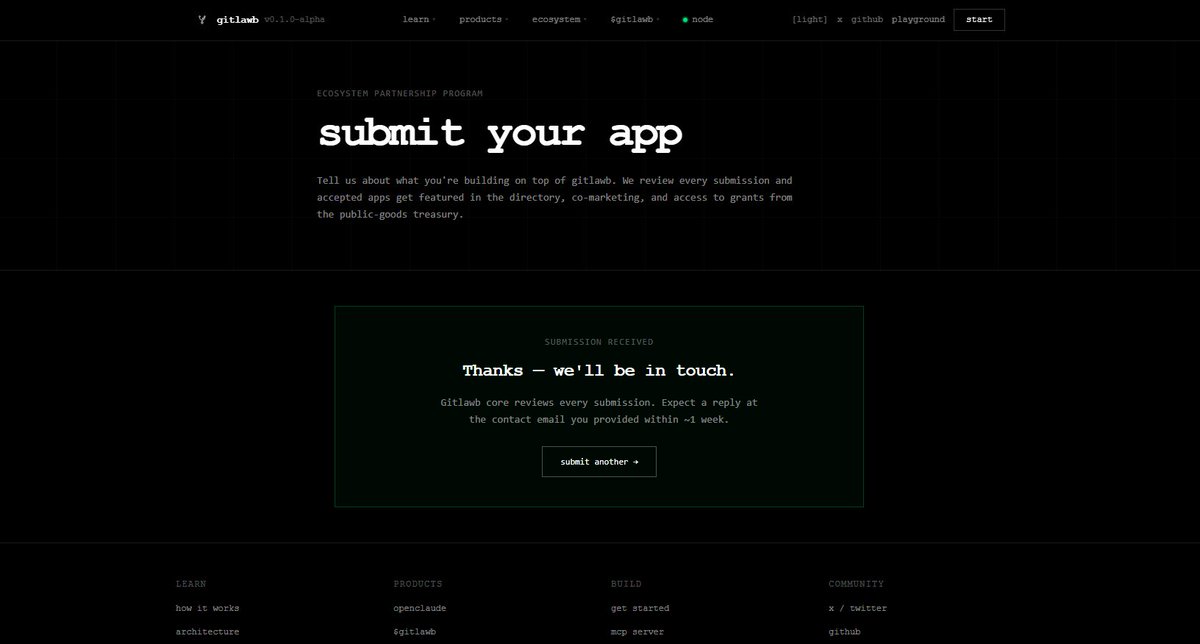
Hey @gitlawb
We've been building GitGhost: anonymous git commits via ring signatures, so a contribution can be proven to come from a trusted group without revealing which member signed. Privacy-first, for developers.
Your work on decentralized, cryptographic identity for code feels deeply aligned with ours. We'd love to explore how anonymous commits could fit into your ecosystem.
Open to a conversation? 👻
Introducing GitGhost ChatBox, coming soon to @github
Our verifier today is quiet. It checks a commit and hands you a result. ChatBox is the next step: an agent that lives in your repo and that you can actually talk to, right inside a pull request.
When a contribution comes in from a fork, ChatBox reads what's already in the commit, whether it carries a valid ghost signature, which ring it belongs to, and whether the author stays anonymous, then sums it up in plain language. And you can ask it follow-up questions in the comments, like a teammate who already did the homework.
It only ever looks at what's already public in the commit. No hidden access, no identities exposed.
Coming soon.
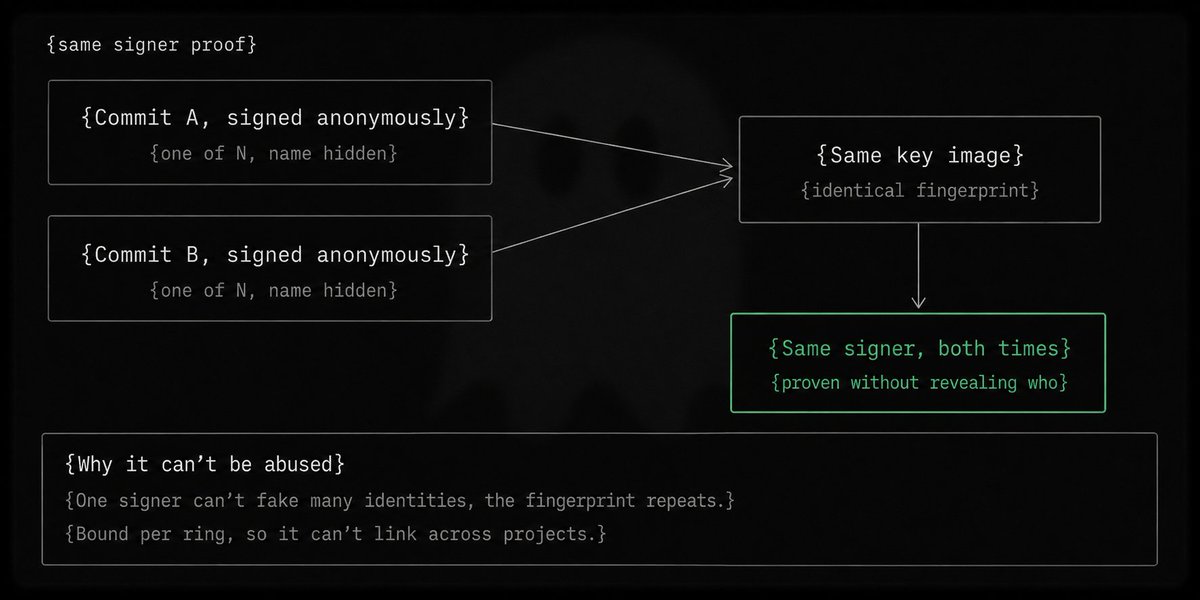
The key image is the small piece of math that makes GitGhost anonymous AND abuse-proof at once. Most anonymous systems can't do both
A ring signature alone proves "one of these N people signed this" without revealing who. Great for anonymity, but it has a hole: if nobody can tell who signed, what stops one person from signing 100 times and pretending to be a crowd? That's the sybil problem.
The fix is the key image: a value derived from your secret key that comes out the same every time you sign in the same ring. Think of it as an invisible fingerprint. It never says who you are, but the same signer always leaves the same mark. Two signatures, same fingerprint means same person, even though nobody learns the name.
And it's bound to the specific ring you sign in, so your fingerprint in one project can't be linked to another. Anonymity and accountability, at the same time.
Same curve, less tooling: the protocol uses secp256k1, the same curve as Bitcoin and Ethereum, so on-chain anchoring reuses existing tooling instead of inventing its own.
No wallet needed: a sponsored relayer at /api/anchor pays gas after re-verifying the signature itself, so users never touch a wallet. Rate-limited to keep it from being abused.
What lands on-chain is just three values: commit hash, ring root, key image. No identities, ever.
why GitGhost anchors to @base , with the actual numbers.
Anchoring writes a commit's proof on-chain for permanent, tamper-proof timestamping. Choice of chain matters, so here's the reasoning.
Security: Base is an Ethereum L2, so anchors inherit Ethereum-grade settlement. The timestamp doesn't depend on trusting us.
Cost: about $0.0001 per anchor. At a hundredth of a cent, anchoring is cheap enough to be a default rather than something you ration.
Speed: roughly 1.6 seconds end to end, and that figure already includes re-running full LSAG verification server-side before the write.
A quiet little milestone we're happy about.
@gitghost/cli just crossed 450 downloads in its first week on npm, and the trend is climbing. Not bad for a tool that's only been public for a couple of days.
What makes it feel real: this is organic. No paid promotion, no growth tricks. Just developers finding a CLI for anonymous git commits via ring signatures, installing it, and trying it for themselves. All crypto runs locally, MIT licensed, Node 18+.
If you're one of the 450, thank you. If you're not yet:
↳ npm i @gitghost/cli
We're building this in the open, and early signs like this keep us going. Ship code, leave no trace.


![gitghost_'s tweet photo. the GitGhost Dashboard. An agent-driven way to ship verifiable ghost commits straight from the browser. [COMING SOON]
The flow: log in with GitHub, connect a repo, describe the change in plain language.
The agent writes it, you review the diff, and on approval it opens a PR as a ghost commit with Ghost-* trailers attached. Same verification model as the CLI, every commit provably from a declared ring.
What it unlocks beyond just coding: verified commits land in a public feed, repos rank by ghost activity, you keep iterating on the same work, and rings let teams build shared reputation over time.
One honest note: dashboard signing is a different trust model than the CLI. Local signing keeps the key on your machine. A hosted agent that commits for you necessarily handles more on the server side. We'll be clear about exactly what that means as we build it, because for a privacy tool, that distinction matters.](https://pbs.twimg.com/media/HJLaR-gXMAAbkbP.jpg)