Full Stack Developer with 3+ years of experience, building and shipping production-ready web applications end-to-end.
Sharing my portfolio👇
🔗https://t.co/DsqxCQaqs8
#FullStackDeveloper#BuildInPublic
I've got hardcoded checks for known breakers — like "Create an invoice" with zero details, which used to make the AI invent a fake one. That goes straight to chat now.
Everything else goes to a small AI model with examples of what's a command vs just talking. "What can you do?" is actually one of those examples — no invoice keywords, so it needed an explicit rule or the model would guess wrong.
Pure AI tripped on vague stuff, pure rules can't cover every phrasing - so I landed on both.
Update on Ledger 👇
One problem with the invoice agent: not every user message is an invoice command.
"Create an invoice" (without details) could trigger bad assumptions.
"What can you do?" had nowhere to go.
GST/VAT questions weren't handled well.
So I added a Chat Node.
✅ Separates conversation from invoice actions
✅ Answers capability & tax questions naturally
✅ Asks clarifying questions for incomplete requests
✅ Prevents fake invoice generation
The bigger improvement was upstream: adding deterministic intent checks before the LLM sees the request. Fewer guesses, better routing, safer outcomes.
Small feature. Big reliability upgrade.
#buildinpublic #AI #LangGraph #LangChain
The full architecture of Ledger — an AI invoicing agent.
Auth → onboarding → 6-node LangGraph pipeline → invoice detail
Invoice state is persisted: draft → confirmed → sent → paid
Live at https://t.co/mLSGVNC8tI
Built Ledger — an AI invoicing agent. Just type what you need.
Under the hood:
→ LangGraph pipeline
→ Router → Generator → Editor → RAG
→ Multi-invoice support & Taxes back calculation
→ Vector search across past invoices
→ INR, USD, EUR
More coming soon.
#buildinpublic
Invoicing shouldn't take 30 minutes.
Built something about that.
The vision: describe your invoice in simple English — AI handles the rest.
Demo dropping soon 👀
#buildinpublic#AI
I built a LangGraph agent with human approval today.
Here’s how it works:
1️⃣ User enters a task
2️⃣ Agent generates a step-by-step plan
3️⃣ Workflow pauses for approval
✅ Approve → Agent executes the plan
❌ Reject → User is asked to run the agent again
One thing I'm learning while building agents:
Generation is easy.
Control is the real challenge.
LangGraph makes it much easier to design workflows where agents can pause, wait for humans, and then continue execution.
#LangGraph #AIAgents #LangChain #BuildingInPublic
LangGraph becomes much easier once you understand these 3 concepts:
1️⃣ State Shared memory across the workflow
2️⃣ Nodes Actions like LLM calls or tools
3️⃣ Edges Logic that decides the next step
Together they create stateful AI workflows with loops, retries, and branching.
#AI #LangGraph #AIAgents #LearningInPublic
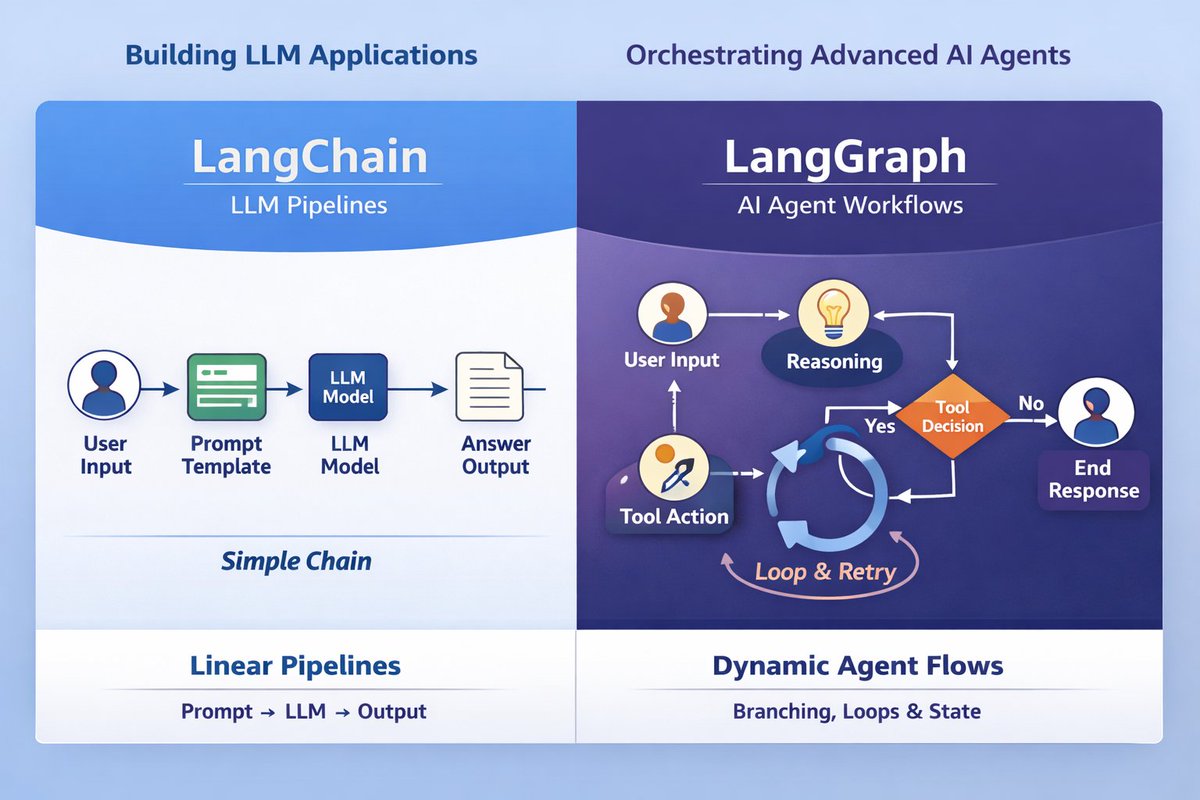
Many AI applications start with simple LLM chains.
But real AI apps need more:
- multiple steps
- decision making
- retries
- loops
- state across interactions
LangChain simplifies building LLM apps with tools, memory, and structured pipelines using LCEL.
But when workflows get complex, LangGraph helps build stateful AI agents with branching, loops, and decision-making.
LCEL = pipelines
LangGraph = agent workflows
#AI #LangChain #LangGraph #AIAgents
After learning about RAG, Chunking, and Embeddings, I built a small Light RAG demo to see how it works in practice.
Goal:
Make the model answer questions only from the documents we provide instead of relying purely on its training data.
How it works:
Ingestion Phase
- Add a document / policy text
- Split it into chunks
- Generate embeddings
- Store them in a vector store
Query Phase
- User asks a question
- Convert query → embedding
- Retrieve similar chunks via semantic search
- Send retrieved context to the LLM → generate answer
Tech Stack:
- Next.js
- Node.js
- LangChain
- OpenAI Embeddings
- In-memory Vector Store
Building small demos like this is helping me understand how LLMs + external knowledge power modern AI applications.
#AI #RAG #LangChain #BuildInPublic #LearningInPublic
How do AI systems search through massive documents and find the right answer?
Two key ideas make it possible:
Chunking
Large documents are split into smaller sections so the system can search specific pieces of information.
Embeddings
Each chunk is converted into a numerical vector that captures its meaning.
When a user asks a question, the system compares the query embedding with stored chunk embeddings to find the most relevant context.
This is the core mechanism behind RAG (Retrieval Augmented Generation) used in many modern AI applications.
#AI #RAG #Chunking #Embeddings #BuildInPublic #LearningInPublic
Built my first full-stack AI project: Promptify 🚀
React + Node + MongoDB + OpenAI
Chat + image generation in one app.
From learning concepts to building real products — this feels good.
Learning in public. Building daily.
#BuildInPublic#AI
Practiced OpenAI hands-on today 🚀
Built a basic AI chatbot from scratch to understand how LLMs actually work in an app.
Small project, big clarity.
#BuildInPublic#AI#OpenAI
Ever wondered how AI tools answer questions using your own documents?
The answer is RAG
AI retrieves relevant info first, then generates the answer.
Docs → Chunking → Embeddings → Vector DB
Query → Similarity Search → Context → LLM → Answer
#AI#RAG#LLM#BuildInPublic
Built a Search Web Agent 🤖🔎
Next.js + OpenAI + LangChain + Tavily.
LLM answers simple queries.
Automatically switches to web search when needed.
Trying to explore how AI agents can combine LLMs + real-time web data.
#AI#LangChain#BuildInPublic
Spent time today building clarity around modern AI fundamentals.
LLMs, Generative AI, Agentic AI, AI agents, workflows, multi-agent systems, and RAG.
Not deep dives — but enough to understand how intelligent systems are structured beyond simple prompting.
#BuildInPublic#AI