Google Sheets just got even faster! 🔥
Yesterday they did performance upgrades:
✅ 50% faster pasting from another sheet
✅ 50% faster filter conditions
✅ 30% faster loading of existing data
Anyone noticed the difference?
You are very welcome Alex! 😊 I am so glad my feedback was helpful. You have built something truly incredible and as a dreamer myself thinking of 100s of ideas, it is fantastic to get immediate feedback on it from SWOT all the way to a willingness to pay score. Having a full business proposal within a minute is very impressive!
It is such a pleasure to be part of the journey 🫶 I am excited to see everything that is coming up next! Keep crushing it!!!
@jojogh_007 I would easily hike up with a backpack loaded with snacks, a bottle of wine and a picnic blanket, and join you in this exact spot. These are special moments in nature
@_KavinPrasath I was thinking about this.... The best future-proofing job is counseling. A machine can say you have cancer and try and console you. But a human can truly understand the emotional pain and be compassionate.
Even having a therapy session with a robot, yikes 😅
What an exciting time! 😁
You draw really well and the use of the square paper is so clever to get the sizing right.
For me, the first one is really cool. The main shape looks like a shield. Looks like something from a superhero logo style. It also gives software safety associations. I also see a diamond in the shape which matches your services 💎
The banner across makes the wording really pops with the follow on with MVP.
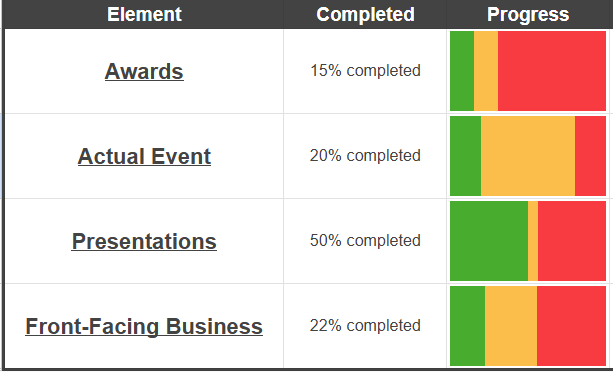
"I am looking for a progress bar within a cell, where the colors indicate the metric performance."
The formula SPARKLINE will assist you 🤗
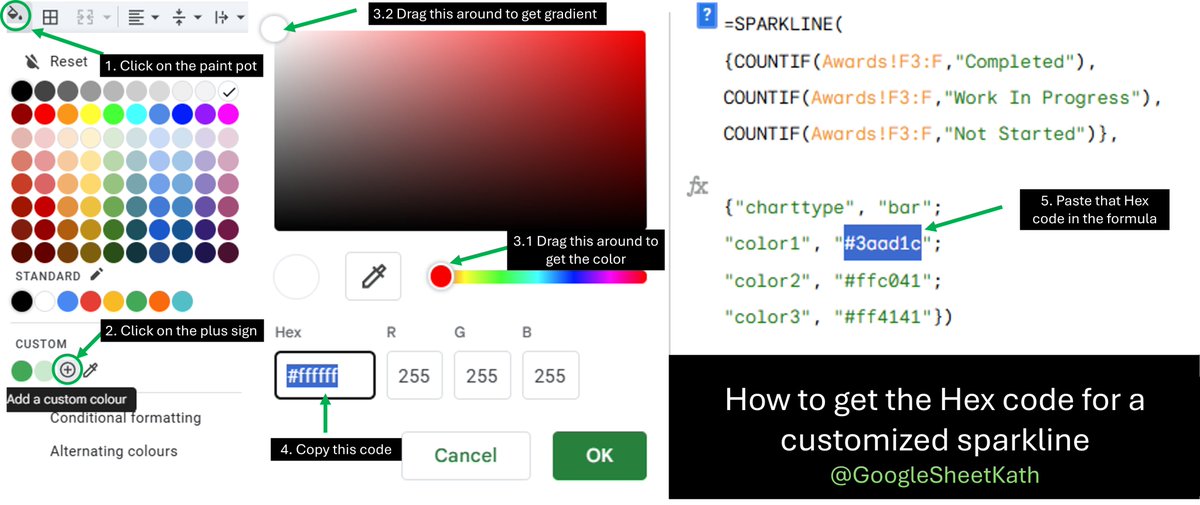
=SPARKLINE(
{COUNTIF(Awards!F3:F,"Completed"),
COUNTIF(Awards!F3:F,"Work In Progress"),
COUNTIF(Awards!F3:F,"Not Started")},
{"charttype", "bar";
"color1", "#3aad1c";
"color2", "#ffc041";
"color3", "#ff4141"})
The first COUNTIF listed is allocated to color1. The second COUNTIF is allocated to color2. The order updates chronologically.
To customize the color of that progress bar, go to the paint bucket in the toolbar. Select the color you would like. Copy the Hex code and paste it into the formula.
It is really odd when you actually think about. It is like that with all things in life.
In grade 9, we did the typing and CAD. We could not take this to matric, it was more of an extra subject to learn.
From the stock standard subjects, I could take the following
-> Home economics (cooking, design & materials)
Years ago they offered all those skills like sewing and knitting.
-> Computer Applied Technology (IT but only on Microsoft Office products)
-> Music (but you had to have an instrument in grade 6 to do that)
-> Accounting
-> Geography
-> Life orientation (this subject could have been amazing like teaching us taxes, how to buy household items based on value, what life looks like outside school but it was far from it)
-> AP english and maths (it was varsity level stuff to get you ahead. You had to pay extra to write the exams and go to those classes. There was pressure on us to do some kind of tertiary education afterwards.)
Did you have any of these subjects? Was there something you had that was out of the norm?
@Writenthic I can only imagine!
I use whatsapp on my laptop and the emojis work the same way :joy followed by enter makes a "😂" and it truly saves me having to go from my keyboard to the mouse and select the emoji.
This is the hack of 2025 🔥