@jisakuhibi And Acer say they are considering to unlock the OD setting with VRR enable, on most of their machines, so maybe they will release even newer version of X32 FP firmware someday.
@jisakuhibi https://t.co/3qTnd72suC
Acer just release new firmware of X32 FP, update SOP included there too.
https://t.co/ZrEl0is1Ty
They fixed the 60hz overshoot problem too.
If it's possible, could you check about it again?🤔Thanks.
@xm3lite@harukaze5719 https://t.co/gbSTuBdr8y
Yes. AW3423DW was listed as 'Flat' on that certified database too.
So it will be "Freesync" for sure, 'Flat' will be fake news.
@jisakuhibi And could you confirm, could you adjust 'Overdrive' when you connect NVIDIA GPU+HDMI 2.1?(HDMI 2.1 VRR)
That was something able to adjust with XV282K KV model. X32 FP might got chance too.
https://t.co/Exw5j67nXY
"You can change the ‘Over Drive’ setting when using HDMI 2.1 VRR"
@jisakuhibi If you set OD to 'OFF' first, then you enable the VRR, still got the same result? Some acer models will be different.
https://t.co/cPnb7t8yIP
level is set to ‘Off’ or ‘Extreme’ before enabling ‘Adaptive-Sync’, the pixel overdrive will act as if it’s set to ‘Off’ in both cases.
@jisakuhibi Don't know what's the reason then.
It's also same result with DP or Freesync Premium Pro(ON)? Also tested about these?
Just huge different there, don't know why acer didn't got the same result.
Grey/Black/White, 480, 3840 speed
Might ask them to check with these setting again.
@jisakuhibi Just got some discuss with PCMonitors.
If you test OD with Nvidia GPU+HDMI, then it might got some chance to get different result with AMD GPU+DP.
Due to AMD use adaptive-sync, and HDMI+Nvidia use HDMI2.1 VRR/G-sync compatible.
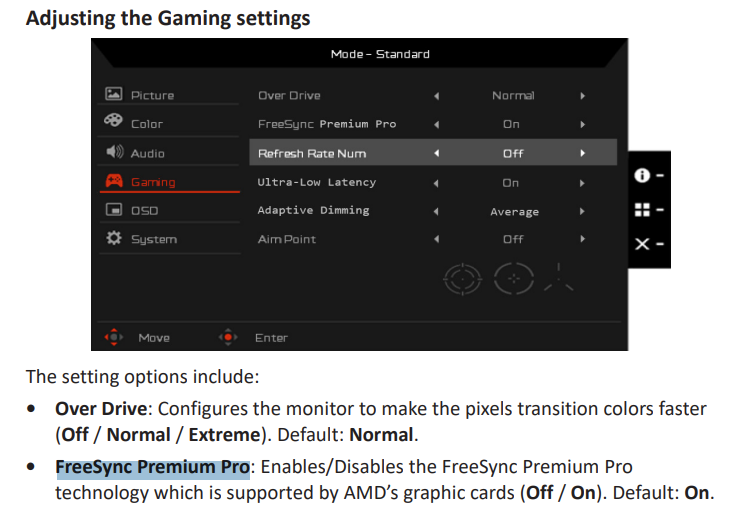
FreeSync Premium Pro option is one of factor too.
@jisakuhibi Still thinking about what could be the reason of it.
I think this option "FreeSync Premium Pro" might got small chance to affect something too.
https://t.co/Im4loLWR44