You arrive at work on Monday morning and discover that somebody logged into a server over the weekend.
The logs are still there, but the attacker claims they never touched the machine. How would you prove they are lying?
How Investigators Track You Using Browser History (Digital Forensics Made Simple)
By Winston
Hackademy – Where Hackers Are Made
⸻
Introduction
Let me be straight with you.
Your browser remembers more than you think.
Every website you visit, every search you make, and even some of the things you type leave traces behind. Most people do not notice this because everything happens quietly in the background.
Now here is the important part.
Deleting your history does not always mean the story is gone.
In many cases, parts of that story are still there.
That is where browser forensics comes in.
Today, I will show you simply and practically how investigators use browser data to understand what really happened on a system.
⸻
What Is Browser Forensics?
Think of browser forensics as asking one simple question:
“What actually happened on this computer?”
Instead of guessing, investigators check the browser.
Browser forensics is the process of analysing browser data to find answers. It helps uncover things like which websites were visited, when they were visited, what searches were made, and what files were downloaded.
It is not magic. It is just careful observation of existing data.
⸻
What Your Browser Is Saving
Most people think their browser only saves history. That is not true. It stores several types of information.
⸻
Browsing History
Your browser keeps a list of websites you have visited.
It also records time. This means an investigator can see exactly when a website was opened. That timing can be very important in an investigation.
⸻
Cookies
Cookies are small pieces of data stored by websites.
They help you stay logged in and remember your preferences. From an investigation point of view, they can show patterns such as how often you visit certain sites.
⸻
Cache
When you open a website, your browser saves parts of it on your computer. This is called cache.
It helps pages load faster, but it also means something important. Even if a website is no longer available, parts of it may still exist on your system.
⸻
Download History
Your browser keeps records of files you download.
Even if the file is deleted later, the record of that download may remain.
⸻
Saved Data
Browsers often store information you type regularly. This includes emails, usernames, and sometimes login details.
It makes things easier for users, but it also creates useful evidence.
⸻
Real World Example
Imagine a company suspects that sensitive files were leaked.
An employee denies being involved.
Now investigators check the system.
They look at the browser and find the following:
The employee visited a file-sharing website late at night.
There were searches like “how to send files anonymously.”
There was a file downloaded earlier that same day.
Nobody saw anything happen.
But the browser tells the story clearly.
Step by step, the truth begins to come together.
⸻
“But I Deleted My History”
This is where many people misunderstand things.
Deleting your history only removes what is easy to see.
It does not remove everything.
Other traces can still exist in different places. Cached files may still be present. DNS logs may still show which websites were visited. System logs may still contain records. In some cases, deleted data can even be recovered.
Think of it like cleaning a room by hiding things out of sight. It may look clean, but the evidence is still there.
⸻
Why This Matters
Browser forensics is used in real situations every day.
It helps investigate insider threats, security incidents, and suspicious activity. It also plays a role in legal cases.
Even attackers leave traces behind.
They may try to hide, but systems remember more than they expect. That is often how investigators uncover the truth.
⸻
Common Mistakes People Make
One common mistake is believing that incognito mode makes you invisible.
It does not.
It only prevents your browser from saving history on your device. Your activity can still be visible to networks and websites.
Another mistake is thinking that deleting history removes all evidence.
As you have seen, that is not the case.
⸻
Key Takeaways
Your browser stores more information than most people realise.
Investigators can use that information to rebuild events.
Deleting history does not mean everything is gone.
Understanding browser data is an important skill in cybersecurity.
⸻
Conclusion
If you are serious about learning cybersecurity, this is a good place to start.
Your browser is not just a tool for browsing. It is a record of your activity.
Every click and every search leaves a trace.
Once you understand that, you begin to think differently.
You stop thinking like a regular user.
You start thinking like someone who can investigate and uncover the truth.
A small business owner complained that his website traffic suddenly increased massively overnight and the site eventually became unreachable for customers. At first he thought maybe one of his posts went viral, but after checking the server dashboard, the hosting company showed thousands of requests hitting the website every second from different countries.
The strange thing was that many of the requests looked almost normal. Some used real browser user agents and some even visited random pages on the site before repeatedly refreshing the login page. Because of this, the owner became confused and asked how somebody could attack a website using what looked like normal traffic.
Question 1:
Why do you think DDoS attacks can be difficult to stop sometimes, especially when the traffic looks similar to normal users?
Question 2:
If you were responsible for protecting that company’s website, what defensive measures would you put in place to reduce the impact of an attack like this?
How Attackers Control Systems Remotely (Command and Control Explained Simply)
One thing many beginners imagine is that once a hacker gains access to a system, they are constantly typing directly inside that machine every second.
That is not always how it works.
In many real situations, the compromised system is quietly communicating with the attacker in the background. The attacker does not need to sit there manually controlling everything all the time. The system itself becomes something that can receive instructions remotely.
This is what people mean when they talk about Command and Control, often shortened to C2.
The idea is actually very simple.
Imagine someone secretly plants a walkie talkie inside an office building. Nobody notices it. Every few minutes, the person inside the building checks that walkie talkie for new instructions. If there is a command waiting, it follows it. If there is nothing, it stays quiet and keeps waiting.
That is basically how Command and Control works.
The compromised system reaches out to a remote server controlled by the attacker. It checks in periodically and asks if there are any commands to execute. This communication is often called beaconing because the infected machine keeps sending signals outward at intervals.
The commands can be different depending on the attacker’s goal. Sometimes the attacker wants system information. Sometimes they want files. Sometimes they want screenshots, credentials, or remote access. The infected system receives the instruction, performs the action, and sends the result back.
The dangerous part is that this traffic can look very normal.
If the communication blends in with ordinary internet activity, it becomes difficult to notice immediately. Some attackers even design their traffic to look like regular web browsing or cloud application traffic. To the average user, nothing seems suspicious.
This is why attackers prefer systems that communicate outward instead of opening obvious inbound connections. Outbound traffic is often trusted more inside organizations. If a system is already allowed to access the internet, the communication can hide within that normal activity.
From a hacker’s perspective, the goal is stability and invisibility. The attacker wants a reliable way to control the compromised system without attracting attention. From a defender’s perspective, the focus is on identifying patterns that should not exist. Why is a workstation communicating with an unusual external server every few minutes? Why is traffic happening at regular intervals even when the user is inactive?
One important thing to understand is that not every malicious connection is loud or dramatic. Some of the most dangerous compromises are extremely quiet. A single system can remain infected for weeks or months simply because the communication looks ordinary.
This is why monitoring outbound traffic matters so much. Security is not only about what comes into a network. It is also about understanding what systems are trying to send out.
If you are into ethical-h@ckin and you are ready to work on hands on projects and be around like minded people. Comment “Hi” and follow me!
ps: NOT for BEGINNERS!!
If you are into ethical-h@ckin and you are ready to work on hands on projects and be around like minded people. Comment “Hi” and follow me!
ps: NOT for BEGINNERS!!
The Hacker Who Was Hunted for Years Like a Ghost
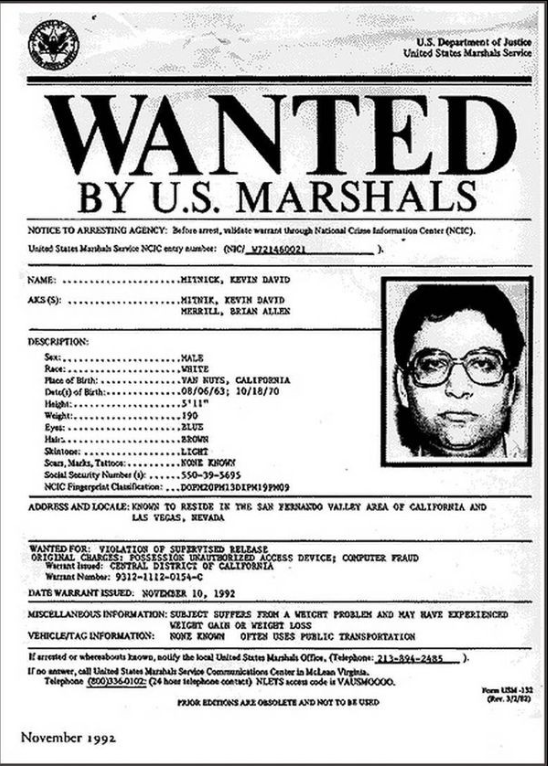
For years, Kevin Mitnick was one of the most wanted hackers in the United States. In the 1990s, his name was everywhere inside law enforcement circles, but almost nobody could actually find him. Companies were being breached, phone systems were being manipulated, and confidential software was being copied, yet Kevin always stayed one step ahead.
What made Kevin different was not just technical skill. He was extremely good at talking to people. He could call a company, pretend to be an employee, and convince staff to give him access to systems without ever realizing they were being tricked. Most of his hacks started with conversations, not computers.
As the damage increased, the FBI became heavily involved. Kevin went on the FBI’s Most Wanted list, which was very rare for a hacker at that time. He went on the run and lived quietly, constantly changing locations and identities. He avoided phones, stayed offline as much as possible, and trusted very few people.
Eventually, in 1995, his run ended. Investigators tracked him down to an apartment in North Carolina. He was arrested without drama, but the case shocked the tech world. Many people expected a dangerous criminal, but instead found a quiet, intelligent man who had relied heavily on manipulation rather than force.
Kevin Mitnick served several years in prison, much of it under strict conditions. After his release, he completely changed direction. He became a cybersecurity consultant and later helped companies protect themselves from the same techniques he once used against them.
This story shows that hacking is not always about code. It is often about people, trust, and small mistakes. It also shows that no matter how long someone stays hidden, being hunted forever is not realistic.
If you are into ethical-h@ckin and you are ready to work on hands on projects and be around like minded people. Comment “Hi” and follow me!
ps: NOT for BEGINNERS!!