A trader built a QUANT bot using Claude Fable 5.
Result: $81,323 profit on Polymarket.
25,511 predictions in 54 days.
46% win rate.
$1,506 per day on average.
The strategy is surprisingly simple:
1. Fast market-making model focused on short crypto Up/Down markets
2. No need for both sides at once. System accumulates one side when prices dislocate, then completes the position when the opposite side gets cheap
3. Edge comes from temporal arbitrage + partial hedging + constant inventory rotation across nearby windows
Biggest winning trades:
$1,277 → $2,516 (+$1,239 profit | 97% gain)
$1,059 → $2,205 (+$1,146 profit | 108% gain)
$1,372 → $2,487 (+$1,115 profit | 81% gain)
The entire profit curve is built on one small edge repeated thousands of times.
This is not about predicting the market.
This is about reading price dislocations faster than everyone else and exploiting the gap before it closes.
The system runs autonomous:
→ Claude handles decision logic
→ Monitors crypto markets 24/7
→ Executes when arbitrage windows open
→ Rotates inventory continuously
No emotions.
No guessing.
Just math and execution speed.
💡 I'm sharing the complete Claude prompt and workflow behind this QUANT bot.
Free for 24 hours.
To get it:
1️⃣ Comment the word "Fable"
2️⃣ Like and Repost
3️⃣ Follow @codewithimanshu
I'll DM you the setup.
Graph engineering is great, but it does not work until you have both halves
Seven repos, split by which job they actually do.
THE GRAPH THAT RUNS THE WORK
1. /langchain-ai/langgraph
You draw the steps as a diagram and it executes them, saving progress after each one. Crash at step forty and it picks up at step forty instead of starting over. You can also pause it mid run for a human to approve something, then resume days later. 38k stars, MIT.
2. /microsoft/agent-framework
The same thing for teams on .NET or Python. Microsoft merged AutoGen and Semantic Kernel into this and told everyone to start here instead. 12k stars, MIT.
3. /temporalio/temporal
Goes underneath whatever you build. It makes a process survive a crashed server, a restart, or three days of waiting on someone to reply. Not built for AI, which is exactly why it works.
THE GRAPH THE WORK LOOKS THINGS UP IN
4. /Graphify-Labs/graphify
Point it at any folder and it maps everything inside into one connected graph. Notes, PDFs, code, images, spreadsheets. Then your agent queries the map instead of opening files one by one. 97k stars, Apache 2.0.
5. /abhigyanpatwari/GitNexus
Same idea but code only and much deeper. Traces every function call, import and class inheritance across the whole repo, so the agent stops editing files whose dependencies it never read. 45k stars.
6. /getzep/graphiti
Memory that knows when a fact was true. Ask who owned an account in February and it answers February, not today. 29k stars, Apache 2.0.
7. /topoteretes/cognee
Turns a pile of documents into a queryable graph running on a single Postgres you host yourself. Nothing leaves your machine. 29k stars, Apache 2.0.
Pick the first group if you are building a process. The second if you are building a map.
Bookmark this
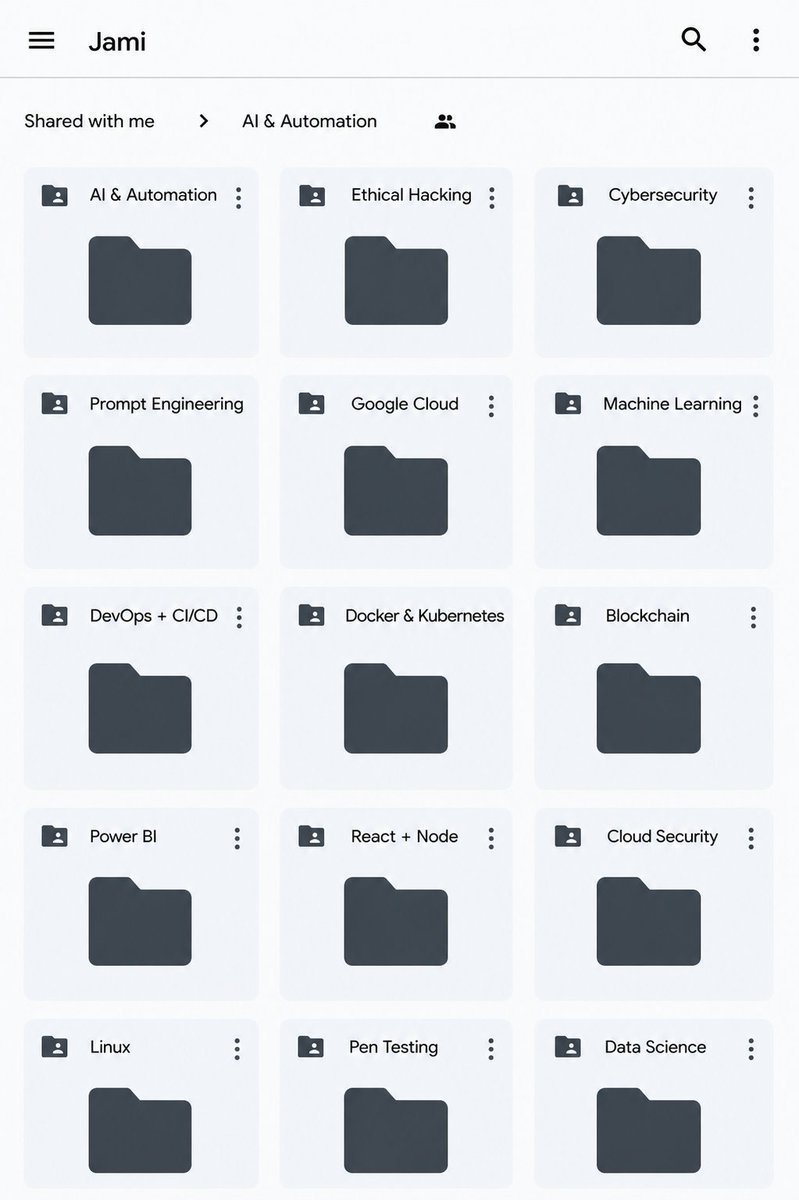
All Paid Courses (Free for First 4500 People)
𝗣𝗮𝗶𝗱 𝗖𝗼𝘂𝗿𝘀𝗲 𝗙𝗥𝗘𝗘 (PART - 1)
1. Artificial Intelligence
2. Machine Learning
3. Prompt Engineering
4. Claude,Chatgpt,Grok
5. Data Analytics
6. AWS Certified
7. Data Science
8. BIG DATA
9. Python
10. Ethical Hacking
(72 Hours only )
Like + RT + comment ' Drive '
Must Follow me so I can DM you.
Another WTF moment.
A developer just open-sourced a coding agent harness that boots 245x faster than Claude Code. It's called jcode. You launch it and the first frame renders in 14 milliseconds. Claude Code takes 3,436. One active session uses 27.8 MB of RAM. Claude Code uses 386.6. Run ten sessions in parallel and jcode holds at 117 MB while OpenCode swells to 3.2 GB.
Each agent has a semantic memory graph instead of a scratchpad. Every turn gets embedded as a vector. The graph is queried on every turn for related memories, and a sideagent verifies the hits before injecting them into context. Consolidation runs in the background to check for stale or conflicting facts. No manual /remember calls. No token burn on lookup tools.
The provider list is 30+ deep. Claude, ChatGPT, Gemini, GitHub Copilot, Azure, OpenRouter, DeepSeek, Groq, Mistral, Perplexity, Fireworks, Ollama, LM Studio, and any OpenAI-compatible endpoint you point it at. Ran out of tokens on your first ChatGPT Pro sub? /account swaps to the second.
Then there's Swarm. Spawn two agents in the same repo and the server manages them. When agent A edits a file agent B has been reading, agent B gets pinged and can check the diff. Agents can DM each other, broadcast to the room, or spawn their own worker teams for parallel tasks. Groups, channels, and completion statuses are handled automatically.
The UI has live side panels that render mermaid diagrams inline. To make it fast, the author wrote a Rust mermaid renderer 1800x faster than the JavaScript one, then wrote a custom terminal called Handterm because no existing terminal could do smooth partial-line scrolling.
Self-dev mode is where it gets wild. Tell your agent to enter self-dev and it starts editing jcode's own source code, rebuilds the binary, reloads it live, and keeps working across your existing sessions. You can also resume broken sessions from Claude Code, Codex, OpenCode, or pi directly inside jcode. Anthropic's cache goes cold at the 5-minute mark and you're staring down a big cache miss on your next turn? The UI warns you before you spend the tokens.
Written in Rust. MIT licensed. Runs on macOS, Windows, Linux, and Termux. Sitting at 11.2k stars with a native iOS app coming.
https://t.co/OonuUaLXAr
FAANG software engineer tells how they vibe code at FAANG
---
"You still always start with a technical design document. This is where a bulk of the work happens. The design doc starts off as a proposal doc. If you can get enough stakeholders to agree that your proposal has merit, you move on to developing out the system design itself. This includes the full architecture, integrations with other teams, etc.
Design review before launching into the development effort. This is where you have your teams design doc absolutely shredded by Senior Engineers. This is good. I think of it as front loading the pain.
If you pass review, you can now launch into the development effort. The first few weeks are spent doing more documentation on each subsystem that will be built by the individual dev teams.
Backlog development and sprint planning. This is where the devs work with the PMs and TPMs to hammer out discrete tasks that individual devs will work on and the order.
Software development. Finally, we can now get hands on keyboard and start crushing task tickets. This is where AI has been a force multiplier. We use Test Driven Development, so I have the AI coding agent write the tests first for the feature I’m going to build. Only then do I start using the agent to build out the feature.
Code submission review. We have a two dev approval process before code can get merged into man. AI is also showing great promise in assisting with the review.
Test in staging. If staging is good to go, we push to prod."
---
reddit. com/r/vibecoding/comments/1myakhd/how_we_vibe_code_at_a_faang/
My students are FORBIDDEN to touch Kubernetes before they do this:
They need to get a solid foundation in Linux first.
Pallava wanted to jump straight to Kubernetes. Heart in the right place. Strategy would've destroyed him. Here's why.
Pod won't start? Error says storage mount failure. Without Linux mount knowledge, you're guessing. With Arch experience, you know exactly where to look.
Container crashes need process management, file systems, permissions, networking knowledge. That's all Linux. Kubernetes just orchestrates what Linux already does.
I asked Pallava: Cloud or Kubernetes? His heart said Kubernetes. Perfect. We're going there. Through Linux first.
Thomas debugging GPT partition errors? That's the same thinking you'll use when StatefulSets fail in production. Same mental model. Different tool.
Install Arch. Break things. Debug partitions. Fight systemd. This isn't delaying Kubernetes. This IS learning Kubernetes.
Cloud is easy. Kubernetes is just orchestration. Linux is where skills live. Master Linux, everything else becomes effortless.
Build the foundation that makes advanced topics feel natural. Skip fundamentals, struggle forever. Your choice.
We just made Next.js 93% faster in Kubernetes. Not a typo.
Median latency: 182ms → 11.6ms
Success rate: 91.9% → 99.8%
How? We stopped fighting the Linux kernel and started working with it.
Thread on why your Node.js pods are slower than they should be 🧵
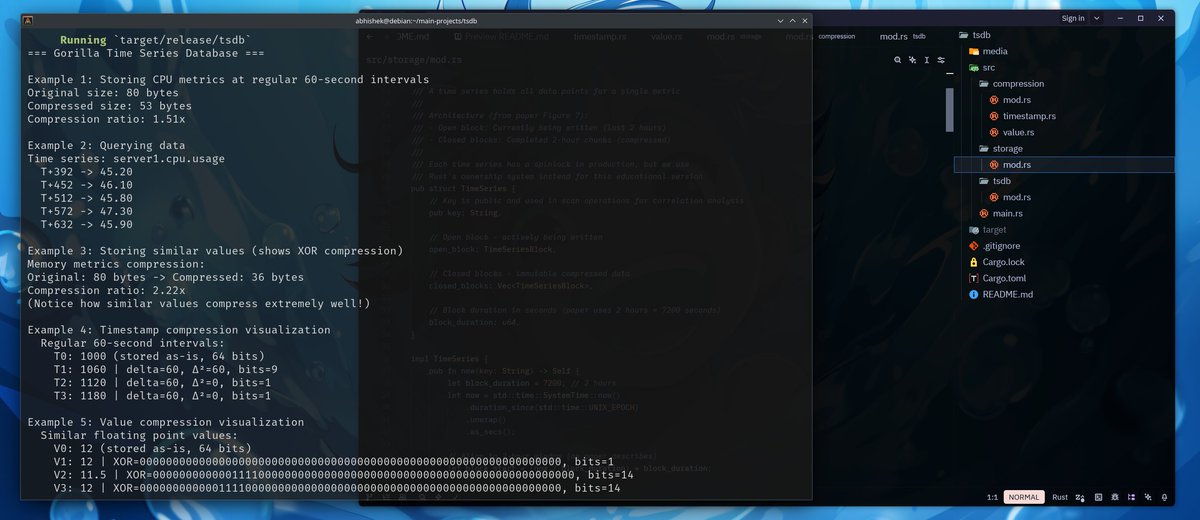
I implemented an In-memory time-series database in Rust.
Features:
-Delta-of-Delta Timestamp Compression
-XOR Float Compression (Gorilla-style)
-Fixed 2-hour Chunks for Optimal Compression
-Fully In-Memory Storage
-O(1) Time-Series Lookup (TSMap)
-Fast Sequential Scans
It was really fun to build, I did it purely for learning.
this paper taught me a lot about real world compression techniques.
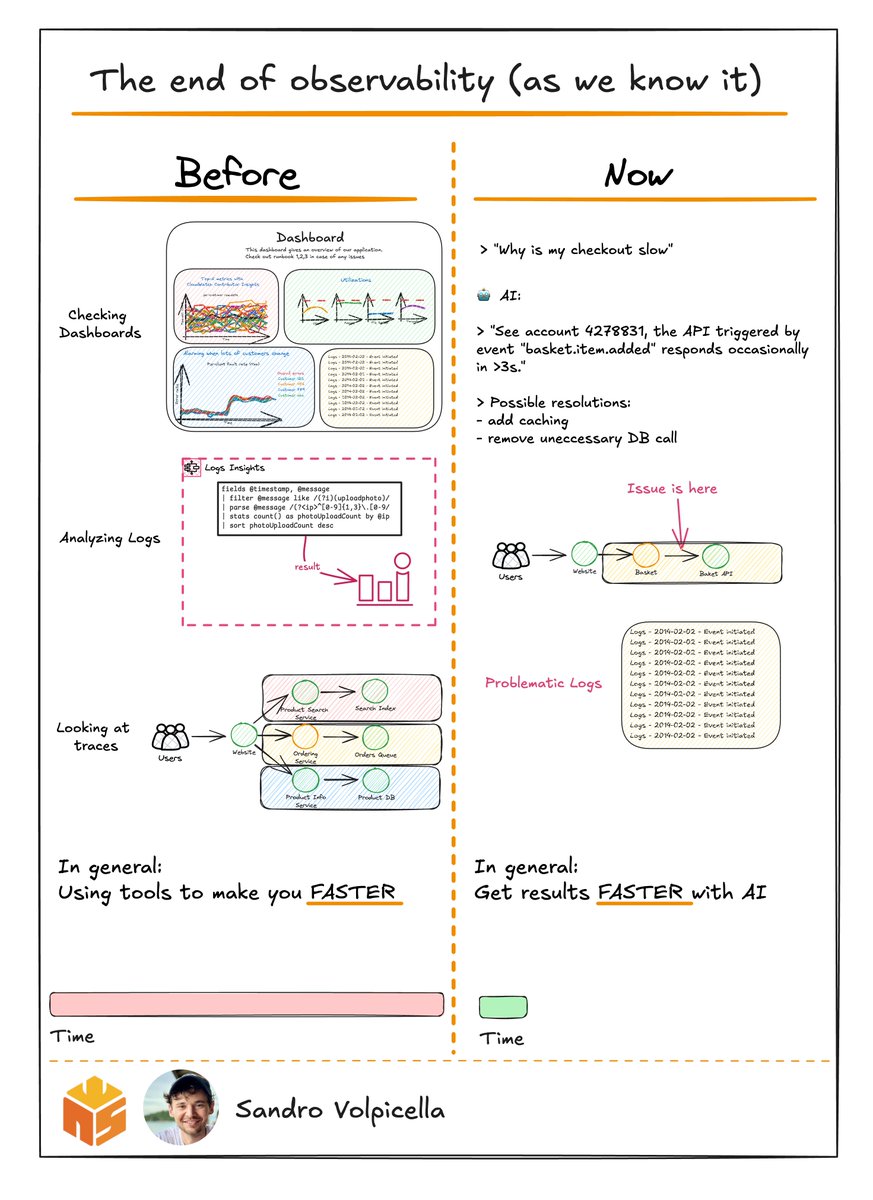
Honeycomb published a blog post called "The End of Observability as We Know It."
I've been using observability tools for years now. Heck, I wrote a book about CloudWatch ⛅
And honestly? I like the take of this post.
Let's see a typical daily observability issue:
- You have 5 AWS accounts.
- Each account runs different services that interact with each other.
To be able to find issues you use tools that observability providers have built for you like:
📜 Logs
📊 Dashboards
🕸️ Traces
Every feature is there for you to help you find the problem FASTER.
This is what Austin states: SPEED MATTERS.
And I like that take. In the end, you want to get results fast. You don't care how you get the results.
This is where AI & LLMs come in.
They're just much faster at digging through tons of data.
Let's say you have a production issue like your checkout is slow.
As a developer, you don't care about which tool you use to find the issues.
You care about finding the solution.
With proper AI it could look like that:
> "My checkout is slow for some customers, why?"
…🤖
> "Account 42783330 has occasional spikes over 3s. Could you use caching? Or I saw two database calls that aren't necessarily needed at this part of the code."
Sounds good at a first glance.
But I want to actually see the root cause.
Maybe caching is just fixing the symptom.
But the actual root cause is something completely else.
I think AI shouldn't be 100% only text-based.
It should also show you the exact investigation path in the tools you already know how to use.
You need to use it in a combination. If it helps you get to the goals faster, that's great!
I've always loved Honeycomb's resources on observability 📚
Before writing my CloudWatch book, I read their "Observability Engineering" book. It's amazing.
Their blog is also a gold mine for understanding that observability is more than just dashboards and three pillars 😉
Thank you to Honeycomb for inviting me to explore their solutions and sponsoring this content.
🔗 Check out the blog post (includes real-world examples): https://t.co/Mi6qZpUgDp
So I was as usual learning about Docker and got to know that Docker networking is so freaking good.
When you create a Docker container, it by default takes up the bridge network and the container is assigned a private IP by the internal IPAM (IP Address Management) driver automatically.
But you can create your own bridge network called a user-defined network, and because of that, containers can talk to each other via their name only, provided they are in the same network. In the default bridge network, containers can only communicate by IP address.
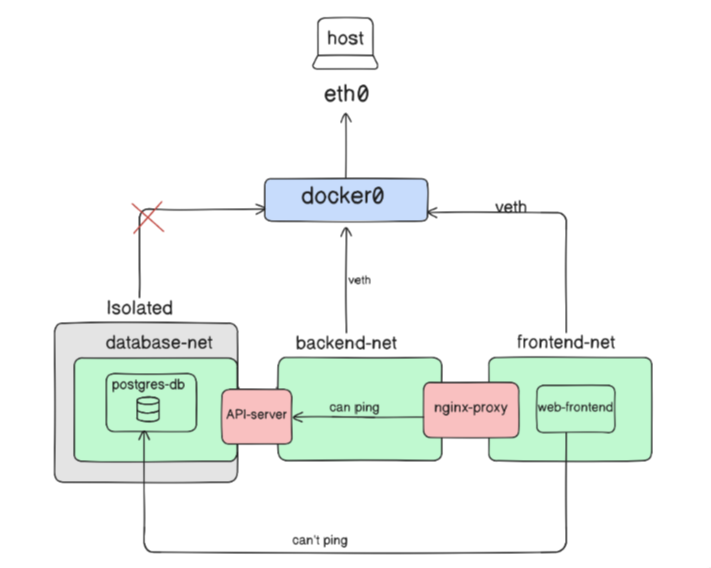
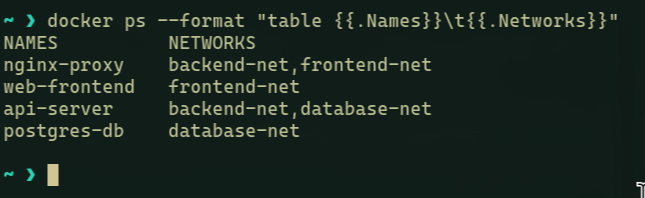
I tried creating a small production emulation system just for understanding, in here you have four containers: an API server, web frontend, a database, and a reverse proxy, with three bridge networks: database, backend, and frontend each.
The API server is in both the database and backend networks, while the nginx proxy is in both the frontend and backend networks because it has to route traffic from one port to another. The containers in the same network can only ping each other, rest you can't communicate unless you connect a container to multiple networks.
The database network is isolated and denied internet access using the --internal flag because it's a convenient way of securing your database. Although the containers inside the database network can internally communicate with other containers on that network, they can't get internet access.
The rest of the containers get internet access in the classic but interesting way, each has its own private IP address and is connected to docker0 via virtual Ethernet pairs (veth pairs). The docker0 bridge acts like a virtual switch that is responsible for routing traffic between these containers and the host's network interface. This is amazing because it's kinda like the Internet's simulation on a small scale, just here we have containers instead of physical devices.
You don't necessarily need networking to connect to your Linux VM.
No IP addresses. No SSH keys. No firewall rules. No routing tables.
If you are on the same physical machine, TCP/IP can be just overhead.
Meet AF_VSOCK.
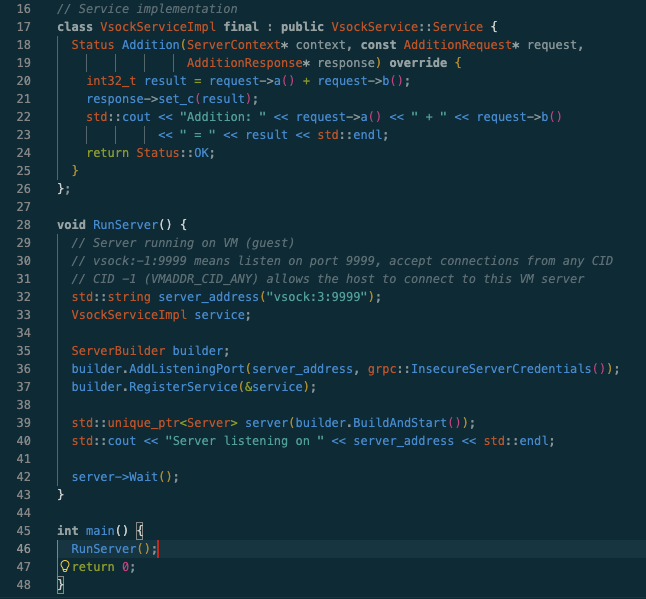
It’s a special address family in the Linux kernel designed specifically for communication between a hypervisor and its virtual machines.
Think of it as a pipe that punches through the VM wall.
Instead of an IP address (192.168.x.x), you use a Context ID (CID). Host is usually CID 2. Guest gets a unique CID (e.g., 3).
The kernel handles the rest, moving data between host and guest memory.
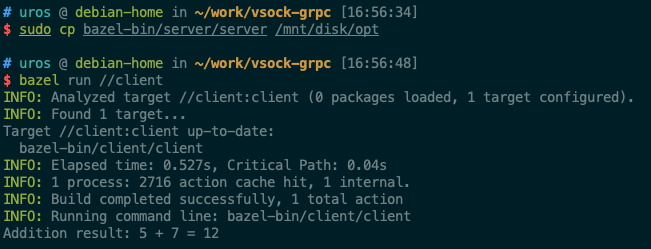
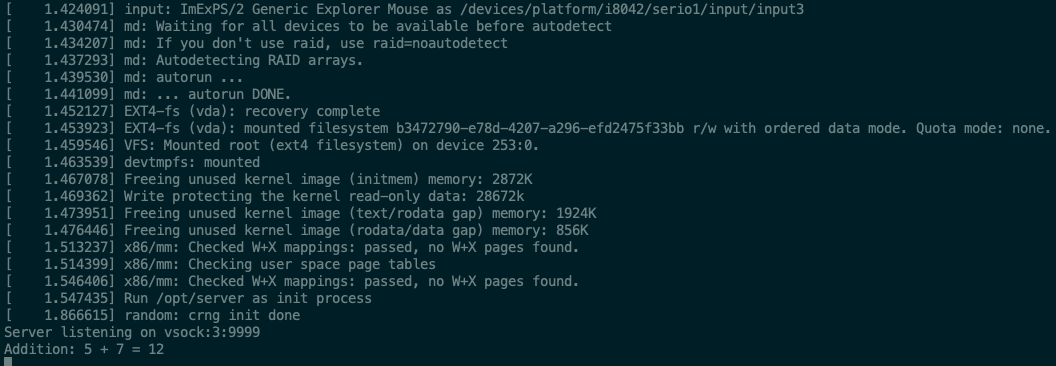
I'm building a small repo to demonstrate this: Running high-performance gRPC over vsock without a single network packet leaving the kernel.
The server runs inside the VM (C++ server). The client runs on the host. The latency? Near zero.
I'll be opening this repo and writing a deep dive on how to implement vsock in your own tools.
Follow along if you like low-level Linux plumbing. 🛠️
@heysatya_@heysatya_ ,
1) provide em with a small user flow to code and ask to handle as many data loading gotchas as 1 can think of.
2) beautiful design ×= a great UX. The UI should not break if you don't get a response from the backend. Ask for improvements on UX and performance.
@heysatya_@heysatya_ , I don't know if I'm cracked yet, but I do love cracking beautiful designs. As I'm on hiatus, I'm craving for some action. I am not interested in working full-time so consider me down as a helper (0.5x)
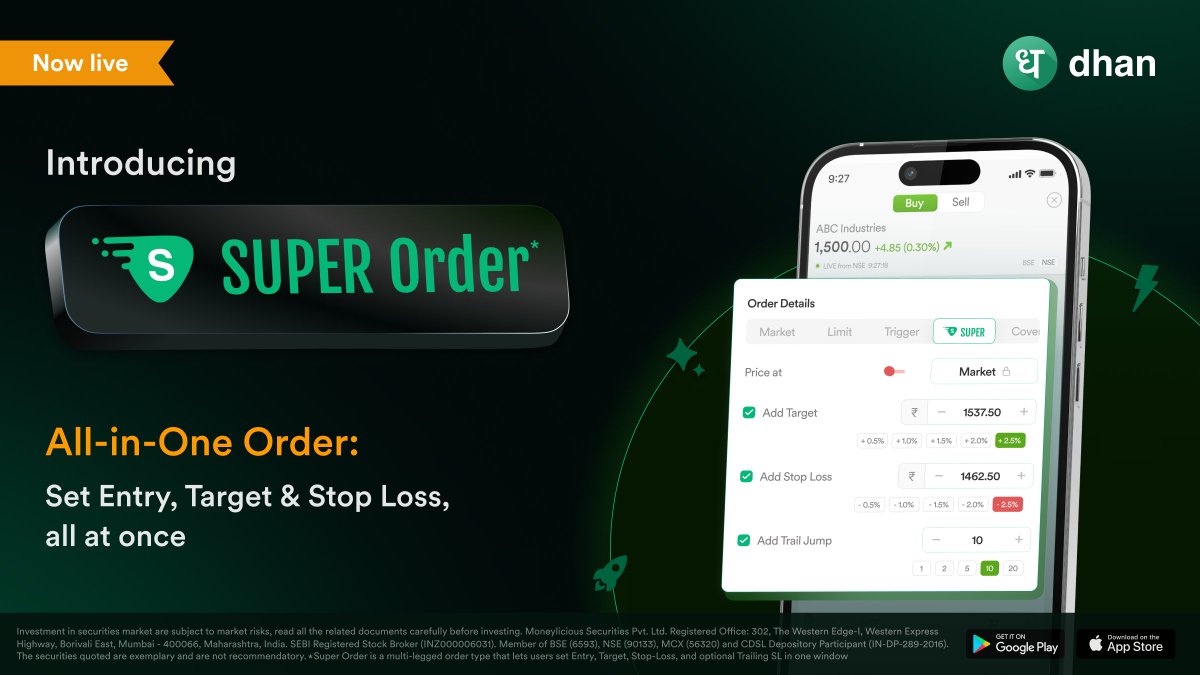
Now Live: Super Orders for Trading & Investing ⚡️
Every investor and trader takes a unique approach to the market. Super Orders is built for these distinct styles and strategies.
Dhan users can now plan trades, manage risk & define entry, target, and stop loss in a single order 🧵
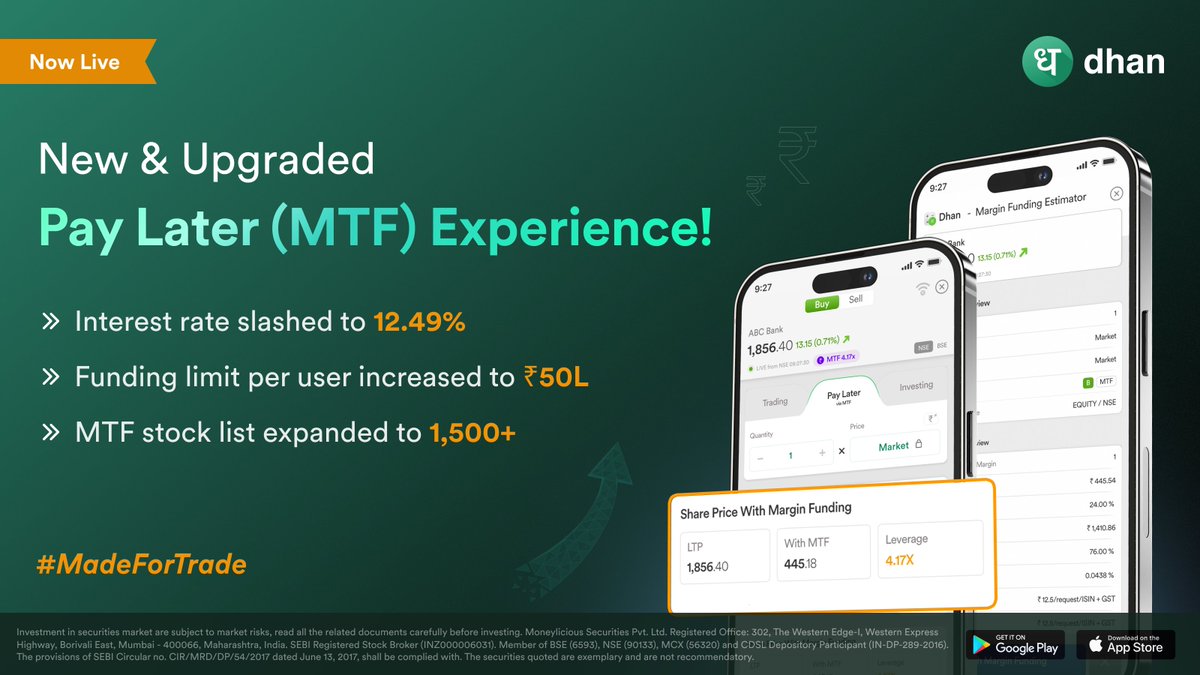
Important update: MTF (Pay Later) interest rates reduced to 12.49%! ⚡️
Increased Funding Limits - To support traders looking for higher leverage, we have restored the funding limit per user from ₹25 Lac to ₹50 Lac. 🧵
More Stocks with 4X Leverage - Now, you can trade with up to 4X leverage on 1500+ stocks, further expanding your trading opportunities.