Technical breakdown: How RPA eliminated 20+ hours of weekly manual work for an e-commerce client.
It is not the most fancy one, but I think there are still a lot of use cases where simple workflows like this make a huge impact.
The Problem: The Finance team logged into 30+ banking portals daily, applied filters, downloaded CSV files, and then spent hours reconciling transactions against invoices.
2 hours daily across multiple platforms.
1/ 🤖 Automated Data Acquisition
UiPath robots handled the complexity:
→ Multi-factor authentication across 30+ different banking portals
→ Navigated complex bank interfaces with custom selectors
→ Applied transaction filters and downloaded CSV files automatically
→ API integrations for compatible platforms (skipped manual login entirely)
→ Scheduled daily runs during off-peak hours
Each bank portal worked completely differently, so no shortcuts here.
2/ ⚡ Data Processing & Standardization
Azure Data Factory became the core component:
→ Azure Blob Storage as a secure central repository for all financial files
→ ETL pipelines processed disparate CSV formats into standardized schemas
→ Normalized transaction categorization across all platforms
→ Built validation rules to flag discrepancies and unusual patterns
Raw data from 30+ sources became clean, unified datasets.
3/ 📊 Financial Intelligence Layer
Azure SQL Database with proper reconciliation logic:
→ Centralized database with standardized financial data structure
→ Automated matching between invoice systems and actual bank transactions
→ Real-time KPI dashboard
→ Direct integration into existing accounting systems
→ Email alerts if something is flagged
The Result: 20+ hours weekly eliminated, 99.8% transaction matching accuracy, real-time financial visibility.
Want the deep dive on any specific part? Drop me a DM.
Saw this from @PromptLLM and immediately built my own version.
I was using Notion for todos, but could never be consistent with using it.
Shoutout to @daniskyy, who made a dashboard version in the replies, I used his layout as inspiration.
But I took it further: built a backend that tracks exactly when focus sessions happen and times how long tasks spend in each section (todo → in progress → done).
Added categories too (work, personal, business) and export functionality.
Now I can feed all this data to an LLM with my context and get insights on which tasks I procrastinate on most, which ones take longer than expected...
Now I can act on the data and do those tasks first.
Crazy you can build this in more or less one hour.
Screenshots in the replies 👇
Been in the trenches for the last month building a system for a client.
Ecom company with 30+ bank accounts across different countries. Manual data collection was eating 4 hours daily.
Built automation with RPA, databases, and APIs, nothing fancy but gets the job done.
Now they get real-time financial data without the manual hustle.
Dropping the full breakdown soon. What's everyone else been building in this time?
Saw this from @PromptLLM and immediately built my own version.
I was using Notion for todos, but could never be consistent with using it.
Shoutout to @daniskyy, who made a dashboard version in the replies, I used his layout as inspiration.
But I took it further: built a backend that tracks exactly when focus sessions happen and times how long tasks spend in each section (todo → in progress → done).
Added categories too (work, personal, business) and export functionality.
Now I can feed all this data to an LLM with my context and get insights on which tasks I procrastinate on most, which ones take longer than expected...
Now I can act on the data and do those tasks first.
Crazy you can build this in more or less one hour.
Screenshots in the replies 👇
not being able to concentrate really isn't an excuse now with AI
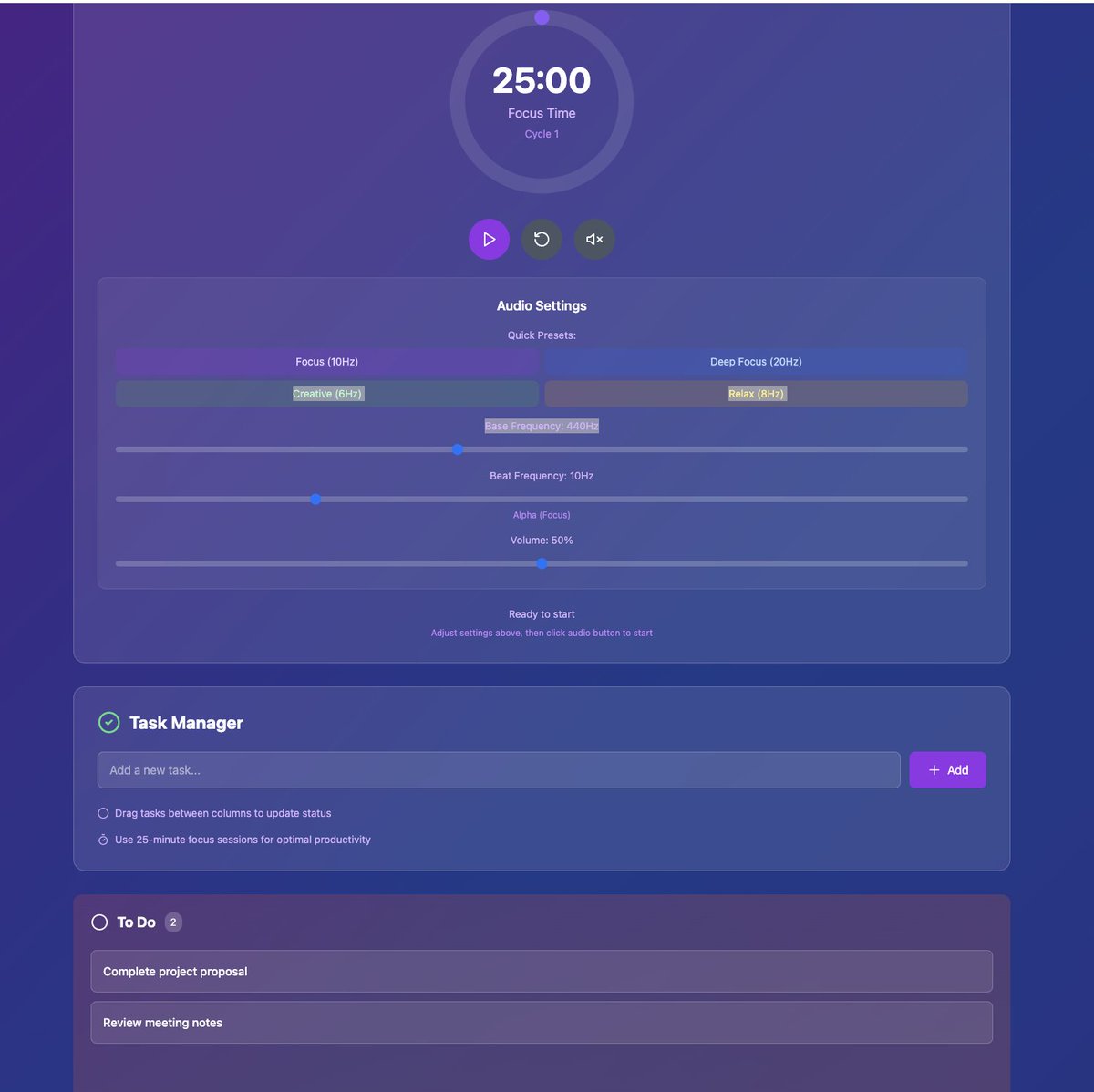
Anytime I am struggling I get Claude to create me a custom to-do list app with a pomodoro timer and a binaural beats generator and then I am in the flow state.
The below was created in less then 2 minutes. It has a timer, custom binaural beats I can adjust to the tone I need and a task tracker where I can drag and drop tasks.
What's funny that 3 years ago this would be a $20 a month SaaS. Now it's something that I can whip up in 5 minutes that has everything you need to maximise productivity, for free.
Ever seen a business process so broken it hurts to watch?
That client system I mentioned? Here's exactly what was happening:
Ecom company with operations across 8 countries. Every morning, someone had to manually log into 30+ different bank accounts, different countries, different currencies, and different interfaces and standardize data with old-school Excel.
4 hours of pure data collection, just to download transaction files for reconciliation and accounting.
Built RPA bots to handle it:
→ Automated logins across all portals → Applying filters → Download files → Database
Manual work: eliminated
Time saved: 20+ hours weekly
Money saved: >€15k+ annually
For deterministic workflows like this, RPA beats fancy AI agents every time.
Technical breakdown coming next. Anyone else built some interesting RPA workflows lately?
[7/7] 📈 RESULTS & INSIGHTS:
This cut support costs by 80% with a relatively simple implementation. Almost any business with approval bottlenecks could benefit from a similar approach.
Anyone can learn to implement something like this! Let me know if you have some questions!
Built a RAG-based AI agent that completely replaced an outsourced support team for a property rental business.
Built with Python, Langchain, and Supabase for the database backend.
Result? 80% cost reduction & happier customers.
It handles refunds, answers queries & accesses all property info without human intervention.
Here's how I built it 🧵 [1/7]
[6/7] 🔄 INTEGRATION POINTS:
The whole system connects to their existing tools:
Email for sending refund approvals to finance
Customer database for verification
Property management system for booking details
No rebuilding of existing infrastructure required.
I feel like most people still aren't using projects/workspaces in their LLMs (hope i'm wrong)...
I have different projects set up for coding, content creation, strategy, learning, health… basically every aspect of my life
I add my JSON profile to every project + specific context for each use case and a good system prompt
all those prompt ideas you see on twitter by @apollonator3000, @amineobeidat … if you're gonna use them more than once, just create a project for it instead of starting from scratch every time and add as much context as possible.
Like that you have reusable personal assistant for every topic
How to start with AI and automation (even if you can't code):
Been getting this question in my DMs a lot, so here's my approach:
First, become proficient with your chosen LLM. Ask it everything you don't understand about a topic until it makes sense.
For beginners, definitely start with no-code tools (Make. com or n8n):
- Find a short tutorial (20 min max) about the basics
- Jump straight to some guided projects on youtube (recommend Jack Roberts)
- Find a use case in your life and try to automate it yourself
- in both of those, you will be implementing a lot of AI "nodes"
- N8n is great for AI agents too, perfect for learning about context and prompting.
Skip paid courses for now, youtube has all the alpha you need to get started.
With these no-code tools and good prompting skills, you can get quite far, and it serves as a solid foundation for everything else.
===================
If you need or want to go beyond no-code,
Python is definitely the best for AI automation. Pair it with Cursor and LLMs you will be set!
For Cursor and more advanced stuff, would defo recommend @TakeoffAI (by @mckaywrigley )
The key? Build real stuff while you learn. That's how you actually progress.
@aced_crypto777 havent used it yet but looks nice. But if you really wanna learn ai I think you need to come closer to the models, no code tools are good place to start, because than you will also quickly understand how other apps are made





![hajKuron's tweet photo. Built a RAG-based AI agent that completely replaced an outsourced support team for a property rental business.
Built with Python, Langchain, and Supabase for the database backend.
Result? 80% cost reduction & happier customers.
It handles refunds, answers queries & accesses all property info without human intervention.
Here's how I built it 🧵 [1/7]](https://pbs.twimg.com/media/GpT5D9PWUAAb-iG.jpg)


