

Top Tweets for #60daysofMERN

day 24 of #60daysofMERN
Brace yourselves! Starting on July 1st, we’re diving into REACT as part of our #60daysofmern series.
We’ll begin with the basics and progress to advanced concepts. Whether you're a beginner eager to start your React journey or an experienced developer looking to level up, there's something for everyone. Your support and participation mean the world to me. This journey isn't just about React, it's about our shared passion for learning and growing together as a community.
Day 23 of #60daysofmern
Project 2: Weather App
Objective:
Create a weather app that fetches and displays the current weather for a given city using the OpenWeatherMap API.
Instructions:
1. Use the OpenWeatherMap API to fetch weather data for a city.
2. Display the temperature, weather description, and an icon representing the weather.
3. Include an input field for the user to enter the city name and a button to fetch the weather data.
Day 22 of #60daysofMERN 🚀
From today onwards, we will practically implement the JavaScript concepts we have learned in this series by working on simple projects. The solutions (code) will be shared the next day. All the best, and please try your best to complete these exercises.
Day 22 of #60daysofMERN 🚀
From today onwards, we will practically implement the JavaScript concepts we have learned in this series by working on simple projects. The solutions (code) will be shared the next day. All the best, and please try your best to complete these exercises.
JavaScript Essential Topics before starting with React:
Day 20 of #60DaysofMERN
Error Handling in JavaScript explained:
Day 19 of #60daysofmern
JavaScript Arrays Explained:
Day 15 of #60daysofMERN
Check out the following link for all my HTML and CSS notes from the #60DaysOfMERN series! You'll find handmade notes, code snippets, threads, and exercises neatly categorized from basic to advanced. Happy Learning!🌻💛
Check it out here:
https://t.co/arymnsU4Os
Strings and Conditional Statements in JavaScript explained:
Day 13 of #60daysofMERN
I have created a document containing all the handmade notes, articles and exercises for HTML & CSS from the #60daysofMERN series. Those who want access to it please comment "interested" under this post.
JavaScript Data types and Variables:
Day 12 of #60daysofMERN
Brace yourselves, because from today onwards we are going to start JavaScript in our #60DaysOfMERN series! It will cover everything from the basics to advanced topics.💻
Turn on your post notifications so that you don't miss it, and retweet so that it reaches more people in need. 🌻🫶
Important HTML and CSS topics required before starting with JavaScript:
Day 10 of #60daysofMERN
CSS Media queries, Flexbox and Grid explained:
Day 9 of #60daysofMERN
Day 8 of #60daysofMERN 🚀
Topics Covered:
- CSS Z-Index
- Pseudo Class
- Cursor Properties
CSS Z-index
CSS z-index is a property that controls the stacking order of elements on a web page. Here's a simple way to understand it:
- Stacking Order:
Think of your web page as a stack of papers. The z-index helps you decide which paper (element) is on top of the stack and which is underneath.
- Higher Value, Higher Position:
The higher the z-index value, the closer the element is to the front. An element with a z-index of 10 will be in front of an element with a z-index of 5.
- Default Value:
If you don't set a z-index value, elements are stacked in the order they appear in the HTML code.
- Positioned Elements:
The z-index only works on elements that have a position value other than static. This means you need to set the element's position to relative, absolute, fixed, or sticky.
Pseudo Class
A CSS pseudo-class is a keyword added to a selector that specifies a special state of the selected elements. It allows you to style elements based on their state or position in the document tree, even if they don't have a specific class or ID.
Here's a simple breakdown:
- Pseudo-classes are used to define the styling for a special state of an element. For example, when a user hovers over a link, you might want the link to change color.
Syntax:
A pseudo-class is written after the selector, prefixed with a colon (:). For example, a:hover targets an anchor (<a>) element when it is being hovered over by the mouse.
Common Pseudo-Classes:
:hover : Applies when the user designates an element (usually by mousing over it).
:active : Applies when an element is being activated by the user (e.g., clicked on).
:focus : Applies when an element has focus, such as when a user clicks on an input field.
:first-child: Applies to an element that is the first child of its parent.
:last-child: Applies to an element that is the last child of its parent.
:nth-child(n): Applies to an element that is the nth child of its parent.

Day 7 of #60daysofMERN 🚀
Topics Covered:
- CSS Display Properties
- CSS Positioning Properties
- CSS units
CSS Display Properties
The display property in CSS is used to control the layout and rendering of elements on a web page.
1. block
- The element is displayed as a block-level element.
- Takes up the full width of its parent container by default.
- Starts on a new line, and any subsequent elements are pushed to the next line.
2. inline
- The element is displayed as an inline-level element.
- Takes up only as much width as necessary and does not start on a new line.
- Allows other elements to flow around it.
3. inline-block
- Combines characteristics of both block and inline.
- The element is formatted as an inline element but can have width and height set like a block element.
- Does not start on a new line and allows other elements to flow around it.
CSS Positioning Property
The position property in CSS is used to control the positioning of elements on a web page. It allows you to specify how an element is placed in relation to its containing element and other elements.
1. static
- Default value for all elements.
- Elements are positioned according to the normal flow of the document.
- top, right, bottom, and left properties have no effect.
2. relative
- Element is positioned relative to its normal position in the document flow.
- top, right, bottom, and left properties move the element from its normal position without affecting the layout of other elements.
3. absolute
- Element is removed from the normal document flow and positioned relative to its nearest positioned ancestor (an ancestor with a position value of relative, absolute, fixed, or sticky). If no such ancestor exists, it is positioned relative to the initial containing block (typically the <html> element).
- Other elements are positioned as if the absolutely positioned element does not exist.
4. fixed
- Element is removed from the normal document flow and positioned relative to the viewport (the browser window).
- Stays in the same position even when the page is scrolled.
5. sticky
- Element is treated as relative until it crosses a specified threshold, at which point it is treated as fixed.
- Useful for elements that should stick to the viewport while scrolling within a container.
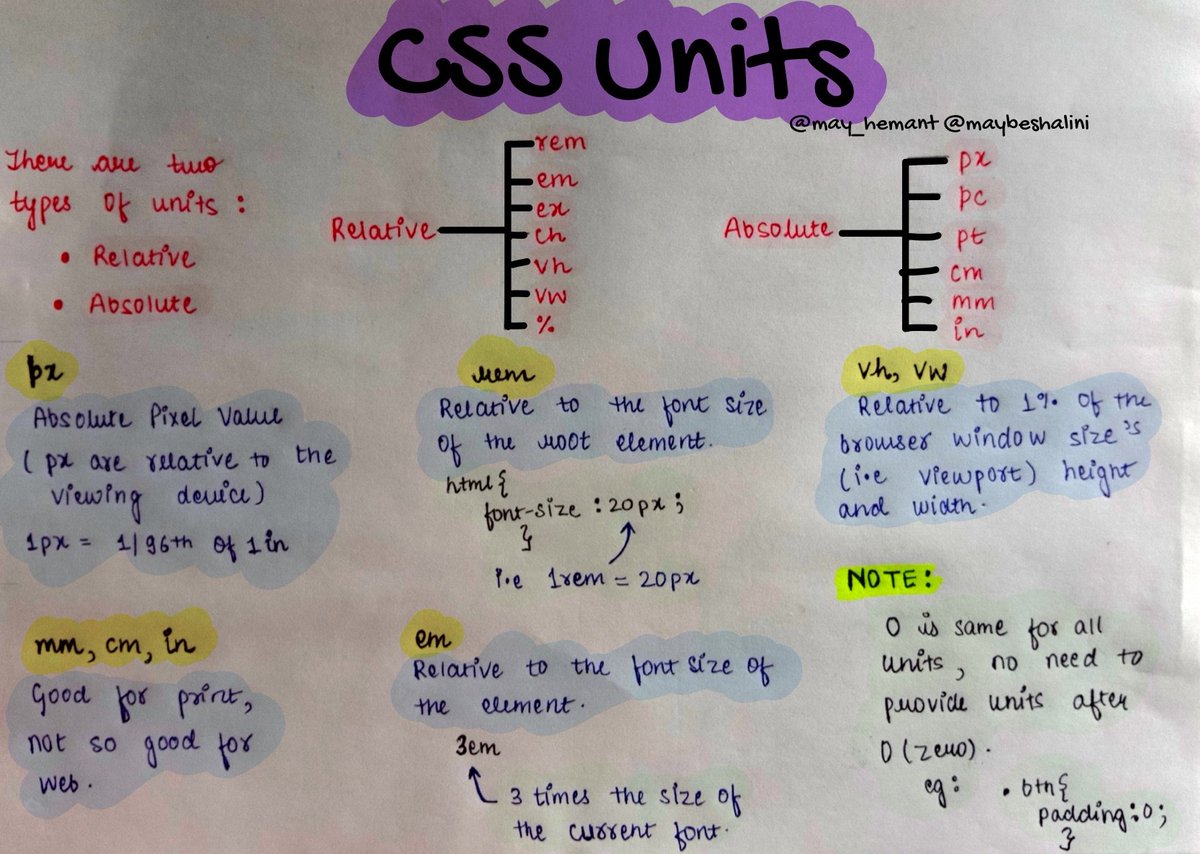
CSS Units
CSS units are used to specify various measurements for styling web elements, such as dimensions, spacing, font sizes, and more.
1. Absolute Units
Absolute units are fixed and do not change based on other elements or the viewport. They are best used when the exact size of an element is critical.
eg: px (pixels), cm (centimeters), mm (millimeters) etc.
2. Relative Units
Relative units are relative to other measurements, such as the parent element’s size or the viewport. They are useful for creating flexible and responsive designs.
eg: % (percentage), em, rem (root em), vw (viewport width) etc.


Last Seen Hashtags on Sotwe
minichat((((*))))* filter:videos
Seen from Italy
หลุดนักเรียน
Seen from Thailand
anxiousPanda video ()*****************
Seen from United Kingdom
AllFalconsGo2College
Seen from United States
للشرموطه
Seen from Egypt
teenageee()***()()()+filter:native_video
Seen from Malaysia
cder
Seen from Kuwait
NewJeans_SuperShy
Seen from United States
mvsales thighjob
Seen from United States
minichat minichat filter:videos
Seen from United States
Most Popular Users

Elon Musk 
@elonmusk
241.5M followers

Barack Obama
@barackobama
118.9M followers

Cristiano Ronaldo
@cristiano
114.6M followers

Donald J. Trump
@realdonaldtrump
111.8M followers

Narendra Modi
@narendramodi
107.1M followers

Rihanna
@rihanna
98.7M followers

NASA
@nasa
92.3M followers

Justin Bieber
@justinbieber
91.8M followers

KATY PERRY
@katyperry
90.1M followers

Taylor Swift
@taylorswift13
84M followers

Lady Gaga
@ladygaga
75.5M followers

Virat Kohli
@imvkohli
73.5M followers

Kim Kardashian
@kimkardashian
70.9M followers

YouTube
@youtube
68.8M followers

Neymar Jr
@neymarjr
66.6M followers

Bill Gates
@billgates
65.3M followers

Selena Gomez
@selenagomez
63.1M followers

The Ellen Show
@theellenshow
62.2M followers

CNN
@cnn
61.7M followers

X
@x
60.7M followers