Top Tweets for #AIMLBasics
Day 3 of #AIMLBasics
Jupyter Notebook
Jupyter Notebook is an open-source, interactive web application that allows you to create and share documents containing live code, equations, visualizations, and explanatory text. It supports many programming languages, with Python being the most common.
Why Use Jupyter Notebook?
- Interactive Coding: Write and execute code in separate cells, making it easy to debug and test.
- Visualization: Ideal for data analysis with built-in support for charts, plots, and other visualizations.
- Documentation: Combine code, results, and text in a single notebook for better readability and sharing.
- Collaboration: Share notebooks easily as .ipynb files or export them to HTML, PDF, etc.
- Versatility: Suitable for data science, machine learning, educational purposes, and prototyping.
You can install notebook via
1) - pip install notebook
2) If you use Anaconda, it's pre-installed. If not : conda install jupyter
Types:
There are two main types: Hosted and local.
Components of a Jupyter Notebook:
- Notebook Interface: The main screen where you write and run code or notes.
- Cells:
Code Cells: Write and run code.
Markdown Cells: Write text, titles, or notes.
- Kernel: The backend that runs your code (Python by default).
- Toolbar: Buttons for saving, running, adding, or deleting cells.
Command mode and Edit mode
Command Mode: For managing cells (add, delete, move).
Edit Mode: For writing code or text in cells.

Day 2 of #AIMLBasics
Python Fundamentals
REPL
R- Read (It reads the expression or statement you type.)
E- Evaluate (It evaluates the expression, meaning it executes the code and computes the result)
P- Print (It prints the result of the evaluation to the screen)
L- Loop (It then waits for the next input, repeating the process.)
REPL is useful for quick testing, debugging, or learning Python interactively.
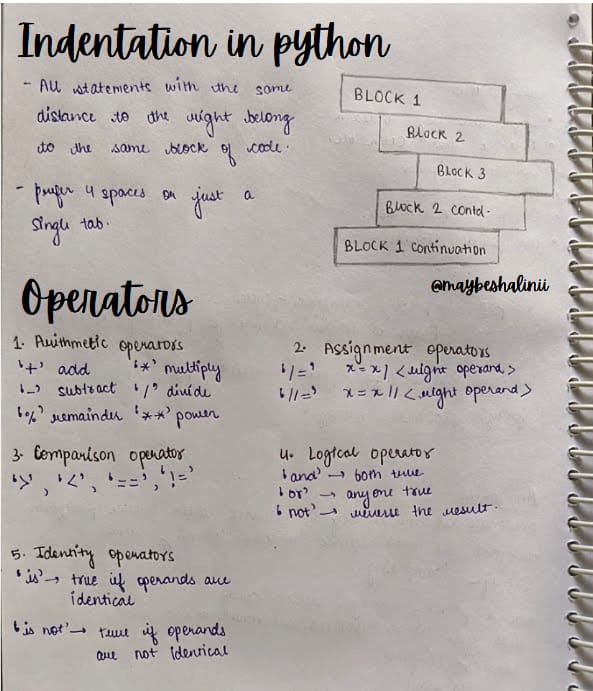
Indentation in python
indentation is used to define the structure and flow of code. Unlike other languages that use braces {} to define code blocks, Python relies on indentation (spaces or tabs) to group statements under loops, functions, conditionals, etc.
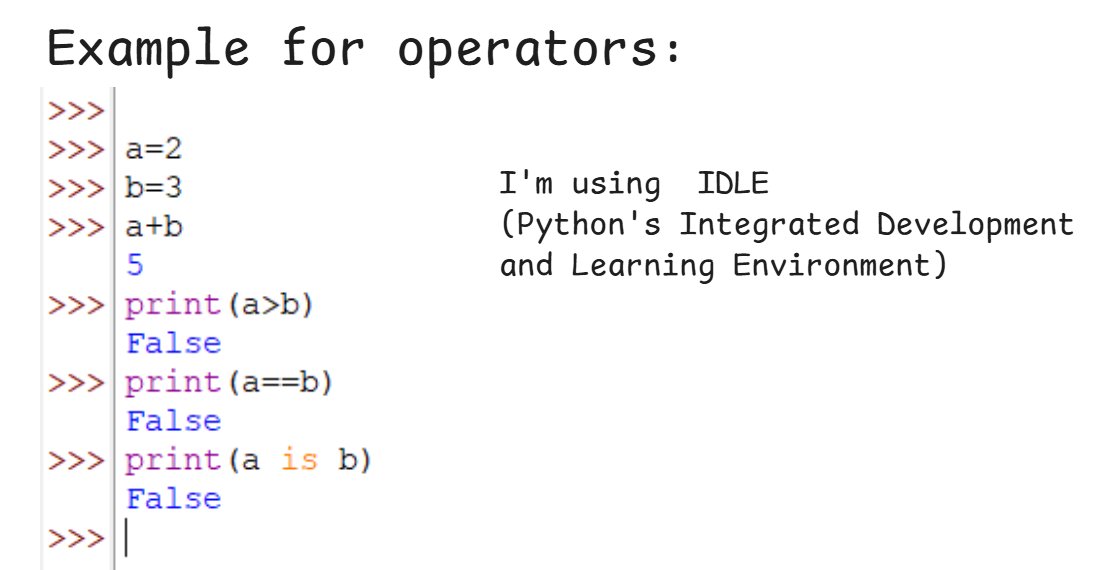
Operators
operators are symbols used to perform operations on variables and values. There are several types of operators:
1. Arithmetic Operators
2. Comparison (Relational) Operators
3. Logical Operators
4. Assignment Operators
5. Identity Operators
6. Membership Operators
7. Bitwise Operators
Python Comments
- Comments start with #
- Comments are ignored by the compiler and has no effect on the program.
- Docstrings : triple quotes at the beginning and the end of the docstring (" " " ----- " " ")
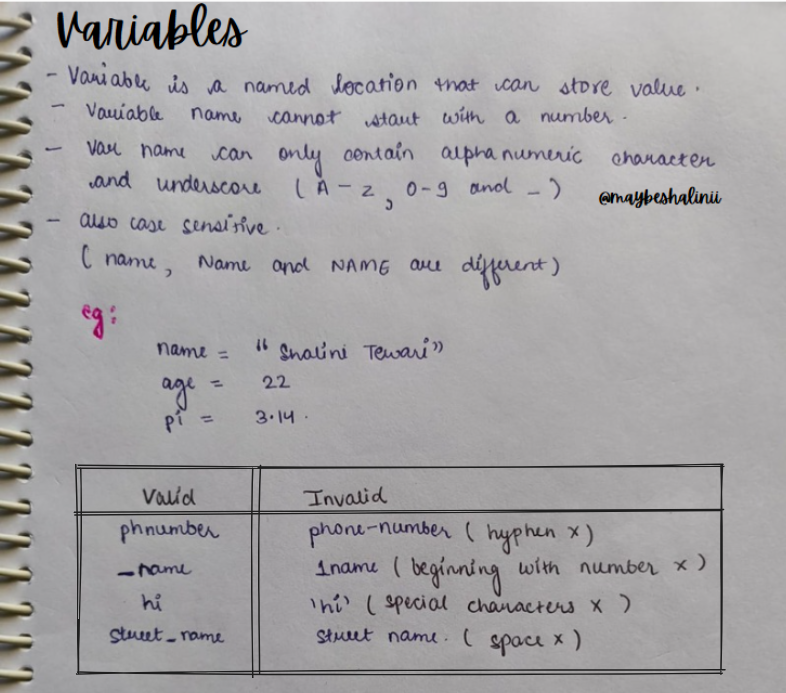
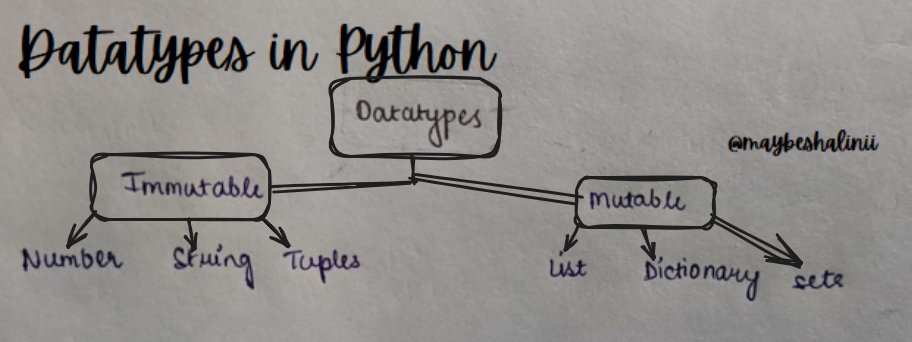
Datatypes in Python:
- int: Integer numbers (e.g., 5, -3, 42).
- float: Decimal numbers (e.g., 3.14, -0.5).
- str: String (text) enclosed in quotes (e.g., "hello", 'world').
- bool: Boolean values (True or False).
- list: Ordered, mutable collection of items (e.g., [1, 2, 3]).
- tuple: Ordered, immutable collection of items (e.g., (1, 2, 3)).
- set: Unordered collection of unique items (e.g., {1, 2, 3}).
- dict: Key-value pairs (e.g., {"name": "John", "age": 25}).
- None: Represents the absence of a value or a null value.
![maybeshalinii's tweet photo. Day 2 of #AIMLBasics
Python Fundamentals
REPL
R- Read (It reads the expression or statement you type.)
E- Evaluate (It evaluates the expression, meaning it executes the code and computes the result)
P- Print (It prints the result of the evaluation to the screen)
L- Loop (It then waits for the next input, repeating the process.)
REPL is useful for quick testing, debugging, or learning Python interactively.
Indentation in python
indentation is used to define the structure and flow of code. Unlike other languages that use braces {} to define code blocks, Python relies on indentation (spaces or tabs) to group statements under loops, functions, conditionals, etc.
Operators
operators are symbols used to perform operations on variables and values. There are several types of operators:
1. Arithmetic Operators
2. Comparison (Relational) Operators
3. Logical Operators
4. Assignment Operators
5. Identity Operators
6. Membership Operators
7. Bitwise Operators
Python Comments
- Comments start with #
- Comments are ignored by the compiler and has no effect on the program.
- Docstrings : triple quotes at the beginning and the end of the docstring (" " " ----- " " ")
Datatypes in Python:
- int: Integer numbers (e.g., 5, -3, 42).
- float: Decimal numbers (e.g., 3.14, -0.5).
- str: String (text) enclosed in quotes (e.g., "hello", 'world').
- bool: Boolean values (True or False).
- list: Ordered, mutable collection of items (e.g., [1, 2, 3]).
- tuple: Ordered, immutable collection of items (e.g., (1, 2, 3)).
- set: Unordered collection of unique items (e.g., {1, 2, 3}).
- dict: Key-value pairs (e.g., {"name": "John", "age": 25}).
- None: Represents the absence of a value or a null value.](https://pbs.twimg.com/media/GeGwqeJaoAAIf-9.jpg)
Day 1 of #AIMLBasics
Python Introduction
Python is one of the most popular programming languages in data science because of its simplicity, flexibility, and vast library support.
It’s beginner-friendly, with an easy-to-read syntax that helps you focus on solving problems rather than getting stuck on the code itself.
In data science, Python is used for tasks like analyzing datasets, creating visualizations, and building machine learning models. Libraries like pandas help you manipulate data easily, Matplotlib and Seaborn allow you to create insightful charts, and NumPy handles complex mathematical operations.
Download python:
- Go to the Official Website
- Click on the Downloads tab.
The website will detect your operating system (Windows, macOS, or Linux) and suggest the latest version.
- Run the Installer and wait for installation.
- Verify the installation.
A Python IDE (Integrated Development Environment) is a software application that provides tools to write, test, and debug Python code efficiently.
- IDLE: Simple, lightweight, great for beginners.
- PyCharm: Advanced features for large projects.
- VS Code: Lightweight, customizable, supports extensions.
- Jupyter Notebook: Ideal for data science and visualizations.
- Atom: Customizable with Python plugins.

Starting today in our #AIMLBasics course, we’re learning Python perfect for beginners, with no prerequisites required.
I’ll also be posting quizzes and learning materials every day at 3 PM. These articles and handmade notes will help you understand the topics briefly and serve as structured material to deep dive into the subjects using your preferred learning options (YouTube videos, articles, blogs).
Turn on notifications to stay in the loop! 🔔
Most Popular Users

Elon Musk 
@elonmusk
240.5M followers

Barack Obama 
@barackobama
118.7M followers

Cristiano Ronaldo 
@cristiano
114.4M followers

Donald J. Trump 
@realdonaldtrump
111.8M followers

Narendra Modi 
@narendramodi
107M followers

Rihanna 
@rihanna
98.7M followers

NASA 
@nasa
92.2M followers

Justin Bieber 
@justinbieber
91.8M followers

KATY PERRY 
@katyperry
90M followers

Taylor Swift 
@taylorswift13
84M followers

Lady Gaga 
@ladygaga
75.5M followers

Virat Kohli 
@imvkohli
73.4M followers

Kim Kardashian 
@kimkardashian
70.8M followers

YouTube 
@youtube
68.7M followers

Neymar Jr 
@neymarjr
66.3M followers

Bill Gates 
@billgates
65.2M followers

Selena Gomez 
@selenagomez
63M followers

The Ellen Show
@theellenshow
62.1M followers

CNN 
@cnn
61.7M followers

X 
@x
60.6M followers


![maybeshalinii's tweet photo. Day 2 of #AIMLBasics
Python Fundamentals
REPL
R- Read (It reads the expression or statement you type.)
E- Evaluate (It evaluates the expression, meaning it executes the code and computes the result)
P- Print (It prints the result of the evaluation to the screen)
L- Loop (It then waits for the next input, repeating the process.)
REPL is useful for quick testing, debugging, or learning Python interactively.
Indentation in python
indentation is used to define the structure and flow of code. Unlike other languages that use braces {} to define code blocks, Python relies on indentation (spaces or tabs) to group statements under loops, functions, conditionals, etc.
Operators
operators are symbols used to perform operations on variables and values. There are several types of operators:
1. Arithmetic Operators
2. Comparison (Relational) Operators
3. Logical Operators
4. Assignment Operators
5. Identity Operators
6. Membership Operators
7. Bitwise Operators
Python Comments
- Comments start with #
- Comments are ignored by the compiler and has no effect on the program.
- Docstrings : triple quotes at the beginning and the end of the docstring (" " " ----- " " ")
Datatypes in Python:
- int: Integer numbers (e.g., 5, -3, 42).
- float: Decimal numbers (e.g., 3.14, -0.5).
- str: String (text) enclosed in quotes (e.g., "hello", 'world').
- bool: Boolean values (True or False).
- list: Ordered, mutable collection of items (e.g., [1, 2, 3]).
- tuple: Ordered, immutable collection of items (e.g., (1, 2, 3)).
- set: Unordered collection of unique items (e.g., {1, 2, 3}).
- dict: Key-value pairs (e.g., {"name": "John", "age": 25}).
- None: Represents the absence of a value or a null value.](https://pbs.twimg.com/media/GeGwqeJakAETvMj.jpg)
![maybeshalinii's tweet photo. Day 2 of #AIMLBasics
Python Fundamentals
REPL
R- Read (It reads the expression or statement you type.)
E- Evaluate (It evaluates the expression, meaning it executes the code and computes the result)
P- Print (It prints the result of the evaluation to the screen)
L- Loop (It then waits for the next input, repeating the process.)
REPL is useful for quick testing, debugging, or learning Python interactively.
Indentation in python
indentation is used to define the structure and flow of code. Unlike other languages that use braces {} to define code blocks, Python relies on indentation (spaces or tabs) to group statements under loops, functions, conditionals, etc.
Operators
operators are symbols used to perform operations on variables and values. There are several types of operators:
1. Arithmetic Operators
2. Comparison (Relational) Operators
3. Logical Operators
4. Assignment Operators
5. Identity Operators
6. Membership Operators
7. Bitwise Operators
Python Comments
- Comments start with #
- Comments are ignored by the compiler and has no effect on the program.
- Docstrings : triple quotes at the beginning and the end of the docstring (" " " ----- " " ")
Datatypes in Python:
- int: Integer numbers (e.g., 5, -3, 42).
- float: Decimal numbers (e.g., 3.14, -0.5).
- str: String (text) enclosed in quotes (e.g., "hello", 'world').
- bool: Boolean values (True or False).
- list: Ordered, mutable collection of items (e.g., [1, 2, 3]).
- tuple: Ordered, immutable collection of items (e.g., (1, 2, 3)).
- set: Unordered collection of unique items (e.g., {1, 2, 3}).
- dict: Key-value pairs (e.g., {"name": "John", "age": 25}).
- None: Represents the absence of a value or a null value.](https://pbs.twimg.com/media/GeGwqa8agAAgiAT.png)
![maybeshalinii's tweet photo. Day 2 of #AIMLBasics
Python Fundamentals
REPL
R- Read (It reads the expression or statement you type.)
E- Evaluate (It evaluates the expression, meaning it executes the code and computes the result)
P- Print (It prints the result of the evaluation to the screen)
L- Loop (It then waits for the next input, repeating the process.)
REPL is useful for quick testing, debugging, or learning Python interactively.
Indentation in python
indentation is used to define the structure and flow of code. Unlike other languages that use braces {} to define code blocks, Python relies on indentation (spaces or tabs) to group statements under loops, functions, conditionals, etc.
Operators
operators are symbols used to perform operations on variables and values. There are several types of operators:
1. Arithmetic Operators
2. Comparison (Relational) Operators
3. Logical Operators
4. Assignment Operators
5. Identity Operators
6. Membership Operators
7. Bitwise Operators
Python Comments
- Comments start with #
- Comments are ignored by the compiler and has no effect on the program.
- Docstrings : triple quotes at the beginning and the end of the docstring (" " " ----- " " ")
Datatypes in Python:
- int: Integer numbers (e.g., 5, -3, 42).
- float: Decimal numbers (e.g., 3.14, -0.5).
- str: String (text) enclosed in quotes (e.g., "hello", 'world').
- bool: Boolean values (True or False).
- list: Ordered, mutable collection of items (e.g., [1, 2, 3]).
- tuple: Ordered, immutable collection of items (e.g., (1, 2, 3)).
- set: Unordered collection of unique items (e.g., {1, 2, 3}).
- dict: Key-value pairs (e.g., {"name": "John", "age": 25}).
- None: Represents the absence of a value or a null value.](https://pbs.twimg.com/media/GeGvHYIbcAAJQ7_.jpg)