

Top Tweets for #DFIRTips

🚨 #DFIRtips 🚨
Today, during an investigation, I found a registry key that proved to be extremely useful in identifying the execution of a malicious executable: HeapLeakDetection!
You can find it in the Software hive, specifically at HKLM\Software\Microsoft\RADAR\HeapLeakDetection\DiagnosedApplications.
This registry key is interesting because its subkeys refer to all the executables that have been detected by RADAR technology for real-time memory leak detection.
Each subkey has its own LastDetectionTime which tells us the last time a memory leak occurred and which executable was affected.
Even though it is not particularly well-known, this artifact could sometimes turn your investigation around, especially when the threat actor tries to erase their tracks by deleting the most common artifacts (Prefetch files, evtx logs, etc.)
[screenshots from my test machine]
![samaritan_o's tweet photo. 🚨 #DFIRtips 🚨
Today, during an investigation, I found a registry key that proved to be extremely useful in identifying the execution of a malicious executable: HeapLeakDetection!
You can find it in the Software hive, specifically at HKLM\Software\Microsoft\RADAR\HeapLeakDetection\DiagnosedApplications.
This registry key is interesting because its subkeys refer to all the executables that have been detected by RADAR technology for real-time memory leak detection.
Each subkey has its own LastDetectionTime which tells us the last time a memory leak occurred and which executable was affected.
Even though it is not particularly well-known, this artifact could sometimes turn your investigation around, especially when the threat actor tries to erase their tracks by deleting the most common artifacts (Prefetch files, evtx logs, etc.)
[screenshots from my test machine]](https://pbs.twimg.com/media/GagOclUXwAAavfG.jpg)
![samaritan_o's tweet photo. 🚨 #DFIRtips 🚨
Today, during an investigation, I found a registry key that proved to be extremely useful in identifying the execution of a malicious executable: HeapLeakDetection!
You can find it in the Software hive, specifically at HKLM\Software\Microsoft\RADAR\HeapLeakDetection\DiagnosedApplications.
This registry key is interesting because its subkeys refer to all the executables that have been detected by RADAR technology for real-time memory leak detection.
Each subkey has its own LastDetectionTime which tells us the last time a memory leak occurred and which executable was affected.
Even though it is not particularly well-known, this artifact could sometimes turn your investigation around, especially when the threat actor tries to erase their tracks by deleting the most common artifacts (Prefetch files, evtx logs, etc.)
[screenshots from my test machine]](https://pbs.twimg.com/media/GagOclQWcAA0v0P.jpg)

New changes to #dfir cheat sheet https://t.co/d77taTQQEY:
1. Restructured Windows artifacts sections
2. New #powershell resources added to Execution activities.
3. Windows timestamp rules added to the file activities section.
#dfirtips #cybersecurity


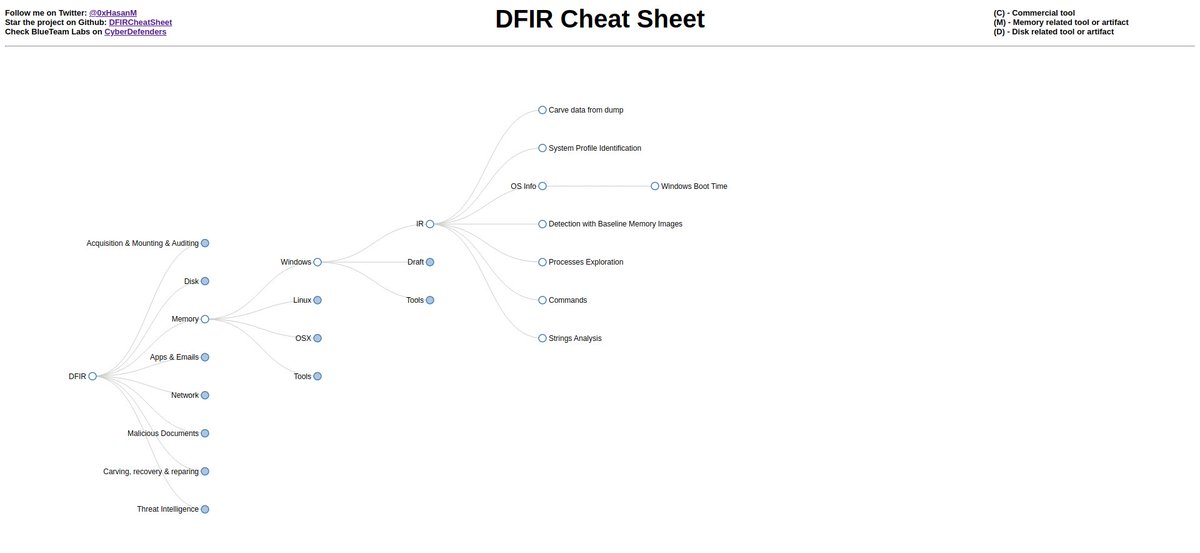
#Powershell command to enable all #AuditPolicies
https://t.co/er2zz7Zj2z
#dfir #dfirtips #CyberSecurity
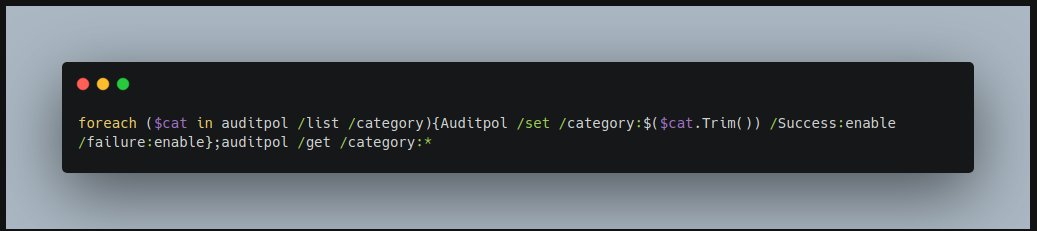
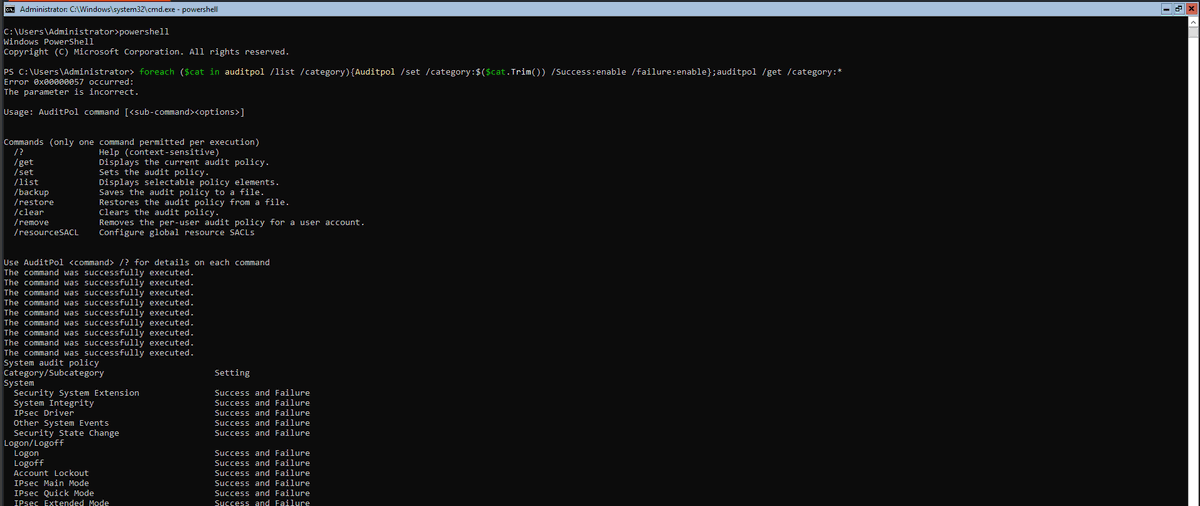
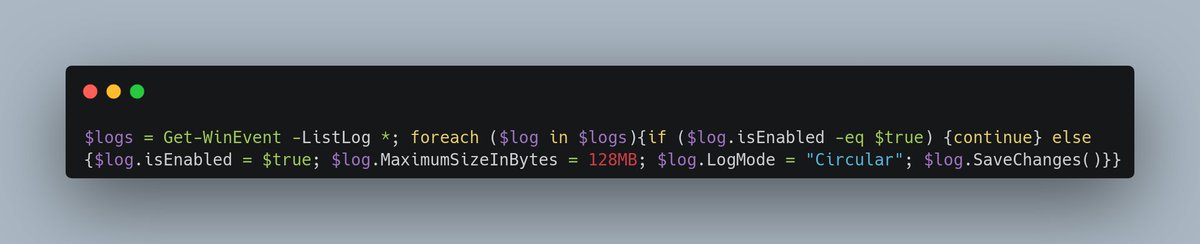
#Powershell command to enable all #EventLogs with 128 MB maximum size.
https://t.co/exB3Z1vv6j
#dfir #dfirtips #CyberSecurity
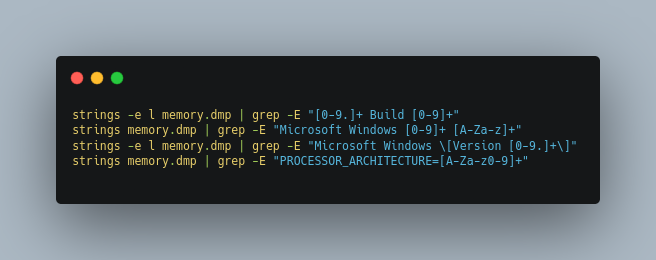

A great #DFIR thread from one of our Analysts at @HuntressLabs on how you can quickly cut through logs
#DFIRtips #infosec

Let's quickly look at how Defenders can benefit from tools like Chainsaw, Sigma, docs from KAPE & Velociraptor, and Security Onion 🕵️♂️
We'll use real, shady data - fresh out the kitchen 🧑🍳
Along the way, I'll share some tips and shortcuts to cut faster through data and logs
🧵
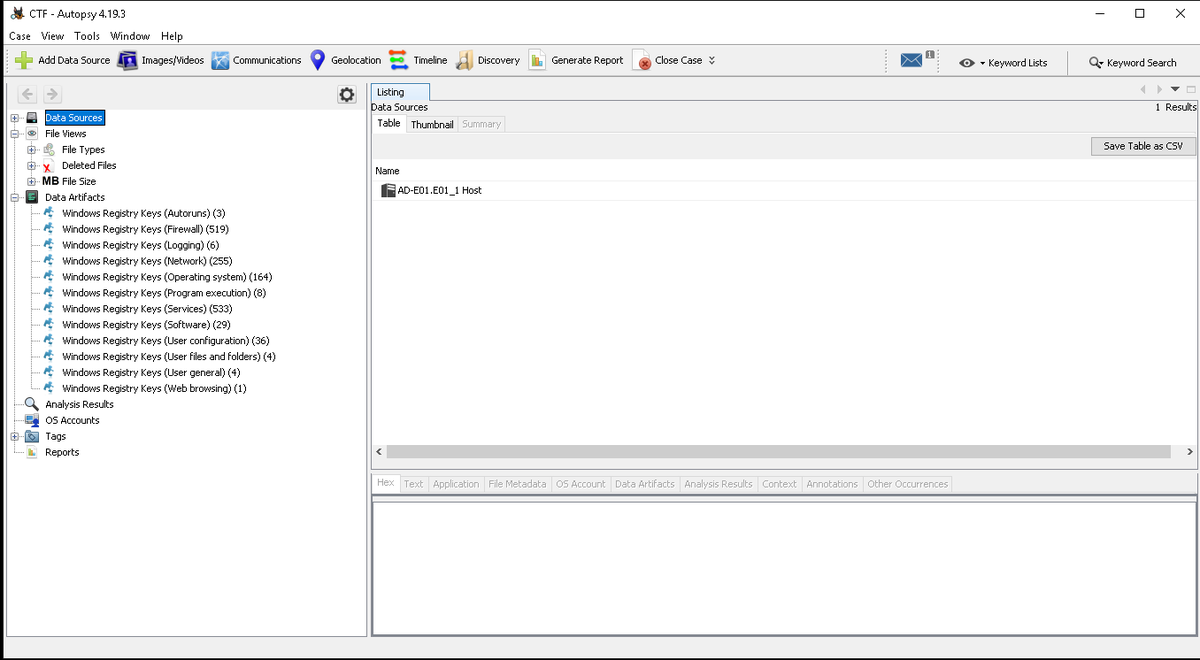
RegistryExplorer: @sleuthkit autopsy module to analyze Registry Hives based on @EricRZimmerman RegistryExplorer's bookmarks
https://t.co/GXTTN0Z05y
Features:
1. Analyze registry hives without loading a full disk image
2. Keys Categorization
#dfirtip #dfirtips #cybersecurity
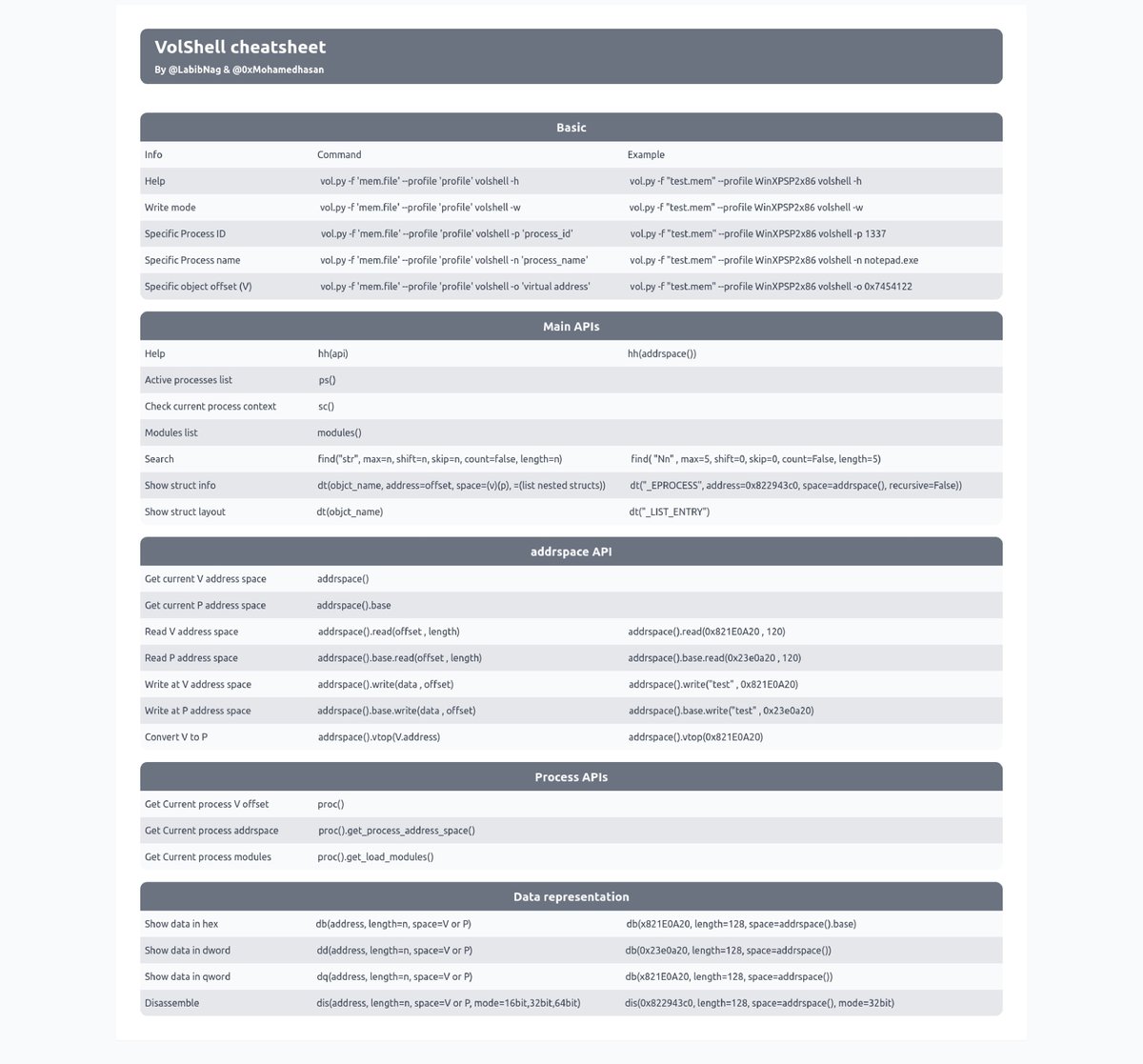
VolShell @volatility cheatsheet
by @LabibNag & @0xMohamedhasan
https://t.co/p74irYueBd
There are more upcoming #memory #forensics cheatsheets. Stay tuned.
#DFIR #DFIRTIPS #CyberSecurity


@Old_man_G Hallo, here is your unroll: 1\ #dfirtips #dfir #infosec Windows Event Logs can be daunting… https://t.co/9k4TLQwM1z Share this if you think it's interesting. 🤖
@theparanoidnerd Namaste, please find the unroll here: 1\ #dfirtips #dfir #infosec Windows Event Logs can be daunting… https://t.co/9k4TLQwM1z Share this if you think it's interesting. 🤖


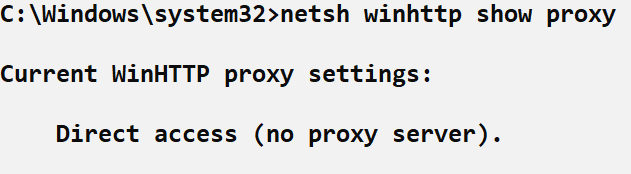
If you need to quickly determine if a system-wide proxy is configured on a Windows system (useful in threat hunting and general investigations), use the following command #DFIRtips:
netsh winhttp show proxy
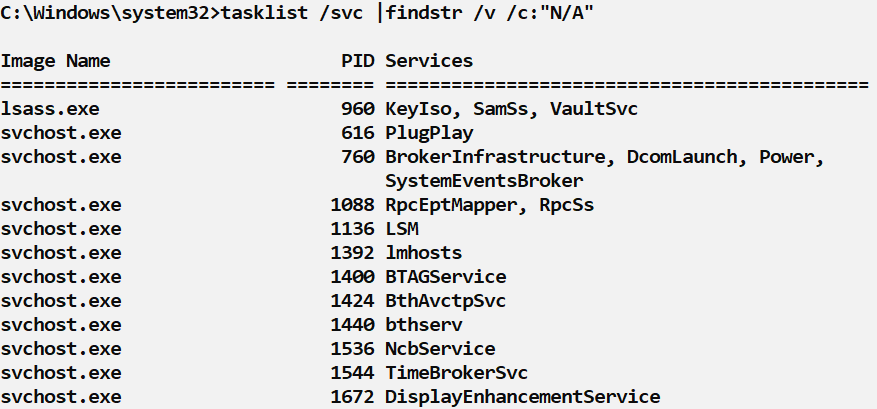
If you want to find all Windows processes running as a service, use:
tasklist /svc|findstr /v /c:"N/A"
This will get rid of any processes not running as a service. To find processes NOT running as a service:
tasklist /svc|findstr /c:"N/A"
Know normal, hunt oddities. #DFIRtips
If you want to see which processes have networking functionality (that's most of them BTW), use "tasklist /m ws2_32.dll" to show programs that import the DLL and hence have some networking capability.
Useful when a vendor says "we don't talk on the network at all" #DFIRtips

Think you should have more processes in your mac_pslist output? Try the more robust mac_tasks @volatility plugin instead!: https://t.co/pOjdCkdzyH #DFIR #DFIRtips
Last Seen Hashtags on Sotwe
Most Popular Users

Elon Musk 
@elonmusk
240.8M followers

Barack Obama
@barackobama
119.2M followers

Donald J. Trump
@realdonaldtrump
111.7M followers

Cristiano Ronaldo
@cristiano
111.2M followers

Narendra Modi
@narendramodi
107M followers

Rihanna
@rihanna
97.8M followers

NASA
@nasa
92.2M followers

Justin Bieber
@justinbieber
91M followers

KATY PERRY
@katyperry
88M followers

Taylor Swift
@taylorswift13
81.9M followers

Lady Gaga
@ladygaga
73.4M followers

Virat Kohli
@imvkohli
70.4M followers

Kim Kardashian
@kimkardashian
69.9M followers

YouTube
@youtube
68.7M followers

Bill Gates
@billgates
64.1M followers

Neymar Jr
@neymarjr
63.2M followers

The Ellen Show
@theellenshow
62.4M followers

CNN
@cnn
61.9M followers

Selena Gomez
@selenagomez
61.1M followers

X
@x
60.8M followers