

Top Tweets for #ENGINEERINGSTUDENT

⚙️ Engineering Report需要支持?Technical Writing、Research、Formatting指导!
💬 微信:writerly
🔗 https://t.co/VPmALHpzk6
#EngineeringStudent #工程留学 #中国留学生

SolidWorks Tutorial: Impeller Casing for a Centrifugal Pump (Step-by-Step) https://t.co/1aHEIVPFmR via @YouTube #SolidWorks #CAD #Engineering #SolidWorks2027 #CAD #engineeringstudents

Wasted my first year of BTech doing random bakchodi
Saw a classmate land a GTM internship at a Bangalore startup and something just clicked.
Know basic HTML, CSS & JS. Gonna lock in on web dev + DSA now.
Drop some advice, folks.
#engineeringstudent #WebDevelopment #dsa


Fourier's Law of Heating 3 - Mathematical Models and Governing Equation #EngineeringStudents #PhysicsStudents #MathematicsStudent #ChemistryStudents #Engineers #Researchers #Scientists

🌱 Smart Plant Water Reminder using ESP32 | Wokwi Simulation
Excited to share my latest IoT mini project – Smart Plant Water Reminder built using ESP32 and simulated in Wokwi.
💡 Project Highlights:
• Monitors soil moisture levels.
• Displays plant status on an OLED display.
• Activates a buzzer when the soil becomes dry, reminding the user to water the plant.
• Simulated and tested successfully in the Wokwi platform before hardware implementation.
This project helped me strengthen my understanding of ESP32 programming, sensor integration, OLED display interfacing, and IoT-based smart automation.
Every small project is a step toward building smarter and more sustainable solutions.
Project link: https://t.co/UaRBuFDu5Q
🔥 Top 6 ESP32 eBooks
https://t.co/MvafQvkQbk
#ESP32 #IoT #EmbeddedSystems #Wokwi #SmartPlant #Automation #Electronics #EngineeringStudent #StudentProject #Innovation #LearningByDoing

💡 Push Button Controlled LED using Arduino Uno
One of the first projects I built during my Arduino and IoT learning journey was a simple yet powerful circuit: controlling an LED using a push button.
📌 What I learned:
🔹 Reading digital inputs from a push button
🔹 Controlling outputs through Arduino programming
🔹 Working with pull-down resistors and circuit connections
🔹 Understanding the interaction between hardware and software
While the circuit is simple, it forms the foundation for countless real-world applications such as smart switches, security systems, automation devices, and IoT solutions.
🔽 Download Best Arduino eBooks
📕 https://t.co/FehAXCKPbl
Small projects like these build the confidence needed to tackle larger engineering challenges. 🚀
#Arduino #IoT #EmbeddedSystems #Electronics #Engineering #CircuitDesign #Tinkercad #Innovation #EngineeringStudent #TechLearning #IITJammu

India's Robotics Market to Hit $13 Billion by 2030 📈🤖
And here's why that matters to engineering students RIGHT NOW:
The demand breakdown:
🏭 Manufacturing automation: 40%
🏥 Healthcare robotics: 25%
🌾 Agricultural robotics: 20%
🏠 Service robots: 15%
What this means for us (ECE/CS students):
→ Robotics isn't "future tech" anymore — it's NOW
→ Companies are hiring interns with basic embedded systems knowledge
→ Cross-domain skills = competitive advantage
Real example from my internship:
At Tarcin Robotic LLP, I saw firsthand how robotics companies need people who understand BOTH hardware (sensors, actuators) AND software (Python, C, IoT protocols).
Skills that are suddenly valuable:
✅ ESP32/Arduino programming
✅ Sensor integration (not just theory)
✅ ROS (Robot Operating System) basics
✅ Computer vision (even basic OpenCV)
✅ IoT + Robotics combination
You don't need a robotics degree to enter this field.
You need projects, hands-on experience, and curiosity.
📕 https://t.co/ZiOzwZCp4W
Are you building anything in robotics? Share below! 👇
Source: NASSCOM & Industry reports 2026
#Robotics #India #FutureTech #CareerOpportunities #Automation #ECE #EngineeringStudents #IoT #RoboticsEngineering #TechTrends #InternshipReady

5 Free Tools Every ECE Student Should Know About 🛠️✨
Spent 2 years finding the best tools for hardware + software projects.
Here's what actually worked (all FREE):
1️⃣ Wokwi (https://t.co/sfRS3vysVW)
→ Simulate ESP32/Arduino circuits in browser
→ No hardware? No problem!
→ Debug your code BEFORE buying components
→ I used this to test my IoT projects before deploying
Best for: Learning, prototyping, debugging
2️⃣ EasyEDA (https://t.co/7QQHXJPWBH)
→ Design PCBs for free
→ Export Gerber files for manufacturing
→ Huge component library
→ I designed my first PCB here during our Value Added Course
Best for: PCB design, schematic capture
3️⃣ Tinkercad (https://t.co/i55bDLa8dl)
→ 3D modeling + Arduino simulation
→ Super beginner-friendly
→ Used it before printing in our Idea Lab
Best for: 3D printing, circuit simulation
4️⃣ Fritzing (https://t.co/vgdzPc77Ul)
→ Beautiful circuit diagrams
→ Perfect for project documentation
→ Used it in my hackathon presentations
Best for: Project reports, presentations
5️⃣ VS Code + PlatformIO
→ Best IDE for ESP32/Arduino
→ Better than Arduino IDE (trust me)
→ Auto-completion, debugging, multi-board support
→ Game changer for serious embedded work
Best for: Professional embedded development
💡 Pro Tip:
Don't just collect tools. Master 1-2 that fit your workflow.
I use: Wokwi (testing) → EasyEDA (PCB) → VS Code (coding) → Tinkercad (3D printing)
🔽 Download Best ESP32 eBooks
📕 https://t.co/yUaVkQfGM1
What's YOUR favorite tool? Share in comments! 👇
#ECE #EmbeddedSystems #Arduino #ESP32 #PCBDesign #FreeTools #EngineeringStudents #IoT #TechTools #StudentResources

5 Arduino Projects Every Beginner Should Build (In Order) 🎯
Taught 3 juniors Arduino last month.
Here's the exact roadmap that worked:
❌ Common Mistake:
Jumping to "Smart Home Automation" on Day 1
→ Gets overwhelming → Gives up
✅ Better Approach:
Build these 5 projects in sequence:
1️⃣ LED Blink (1 hour)
What you learn: digitalWrite(), delay(), pinMode()
Why it matters: Understand output control basics
Code complexity: 5 lines
2��⃣ Traffic Light System (2 hours)
What you learn: Multiple outputs, timing, state management
Why it matters: Intro to automation logic
Real application: Actual traffic lights use similar logic
3️⃣ Temperature Monitor (DHT11) (3 hours)
What you learn: Reading sensor data, Serial Monitor debugging
Why it matters: First sensor integration
Challenge: Understanding datasheets, libraries
4️⃣ Automatic Night Light (LDR + LED) (2 hours)
What you learn: Analog input, if-else conditions, threshold logic
Why it matters: Sensor → Decision → Action (core of automation)
Real application: Street lights, security systems
5️⃣ Ultrasonic Distance Sensor + Buzzer (4 hours)
What you learn: Multi-component integration, map() function
Why it matters: Combining multiple sensors + outputs
Real application: Parking sensors, obstacle detection
💡 After These 5:
You understand:
✅ Digital I/O (LEDs, buttons)
✅ Analog input (sensors)
✅ Serial communication (debugging)
✅ Conditional logic (if-else)
✅ Component integration (multiple sensors)
🚀 Then Move to:
→ ESP32 for WiFi/IoT projects
→ Servo motors for robotics
→ LCD displays for user interfaces
🔽 Download Best ESP32 eBooks
📕 https://t.co/yUaVkQfGM1
🔽 Download Best Arduino eBooks
📕 https://t.co/FehAXCKPbl
Pro Tip:
Don't just copy code from tutorials.
Break something. Fix it. That's real learning.
Which project are you stuck on? Comment and I'll help! 👇
#Arduino #BeginnersGuide #ESP32 #IoT #Electronics #ECE #LearnByDoing #EngineeringStudents #MakerCommunity #ArduinoProjects #EmbeddedSystems

🚀 Things I Wish I Knew Before Learning Embedded Systems
When I started learning Embedded Systems, I thought writing code was the hardest part.
After working on ESP32, Raspberry Pi, IoT, Computer Vision, and robotics projects, I realized the real challenges were somewhere else.
Here are 5 lessons I wish I knew earlier:
🔹 Master C Fundamentals
Pointers, structures, memory management, and bitwise operations matter more than most frameworks.
🔹 Communication Protocols Are Essential
Understanding UART, SPI, and I2C makes debugging hardware much easier.
🔹 Debugging Is a Core Skill
A large part of embedded development is finding and fixing issues rather than writing new code.
🔹 Learn RTOS Concepts Early
Tasks, scheduling, queues, and semaphores are used in many real-world embedded products.
🔹 Power and Timing Matter
Efficient use of memory, CPU time, and power often determines whether a system succeeds.
These lessons came from building projects, making mistakes, and spending hours debugging issues that looked impossible at first.
Every project taught me something new, and I'm still learning.
🔽 Download Best ESP32 eBooks
📕 https://t.co/yUaVkQfGM1
💡 What is one thing you wish you had known before starting Embedded Systems or Electronics?
#EmbeddedSystems #Firmware #ESP32 #IoT #Electronics #EmbeddedEngineering #RTOS #EdgeAI #ComputerVision #ArtificialIntelligence #FirmwareDevelopment #Engineering #EngineeringStudents #TechCareers #TechEducation #FirmwareDevelopment #ElectronicsEngineering #Innovation #LearningInPublic

📏 Ever wondered how robots measure distance without touching anything?
The HC-SR04 Ultrasonic Sensor uses sound waves to detect objects and calculate distance in milliseconds. A simple sensor, but it powers countless robotics, automation, and obstacle-avoidance systems.
It's fascinating how a small module can become the "eyes" of a robot. 🤖
Every project teaches something new, and every schematic reveals how intelligent systems actually work behind the scenes.
📕 https://t.co/FehAXCLn0T
#Robotics #Arduino #ESP32 #Electronics #EmbeddedSystems #IoT #EngineeringStudent

Exploring the Raspberry Pi 5 — a tiny computer with endless possibilities.
The Raspberry Pi 5 is not just another development board. It's a complete single-board computer capable of running operating systems, AI applications, IoT platforms, robotics projects, and even edge computing workloads.
From GPIO interfacing to computer vision and automation, Raspberry Pi bridges the gap between software and hardware innovation.
What makes it powerful?
🔹 Quad-Core 64-bit ARM Cortex-A76 Processor
🔹 Up to 8GB LPDDR4X RAM
🔹 Dual 4K Display Support
🔹 PCIe Expansion Interface
🔹 High-Speed USB 3.0 Connectivity
🔹 Gigabit Ethernet & Wireless Networking
🔹 40-Pin GPIO for Hardware Integration
Currently exploring:
⚙️ Embedded Linux
🤖 Robotics & Automation
📡 IoT Systems
🧠 Edge AI & Computer Vision
🔌 Hardware-Software Integration
The deeper I explore Raspberry Pi, the more I appreciate how a credit-card-sized computer can power real-world innovation—from smart devices to intelligent robotic systems. 🚀
🔽 Download Best Raspberry Pi eBooks
📕 https://t.co/wZYBObTS7I
#RaspberryPi5 #RaspberryPi #EmbeddedSystems #Linux #IoT #EdgeAI #ComputerVision #Robotics #Automation #ElectronicsEngineering #HardwareDesign #EngineeringStudent #TechInnovation #AestheticRagib

🚀 Built a Smart Home Automation System using ESP32 and the VC-02 Offline Voice Recognition Module.
🔹 Offline voice-controlled appliance switching
🔹 ESP32-based control system
🔹 Relay-controlled home appliances
🔹 USB Type-C rechargeable battery system
🔹 Four-pole connector for switch box integration
🔹 Fully functional hardware prototype
This project highlights the power of embedded systems in creating reliable and privacy-focused smart home solutions without internet dependency.
📕 https://t.co/yUaVkQfGM1
#ESP32 #SmartHome #EmbeddedSystems #VoiceRecognition #IoT #EngineeringStudent #Electronics #Automation #HardwareProject #Innovation


Hey everyone 👋
I've been working on https://t.co/gEEu83V3Hr and would really appreciate your feedback.
Please take a few minutes to explore the website and let me know:
• What's good?
• What's missing?
• Any UI/UX improvements?
• Any bugs or issues you notice?
Your honest feedback will help me improve the platform for engineering students. Thanks in advance! 🚀
#WebDevelopment #FeedbackWanted #EngineeringStudents #EdTech
Successfully designed and simulated a Temperature Alert System using Arduino Uno, a Temperature Sensor, and a Buzzer in Wokwi.
✅ Monitors real-time temperature readings
✅ Displays temperature values through Serial Monitor
✅ Automatically activates a buzzer when the temperature exceeds the predefined threshold (30°C)
✅ Demonstrates sensor interfacing, analog-to-digital conversion, and embedded system programming
This project helped me strengthen my understanding of Arduino programming, sensor integration, and IoT-based monitoring systems.
📕 https://t.co/FehAXCKPbl
#Arduino #EmbeddedSystems #IoT #TemperatureMonitoring #ElectronicsEngineering #EEE #Wokwi #Programming #EngineeringStudent #ProjectBasedLearning

🚀 Built a Motion-Controlled 7 LED Chaser System using Arduino and MPU6050!
📕 https://t.co/FehAXCKPbl
I'm excited to share my latest embedded systems project where I interfaced an MPU6050 accelerometer and gyroscope sensor with an Arduino Uno to control a 7-LED chaser display based on tilt and motion.
🔹 Technologies Used:
• Arduino Uno
• MPU6050 (Accelerometer & Gyroscope)
• LEDs and Resistors
• Embedded C Programming
• I2C Communication Protocol
🎯 Key Features:
✅ Real-time motion sensing
✅ Tilt-based LED control
✅ Sensor interfacing using I2C
✅ Interactive visual feedback
This project helped me gain practical experience in sensor integration, microcontroller programming, and real-time embedded system design.
I am continuously exploring Arduino, IoT, Robotics, PCB Design, and Embedded Systems to strengthen my engineering skills.
#Arduino #EmbeddedSystems #MPU6050 #ElectronicsEngineering #IoT #Robotics #Microcontroller #Sensors #EngineeringStudent #DIYElectronics #Innovation #Technology #LinkedInLearning
🚀 Arduino Simulation Project in Wokwi! 🚀
✴️I Excited to share my first project built using the Wokwi Simulator: Railway Gate Automation System using Arduino Uno.
📕 https://t.co/FehAXCKPbl
🔹 Features:
🔸Automatic railway gate control using a servo motor.
🔸Train arrival and departure detection using push buttons (sensor simulation).
🔸Red and Green LED indicators for gate status.
🔸Buzzer warning system for approaching trains.
🔸Real-time status monitoring through Serial Monitor.
💡 Through this project, I gained hands-on experience with:
🔸Arduino programming (Embedded C/C++)
🔸Servo motor interfacing
🔸Digital input/output control
🔸Simulation and testing using Wokwi
🔸Basic embedded systems design
🔸This project strengthened my understanding of embedded systems and automation concepts. Looking forward to building more projects in Arduino, IoT, and ECE core domains.
#Arduino #Wokwi #EmbeddedSystems #ECE #ElectronicsEngineering #IoT #Automation #LearningByDoing #EngineeringStudent #ArduinoUno #Projects


🚀 Exploring the Power of ESP32 with Multiple Sensors!
Over the past few weeks, I've been working with the ESP32 and various sensors to understand how embedded systems interact with the real world.
📘 Full Project Guide:
https://t.co/yUaVkQfGM1
The ESP32 is one of the most powerful and affordable microcontrollers for IoT applications. With built-in Wi-Fi and Bluetooth, dual-core processing, low power consumption, and support for protocols like I2C, SPI, UART, ADC, and PWM, it enables rapid development of smart and connected devices.
🔹 Sensors Featured:
🌡️ DHT11/DHT22 – Temperature & Humidity Monitoring
🌡️ BMP280/BME280 – Pressure, Temperature & Altitude Measurement
🌫️ MQ-2 – Smoke, LPG & Gas Detection
🌫️ MQ-135 – Air Quality Monitoring
🚨 MQ-7 – Carbon Monoxide Detection
📏 HC-SR04 – Distance Measurement
💡 LDR – Light Intensity Detection
🏃 PIR – Motion Detection
🌱 Soil Moisture Sensor – Smart Irrigation Systems
🌧️ Rain Sensor – Rainfall Detection
🧲 Hall Effect Sensor – Magnetic Field Detection
🌈 TCS3200 – Color Recognition
🌡️ DS18B20 – High Precision Temperature Sensing
📍 VL53L0X – Time-of-Flight Distance Measurement
🎯 MPU6050 – Accelerometer & Gyroscope
❤️ MAX30102 – Heart Rate & SpO₂ Monitoring
🎤 Sound Sensor – Noise Detection
🌡️ SHT31/SHT35 – Industrial Grade Temperature & Humidity
🌬️ BME680 – Air Quality, Pressure, Temperature & Humidity
📡 RFID RC522 – Contactless Identification & Access Control
💡 Key Applications:
1️⃣ Smart Agriculture – Soil monitoring, irrigation automation, weather tracking.
2️⃣ Smart Home Automation – Motion-based lighting, environmental monitoring, security systems.
3️⃣ Industrial IoT (IIoT) – Predictive maintenance, gas leakage detection, equipment monitoring.
Working with these sensors has helped me gain practical knowledge in sensor interfacing, embedded programming, IoT communication, and real-time data acquisition.
Which ESP32 sensor project have you worked on recently? I'd love to hear your ideas and experiences in the comments!
#ESP32 #IoT #EmbeddedSystems #ElectronicsEngineering #Arduino #Microcontroller #Sensors #SmartAgriculture #HomeAutomation #IndustrialIoT #EngineeringStudents #Innovation #Technology #ESP32Projects #WirelessCommunication #Electronics

What I Learned Today: ESP32
ESP32 is a small but powerful microcontroller used in many IoT and embedded system projects.
🔹 Key Features
✅ Built-in Wi-Fi
✅ Built-in Bluetooth
✅ Fast Dual-Core Processor
✅ Low Power Consumption
✅ Easy to Program
🔹 Applications
🏠 Smart Home Automation
🤖 Robotics
🌱 Smart Agriculture
📡 IoT Devices
⌚ Wearable Technology
💡 My Takeaway
ESP32 makes it easy to build smart and connected devices because it combines a microcontroller, Wi-Fi, and Bluetooth on a single board.
Small board, endless possibilities!
📘 Full Project Guide:
https://t.co/yUaVkQgeBz
#ESP32 #IoT #EmbeddedSystems #ECE #Electronics #EngineeringStudent #Microcontroller #TechLearning #Arduino #LearningJourney #FutureEngineer

🚀 My First Engineering Project
Excited to share my first electronics and embedded systems project!
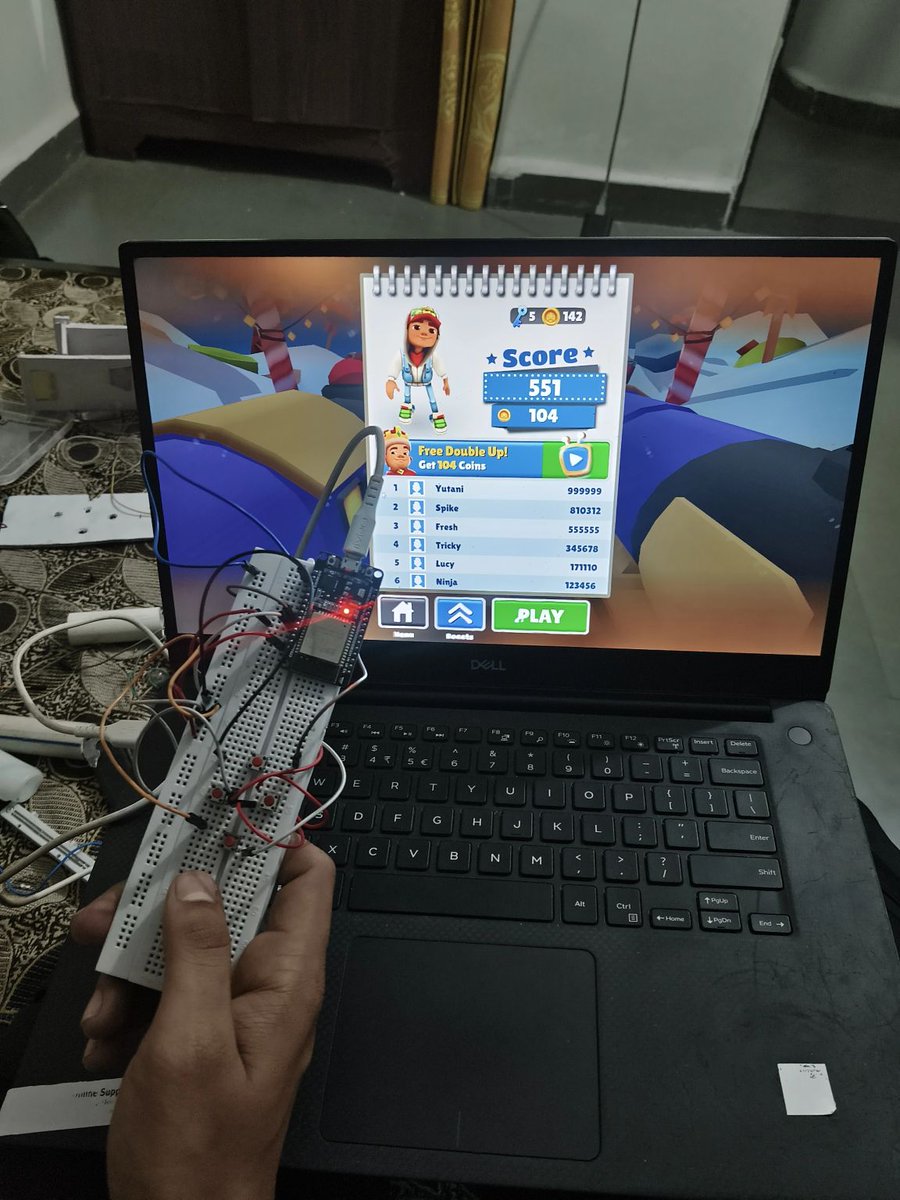
🎮 ESP32 Bluetooth Gaming Controller
This project uses an ESP32 microcontroller to act as a Bluetooth keyboard and control games wirelessly using push buttons. The controller sends keyboard arrow key commands (��� ↓ ← →) to a laptop through Bluetooth.
🔧 Technologies Used:
• ESP32
• Arduino IDE
• Bluetooth HID Keyboard
• KiCad for circuit design
• Breadboard prototyping
💡 What I Learned:
• ESP32 programming
• GPIO and button interfacing
• Bluetooth communication
• Circuit design and schematic creation
• Debugging hardware and software integration
This project helped me understand how embedded systems, hardware design, and programming work together to create a real-world application.
Looking forward to building more IoT, PCB design, and embedded systems projects.
https://t.co/yUaVkQfGM1
#ESP32 #EmbeddedSystems #ElectronicsEngineering #IoT #PCBDesign #KiCad #Arduino #EngineeringStudent #Bluetooth #TechProjects #ElectricalEngineering


🚀 Excited to share my project — Autonomous Target Tracking Vision Rover! 🤖📡
Built a smart rover capable of detecting and following targets autonomously while streaming real-time video wirelessly — combining robotics, embedded systems, IoT, and vision systems into one integrated solution.
🔧 What I built:
Designed and developed a complete rover system from scratch by integrating sensors, motor control, ESP32-CAM for vision, and wireless communication to achieve autonomous target tracking with live video streaming.
⚙️ Tech Stack:
→ ESP32 DevKit V1 (Main microcontroller)
→ ESP32-CAM Module (for live video streaming & vision)
→ L293N Motor Driver
→ HC-SR04 Ultrasonic Sensor
→ IR Sensors for direction detection
→ DC Motors & Robot Chassis
→ WiFi-based real-time video transmission
💡 What makes it special:
Real-time sensor inputs combined with camera-based live streaming control rover movement, enabling it to track targets autonomously while providing visual feedback — forming a vision-assisted surveillance and tracking system.
🎯 Application:
This system can be applied in:
Cricket practice environments for basic ball tracking 🏏
Surveillance and monitoring systems
Smart robotics and automation use-cases
🎓 Learning Outcomes:
→ Sensor integration & embedded programming
→ Motor control & navigation logic
→ Camera interfacing using ESP32-CAM
→ IoT-based communication (WiFi streaming)
→ Real-world problem solving using robotics
🚀 Future Scope:
→ Integration of AI-based object detection (OpenCV / ML models) using camera feed
→ Full transition to vision-based tracking (removing IR dependency)
→ Implementation of advanced computer vision + path planning algorithms
→ Development of a mobile app with live control & analytics
→ Expansion into security surveillance, smart delivery robots, and sports analytics
https://t.co/yWqtzxblEv
#Robotics #ESP32 #ESP32CAM #EmbeddedSystems #IoT #ComputerVision #EngineeringStudent #Automation #TechProjects #Innovation #Electronics #ProjectShowcase


Want to major in Civil Engineering? Here is how to transfer from American River College to Sacramento State in 3 years flat. 🛠️📐
#TecoGuide #CivilEngineering #AmericanRiverCollege #SacStateBound #EngineeringStudent #TransferPathway
🚀 Understanding the Arduino UNO – The Foundation of Embedded Systems! 🔧💡
Today, I created a detailed infographic explaining the complete pin configuration of the Arduino UNO, one of the most widely used microcontroller development boards for beginners and professionals alike.
The diagram covers:
✅ Digital I/O Pins (D0–D13)
✅ PWM Pins for Motor and LED Control
✅ Analog Input Pins (A0–A5)
✅ Power Supply Pins (5V, 3.3V, GND, Vin)
✅ UART Serial Communication (TX/RX)
✅ USB Programming Interface
✅ Microcontroller Architecture Overview
✅ Pin Functions and Practical Applications
Understanding the pin configuration is the first step toward building exciting projects such as IoT systems, robotics, drones, flight computers, autonomous vehicles, smart agriculture solutions, and industrial automation systems.
As engineers, mastering the fundamentals of hardware interfaces allows us to design more reliable, efficient, and scalable embedded solutions. Every advanced system starts with a strong understanding of its core components.
📚 Learning never stops. Every pin has a purpose, and every project begins with understanding how these pins interact with sensors, actuators, communication modules, and the real world.
📕 https://t.co/FehAXCKPbl
#Arduino #ArduinoUNO #EmbeddedSystems #ElectronicsEngineering #Microcontroller #IoT #Robotics #EngineeringEducation #STEM #Programming #CProgramming #EmbeddedC #HardwareDesign #Innovation #Technology #Learning #EngineeringStudents #Electronics #Automation #TechCommunity #ShivamSingh

🔹 Why ESP32 is a Game-Changer for IoT Projects 🔹
As an Electronics & Communication Engineering student, I've explored different microcontrollers, and the ESP32 stands out for IoT applications.
✅ Built-in Wi-Fi and Bluetooth
✅ Dual-core processor for better performance
✅ More GPIO pins and memory
✅ Cost-effective for both learning and real-world projects
One of the biggest lessons I've learned is that choosing the right controller can significantly reduce development time and improve project efficiency.
Whether you're building smart home systems, automation projects, or wireless monitoring solutions, ESP32 is an excellent platform to start with.
💡 What is your favorite microcontroller for embedded and IoT projects?
📕 https://t.co/yUaVkQfGM1
#ESP32 #IoT #EmbeddedSystems #ElectronicsEngineering #ECE #Microcontroller #EngineeringStudents #TechInnovation #Arduino #LearningJourney

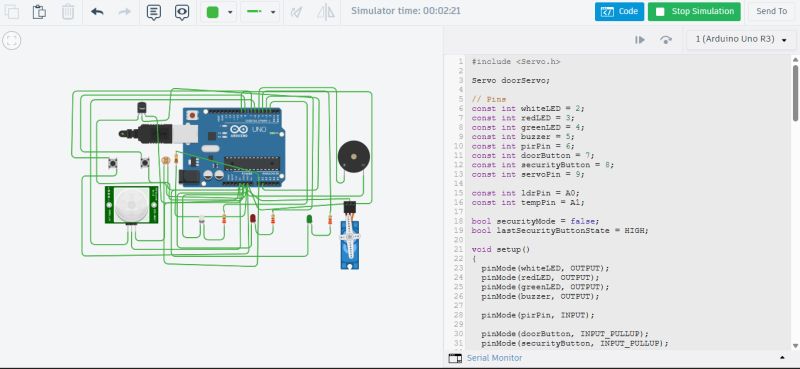
Smart Home Automation & Security System using Arduino UNO 🔒
Excited to share my latest IoT project developed using Arduino UNO and Tinkercad Simulation!
Key Features:
🔹 Motion detection using PIR sensor
🔹 Automated door control with Servo Motor
🔹 Security mode activation via push buttons
🔹 Visual status indication using LEDs
🔹 Buzzer-based intrusion alert system
🔹 Integration of multiple sensors for enhanced home security
This project helped me gain hands-on experience in:
📌 Embedded Systems
📌 Arduino Programming (C/C++)
📌 Sensor Interfacing
📌 Home Automation Concepts
📌 IoT Prototyping and Simulation
Every project is a step closer to building smarter and safer homes. Looking forward to implementing this on real hardware and adding cloud-based monitoring in future versions.
📕 https://t.co/FehAXCKPbl
#Arduino #IoT #SmartHome #HomeAutomation #EmbeddedSystems #EngineeringStudent #EEE #Electronics #Tinkercad #ArduinoProjects #Innovation #Technology #StudentProject #LearningByDoing #FutureTech
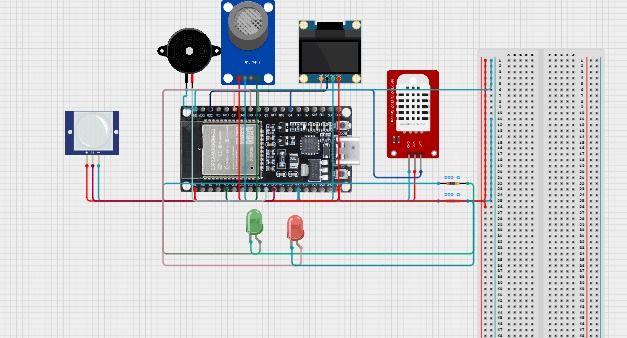
🚀 Excited to share my latest embedded systems project — an RTOS-Based Smart Monitoring System built using ESP32 and FreeRTOS.
The system is designed to perform real-time environmental monitoring by handling multiple tasks simultaneously with efficient scheduling and responsiveness. By leveraging FreeRTOS, the project demonstrates how multitasking can be implemented effectively in embedded applications.
🔧 Key Highlights:
• Real-time task management using FreeRTOS
• ESP32-based high-performance embedded platform
• Temperature & humidity monitoring
• Gas/smoke detection with alert mechanism
• OLED display for live system status monitoring
• Buzzer and LED indicators for safety notifications
• Optimized multitasking and resource management
📚 Technologies & Concepts Applied:
Embedded C | ESP32 | FreeRTOS | Sensor Interfacing | IoT | Real-Time Systems
This project helped me strengthen my understanding of RTOS concepts, task scheduling, inter-device communication, and embedded system design for smart automation applications.
Looking forward to building more advanced real-time and IoT-based solutions. 🚀
📕 https://t.co/yUaVkQfGM1
#EmbeddedSystems #ESP32 #FreeRTOS #IoT #RealTimeSystems #EmbeddedEngineering #Electronics #Microcontroller #SmartSystems #Automation #EngineeringStudent #ECE #TechInnovation #LearningJourney
🚀 Creative IoT – A Comparative Insight into Popular Microcontrollers
In the rapidly evolving world of Internet of Things (IoT) and embedded systems, selecting the right microcontroller is a foundational decision that directly impacts performance, scalability, cost, and reliability of a project. This creative visual comparison brings together some of the most widely used microcontroller boards, each serving a unique purpose across learning, prototyping, and real-world applications.
🔹 Arduino Uno R3
Arduino Uno remains the most popular entry point into embedded systems. With its simple architecture, ease of programming, and massive open-source community, it is ideal for beginners, academic learning, and basic automation projects. Although it lacks built-in connectivity, it provides a strong foundation for understanding digital and analog I/O, sensors, and control logic.
📕 https://t.co/FehAXCKPbl
🔹 ESP32 DevKit
ESP32 stands out as a powerful dual-core microcontroller with integrated Wi-Fi and Bluetooth (BLE). Its high processing capability, multiple GPIOs, and support for real-time applications make it a top choice for smart home systems, wearable devices, and advanced IoT solutions. ESP32 bridges the gap between performance and affordability, making it highly attractive for both students and professionals.
📕 https://t.co/yUaVkQfGM1
🔹 ESP8266 NodeMCU
ESP8266 revolutionized IoT by making Wi-Fi connectivity affordable and accessible. It is widely used for low-cost IoT projects, cloud-connected sensors, and home automation systems. While its processing power is moderate compared to ESP32, its simplicity and cost efficiency make it a reliable option for budget-friendly IoT innovations.
📕 https://t.co/ZsHWCRWuYz
🔹 STM32 Blue Pill
The STM32 Blue Pill represents the industrial side of embedded systems. Known for high performance, low power consumption, and precise control, STM32 microcontrollers are widely used in automotive, medical, and industrial IoT applications. They are best suited for developers aiming to build performance-critical and production-ready systems.
📕 https://t.co/m3TxwRK2pp
🔹 Raspberry Pi Pico
Powered by the RP2040 microcontroller, Raspberry Pi Pico offers a flexible and modern approach to embedded development. With dual-core processing and support for MicroPython and C/C++, it is ideal for custom embedded applications, robotics, and real-time control systems where compact design and efficiency matter.
📕 https://t.co/wZYBObTkia
📌 Key Insight:
There is no single “best” microcontroller. The right choice depends on project requirements such as processing power, connectivity, cost, power consumption, and application domain. From smart homes and wearables to industrial IoT and drones, each board plays a vital role in shaping innovative solutions.
💡 Small in size, limitless in potential.
Understanding these platforms empowers engineers and students to design smarter, more efficient, and future-ready systems.
#IoT #EmbeddedSystems #Microcontrollers #Arduino #ESP32 #ESP8266 #STM32 #RaspberryPiPico #Electronics #ECE #EngineeringStudents #TechInnovation .

🔵 Exploring the power of the STM32 Blue Pill — a compact ARM-based microcontroller board designed for high-performance embedded applications.
📕 https://t.co/m3TxwRK2pp
From GPIO control to PWM, UART, SPI, and I2C communication, STM32 opens the door to faster and more optimized real-time systems. ⚙️
Currently learning more about:
🔹 Embedded Programming
🔹 ARM Cortex Architecture
🔹 Sensor Integration
🔹 Robotics & Automation
Understanding low-level hardware is the first step toward building smarter technology. 🚀
#STM32 #EmbeddedSystems #ARM #Electronics #IoT #Automation #Microcontroller #Robotics #EngineeringStudent


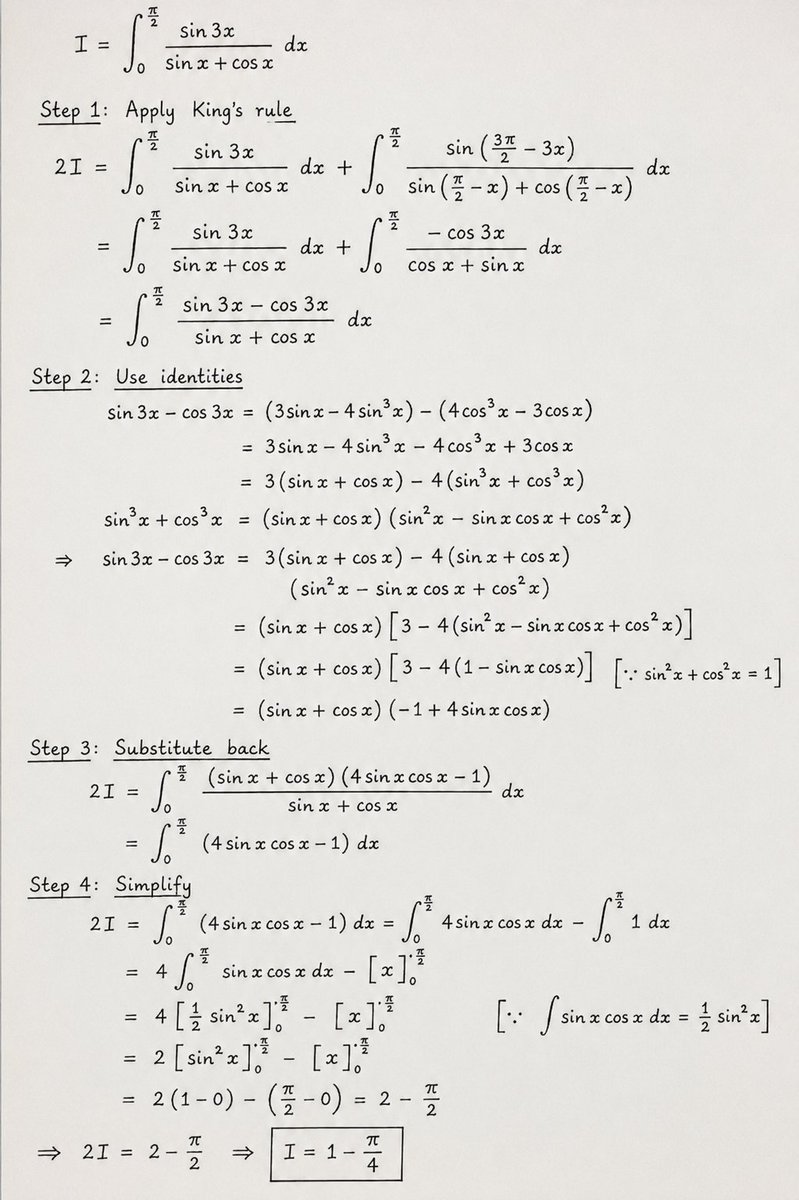
📘 Trigonometric Definite Integral Solved Step by Step ✍️
A beautiful calculus problem simplified using King’s Rule and trigonometric identities. 🚀
Problem:
∫ from 0 to π/2 of sin(3x) / (sin(x) + cos(x)) dx
In this handwritten solution, we use:
✔️ King’s Rule for definite integrals
✔️ Trigonometric identities
✔️ Algebraic simplification
✔️ Step-by-step integration techniques
What looks complicated at first becomes surprisingly elegant after simplification. 📐
Perfect for:
🎯 Engineering Mathematics
📚 Calculus students
⚙️ JEE & competitive exam preparation
🧠 STEM learners
Mathematics is not about memorizing formulas — it’s about discovering patterns and simplifying problems creatively.
Final Answer:
I = 1 − π/4
Follow for more handwritten calculus solutions and advanced mathematical concepts explained simply.
#Calculus #Integration #DefiniteIntegral #Trigonometry #EngineeringMath #Mathematics #STEM #LearnMath #MathTutorial #EngineeringStudent #HandwrittenNotes #EducationalContent
📘 Definite Integral Problem Solved Step by Step ✍️
Another handwritten calculus problem explained clearly from start to finish. 🚀
In this example, we find the area bounded by the curve:
y = x² − 4x + 3
between x = 1 and x = 3.
This problem is especially important because the curve lies below the x-axis in the interval, so we carefully handle the negative sign while calculating the area.
Covered step by step:
✔️ Understanding the graph
✔️ Identifying the bounded region
✔️ Setting up the definite integral
✔️ Solving the integration carefully
✔️ Finding the final area
Mathematics becomes much easier when concepts are visualized logically instead of memorizing formulas blindly. 📐
Perfect for engineering students, calculus beginners, and STEM learners.
Follow for more handwritten math solutions and engineering concepts explained simply.
#Calculus #Integration #DefiniteIntegral #Mathematics #Engineering #STEM #LearnMath #MathTutorial #EngineeringStudent #Maths #EducationalContent #HandwrittenNotes #IntegralCalculus


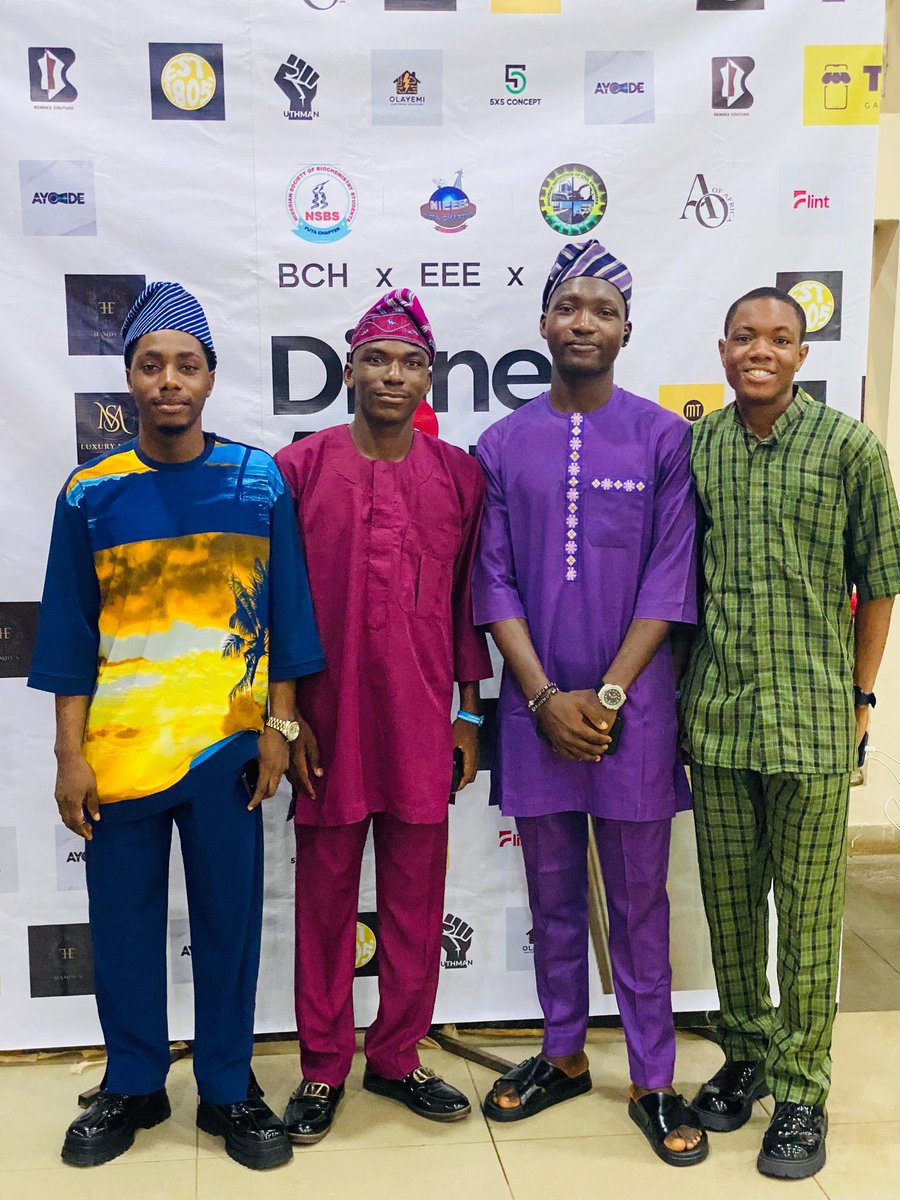
𝑮𝑹𝑬𝑨𝑻𝑵𝑬𝑺𝑺 𝑺𝑻𝑨𝑹𝑻 𝑭𝑹𝑶𝑴 𝑺𝑶𝑴𝑬𝑾𝑯𝑬𝑹𝑬
Yesterday 13th February 2026, I was truly honored to receive Entrepreneur of the Year award.
#FUTA #studentrepreneur #realestate #futarian #diaspora #entrepreneur #engineeringstudent #lagosrealestate #abujarealestate



Come along with Drew, one of our @uvic Engineering Co-op Students, as she shares what a day in her co-op looks like at Victoria Hand Project. 🦾
#university #prosthetics #coop #internships #dayinthelife #student #engineeringstudent #engineering #biomedical

Rectangular, Triangular, or Trapezoidal? Master Hydraulic Radius (R_h) for all common channel shapes. Swipe to see the formula for each geometry!
#OpenChannelFlow #HydraulicRadius #TrapezoidalChannel #EngineeringStudent #StudyTips #ManningsEquation #FluidFlow #GATEME #GyaanCore

Rectangular, Triangular, or Trapezoidal? Master Hydraulic Radius (R_h) for all common channel shapes. Swipe to see the formula for each geometry!
#OpenChannelFlow #HydraulicRadius #TrapezoidalChannel #EngineeringStudent #StudyTips #ManningsEquation #FluidFlow #GATEME #GyaanCore


What’s the #1 killer of ventilation efficiency?
#ventilation #Engineering #Efficiency #engineeringstudent

Final month of the semester are nothing but caffeine-fueled all-nighters and endless deadlines. 😭
#EngineeringStudent #CollegeLife #DeadlineSeason

Engineering fuels my passion, but university life? Not so much. Dreaming of gears and tech, yet found stuck in the lecture halls. 🛠️💔 #EngineeringStudent #CampusBlues


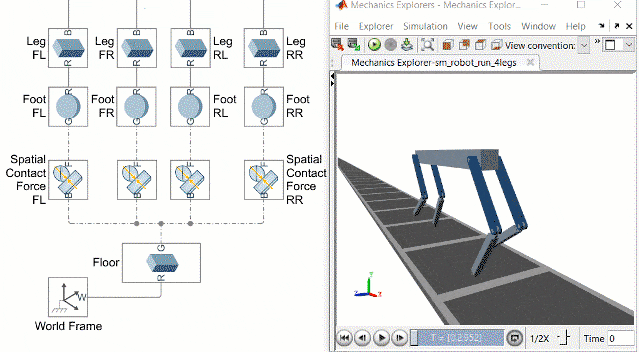
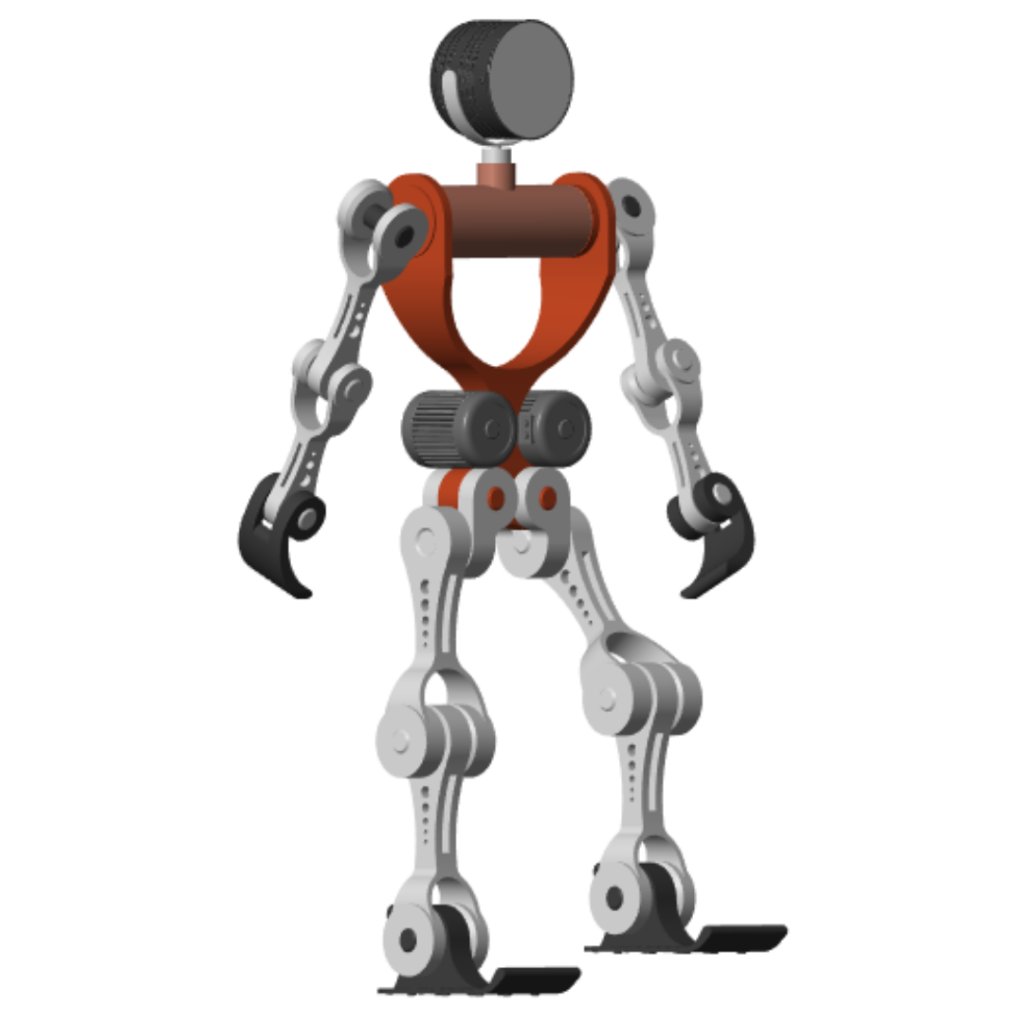
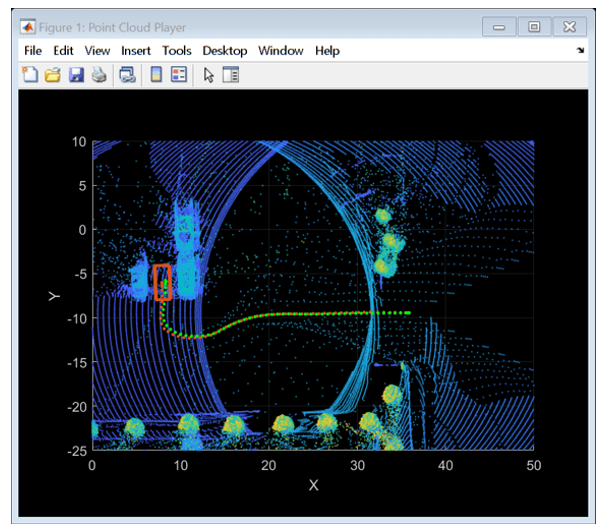
Are you an #engineeringstudent and are interested in projects within emerging tech? Check out these awesome #github repos! @MATLAB

30+ MATLAB and Simulink projects tied to technology trends for #engineeringstudents! #GitHub repository ➡️ https://t.co/pxfpiLGf9H

Pick any engineering books with discounted rate from online bookstore - Bookzhop
Also get 50% off on your purchase price while returning
Visit https://t.co/hM4xJSXXtj
#books #engineering #engineeringbooks #usedbooks #bookstore #buybooksonline #buybooks #engineeringstudent


LIGHTS, CAMERA, ACTION! This is the #holdingpower film club! This is Vulcan+ Twist Foot #cablecleat #installation guide! #design #innovation #userfriendly #cablemanagement #ukmfg https://t.co/au19f0TxdQ


Last Seen Hashtags on Sotwe
ngintip ibu ibu
Seen from Malaysia
public
Seen from Turkey
페티쉬판매
Seen from United States
บ้านอ้น
Seen from Thailand
зрелые
Seen from United States
bursatravesti
Seen from Turkey
胡塞武裝
Seen from United States
sexdoll
Seen from United States
FakeJaggery
Seen from United States
รีทวิตส่งคลิปเล่นหีให้
Seen from Thailand
Trends for you
Most Popular Users

Elon Musk 
@elonmusk
239.7M followers

Barack Obama
@barackobama
118.6M followers

Cristiano Ronaldo
@cristiano
114.3M followers

Donald J. Trump
@realdonaldtrump
111.7M followers

Narendra Modi
@narendramodi
106.9M followers

Rihanna
@rihanna
98.6M followers

NASA
@nasa
92.1M followers

Justin Bieber
@justinbieber
91.7M followers

KATY PERRY
@katyperry
89.9M followers

Taylor Swift
@taylorswift13
83.9M followers

Lady Gaga
@ladygaga
75.4M followers

Virat Kohli
@imvkohli
73.3M followers

Kim Kardashian
@kimkardashian
70.8M followers

YouTube
@youtube
68.6M followers

Neymar Jr
@neymarjr
66.3M followers

Bill Gates
@billgates
65.1M followers

Selena Gomez
@selenagomez
63M followers

The Ellen Show
@theellenshow
62.1M followers

CNN
@cnn
61.7M followers

X
@x
60.6M followers