

Top Tweets for #GettingToKnowIntelliJ

You can use the New Project Wizard to configure existing JDKs, or download new ones from different vendors. #GettingToKnowIntelliJ
https://t.co/7nYc3wmSDo
You can enable soft wrap for the editor with ⇧⇧ (macOS), or Shift+Shift (Windows/Linux), for the Search Everywhere dialogue, and then type in soft wrap. #GettingToKnowIntelliJ
https://t.co/M1mNcY5Kj6
IntelliJ IDEA's IDE Feature Trainer helps you to learn the IDE. It guides you through different areas so you can pick and choose what you want to learn based on your requirements.
Check out this video to learn more: https://t.co/lo0mavYmx0
#GettingToKnowIntelliJ
IntelliJ IDEA can let us know about problems in the classes that extend sealed classes (a preview feature in #Java 16), and suggest solutions.
#JDK16 #2021.1 #GettingToKnowIntelliJ
Sealed classes (a preview feature in #Java 16) are a way to take control of inheritance. With a sealed class like this one, IntelliJ IDEA will tell us we need to "permit" the child class, and automatically make changes if it can.
#JDK16 #2021.1 #GettingToKnowIntelliJ
If you want to use preview features in the latest versions of #Java in IntelliJ IDEA, you need to set the language level to "Preview"
#JDK16 #2021.1 #GettingToKnowIntelliJ
We've just launched the first edition of our #IntelliJ IDEA Guide! We hope this will serve as a central location for all your favourite tips and tricks. Check it out and and let us know what you think! #GettingToKnowIntelliJ
https://t.co/h3qyTYNJ4b
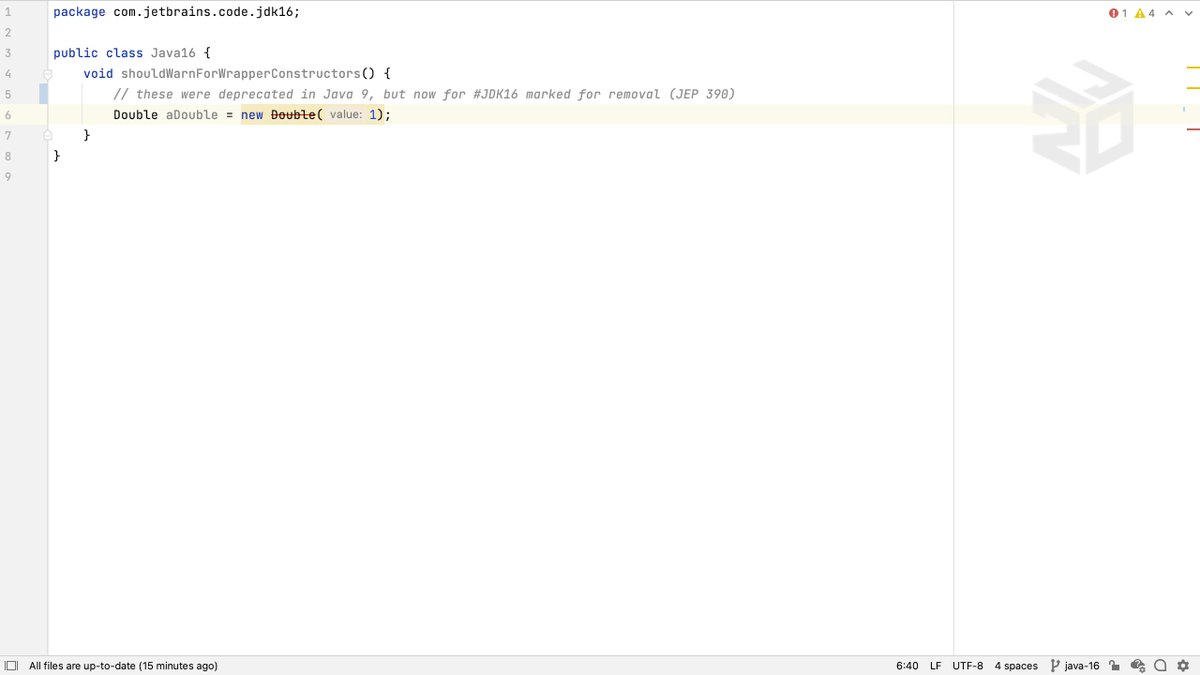
#JDK16 has marked the wrapper class constructors for removal, so you'll see these with a red strikethrough in IntelliJ IDEA. The IDE can automatically replace these with a better approach.
#JDK16 #GettingToKnowIntelliJ
IntelliJ IDEA can find places in our code that can use Pattern Matching for instanceof. There were some changes to this feature in #JDK16 which are fully catered for in IntelliJ IDEA 2021.1.
#JDK16 #2021.1 #GettingToKnowIntelliJ
If we decide that maybe a record should be a full Java class after all, we can get IntelliJ IDEA to automatically convert a record into a Java class.
#JDK16 #2021.1 #GettingToKnowIntelliJ
IntelliJ IDEA can spot classes that can be converted to records. The fields will be become record components, and the constructor and accessors will be removed.
#JDK16 #2021.1 #GettingToKnowIntelliJ
Create a new record from the "New Java Class" dialog: type the name of the record and select the Record type.
#JDK16 #2021.1 #GettingToKnowIntelliJ
#IntelliJTopShortcut: You can use ⌘⇧N on macOS, or Ctrl+Alt+Shift+Ins to copy some selected text from a file into a new scratch file of the same type.
#GettingToKnowIntelliJ
#IntelliJTopShortcut: You can use ⌘ + numbers 1-9 on macOS, or Alt + numbers 1-9 on Windows/Linux to toggle the Tool windows on, and off.
#GettingToKnowIntelliJ
#IntelliJTopShortcut: If we have a long parameter list in Kotlin, we can use ⌥⏎ on macOS, or Alt+Enter on Windows/Linux, to put each parameter on a separate line. You can use the same shortcuts to put parameters into one line as well.
#GettingToKnowIntelliJ
#IntelliJTopShortcut: You can extend the selection by scope with ⌥↑ on macOS, or Ctrl+W on Windows/Linux. You can shrink the selection by scope with ⌥↓ on macOS, or Ctrl+Shift+W on Windows/Linux.
#GettingToKnowIntelliJ
#IntelliJTopShortcut: When a Kotlin expression requires us to cover all the possible options for a parameter, we can use ⌥⏎ on macOS, or Alt+Enter on Windows/Linux, to generate all the branches automatically.
#GettingToKnowIntelliJ
#IntelliJTopShortcut: You can use ⌥⏎ on macOS, or Alt+Enter on Windows/Linux to show context actions for your selection and then edit the code style.
#GettingToKnowIntelliJ
#IntelliJTopShortcut: You can select code by scope and then use ⌥⌘T on macOS, or Ctrl+Alt+T on Windows/Linux to create an editor fold. These are useful to minimise code while you're working on other code. You can always maximise them later.
#GettingToKnowIntelliJ
#IntelliJTopShortcut: We can use ⌥⏎ on macOS, or Alt+Enter on Windows/Linux, before the first parameter to add names to call arguments. You can use the same shortcut again before one argument to add names from that parameter, or just for that parameter.
#GettingToKnowIntelliJ
Most Popular Users

Elon Musk 
@elonmusk
241.3M followers

Barack Obama
@barackobama
119.1M followers

Cristiano Ronaldo
@cristiano
113M followers

Donald J. Trump
@realdonaldtrump
111.8M followers

Narendra Modi
@narendramodi
107.1M followers

Rihanna
@rihanna
98.3M followers

NASA
@nasa
92.3M followers

Justin Bieber
@justinbieber
91.5M followers

KATY PERRY
@katyperry
89.1M followers

Taylor Swift
@taylorswift13
83M followers

Lady Gaga
@ladygaga
74.5M followers

Virat Kohli
@imvkohli
72M followers

Kim Kardashian
@kimkardashian
70.5M followers

YouTube
@youtube
68.8M followers

Neymar Jr
@neymarjr
65M followers

Bill Gates
@billgates
64.6M followers

The Ellen Show
@theellenshow
62.4M followers

Selena Gomez
@selenagomez
62.2M followers

CNN
@cnn
61.8M followers

X
@x
60.8M followers