

Top Tweets for #HotTipsTuesday

🔥#HotTipsTuesday Book Creator End of Year Task - Archive Student Libraries! On Teacher Dashboard - click 3 dots to archive
📚 All the books are still there but hidden from Ss & not editable
✅ Teachers can still view & restore them anytime
✅ Published book links still work

🔥#HotTipsTuesday Did you know you can🎙️voice search for images in Book Creator in different languages? 🌍You need to change your Chrome browser language to the specific language (e.g., French) first.
#UDL #accessibility #inclusion #tdsb

🔥#HotTipsTuesday Skip the preview, dive right into reading! Just add “?nopreview” to the end of a published book link in @BookCreatorApp to bypass the preview window. One less step for students means more time reading! 📚
#UDL #tdsb #inclusion #engagement #joy
🔥#HotTipsTuesday Check out our updated AT Programs pages! 🌟 Get an overview of each tool and see all the ways it can support student learning, access, and independence. 💻✨
#UDL #inclusion #tdsb

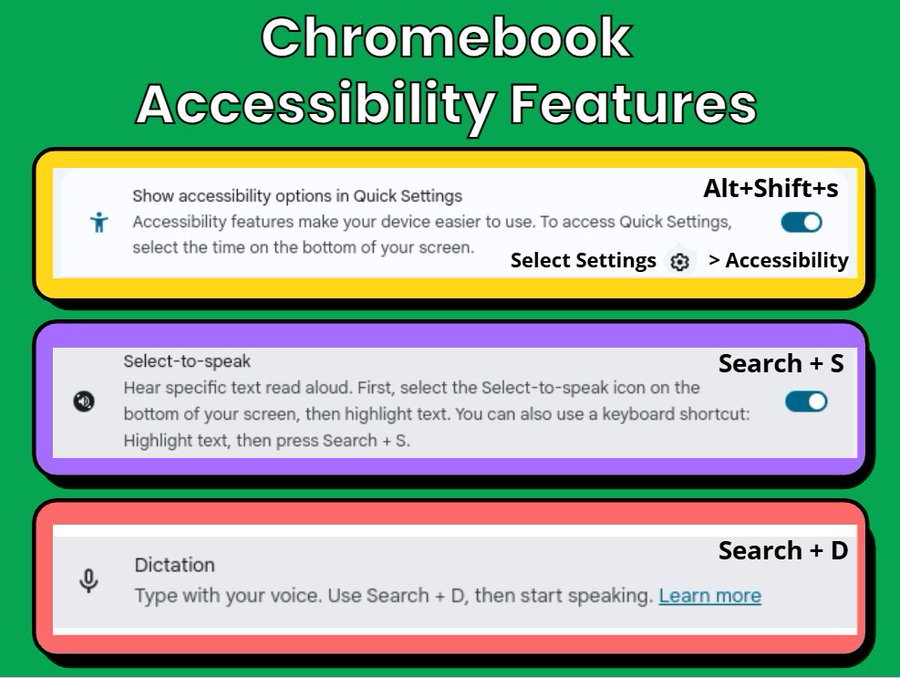
🔥#HotTipsTuesday Have you tried using shortcuts to enable the built-in accessibility features in Chromebooks? Use w/ @mindomo & @LumioSocial
to increase #accessibility.
#UDL #AssistiveTechnology #inclusion #tdsb

🔥#HotTipsTuesday Check on your @BookCreatorApp Library settings. Ensure students have #accessibility settings on but some view settings off. These are the settings we usually recommend. #UDL #tdsb #inclusion
🔥#HotTipsTuesday Have you tried using Group Workspace in @Lumiosocial to increase engagement and support whole-class collaboration? Students have access to a variety of tools to share their thinking.
#UDL #AssistiveTechnology #inclusion #accessibility #tdsb
🔥#HotTipsTuesday @Mindomo can support mental health & self regulation. Ss can create mind maps for what to do when they get stuck on work or don’t know what to do during recess. It promotes learner agency & independence! #UDL #AssistiveTechnology #inclusion #accessibility #tdsb

🔥#HotTipsTuesday How to go from using technology for leisure to learning.
#UDL #inclusion #accessibility #tdsb

🔥#HotTipsTuesday Have you tried using shortcuts to enable the built-in accessibility features in Chromebooks? Use w/@mindomo & @LumioSocial to increase #accessibility
#UDL #AssistiveTechnology #inclusion #tdsb
🔥#HotTipsTuesday Click Add Media and then Narrate to easily create how-to voiceover videos in @WeVideo that support your students allowing them to access instructions as many times as they need.
#UDL #inclusion #accessibility #tdsb

🔥#HotTipsTuesday TDSB Educators - access #AssistiveTechnology recorded Webinars on the Assistive Technology Professional Learning Site. Watch, pause, & rewatch to learn more about AT programs you can use w/ students. https://t.co/MJTm3wLLTC
#UDL #inclusion #accessibility #tdsb

🔥#HotTipsTuesday Quickly close all the gaps in your @WeVideo https://t.co/7kVSOjSnUv
#UDL #AssistiveTechnology #inclusion #accessibility #tdsb

Thanks @TDSB_AT for the #HotTipsTuesday 🔥
How do you use Lumio’s teacher and student pacing in your classrooms? Let us know in the comments 👇
🔥#HotTipsTuesday @LumioSocial lets you switch between Teacher pacing and Student pacing for lessons allowing flexibility and structure when you need it! https://t.co/7kVSOjSnUv
#UDL #AssistiveTechnology #inclusion #accessibility #tdsb #Lumio

🔥#HotTipsTuesday @LumioSocial lets you switch between Teacher pacing and Student pacing for lessons allowing flexibility and structure when you need it! https://t.co/7kVSOjSnUv
#UDL #AssistiveTechnology #inclusion #accessibility #tdsb #Lumio
🔥#HotTipsTuesday Have you seen the "Enlarge Browser" message when using @BookCreatorApp on Chromebooks? Don’t panic! There is usually a quick solution. Try pressing Ctrl and 0 or Ctrl and Shift and 0 to resize.
#UDL #AssistiveTechnology #inclusion #accessibility #tdsb

🔥#HotTipsTuesday Guided Access helps focus Ss on a task by limiting them to 1 specific app, time in an app & use of some iPad features (e.g., temporarily stops volume, lock iPad rotation). Did you know you can use it on websites too? Learn more at https://t.co/9vpAVWwYCN #UDL

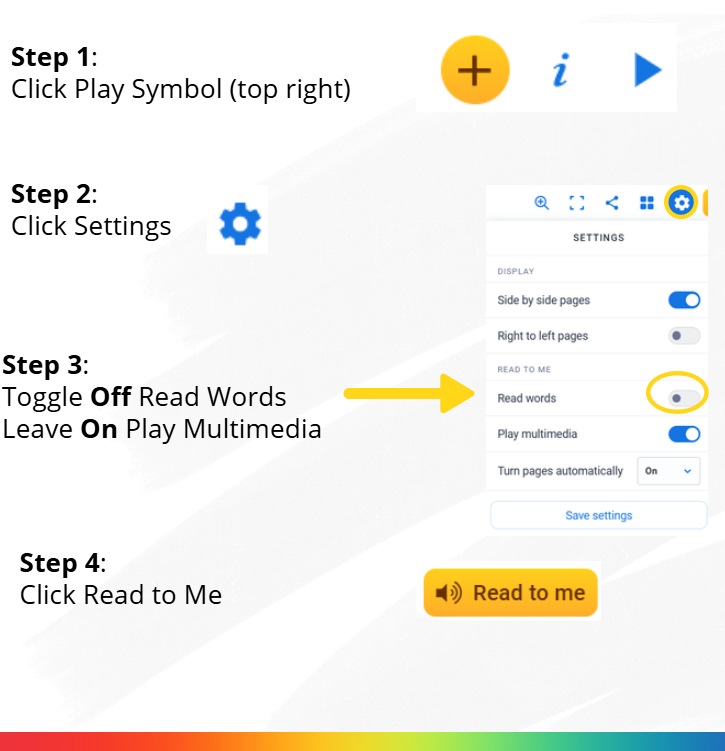
🔥#HotTipsTuesday Want Ss to hear your voice reading @appbookcreator books instead of the computer? Or, have Ss create audiobook versions of their stories that classmates can listen to? How? Add a recording to each page. Turn off "Read words" in settings.
#studentvoice #UDL
🔥#HotTipsTuesday Check out @WeVideo’s stock media to raise your class podcast activity to the next level with music and sound effects.
#UDL #AssistiveTechnology #inclusion #accessibility #tdsb #studentvoice
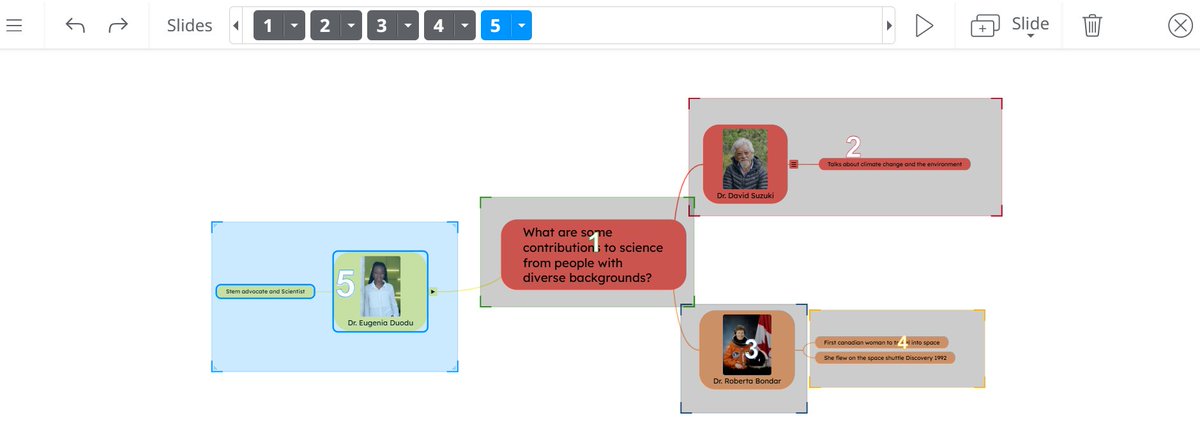
🔥#HotTipsTuesday Mind maps can be busy places. Use the Presenter Tool to chunk information and showcase your thought process for your audience.
#UDL #AssistiveTechnology #inclusion #accessibility #tdsb #studentvoice
Trends for you
Most Popular Users

Elon Musk 
@elonmusk
240.3M followers

Barack Obama
@barackobama
119.3M followers

Donald J. Trump
@realdonaldtrump
111.6M followers

Cristiano Ronaldo
@cristiano
109.5M followers

Narendra Modi
@narendramodi
107M followers

Rihanna
@rihanna
97.4M followers

NASA
@nasa
92.1M followers

Justin Bieber
@justinbieber
90.7M followers

KATY PERRY
@katyperry
87.1M followers

Taylor Swift
@taylorswift13
80.9M followers

Lady Gaga
@ladygaga
72.5M followers

Kim Kardashian
@kimkardashian
69.5M followers

Virat Kohli
@imvkohli
69M followers

YouTube
@youtube
68.6M followers

Bill Gates
@billgates
63.6M followers

The Ellen Show
@theellenshow
62.5M followers

CNN
@cnn
61.9M followers

Neymar Jr
@neymarjr
61.6M followers

X
@x
60.9M followers

Selena Gomez
@selenagomez
60.2M followers