

Top Tweets for #KantreeTips

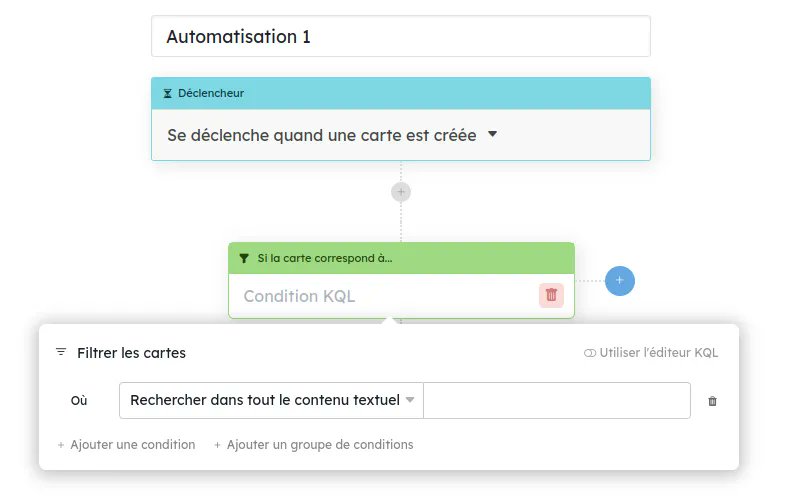
#KantreeTips: Automations ⚡️ Creating conditions in automated rules is now easier than ever thanks to the new filter builder. #Nocode needed!

#KantreeTips: 💡 Global Views in Kantree is a powerful and time-saving feature that allows you to see all your tasks on one board. See how it works [incl. video]: https://t.co/m2Maghli1T. 📺 #projectmanagement
#KantreeTips: Use the sort button at the top of your workspace to quickly sort your ENTIRE board, not just select columns like before. 😎 #likeaboss
#KantreeTips: Use the new Integrations tab in your project sidebar to quickly connect Kantree to third-party apps (Slack, Dropbox, Google, GitHub…) or perform other actions, e.g. collect data using forms, import spreadsheets, add your Kantree calendar to a calendar app, etc. 🔌

#KantreeTips: When you add categories to shared #workspace views, you and your team will stay ultra-organized and spend less time looking for key information. ✌️ Check out this video to see how to get started with categories. 📺 https://t.co/ZWiMcazUeA
#KantreeTips: QUICK SEARCH vs. GLOBAL SEARCH 🔎 Use the quick search button in the top toolbar to quickly find data in your current board. To look for something across all #projects, use the global search button in the system toolbar (bottom left corner) or the organization page.

#KantreeTips : Use the sort button at the top of your workspace to quickly sort your ENTIRE board. #likeaboss 😎 Previously, you could only sort data from each column in the kanban board, but we heard you!
#KantreeTips: Use our new filter editor to filter your boards without using the KQL (Kantree Query Language)! #nocode ✌️ The user-friendly window allows you to combine a lot of requests, add conditions, and select which workspaces or cards to include in the search results.
#KantreeTips: Automations ⚡️ Creating conditions in automated rules is now easier than ever thanks to the new filter builder. #Nocode needed!
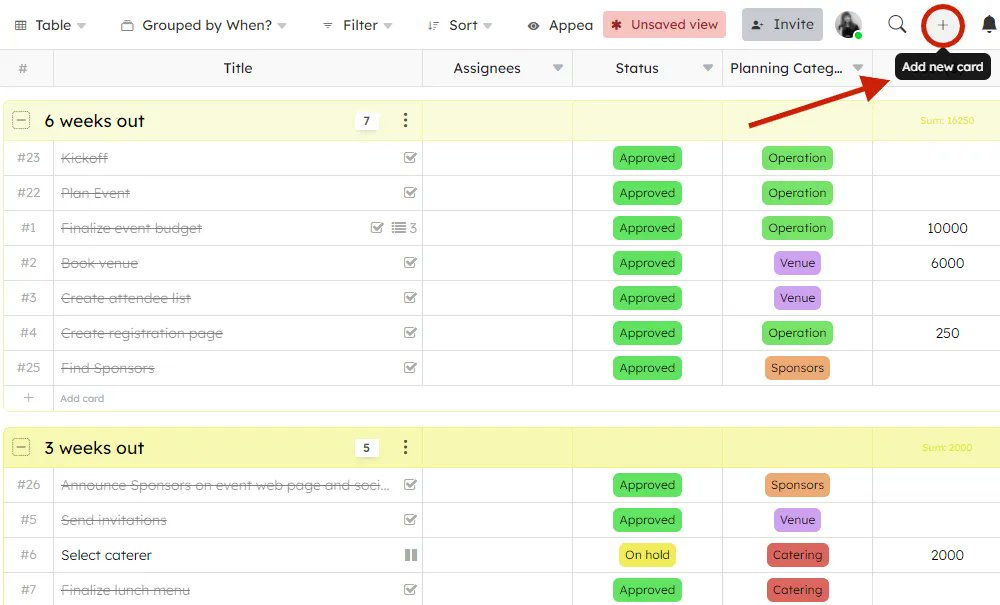
#KantreeTips: Add new cards to your board quickly from the top toolbar, by clicking the plus button in the right-hand corner of your workspace. Nice & easy! 🌞#projectmanagement
#KantreeTips: Use the new Integrations tab in your project sidebar to quickly connect Kantree to third-party apps (Slack, Dropbox, Google, GitHub…) or perform other actions, e.g. collect data using forms, add your Kantree calendar to a calendar app, import spreadsheets etc. 🔌

#KantreeTips: With batch selection, you can quickly select multiple cards and apply an action to all of them at the same time. 📺 Watch this short video to see how: https://t.co/gnWtLJO8Tw. #projectmanager
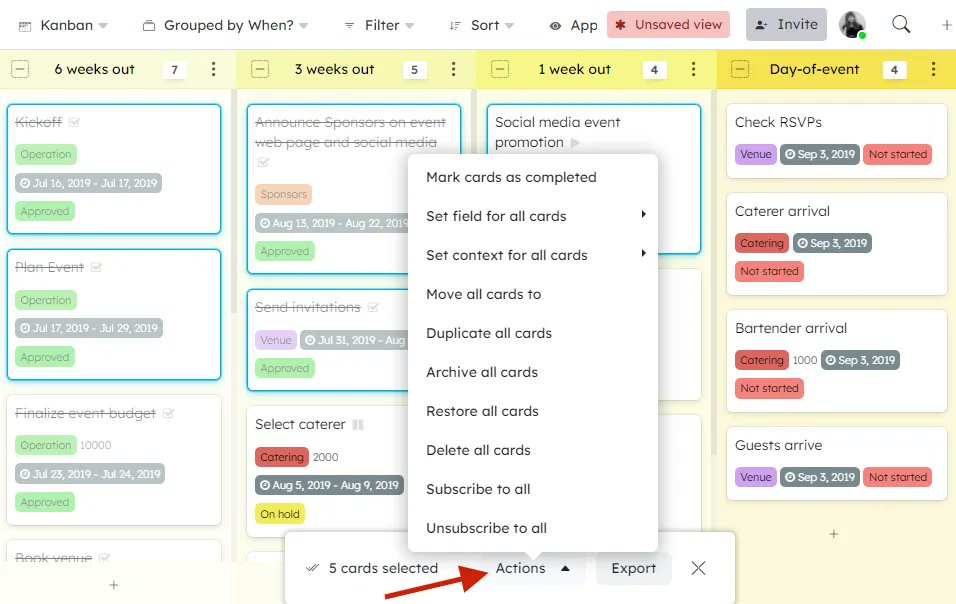
#KantreeTips With BATCH SELECTION, you can select multiple cards and apply an action to all of them at the same time. 👉 Press & hold the CTRL button, then select your cards. A popup window will appear, where you’ll be able to select the batch action you want. #projectmanagement
#KantreeTips: All about My Work, your personal project hub [incl. video] https://t.co/krtmshM103. #projectmanager
#KantreeTips: With My Work, it’s easier than ever to filter workspace views. 😎 At the top of the page - in the inbox, agenda, and your cards - you can choose to display information from all or select workspaces, e.g. only from your favorites. #projectmanagement #hybridwork
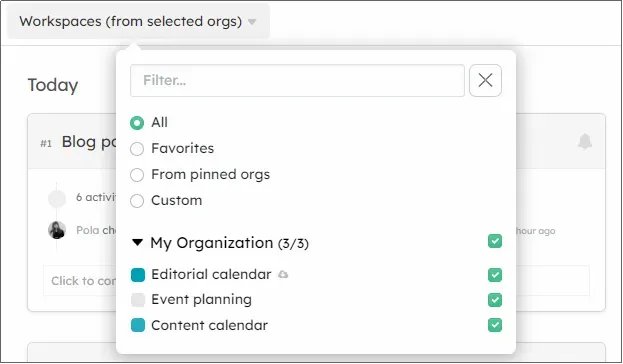
#KantreeTips: With My Work, it’s easier than ever to filter workspace views. 😎 At the top of the page - in the inbox, agenda, and your cards - you can choose to display information from all or select workspaces, for example only from your favorites. #projectmanager

#KantreeTips: The new *My Work* tab combines Kantree Inbox with global dashboards, making searches across workspaces much easier. And you'll have quick access to the most important info in your workspace: activity feed, agenda, all the cards, etc. 👌 #projectmanager

#KantreeTips: Did you know? Kantree’s flexibility means you can create PRIVATE PROJECT VIEWS without distrupting the shared workspace! ✌️ They will be added to the sidebar. Click on the three dots to personalize your view. #projectmanagement

#KantreeTips: When you need input from your team, tag them @ in the comments section of your card. Thanks to email integration, the reply sent from their inbox will appear directly in the card. #teamwork

If you work in #content #marketing, you can create a content calendar in Kantree in a few clicks (there's a template for that). Check out our video to see how: https://t.co/OnzMYwc1Nt. 📺 #KantreeTips
Last Seen Hashtags on Sotwe
マイケル・マッキンタイア
Seen from Japan
nsfw
Seen from France
子ども手当の充実
Seen from United States
فرهنگنوین
Seen from United Kingdom
xlii or #exny or #momson or #nolimit() +filter:native_video
Seen from Netherlands
Teenagers
Seen from United States
Subaru4WD
Seen from United States
Interacial
Seen from Brazil
Spitroasted
Seen from Saudi Arabia
Teenage() +filter:native_video
Most Popular Users

Elon Musk 
@elonmusk
241M followers

Barack Obama
@barackobama
119.2M followers

Cristiano Ronaldo
@cristiano
112.2M followers

Donald J. Trump
@realdonaldtrump
111.8M followers

Narendra Modi
@narendramodi
107.1M followers

Rihanna
@rihanna
98.1M followers

NASA
@nasa
92.2M followers

Justin Bieber
@justinbieber
91.3M followers

KATY PERRY
@katyperry
88.6M followers

Taylor Swift
@taylorswift13
82.5M followers

Lady Gaga
@ladygaga
74M followers

Virat Kohli
@imvkohli
71.3M followers

Kim Kardashian
@kimkardashian
70.2M followers

YouTube
@youtube
68.7M followers

Bill Gates
@billgates
64.4M followers

Neymar Jr
@neymarjr
64.2M followers

The Ellen Show
@theellenshow
62.4M followers

CNN
@cnn
61.8M followers

Selena Gomez
@selenagomez
61.7M followers

X
@x
60.8M followers