

Top Tweets for #Linuxpermissions

🪟 CVE-2026-6842 is a perfect “Linux meets Windows life” reminder: a sneaky .desktop in your home dir is basically phishing for your desktop. Even “low severity” can become chaos.
https://t.co/33Rr96z50g
#WindowsWslSecurity #Cve20266842 #GnuNanoSecurity #LinuxPermissions


Change file owner 👑
User change 👇
chown user filename
Group change 👇
chgrp group filename
#LinuxPermissions #DevOpsJourney

Linux permissions go beyond chmod. Learn how groups, sudo, and modern policy systems control services, reboot, and system-level authority.
More details here: https://t.co/H91YnQzink
#LinuxPermissions #LinuxPrivileges #Linuxadmin #Linuxcommands #Linuxhowto #sudo #Polkit

Day 1 #100DaysOfCode
DevOps/Linux Focus: Basics in Bash
Learned: Creating files, executing files, listing files in storage, shebang/hashbang basics
Next: Variables in Bash
#DevOps #LinuxPermissions #ShellScripting

Mastered 20 essential commands to control access, ownership, and execution on files.
From chmod to 777, I’m unlocking real CLI power 💥
#30DaysOfCode #LinuxPermissions #CLI #ShellScripting #iiceekiing #DevJourney #scarfacedoteth #blockfuselabs


Why Linux is Considered a Secure Operating System - When it comes to operating system security, Linux is often praised as one of the safest options avai... https://t.co/kuTNTTbYDF #Linuxsecurity #Linuxoperatingsystem #Linuxvulnerabilities #Linuxpermissions #Malware #Securitytools


7/15: Find Files by Permissions 🔐🔍
🔍 Investigate permissions with find /path -type f -perm 644. It's crucial for controlling who can access files.
This command searches for files with specific permissions. #LinuxPermissions #DevOpsSecurity
7/15: Find Files by Permissions 🔐🔍
🔍 Investigate permissions with find /path -type f -perm 644. It's crucial for controlling who can access files.
This command searches for files with specific permissions. #LinuxPermissions #DevOpsSecurity

2/10🔍 Understanding Linux UIDs is key for both new and seasoned users. This thread explores SUID (Set User ID), a special file permission in Linux systems. #LinuxPermissions

🐧🔐 Dive into the World of Linux Permissions! Unravel the secrets of controlling access and security on your system. Get ready to empower your Linux journey. 💻🛡️ #LinuxPermissions #CyberSecurity #EmpowerYourLinux


Linux Permissions
...............
#LinuxPermissions, #LinuxSecurity, #LinuxSysAdmin, #LinuxAdministration, #LinuxSysAdminLife, #LinuxBasics, #LinuxUser, #LinuxUserGroup, #LinuxDirectory, #LinuxFilePermissions
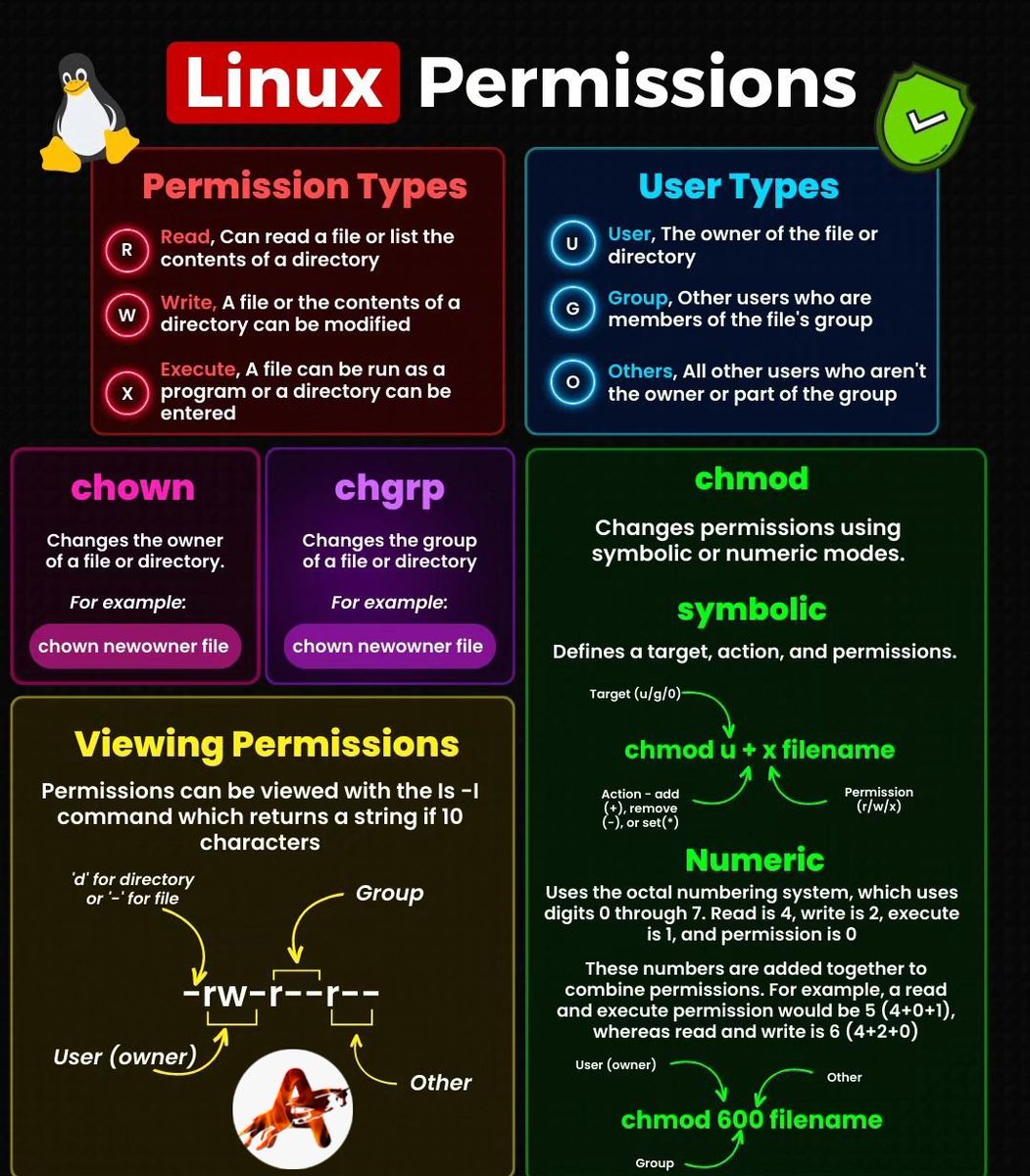

🐧 Mastering Linux Permissions: Unlocking the Power of File and Folder Access Control!
https://t.co/8inW9sC489
#LinuxPermissions #FileAccessControl #LinuxSecurity #PrivacyMatters


𝒄𝒉𝒎𝒐𝒅 -𝑹 777 / #𝑻𝒐𝒐 𝑴��𝒄𝒉 𝑭𝒖𝒏 😂😂
🚀 The 𝒄𝒉𝒎𝒐𝒅 command is a command-line utility used in Unix-like operating systems to change the permissions of files and directories.
#LinuxPermissions #UnlockTheSecrets #LearningOpportunity #linux #chmod #devops

9/10: These advanced permission features provide finer control over file access and security in Linux. Whether it's granting specific permissions to multiple entities or utilizing special permissions, Linux has you covered! #LinuxPermissions
8/10: Finally, we have the 'sticky' bit (t). When applied to a directory, it ensures that only the owner of a file can delete or rename it.
To set the sticky bit, use 'chmod +t directory'. #LinuxPermissions
7/10: Another special permission is 'setgid' (s) which allows a user to execute a file with the permissions of the group owner.
To set the setgid permission for a directory, use
'chmod g+s directory'.
#LinuxPermissions
5/10: Sometimes, we need to grant certain permissions to multiple entities. That's where the 'a' (all) option comes in handy. If we want to allow everyone to read and execute the file, we can use: chmod a+rx example.txt. #LinuxPermissions
4/10: We can change permissions using the chmod command.
For instance, to grant execute permission to the owner, we would run: chmod u+x example.txt.
Similarly, we can modify permissions for groups ('g') and others ('o'). #LinuxPermissions
2/10: First, we have the basic permission system: read, write, and execute, represented by the letters 'r', 'w', and 'x'. These permissions are assigned to three entities: owner, group, and others.
Let's see an example using the ls -l command. #LinuxPermissions
1/10: Hey everyone! Let's talk about advanced permission management in Linux. 🚀 As you know, Linux is known for its robust security features, and permissions play a vital role in controlling access to files & directories. Let's dive in & explore some examples! #LinuxPermissions
Last Seen Hashtags on Sotwe
Trends for you
Most Popular Users

Elon Musk 
@elonmusk
240.1M followers

Barack Obama
@barackobama
119.3M followers

Donald J. Trump
@realdonaldtrump
111.6M followers

Cristiano Ronaldo
@cristiano
108.8M followers

Narendra Modi
@narendramodi
106.9M followers

Rihanna
@rihanna
97.2M followers

NASA
@nasa
92.1M followers

Justin Bieber
@justinbieber
90.5M followers

KATY PERRY
@katyperry
86.7M followers

Taylor Swift
@taylorswift13
80.5M followers

Lady Gaga
@ladygaga
72.1M followers

Kim Kardashian
@kimkardashian
69.3M followers

YouTube
@youtube
68.6M followers

Virat Kohli
@imvkohli
68.4M followers

Bill Gates
@billgates
63.4M followers

The Ellen Show
@theellenshow
62.5M followers

CNN
@cnn
61.9M followers

Neymar Jr
@neymarjr
61M followers

X
@x
60.9M followers

CNN Breaking News
@cnnbrk
59.9M followers