

Top Tweets for #MetaSleuthTips

#MetaSleuthTips 🚀Our new Data Explorer feature is now live!
Easily explore, filter, and select transfer data here! Access to complete data within MetaSleuth.
#MetaSleuthTips MetaSleuth now offers timezone customization. 🕒
Easily switch to your local time zone in Settings -> My Account to view fund flow charts more conveniently! 🔍 #MetaSleuth #TimezoneSettings

#MetaSleuthTips Edge Drawing Feature
🔸 Connect nodes on the canvas to reveal unique relationships, like cross-chain transfers (not supported by automatic tracing) and off-chain connections, and more.
🔸 Double-tap to improve clarity by adding notes.

#MetaSleuthTips 跨链自动追踪解析功能
以地址0x5027...836(标记为KyberSwap Exploiter 1)为例,如何利用MetaSleuth进行自动跨链追踪解析👇
🔸跨链转移:该地址通过OptimismGateway和ArbitrumBridge将ETH转移至OP和ARB链上
🔸画布展示:跨链桥在MetaSleuth画布上为独特的八边形
🔸资金追踪:点击跨链桥节点,在下方InterChain Tracker面板中点击Track,可以自动跟踪跨链资金流向
🔍 从结果中可以看到ETH分别转移至OP(3ETH)和ARB(2ETH)
🕵️Simplify and enhance your on-chain investigations with #MetaSleuth
#MetaSleuthTips Cross-Chain Automatic Tracking✍️
Let's take the address 0x50275...836, marked as KyberSwap Exploiter 1 in MetaSleuth.
🔸Cross-Chain Transfers: This address transfers ETH to OP and ARB via OptimismGateway and ArbitrumBridge
🔸Visualize Bridges: Cross-chain bridges are displayed in a unique shape on MetaSleuth
🔸Track Funds: Click the bridge, then in the InterChain Tracker panel, click Track to automatically follow the fund flows
🔍 From the results, we see ETH transferred to OP(3ETH) and ARB(2ETH)
🕵️Simplify and enhance your on-chain investigations with #MetaSleuth
#MetaSleuthTips Node Batch Editing is here ✍️
Simply hold SHIFT + COMMAND to select a group, or use SHIFT to add more nodes.
Now you can easily move nodes and customize their colors in bulk!
Simplify and enhance your on-chain investigations with MetaSleuth🕵️
#MetaSleuthTips
A reminder that the Address Labels API and Compliance Score API are now available for subscription. 🎉
Check out our API documentation for more information.
🔗 https://t.co/K2HzH1S2G4

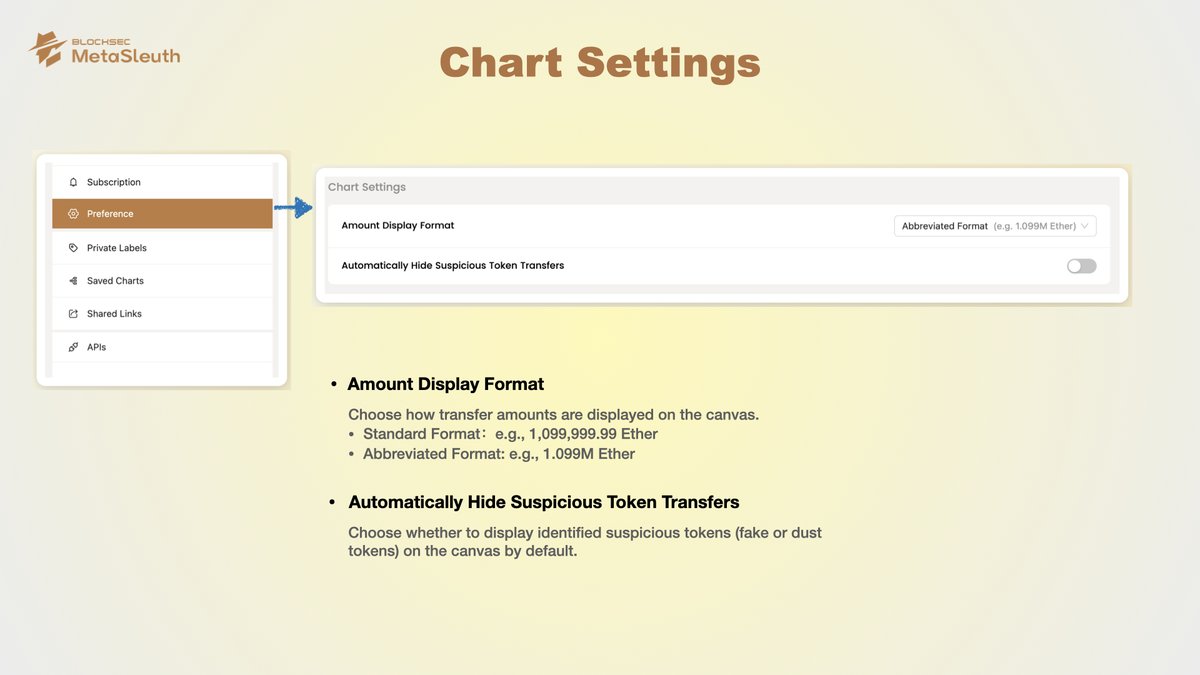
#MetaSleuthTips Chart Settings
1️⃣ Optimize amount display: Switch to abbreviated mode for clear fund flow charts with large amounts.
2️⃣ Customize token visibility: Auto-hide suspicious tokens (fake/dust) we identify, keeping your canvas clutter-free.
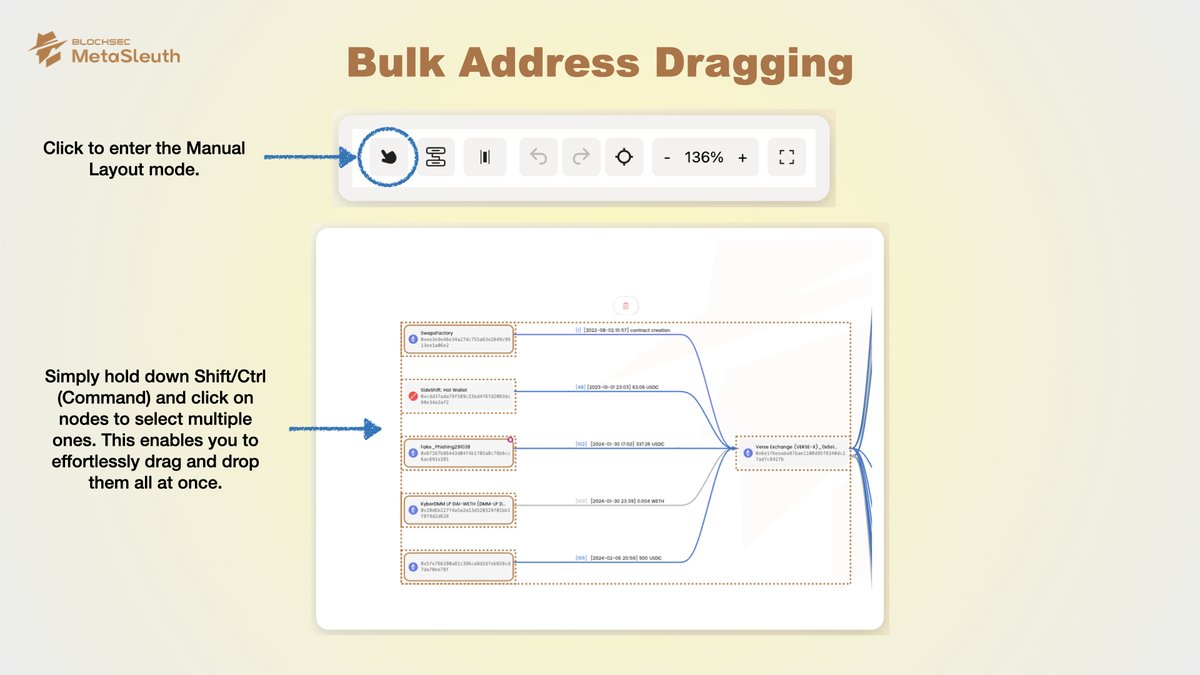
#MetaSleuthTips: Bulk Address Dragging 🚀
Boost investigation efficiency with our update. Effortlessly drag & drop multiple addresses simultaneously.
1. Switch to manual layout mode.
2. Hold Shift/Ctrl(Command) to select multiple addresses.
3. Drag & drop them together.
#MetaSleuthTips
Great news! 🚀
We've raised the limit for batch imports to support up to 30 transactions per import. Say goodbye to import restrictions and hello to faster data processing! 💪

#MetaSleuthTips
Users can now create shared links that never expire and easily update existing shared links to remove their expiration time.

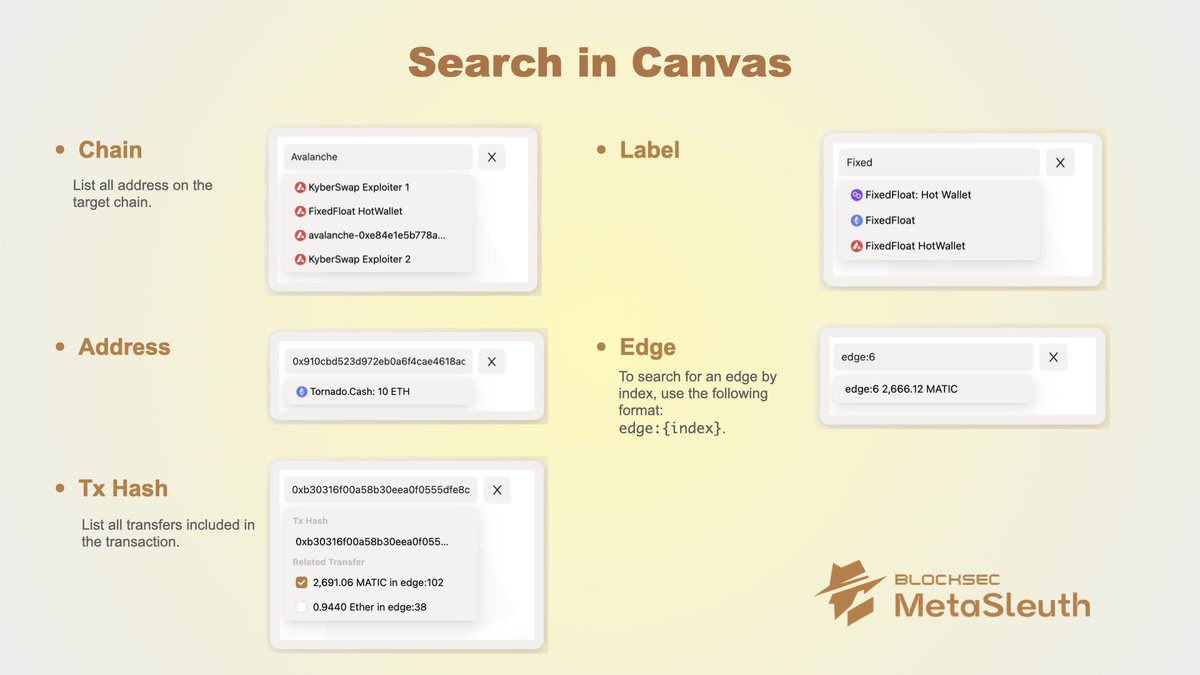
#MetaSleuthTips Search in Canvas
Find everything you need with ease by searching for various elements such as chains, labels, addresses, edges, and transactions.
#MetaSleuthTips Node Batch Editing
Easily select multiple nodes by holding down Shift/Ctrl (Command) and clicking on them.
From there, customize their shapes and colors with ease. 🎨✨

#MetaSleuthTips
Track funds easily by adding the address to the monitoring list if funds have been transferred but not moved further.
This will help you avoid missing any crucial leads.

#MetaSleuthTips No more manually posting screenshots!
Now, when you create shared links and post them on platforms like X and Telegram, a preview image of the entire fund flow chart will be automatically displayed.
https://t.co/Ogy2nKy3ZG
Example of the Heco bridge hack.
#MetaSleuthTips
Exciting update! 🚀 Introducing batch transaction import feature.
Easily import multiple transactions from different chains at once by uploading a CSV file.
Simplify your workflow and boost efficiency. 💼💪

#MetaSleuthTips
📢 Exciting news! Advanced Analyze is now available on Polygon! Stay tuned to find out which chain we'll be supporting next!
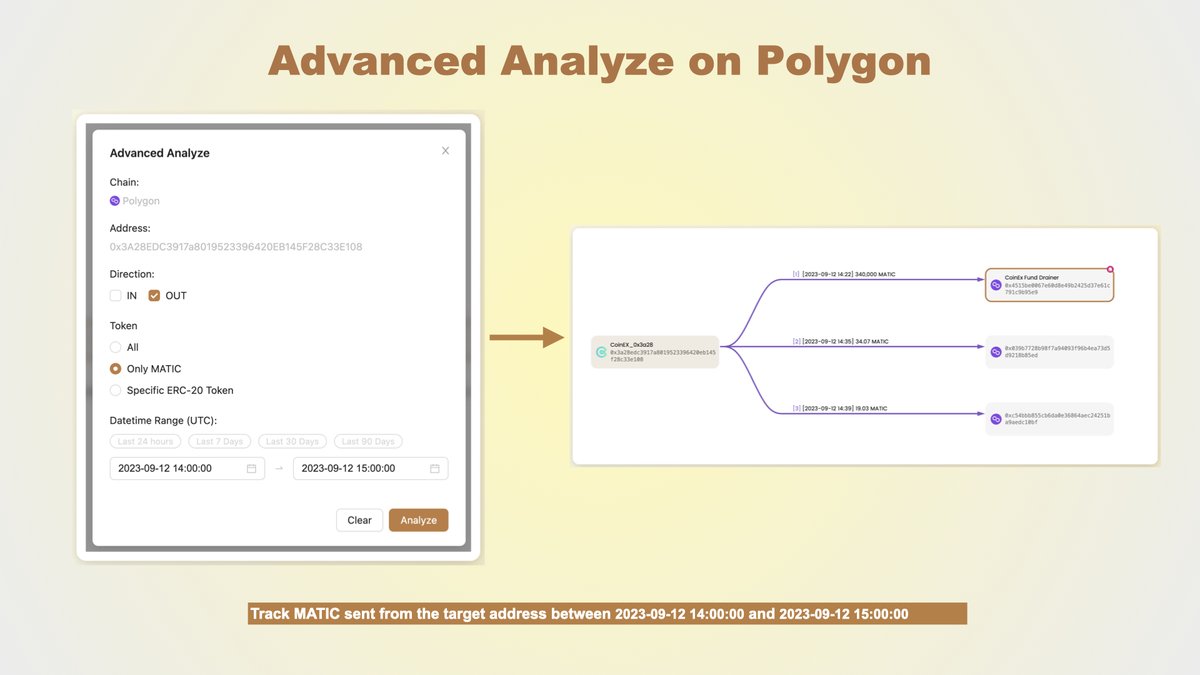
Advanced Analyze has leveled up! 🚀
Now, along with direction and datetime range, you can specify the token you want to track:
✨ Track all tokens
✨ Focus on native token
✨ Dive deep into a specific ERC-20 token

#MetaSleuthTips
Maximize your efficiency by focusing on the fund flow that matters most to you with Advanced Analyze:
· Choose the direction 🧭
· Set a Date Range 📅

#MetaSleuthTips Customize Token Colors
Easily customize the colors of specific tokens in the token filter panel to match your preferences.

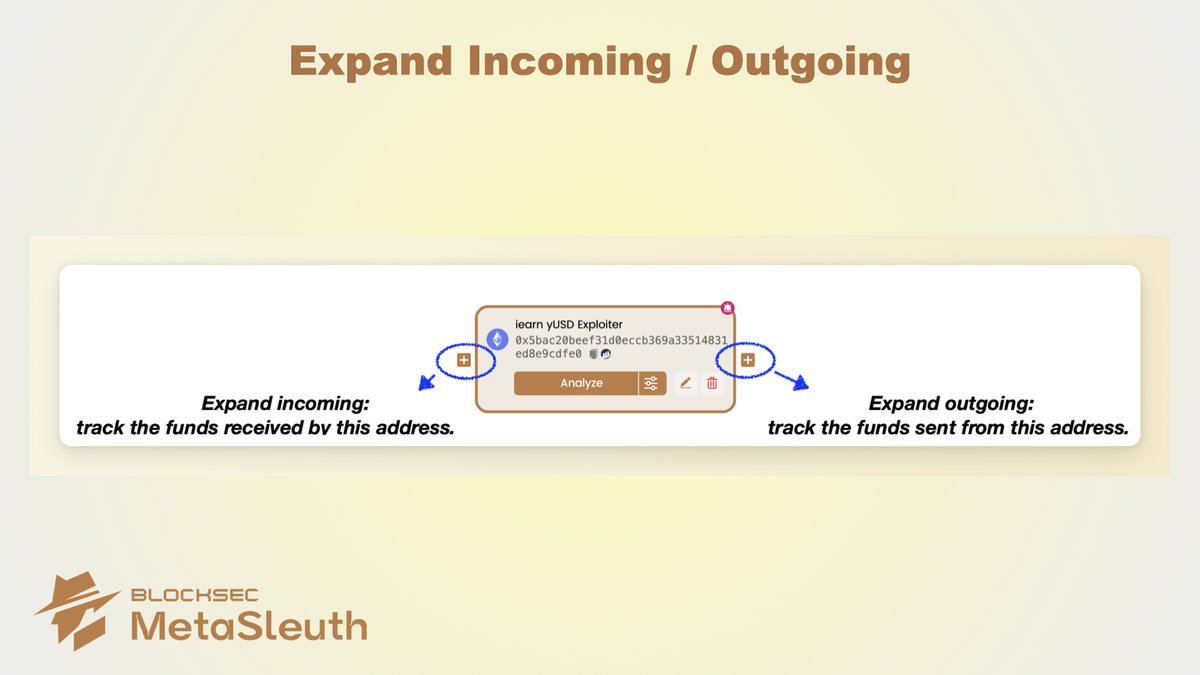
#MetaSleuthTips Expand Incoming / Outgoing
Wanna track funds in a specific direction? Just click the '+' buttons on address nodes.
Expand Incoming to discover funds received by the address, and Expand Outgoing to explore funds flowing out.
Last Seen Hashtags on Sotwe
Most Popular Users

Elon Musk 
@elonmusk
241.5M followers

Barack Obama
@barackobama
118.9M followers

Cristiano Ronaldo
@cristiano
114.6M followers

Donald J. Trump
@realdonaldtrump
111.8M followers

Narendra Modi
@narendramodi
107.1M followers

Rihanna
@rihanna
98.7M followers

NASA
@nasa
92.3M followers

Justin Bieber
@justinbieber
91.8M followers

KATY PERRY
@katyperry
90M followers

Taylor Swift
@taylorswift13
84M followers

Lady Gaga
@ladygaga
75.5M followers

Virat Kohli
@imvkohli
73.5M followers

Kim Kardashian
@kimkardashian
70.9M followers

YouTube
@youtube
68.8M followers

Neymar Jr
@neymarjr
66.5M followers

Bill Gates
@billgates
65.2M followers

Selena Gomez
@selenagomez
63.1M followers

The Ellen Show
@theellenshow
62.2M followers

CNN
@cnn
61.8M followers

X
@x
60.7M followers