

Top Tweets for #ModelContextProtocol

add a remote /api/mcp route using @modelcontextprotocol/sdk and streamable http. start with one read-only tool. ours let the ai look up call history. once that worked, we added notes, transcripts, and usage.

Stop wiring. Start building. ⚡
Fire up Graftcode Gateway and your app instantly appears in Graftcode Vision. The best part? It automatically becomes an MCP server.
No boilerplate. No manual configuration. Just AI-ready apps in seconds
#AI #MCP #ModelContextProtocol #AgenticAI

Just read this blog on MCP Hosting. A great overview of how Graftcode Gateway simplifies exposing existing code as MCP tools—without building a custom MCP server.
🔗 https://t.co/gQuvyeG8Fi
#AIAgents #AIAgentsLaunchpad #MCP #ModelContextProtocol #AgenticAI #LLM #GenerativeAI
Just read a great blog on MCP Hosting.
Key takeaway: Graftcode Gateway lets you expose existing code as MCP tools without building a custom MCP server—making AI agent integration much simpler.
🔗 https://t.co/gQuvyeG8Fi
#AIAgents #AIAgentsLaunchpad #MCP #ModelContextProtocol

💡【独立开发硬核拆解】为什么独立开发者必须立即关注 MCP(Model Context Protocol)?
如果你还在手动给 AI 复制粘贴数据库结构、API 文档,或者在各个 AI 客户端(Cursor、Claude Code、Windsurf)之间重复配置工具链,那你一定要花 3 分钟读懂 MCP。这才是单兵作战真正的效率分水岭。
1️⃣ 什么是 MCP?(大白话版)
MCP 是 Anthropic 推出的一套开放协议。以前,AI 就像一个只有大脑没有手脚的“裸机”,每次想连接你的本地数据库、GitHub 仓库或 Stripe API,开发工具都必须硬编码写连接器。
现在,MCP 统一了“数据源/工具”与“LLM”之间的标准。你只需写一次 MCP Server(相当于万能插座),任何支持 MCP 的 AI IDE(Cursor, Windsurf, Claude 等)都能直接秒变你的“超级全栈开发助理”。
2️⃣ 对独立开发者(Indie Hacker)的 3 个降维打击场景:
💻【场景一:零成本本地开发闭环】
写一个本地数据库的 MCP Server,AI 就能实时、安全地读取你的 Live 数据库 schema 和最新数据。Debug 时直接跟 AI 说:“帮我查下今天最新注册的用户里,Stripe 状态是 pending 的是哪几个,顺便写个脚本修复它。” AI 直接一气呵成。
🔌【场景二:将自己的 SaaS 包装为 MCP,白嫖第一波生态流量】
这是当下极佳的出海/产品切入点!如果你的产品提供某类 API(如邮件发送、SEO 分析),迅速写一个 MCP Server 挂到 GitHub 的 awesome-mcp 列表中。那些正在用 Cursor/Claude 写代码的开发者,就可以一键引入你的工具。
🤖【场景三:打造单兵自动化 SOP】
通过 MCP 挂载,你可以让 AI IDE 自动监控 GitHub Issue ➡️ 自动拉取代码 ➡️ 本地测试 ➡️ 发送 Slack/微信通知。一个人就是一个自动化软件外包公司。
3️⃣ 独立开发者行动指南:
- 不要重复造轮子:先去 GitHub 搜索 `awesome-mcp`,里面有现成开源的 Postgres、Browser、Slack、Google Sheets 各种连接器,直接开箱即用。
- 尝试把你的核心业务逻辑,哪怕是一个小脚本,改造成 MCP Server 并在本地跑起来。体验过一次“AI 真正懂你本地项目所有上下文”的感觉,就再也回不去了。
大家开始在日常工作流里用 MCP 了吗?欢迎在社群里一起交流你的 MCP 奇技淫巧!👇
#MCP #ModelContextProtocol #独立开发 #出海 #AICoding #Cursor

tired of your MCP server dying mid-session? built a fix, keepalive pings + auto-reconnect for VS Code & Cursor. free & MIT: https://t.co/wuD8odGo8W
@code @cursor_ai @modelcontextprotocol #MCP #VSCode #Cursor

Shipped a big MCP upgrade for EvalView today.
You can now drive much more of the workflow over MCP:
- run_check with heal / strict / tags / AI root cause / statistical mode
- run_snapshot with variants / preview / reset
- compare_agents
- replay
The hard part wasn’t adding flags.
It was making sure the wrapper stays reliable as the CLI evolves.
So I added 33 tests for:
- protocol
- schema contracts
- flag wiring
- routing
- timeout tiers
- JSON response stability
- error handling
Trying to make agent eval infra boring in the best way.
https://t.co/tpgJfy8uiy
#buildinpublic #AIagents #MCP #ModelContextProtocol #evals #opensource
#devtools

Your REST APIs aren’t AI-ready yet.
JSON works for frontends, not for LLMs. In the agent era, APIs need to support MCP (Model Context Protocol).
Use the Dual-Exposure Pattern:
- Front door → apps
- Side door → agents (via MCP)
Key setup (Flex Gateway):
- Security first (OAuth 2.0 / Client ID)
- Enable MCP support (must-have)
- Add guardrails (PII masking + ABAC)
- Validate schema (avoid hallucination breaks)
Pro tip:
Test early with
npx @modelcontextprotocol/inspector
Lets you verify tools + policies before agents use them.
So—MCP: future standard or just REST with extra steps?


I just configured the https://t.co/L3HWy2uZEd MCP server on Claude Desktop to generate architecture diagrams locally 🔥
Yes — it’s NOT possible on Claude Web, only Desktop.
You can do it too 👇
Install Claude Desktop
Open Settings → Developer → MCP Servers
Create/Edit config file:
{
"mcpServers": {
"drawio": {
"command": "npx",
"args": ["-y", "@modelcontextprotocol/server-drawio"]
}
}
}
Save the file
Restart Claude Desktop
Done ✅ Now ask Claude to create AWS/K8s architecture diagrams in https://t.co/L3HWy2uZEd format.
Architects & DevOps folks — this is a game changer.
@drawio

{
"mcpServers": {
"filesystem": {
"command": "npx",
"args": ["-y", "@modelcontextprotocol/server-filesystem", "/path/to/your/folder"]
}
}
}

ya da uğraşmayın alın size kullandığım mcp lerin json çıktısı direkt json dosyasına yapıştırın. cursor kullananlar da çalışır. belki diğer ai araçlarında da çalışır
{
"mcpServers": {
"context7": {
"url": "https://t.co/x1Gm71RWqC",
"headers": {}
},
"sequential-thinking": {
"command": "npx.cmd",
"args": [
"-y",
"@modelcontextprotocol/server-sequential-thinking@latest"
]
},
"arxiv-mcp-server": {
"command": "python",
"args": [
"-m",
"arxiv_mcp_server",
"--storage-path",
"C:\\Users\\Mehmet\\.arxiv-mcp-server\\papers"
]
},
"shadcn": {
"command": "npx",
"args": [
"shadcn@latest",
"mcp"
]
},
"cursor-rules": {
"command": "node",
"args": [
"C:\\dev\\test\\dynamic-rules-system-mcp\\dist\\cli.js"
],
"priority": 100
},
"filesystem": {
"command": "npx.cmd",
"args": [
"-y",
"@modelcontextprotocol/server-filesystem@latest"
]
}
}
}

Xtended Day 6/7/8: MCP OAUTH 🥳
NGL - that was hard work! But very happy with end result
Fully integrated OAuth MCP configuration. Seamless from Claude Web, Code & Desktop
Insights:
→ Streamable HTTP /mcp is the newer, future proof MCP format (as opposed to /sse)
→ npx @modelcontextprotocol/inspector was a lifesaver
→ Once given MCP access, Claude code beats everything else
Exclusive waitlist access opening soon! 👇
https://t.co/2Bkj179ACS

Sequential Thinking is an MCP server implementation that provides a tool for dynamic and reflective problem-solving through a structured thinking process.
{
"mcpServers": {
"sequential-thinking": {
"command": "npx",
"args": [
"-y",
"@modelcontextprotocol/server-sequential-thinking"
]
}
}
}

https://github. com/modelcontextprotocol/servers

We never hyped or thanked claude enough literally they build mcp the protocol behind cursor
cant see x talk much about mcp #modelcontextprotocol

Integrating ModelContextProtocol client in openaiagentsdk for agentic systems


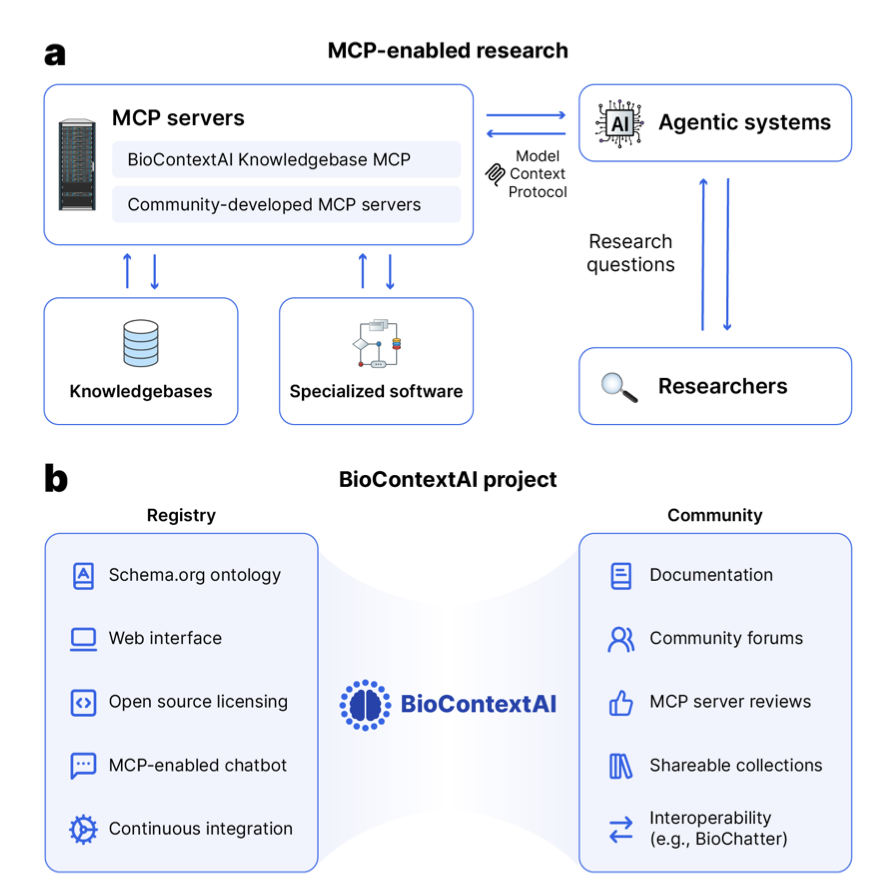
Community-based Biomedical Context to Unlock Agentic Systems
1. A new open-source initiative called BioContextAI aims to enhance the reliability and capabilities of large language models (LLMs) in biomedical research by providing standardized access to validated scientific knowledge through Model Context Protocol (MCP) servers.
2. BioContextAI introduces a community-oriented registry that indexes MCP servers using https://t.co/sbktBYIBFt ontology, offering rich metadata and open-source licensing standards. This registry facilitates the discovery and integration of domain-specific MCP servers for biomedical research.
3. The initiative includes a proof-of-concept MCP server implementation called Knowledgebase MCP, which integrates widely-used biomedical knowledgebases such as STRING, KEGG, PanglaoDb, and others. This server can be deployed locally or used remotely to enhance LLM capabilities.
4. BioContextAI demonstrates improved response quality in LLM-assisted biomedical research tasks when augmented with MCP servers compared to base models or web search capabilities alone. Case studies cover protein-protein interactions, clinical trials, drug usage information, and more.
5. The platform also features BioContextAI Chat, an MCP-enabled chatbot that integrates different commercial LLMs and allows users to interact with the knowledgebases through a user-friendly interface. It includes a review system and shareable collections to help identify the most useful MCP servers.
6. Challenges persist, including security, authentication, and data privacy concerns for remote-hosted MCP servers. The authors call for continued development of BioContextAI as a community hub for LLM-supported biomedical research, with a focus on creating, evaluating, and deploying MCP-augmented agentic systems.
📜Paper: https://t.co/eVTBe0MakA
#BioContextAI #BiomedicalAI #ModelContextProtocol #LLMs #OpenSource #CommunityDriven #ResearchTools

So, I installed the following 2 packages:
`npm install @modelcontextprotocol/sdk`
&&
`npx nx add @nx/node`
DON'T ASK ME WHY I USED NPM & NPX, IT DOESN'T MAKE SENSE TO ME EITHER!
And then I ran:
`npx nx generate @nx/node:application \
--directory=apps/google-email-mcp-server \
--framework=none \
--no-interactive`
This created a new application in the 'apps' dir.
So far so good.
But the heck do I now create a CloudFlare MCP Server in that already initialised app???
send help
We have an 'empty' NX monorepo project created, and specified an 'apps' and 'libs' folder for now.
The next thing is getting the correct dependencies in the root project.json file && creating our first Cloudflare MCP Server!


The new way to raise 1M$ for your app is simple.
Run 'npm i modelcontextprotocol/sdk openai openai/agents mcp-use mcp-inspector mcp-remote anthropic-ai/sdk'
Done.

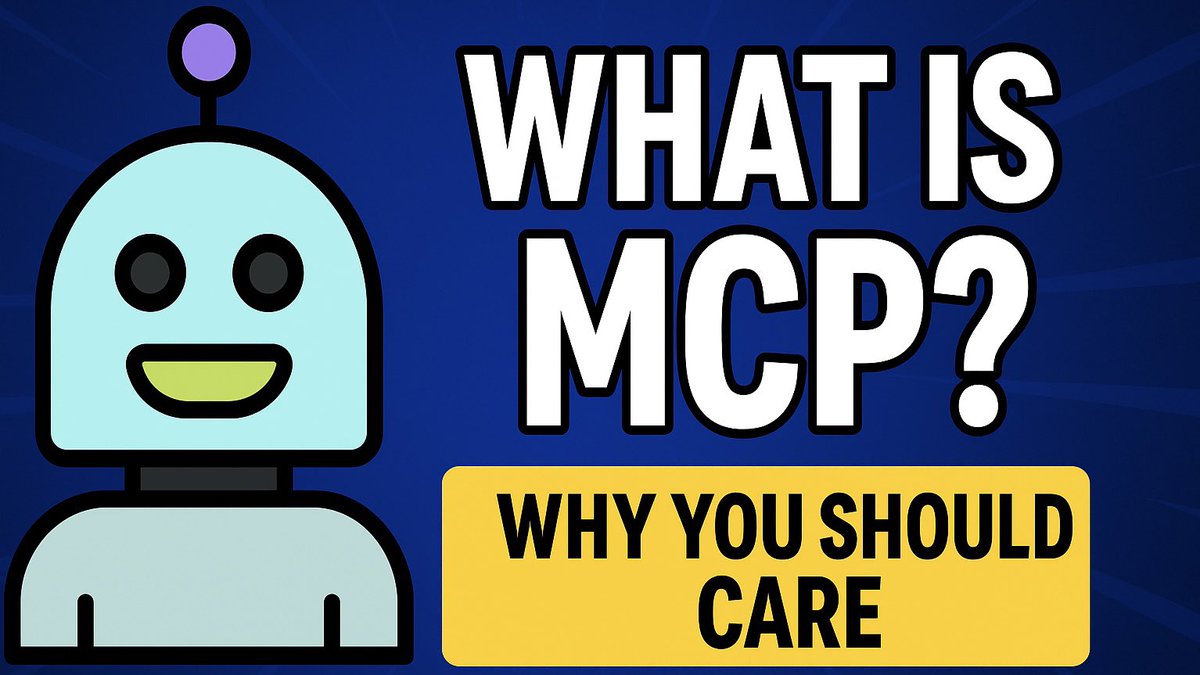
🧠 What if AI tools actually understood your work context, without you needing to explain it every time?
That’s the promise of MCP (Model Context Protocol), a new standard by Anthropic that lets apps send structured context to AI models. Think: instructions, tools, documents, and state, all in one payload.
I just published a video explaining:
What MCP is (and why it matters beyond developers)
Why it’s a foundational shift for AI assistants & agents
How I built my own MCP server using Cursor.
A working demo where an AI agent creates cron jobs using my tool, Cronlytic.
This is early, but powerful. Instead of pasting prompts or wiring APIs manually, agents can now operate in richer, more contextual workspaces and actually get things done.
Would love to hear your thoughts if you’re building in this space, agent infrastructure, workflows, automation, etc.
Video title on YouTube:
What is MCP? Why you should care + How I built My Own MCP Server with Cursor
#AI #MCP #ModelContextProtocol #DevTools #Automation #Cursor #Cronlytic #FastAPI #Builders #IndieHackers #Productivity

@stetsblake Have you tried this command?
claude mcp add puppeteer -s user -- npx -y @modelcontextprotocol/server-puppeteer
Then make sure you restart your Claude Code CLI and check with /mcp if it's there

Claude Desktop with desktop-commander and filesystem installed is another level. Using Opus 4 is better than Cursor in my opinion.
All you need to do is go to:
File > Settings (Ctrl + Comma)
Click on the Developer Tab
Then the Edit Config button and edit the claude_desktop_config.json file to the following
{
"mcpServers": {
"desktop-commander": {
"command": "npx",
"args": [
"-y",
"@wonderwhy-er/desktop-commander"
]
},
"filesystem": {
"command": "npx",
"args": [
"-y",
"@modelcontextprotocol/server-filesystem",
"C:\\Users\\[user]\\claude"
]
}
}
Change this line - "C:\\Users\\[user]\\claude"
To the folder you want Claude to be able to read and write to and save and you have a complete tool to edit or create your developments

Last Seen Hashtags on Sotwe
Trends for you
Most Popular Users

Elon Musk 
@elonmusk
240.1M followers

Barack Obama
@barackobama
118.6M followers

Cristiano Ronaldo
@cristiano
114.4M followers

Donald J. Trump
@realdonaldtrump
111.7M followers

Narendra Modi
@narendramodi
106.9M followers

Rihanna
@rihanna
98.6M followers

NASA
@nasa
92.1M followers

Justin Bieber
@justinbieber
91.7M followers

KATY PERRY
@katyperry
89.9M followers

Taylor Swift
@taylorswift13
83.9M followers

Lady Gaga
@ladygaga
75.4M followers

Virat Kohli
@imvkohli
73.3M followers

Kim Kardashian
@kimkardashian
70.8M followers

YouTube
@youtube
68.6M followers

Neymar Jr
@neymarjr
66.3M followers

Bill Gates
@billgates
65.2M followers

Selena Gomez
@selenagomez
63M followers

The Ellen Show
@theellenshow
62.1M followers

CNN
@cnn
61.7M followers

X
@x
60.6M followers