

Top Tweets for #NISDTechTips

Google Forms gives you more control over your collected data by bringing your results into a table! Using tables offers users access to new features when managing their data. To learn more, go to https://t.co/JVCXHGqWEM #NISDTechTips
Canva Newsletter templates are a lifesaver for back-to-school communication! Create and share schedules, supply lists, & fun first-week photos with ease. #Canva #BackToSchool #TeacherTips #NISDTechTips
A new school year is upon us! Have you changed grades, campuses, or even positions? Don't forget to update your email signature!
Click Settings in Google to get started.
#NISDTechTips
Not sure where to start looking for a setting, function, or even a font in Google Docs, Slides, or Sheets?
Click Help and try Searching the Menus! 🔎
#NISD #NISDTechTips #TechTips #Google

Join us for some fun sessions that are sure to be a rooting and/or tooting good time! 🐎🤠🐄⭐
#NISDTechTips #NISD
Get ahead of your Teacher Choice hours for the 23-24 School Year and sign up for our Canva Corral in Unified Talent today.
June 14th: 1 hour sessions starting at 8:30 AM to 4:00 PM
Sign up for 1, 2, or all the sessions! We can't wait to see you all there!
Feeling nostalgic for the days of using Word art in your presentations? 🥲
Google Slides has you covered! Click Insert and select Word art to unlock your creativity!
#NISD #NISDTechTips #TechTips #GoogleSlides #WordArt
Have you tried Magic commands in Canva yet? Press the "/" key on your keyboard and use the available features that pop up or search for the elements you want. You can add a touch of magic to your designs and save time with this Canva shortcut! ✨🪄 #nisd #nisdtechtips
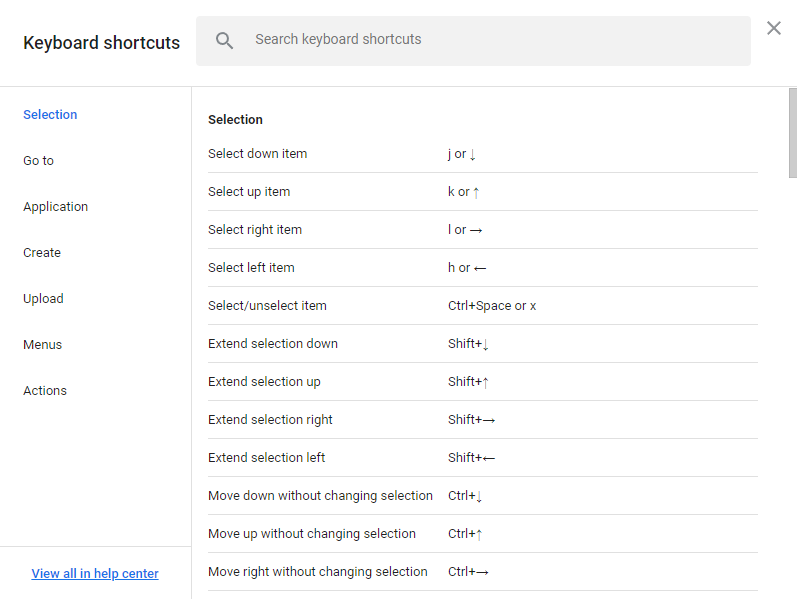
Do you love shortcuts?
Next time you're in Google Drive, press Shift+? to see all of the shortcuts available to you!
These can be especially helpful tricks to keep up your sleeve for the next time you're on a laptop or a Chromebook.
#nisd #NISDTechTips
Have you ever accidently closed the Chrome tab you needed? No problem, just push Ctrl+Shift+T to bring back your last closed tab. #NISD #NISDTechTips #NISDReunited
Did you know that Google Photos can recognize what's in your photos? Try searching for what's in the image! #NISD #NISDTechTips
*BONUS TWEET* It is impossible to have too many tips about managing Chrome tabs! Put those everyday tabs that you have bookmarked into a Bookmark Folder. #NISD #NISDTechTips
We don't know who needs to hear this, but it's okay to close some of those tabs... Do not fear the "X." Close those tabs you will return to later and pick up right where you left off with recently closed tabs.
#NISD #NISDTechTips
Keep watching a video in your browser regardless of the tab you are in with Google's Picture-in-Picture extension! You can even show the video simultaneously in Zoom during a screen share! This extension is a multitasker's dream! #NISD #NISDTechTips
Have a Zoom meeting you would like to add authentication on? It's super easy!
- From the Zoom website, go to Meetings.
- Next to the meeting that you would like to change, click Edit.
- Under Security, click Require authentication to join.
- Then click Save!
#NISD #NISDTechTips
It's easy to get started in Google Keep! You can create notes, reminders, and much more! It's a great tool for getting organized.
#NISD #Google #NISDTechTips
Did you know @gmail and @googledrive have keyboard shortcuts built-in, along with a little guide to help you learn them?
Press "Shift + ?" (without the quotes) to have a popup window appear with a list of shortcuts. #NISDTechTips #NISD
Do you suffer from having too many tabs open? Create tab groups in Chrome to stay organized. #NISD #NISDTechTips
Tips for taking better pictures of assignments on a #Chromebook. RT if you or your students needed this months ago! #Liveandlearn #NISD #NISDTechTips
Consider the dark days of not being able to share folders in Shared drives OVER! Shared Drive Managers can now share folders without having to give rights to the entire drive. #Finally #NISD #NISDTechTips
Need to make a checklist or stay up to date with some To-Dos? Check out #GoogleTasks!
The best part? You can start your tasks right from your inbox, and if you add a date to the task it will show up on your #GoogleCalendar!
#NISD #NISDTechTips
Last Seen Hashtags on Sotwe
真实的意义
Seen from United States
mozambiqu
PissDrinker
Seen from Spain
minichat()***************************************** +filter:native_video
Seen from Norway
minichat()+filter:native_video
なな流出動画
Seen from Japan
snapchat
Seen from United States
nsfw
Seen from Netherlands
フィニッシュ乱発
Seen from Japan
growthzoneams
Seen from United States
Most Popular Users

Elon Musk 
@elonmusk
241.5M followers

Barack Obama
@barackobama
118.9M followers

Cristiano Ronaldo
@cristiano
114.6M followers

Donald J. Trump
@realdonaldtrump
111.8M followers

Narendra Modi
@narendramodi
107.1M followers

Rihanna
@rihanna
98.7M followers

NASA
@nasa
92.3M followers

Justin Bieber
@justinbieber
91.8M followers

KATY PERRY
@katyperry
90.1M followers

Taylor Swift
@taylorswift13
84M followers

Lady Gaga
@ladygaga
75.5M followers

Virat Kohli
@imvkohli
73.5M followers

Kim Kardashian
@kimkardashian
70.9M followers

YouTube
@youtube
68.8M followers

Neymar Jr
@neymarjr
66.5M followers

Bill Gates
@billgates
65.3M followers

Selena Gomez
@selenagomez
63.1M followers

The Ellen Show
@theellenshow
62.2M followers

CNN
@cnn
61.8M followers

X
@x
60.7M followers