

Top Tweets for #NewInLoop

#NewinLoop: Need to explain ROI with actual math? You can now add equations in Loop!
Type /math or /inline equation and drop in square roots, exponents, fractions—you name it. Give it a try!

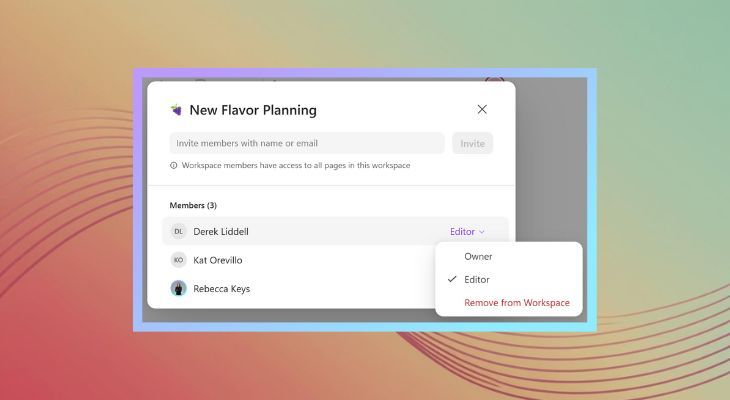
#NewinLoop: You can now edit member roles in your Loop workspaces, so handing off ownership is super easy! Whether you’re onboarding a new project lead or just want to pass the baton, you can now do it all from the workspace settings. Here's how:

🎉 Thanks, Microsoft 365 Insiders! Your feedback made this happen—you can now switch up roles in Loop workspaces! Whether you're passing the leadership baton or fine-tuning teamwork, it’s just a few clicks away.
Learn more: https://t.co/xjw0Zgd9Ji
#MicrosoftLoop #NewInLoop

🎉 Thanks, Microsoft 365 Insiders! Your feedback made this happen—you can now switch up roles in Loop workspaces! Whether you're passing the leadership baton or fine-tuning teamwork, it’s just a few clicks away.
Learn more: https://t.co/xjw0Zgd9Ji
#MicrosoftLoop #NewInLoop
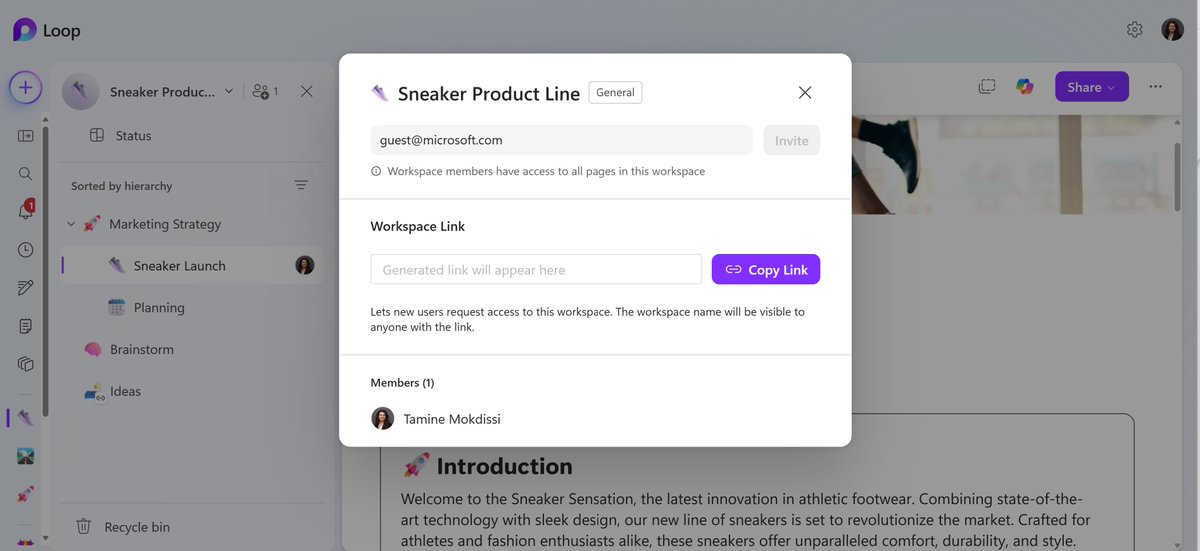
Ready to loop in your external team? Loop now supports guest sharing, so you can co-create with partners, clients, and collaborators outside your org. Just share the page or workspace and work together in real time 🤝 #NewinLoop
#NewInLoop: The missing piece to your productivity puzzle? A calendar. 🧩📆 Calendar View is here to help you visualize timelines, stay ahead of deadlines, and avoid last-minute chaos. Go forth and be organized!
#NewInLoop: Retention Labels are here! 🏷️ Take control of content governance at the item level, whether it’s protecting tax forms, deleting old press materials, or locking down contracts. Set it, forget it, and stay compliant. 🔒

External Sharing 🤝 Information Protection
Earlier this year, we shipped "Guest Sharing" feature to all except those who use MIP. Now that we support Workspace Sensitivity Labels, we have just enabled external sharing for all organizations that use MIP! 🏷️🔒 #NewInLoop
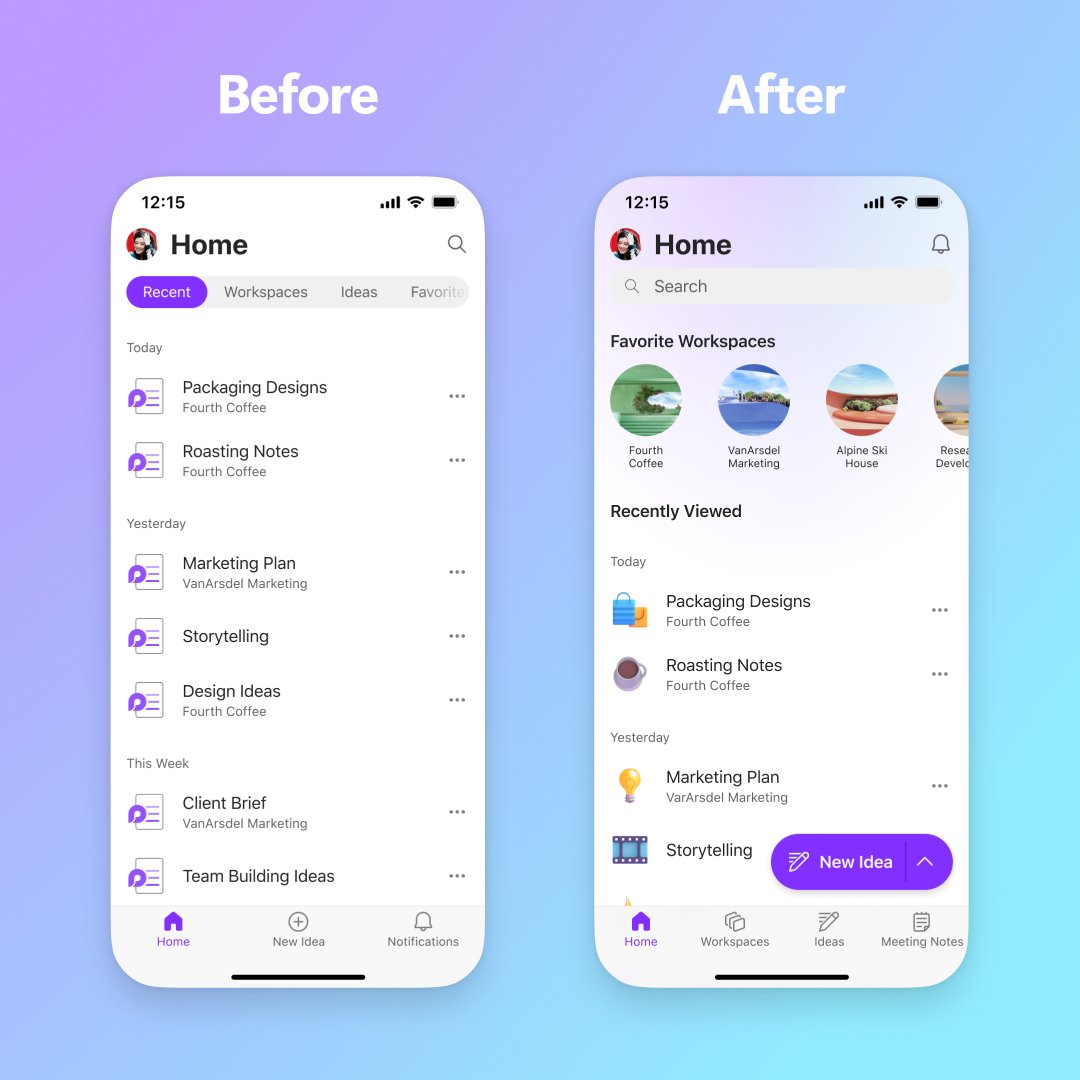
Big #NewinLoop news! Loop on mobile just got a major glow-up with a brand-new home page
✨ Navigate easier, find content faster, and enjoy a fresh look. With a dedicated Meeting Notes tab and quick-access favorites carousel, your Loop experience on the go just got way better 📲

Big #NewinLoop news! Loop on mobile just got a major glow-up with a brand-new home page ✨ Navigate easier, find content faster, and enjoy a fresh look. With a dedicated Meeting Notes tab and quick-access favorites carousel, your Loop experience on the go just got way better 📲
#NewinLoop Workspace Sensitivity Labels!🛡️
Workspace Sensitivity Labels helps you:
➕ Manage access to your entire workspace
🔐 Prevent oversharing
➡️ Restrict sharing with guests or new guests
Learn more about #MicrosoftInformationProtection in Loop: https://t.co/qaz0Vwyd5J
#NewinLoop: Show everyone exactly what you mean by recording a video, an audio or a screen recording to get your point across. Just type '/record'!

🛠️ Loops Tip & Trick: Did you know you can now upload Word, PowerPoint, Excel, and PDF files directly to your Loop workspaces? 📂 Simplify your workflow and give your team all the context it needs to better collaborate.
Learn more 👉 https://t.co/xUyqxQOCEO
#NewInLoop
🛠️ Loops Tip & Trick: Did you know you can now upload Word, PowerPoint, Excel, and PDF files directly to your Loop workspaces?📂
Simplify your workflow and give your team all the context it needs to better collaborate. Learn more. https://t.co/FEg0PaF7SL
#LoopsTips #NewInLoop
🆕ICYMI: You can now upload Word, PowerPoint, Excel, and PDF files to Loop workspaces, giving your team all the context it needs to better collaborate. https://t.co/ymHtyWoEbB #NewInLoop
#NewinLoop ✨ We know you work with all kinds of files to keep projects moving forward. Now, you can bring Word, PowerPoint, Excel, and PDF files together in a Loop Workspace! Just use the 'Upload a file' option when selecting '+ Create new'.
🆕 In case you missed the latest: You can now upload Word, PowerPoint, Excel, and PDF files to Loop workspaces, giving your team all the context it needs to better collaborate. https://t.co/Js9cEamBUG
#NewInLoop #Microsoft365
Introducing Copilot chat! Now you can ask all your questions—big or small—about a Loop page privately 🤫Need to catch up, brainstorm, or even ask a “dumb” question? Copilot can help you with that without disturbing your teammates. #NewinLoop
🆕 ICYMI: You can now upload Word, PowerPoint, Excel, and PDF files to Loop workspaces, giving your team all the context it needs to better collaborate. https://t.co/flPQt84sNo #NewInLoop
🆕ICYMI: You can now upload Word, PowerPoint, Excel, and PDF files to Loop workspaces, giving your team all the context it needs to better collaborate. https://t.co/dOAnR1m06Q
#NewInLoop #Microsoft365
Last Seen Hashtags on Sotwe
julianatovar
Seen from Colombia
找個人一起玩刺激
Seen from Netherlands
dadbod
Seen from Canada
pejuhin foto
Seen from Indonesia
UncleHowdy
Seen from Brazil
tango arabic
Seen from Germany
diyarbakirliseli
Seen from Turkey
bbcflashing
Seen from Turkey
andyandjeff
Seen from Brazil
ميقا_حصريات
Seen from Belgium
Most Popular Users

Elon Musk 
@elonmusk
240.2M followers

Barack Obama
@barackobama
119.3M followers

Donald J. Trump
@realdonaldtrump
111.6M followers

Cristiano Ronaldo
@cristiano
108.8M followers

Narendra Modi
@narendramodi
106.9M followers

Rihanna
@rihanna
97.2M followers

NASA
@nasa
92.1M followers

Justin Bieber
@justinbieber
90.5M followers

KATY PERRY
@katyperry
86.7M followers

Taylor Swift
@taylorswift13
80.5M followers

Lady Gaga
@ladygaga
72.1M followers

Kim Kardashian
@kimkardashian
69.3M followers

YouTube
@youtube
68.6M followers

Virat Kohli
@imvkohli
68.4M followers

Bill Gates
@billgates
63.4M followers

The Ellen Show
@theellenshow
62.5M followers

CNN
@cnn
61.9M followers

Neymar Jr
@neymarjr
61M followers

X
@x
60.9M followers

CNN Breaking News
@cnnbrk
59.9M followers