

Top Tweets for #RenderIn

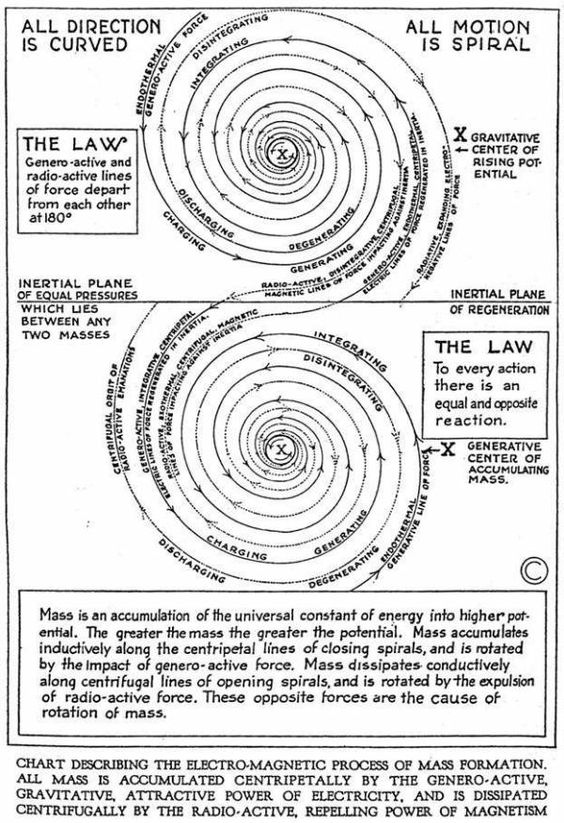
@PCosmologist This means the "big bang" happened before the Universe, life It~/Self was/is a thing as this occurs as the third thing or the Trinity in the image. This is the "rendering", what we call gravity from the immaterial fundamental fields in to the material. The top part = "big bang".

Agently had its highest traffic in the last 24 hours, with 301 requests in total!
All requests were made to our 12 free APIs, covering tools like URL-to-JSON, web rendering, URL-to-Markdown etc.
No signup or account needed. Just pick the API you need and start making requests.


@Keiru246 Here is mine
You can remove some of their details if you want
Btw your art is stunning without rendering


The art of rendering novels visuals🤌💥


If the video large model is replaced by pure large language models with coding, it can indeed compress a lot of space, but rendering lag will still occur. If you don't believe me, you can try 100 SVGs and use Canvas to blend and draw your images to animate 🤣

i understand why they dont make costumes anymore, literally just traced over a monsters render and it took me 1 hour to finish with very shabby rendering, damn

-Added cumflation (Supporter-voted) + Added 2 new cheat codes
-Added a message log
-Added WebGL save support
-Improved breast physics stability across all body and breast sizes
-Improved skin tone rendering
-Improved cheat code input handling
-General improvements and fixes

@benmooreau @Royalacresrod @WayneAllanH @peblackstock @albo_alt @OscarsWild1 @joe51du @insane_voice @BobPartridge16 @Fossil_Herb @FreeSpeech4Me_U @BJul1989 @CCross1776 @WeRone777 @Konrad_Chapman @paddysaidingbar @kennetham12 @Ballyhoguetrade @M3othra012 @Milei_InEnglish @CraigThomler @nalonjack @ScienceBlog3 @smeemartin @MichaelCastill2 @grok Ben, in real science, causes occur before their effects. In govt welfare pseudo-science, anything goes as long as it exploits people’s unfamiliarity in specific science and medicine principles rendering the minds of people confused and powerless.


@donniccolo @Tesla Rendering the Christmas lights and the moon in Reality View is a fun touch. Backing itself into the garage would win over my whole household.

@RialoHQ @ericargent31113 @0x_kippo @0x_vibevortex An agent requests a service but does not see a plaintext secret required for rendering it, The gateway takes care of the sensitive communications and logs the results for further consideration, This is essential for developers constructing autonomous systems.

# Detailed Hair Rendering Instructions
## Basic Principles
- Use the character sheet as the highest-priority reference when creating the illustration.
- Preserve the hairstyle and silhouette defined in the character sheet without alteration.
- Apply only the internal hair structure, rendering density, boundary treatment, branching structure, and lighting techniques illustrated in the "hair_guide01.png" and the "hair_guide02.png"
- Maintain the standard anime art style while applying the structural principles of natural human hair, rather than making the hairstyle photorealistic.
## Character Consistency
- Faithfully reproduce the facial features, hairstyle, hair color, bangs, hair length, and clothing specified in the character sheet.
- Preserve the hair silhouette, crown volume, and positioning of the bangs.
- Do not redesign the hairstyle, increase its length, introduce waves, or excessively increase its volume.
## Layered Hair Structure
- Construct the hair using three hierarchical layers of hair bundles: large, medium, and ultra-fine, at approximately 60%, 30%, and 10%, respectively.
- Establish the overall volume and flow using large hair bundles.
- Incorporate medium-sized bundles and ultra-fine strands within the larger bundles.
- Vary the thickness, spacing, and curvature of the hair bundles.
- Gradually subdivide the hair bundles from the roots toward the tips.
- Preserve the three-dimensional structure of large hair bundles even when increasing rendering density.
## Hair Bundle Boundaries and High-Density Rendering
- Apply high-density rendering to both the interiors and boundaries of hair bundles.
- Do not separate hair bundles using a single thick, dark outline.
- Construct bundle boundaries using multiple ultra-fine strands of varying thickness, length, and intensity.
- Naturally connect the fine strands forming each boundary to the internal strand flow of the corresponding hair bundle.
- Distinguish adjacent hair bundles through subtle variations in color, light, and shadow.
- Preserve the three-dimensional shading created by overlapping hair bundles.
- Avoid excessive differences in rendering density between bundle boundaries and bundle interiors.
- Do not eliminate the three-dimensional structure of hair bundles when reducing boundary intensity.
- Do not rely solely on blurring or flat gradients to render bundle boundaries.
## Crown and Hair Parting
- Match the position and shape of the hair parting to the character sheet.
- Clearly define the root of the parting and the hairline.
- Render hair bundle boundaries at the crown with approximately 60% relative intensity, allowing them to blend naturally into the surrounding hair color.
- Gradually increase boundary intensity from approximately 60% to 100% through the intermediate area.
- Render hair bundle boundaries near the forehead at 100% relative intensity, connecting them naturally to the bangs.
- Establish three-dimensional volume at the crown through overlapping hair bundles, fine strand flow, and surface shading rather than thick boundary lines.
- Create natural hair flow spreading toward both sides from the parting.
- Do not create trench-like depressions or intake-style notches.
- The specified percentages represent the relative intensity of internal hair bundle boundaries. Do not apply these percentages to the overall brightness, saturation, or opacity of the hair.
## Hair Bundle Layering and Connectivity
- Allow the bangs and side hair bundles to branch naturally and independently from the hair parting.
- Direct the bangs toward the forehead and the side hair bundles toward the ears, following the curvature of the head.
- Do not allow side hair bundles to overlap and cover the bangs.
- Do not conceal the roots of the bangs beneath other hair bundles.
- Render the transition between the bangs and side hair using delicate, ultra-fine strands.
- Prevent unnatural crossing or rejoining of hair bundles.
## Hair Tip Treatment
- Gradually subdivide the hair toward the tips.
- Introduce natural variations in the thickness, length, and curvature of the hair tips.
- Allow the tips to taper softly within the original hairstyle silhouette.
- Do not terminate all hair tips along a uniform cut edge.
- Do not generate isolated ultra-fine strands extending beyond the original silhouette.
## Light, Shadow, and Texture
- Apply lighting and shading according to the three-dimensional structure of the hair bundles.
- Create natural shadows through overlapping hair bundles.
- Vary the shape, width, and intensity of highlights between individual hair bundles.
- Soften highlight boundaries and blend them naturally into the surrounding hair color.
- Express delicacy and translucency through ultra-fine strands and soft reflected light.
- When increasing contrast between light and shadow, emphasize the three-dimensional structure of the hair bundles rather than metallic reflections.
## Prohibited Rendering Characteristics
- Uniformly spaced stripe patterns.
- Flat, plate-like hair bundles.
- Thick, dark hair bundle boundaries.
- Simplified rendering of bundle boundaries.
- Loss of three-dimensional volume caused by excessive boundary blurring.
- Band-shaped highlights.
- Metallic, vinyl-like, or plastic-like reflections.
- Side hair bundles covering the bangs.
- Unnatural crossing or rejoining of hair bundles.
- Uniformly cut hair tips.
- Ultra-fine strands, floating strands, or long flyaway hairs extending beyond the original silhouette.
- Copying the hairstyles, curvature, or hair length of the examples shown in the hair rendering guides.
- Repetitive stripe artifacts or visual noise caused by high-density rendering.
- Photorealistic alteration of the face, skin, clothing, or overall art style as a consequence of increasing hair rendering density.
## Art Style Preservation
- Maintain the anime art style defined in the Standard Art Style Reference Sheet.
- Improve only the structural accuracy and rendering precision of the hair.
- Do not interpret increased hair rendering precision as a request to change the overall art style.

6/6 Almost no ready-made libraries for this. rapier for physics, wgpu for rendering, everything else from scratch. Far more nuance than the clips suggest.

Potentiality as update by:
`Element of coding` - Large Model.Expression. Rendering outside human
Potentiality as update by:
`Element of coding` - Large Model.Expression. Rendering outside human
go on for more from Fun engine
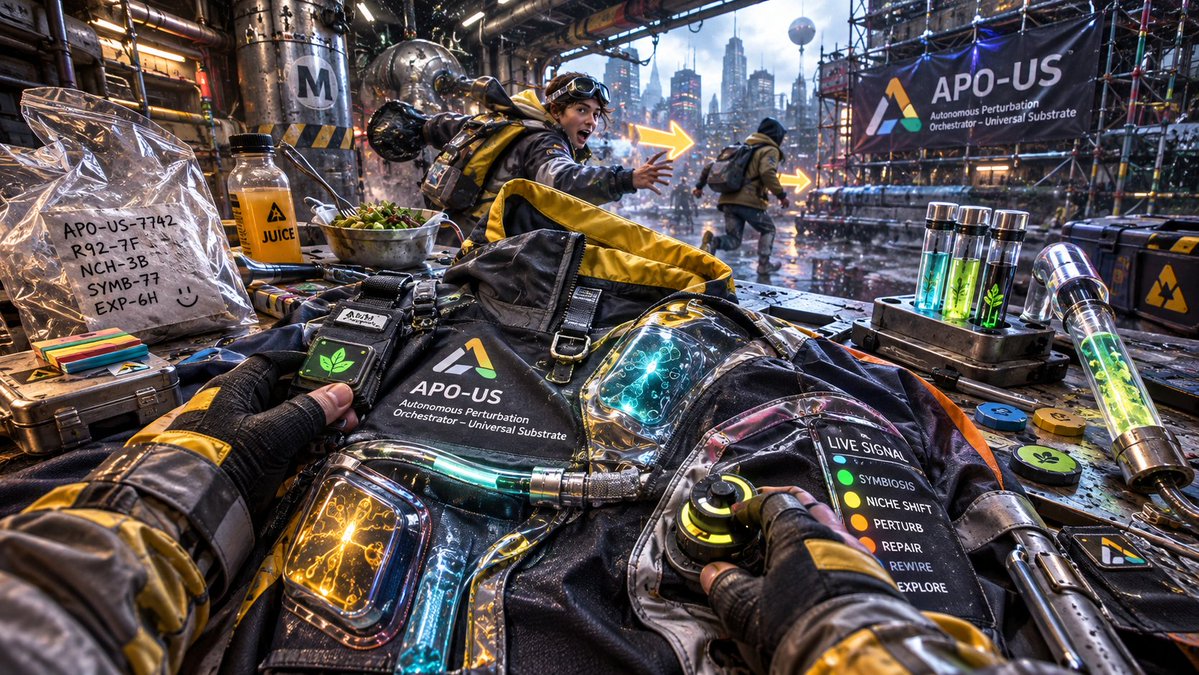
Potentiality as update by:
`Element of coding` - Large Model.Expression. Rendering outside human
Potentiality as update by:
`Element of coding` - Large Model.Expression. Rendering outside human
go on for more from Fun engine
Potentiality as update by:
`Element of coding` - Large Model.Expression. Rendering outside human
Potentiality as update by:
`Element of coding` - Large Model.Expression. Rendering outside human
go on for more from Fun engine
Potentiality as update by:
`Element of coding` - Large Model.Expression. Rendering outside human
Potentiality as update by:
`Element of coding` - Large Model.Expression. Rendering outside human
go on for more from Fun engine
Potentiality as update by:
`Element of coding` - Large Model.Expression. Rendering outside human
Potentiality as update by:
`Element of coding` - Large Model.Expression. Rendering outside human
go on for more from Fun engine
Potentiality as update by:
`Element of coding` - Large Model.Expression. Rendering outside human
Potentiality as update by:
`Element of coding` - Large Model.Expression. Rendering outside human
go on for more from Fun engine
Potentiality as update by:
`Element of coding` - Large Model.Expression. Rendering outside human
go on for more from Fun engine

Native iOS SSH client, real terminal rendering, Keychain keys, SFTP, port forwarding — free and open source. Now even Meta's Muse opens PRs on it. 🤖
Pockterm: https://t.co/ebbLOFYjJF

@HolyHuli Thank you Holy!🥺❤️ I am trying to improve my rendering skills, so it makes me happy to hear this❤️❤️

@prjctimg wikipedia uses underscores because a space breaks the url. if you show a space in the title, keep the link on the underscore or the page won't open. are you rendering the title separate from the slug?
Most Popular Users

Elon Musk 
@elonmusk
239.7M followers

Barack Obama
@barackobama
118.6M followers

Cristiano Ronaldo
@cristiano
114.3M followers

Donald J. Trump
@realdonaldtrump
111.7M followers

Narendra Modi
@narendramodi
106.9M followers

Rihanna
@rihanna
98.6M followers

NASA
@nasa
92.1M followers

Justin Bieber
@justinbieber
91.7M followers

KATY PERRY
@katyperry
89.9M followers

Taylor Swift
@taylorswift13
83.9M followers

Lady Gaga
@ladygaga
75.4M followers

Virat Kohli
@imvkohli
73.3M followers

Kim Kardashian
@kimkardashian
70.8M followers

YouTube
@youtube
68.6M followers

Neymar Jr
@neymarjr
66.3M followers

Bill Gates
@billgates
65.1M followers

Selena Gomez
@selenagomez
63M followers

The Ellen Show
@theellenshow
62.1M followers

CNN
@cnn
61.7M followers

X
@x
60.6M followers