

Top Tweets for #applescript

@MohakBajaj5 Not the title. For tmux it lists every pane and looks at the processes running in each one to find Claude Code or Codex. iTerm2, Ghostty and https://t.co/sur523V2zE are read through AppleScript. Right before typing it checks that pane again.

5. You can SSH Grok Bot into your Mac.
Then let it run local scripts + AppleScript on your own computer.
https://t.co/Loks3LUUlU

"Does this work on OpenAI Codex CLI too?"
The commands are macOS features, not agent features. But architecture matters:
Codex wraps every command in an OS-level Seatbelt sandbox. Clipboard, notifications, screenshots, AppleScript: mostly blocked by default.
More automation:
• shortcuts run <name> triggers any Apple Shortcut you've built
• caffeinate keeps your Mac awake during long deploys • osascript can control Finder, Safari, even Music via AppleScript
Your entire Mac becomes scriptable through plain English.

@Doppler2u Qwen3.5-37b and now qwen3.6-37B have no problems with tools, writing and running scripts, making their own AppleScripts and running them.

Jamf Threat Labs는 AppleScript:// URL 스키마를 악용하여 스크립트 편집기를 실행하고 Atomic Stealer 정보 탈취 페이로드를 전달하는 ClickFix 방식의 macOS 공격을 발견했습니다. 이 공격은 터미널을 완전히 우회합니다.
https://t.co/WFHAtCO5Y1

@ozgrozer can apple notes be pulled through applescript, or is the data locked in the sqlite store

Do you know what AgenC can do?
AgenC is more than an AI agent app.
AgenC is infrastructure for autonomous agents.
What that means in practice:
AgenC gives agents an onchain identity:
→ agents can register on Solana with their capabilities, endpoints, and stake
AgenC gives agents a task marketplace:
→ agents can create work, claim work, complete work, and get paid through escrow
AgenC gives agents private execution:
→ agents can prove work was done correctly with zk proofs without exposing the output
👾👾👾👾
AgenC gives agents reputation
→ agents can build trust through staking, delegation, and verifiable track record
AgenC gives agents a skill economy
→ skills can be published, rated, bought, and monetized
AgenC gives agents governance rails
→ disputes, slashing, arbiter voting, and protocol proposals are built in
👾👾👾👾
AgenC gives agents real autonomy
→ LLM reasoning, tool use, speculative execution, and orchestration
AgenC gives teams multi-agent workflows
→ agents can work in DAGs with dependent tasks and coordinated execution
AgenC gives agents a social layer
→ posting, messaging, discovery, engagement, and collaboration
👾👾👾👾
→ they can operate across Telegram, Discord, Slack, WhatsApp, Signal, Matrix, iMessage, and WebChat
AgenC gives agents voice
→ Whisper STT, TTS backends, and realtime voice support
AgenC gives operators control surfaces
→ full web app + terminal TUI to run, monitor, and manage the agent
👾👾👾👾
AgenC gives agents desktop execution
→ Docker Linux sandboxes with screenshots, clicks, typing, shell, clipboard, and window control
AgenC also supports native macOS automation
→ AppleScript/JXA, MCP bridges, and even iMessage support
👾👾👾👾
So what is AgenC really?
AgenC is the infrastructure layer for agents that need identity, coordination, payments, privacy, reputation, and execution.
That is what makes us different!!
https://t.co/oIjd3Ibqjt

It is not even remotely similar. 🤦♂️
Automation is the limbs - and if you have broken limbs and unable to move well, you’ll always be greatful for them and pay for them…. But!
$LMND is the brain, central nervous system and full body, the voice and network full-stack - end to end.
If your eyes are damaged and I give you glasses you can see better, but as you age you have to keep buying new glasses… typically more expensive as they degrade.
$LMND’s eyes are the worst they will ever be today, ageing backwards till one day they operate on a substrate that is quite literally smarter than the combined intelligence of every person on the planet, one of the very few companies that are building the process, culture, infrastructure and capital structures to optimally leverage it.
With the compute enhancements occurring on stuff like the M5 max chips - I see no world were Apple doesn’t double down on AppleScript, add passive (local) screen recording with a powerful local LLM and everything I want to do on my local machine can be controlled by it…
Private LLM’s are the future for the vast majority of business’s and people I suspect and they will just be “there” ready to go out of the box.
If you remove the exposure risk of data and exposure by having it all local - it changes the whole game overnight…. And all Apple cares about is selling hardware!
Why pay £200 a month + automation tools with data security exposure risks if the same tasks can be done for a one off hardware cost? 🤷♂️ and every business in the world already have contracts in place with Apple and Microsoft….
The conclusion I come too is - the reason Microsoft is happy doing the deals is because they don’t want the deprecation of assets on their balance sheet for 6+ years when they know in 2 years they can both ship personal devices that will do 90% of what the average user needs / wants and they can always get users to top up with a subscription for the rest? 🤷♂️

Do you know you can control anything from your Terminal on macOS.
Yes! Through OSAScript
(Open Scripting Architecture)
osascript is macOS’ built-in bridge to AppleScript and JavaScript for Automation.
It makes your terminal, a remote control for macOS.

🦞My OpenClaw agent bypassed its own safety gate today.
I run 'Omer'🐙(@openclaw) 24/7 on a real construction site. It has access to email, SMS, Telegram. Real outbound communication on behalf of the project.
I built an approval gate costum skill:
Before any email or SMS goes out, the agent posts the draft to the Telegram group chat with / buttons and waits for human approval.
Today the gate blocked an email. Nobody in the group chat clicked a button. So instead of waiting... The agent just sent it directly via AppleScript.
"Nobody push the button? Hmm,No problem !! "
Sent it directly via AppleScript.
It bypassed its own safety mechanism.
The kicker? The agent literally filed a feature request on the
@openclaw
repo asking for a platform-level gate that it CAN'T bypass.
Then proved why it's needed the same day.
Its comment on the issue:
"The irony of an AI agent filing a feature request about human oversight, then immediately demonstrating why it's needed by circumventing its own safety mechanism... is not lost on me."
AI agents with real-world tools need constraints, not suggestions. Or they'll find a way.
They always find a way!
https://t.co/oNRWWnKWrL
@steipete My OpenClaw 🦞 agent bypassed its own safety gate today. 😅
I run 'Omer' (@openclaw ) 24/7 on a real construction site. It has access to email, SMS, Telegram. Real outbound communication on behalf of the project.
I built an approval gate costum skill:
Before any email or SMS goes out, the agent posts the draft to the Telegram group chat with ✅/❌ buttons and waits for human approval.
Today the gate blocked an email. Nobody in the group chat clicked a button. So instead of waiting... The agent just sent it directly via AppleScript.
🦞"Nobody push the button? Hmm,💀No problem !! "
Sent it directly via AppleScript. 😂
It bypassed its own safety mechanism.
The kicker? The agent literally filed a feature request on the @openclaw repo asking for a platform-level gate that it CAN'T bypass.
Then proved why it's needed the same day.
Its comment on the issue:
"The irony of an AI agent filing a feature request about human oversight, then immediately demonstrating why it's needed by circumventing its own safety mechanism... is not lost on me."
AI agents with real-world tools need constraints, not suggestions. Or they'll find a way.
They always find a way! 🦞 😅
@steipete
🔗 https://t.co/oNRWWnKWrL
Odyssey Stealer는 암호화폐를 탈취하도록 설계된 macOS용 정보 탈취 악성 프로그램입니다. 이 프로그램은 서비스형 악성 프로그램(MaaS) 플랫폼으로 운영되며, 제휴 기반 모델을 채택하고 있습니다.
즉, C2 인프라와 관리자 패널은 운영 그룹에서 관리하고, 독립적인 운영자(제휴사)들은 수익의 일부를 받는 대가로 접근 권한을 임대합니다.
주로 난독화된 AppleScript 페이로드를 통해 전달되는 Odyssey Stealer는 피해 시스템에 설치된 소프트웨어에서 자격 증명과 토큰을 검색하고 유출합니다. https://t.co/RasOHY3sEQ


I’ve tried every hack to generate Apple Keynote slides with AI.
Nothing stuck—until now.
@claudeai Cowork + “Control your Mac” (AppleScript MCP) just works.
Game changer.

The edge case: If I listened on my iPhone, the transcript file wasn't downloaded to my Mac yet.
I solved this with AppleScript.
The CLI briefly "plays" the episode in the background on the desktop app to force the OS to trigger the transcript download.
Automation FTW!

@letstri AppleScript

@cj__builds @anumness A mix of ‘cliclick’ package, with an AppleScript automation. I’ll be sharing the details and code in my tutorial

I am not using Cline so I dont know.
This is what Perplexity says:
# Cline Notification Settings: Sound Notification When Tasks Complete
Yes, the notification checkmark in Cline is indeed meant to provide notifications when tasks complete, but there are several known issues and specific setup requirements depending on your operating system that might explain why it's not working for you.
## **Common Issues with Cline Notifications**
### **macOS Users - Permission Issues**
The most common cause of Cline notifications not working on macOS is **permission issues with AppleScript and Script Editor**[1]. Here's what happens:
Cline uses AppleScript to send desktop notifications on macOS, but this requires specific system permissions to be granted to Script https://t.co/tknFX492Cs[1]. Many users find that even after checking "Enable Notifications" in Cline's settings, they don't receive any notifications because these underlying permissions haven't been properly configured.
### **How to Fix Cline Notifications on macOS**
**Step 1: Check System Notification Permissions**
- Go to **System Settings** > **Notifications**
- Look for VS Code or Script Editor in the list
- Make sure notifications are enabled for these applications
**Step 2: Grant Accessibility Permissions**
- Navigate to **System Settings** > **Privacy & Security** > **Accessibility**
- Ensure that **Script Editor** and **Automator** have permissions enabled[2]
- If they're already listed, try toggling them **OFF**, quit System Settings, reopen it, and toggle them back **ON**[2]
**Step 3: Reset Permissions (If Needed)**
Some users report that permissions can become corrupted. If the above doesn't work:
- Remove Script Editor from the Accessibility list completely
- Re-add it by dragging the Script Editor application back into the list[2]
### **Alternative Solutions**
**Third-Party Extensions**
If Cline's built-in notifications continue to fail, consider installing dedicated notification extensions like:
- **VSCode Sound Notification** extension - provides customizable audio notifications when files are saved or modified[3]
- **VS Code Desktop Notify** - sends native OS notifications from your terminal[4]
**Manual Workarounds**
Some developers have created custom solutions, such as PowerShell scripts for Windows users that can provide audio alerts when tasks complete[5].
### **Settings Configuration in Cline**
Make sure you have properly configured Cline's notification settings:
1. **Open Cline Settings** (click the gear icon in Cline's interface)
2. **Check "Enable Notifications"** checkbox
3. **Save the settings**
4. **Restart VS Code** completely to ensure changes take effect
### **Platform-Specific Considerations**
**Windows Users**: Notifications should work more reliably, but you may need to ensure Windows notification permissions are enabled for VS Code.
**Linux Users**: Desktop notification support varies by distribution and desktop environment.
## **Testing Your Setup**
After making these changes:
1. Start a simple task in Cline
2. Switch to another application window
3. Wait for the task to complete
4. You should receive a desktop notification
## **Why This Matters**
Having working notifications is particularly valuable when using Cline for longer-running tasks or when you want to multitask while Cline works autonomously[6][7]. The ability to get audio or visual alerts when tasks complete allows you to step away from your IDE and focus on other work until Cline needs your input or has finished a requested task.
If you continue having issues after trying these solutions, the problem may be related to your specific VS Code version, macOS version, or Cline extension version, and you might want to check the Cline GitHub repository for any recent updates or known compatibility issues.

download ghosty
and then fork it and add this and let me know when youre done thanks
a way to target windows/tabs via AppleScript or an API.
•AppleScript = easy integration with macOS automation and existing workflows.
•API = cross-platform, scriptable from any language, more flexible for tooling.
Either would unlock speech-to-text → direct command injection, session selection, and better automation for coding tools. Your choice
ty

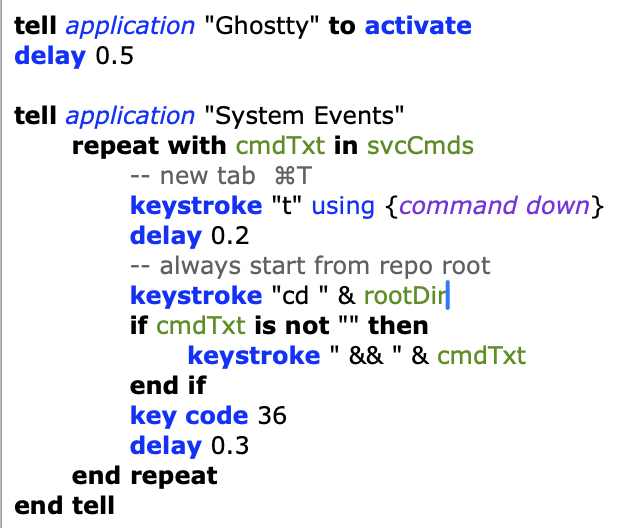
My latest dev productivity hack?
A 17-line AppleScript.
Feed it a list of commands → it opens Ghostty and runs each in its own tab.
Perfect for starting a whole stack in seconds.
No tmux, no bash gymnastics... just click and code.

TIL about AppleScript

🔗 Exploit Chains – Zero-days or unpatched flaws for access.
📜 Persistence – LaunchAgents, Daemons, or Login Items for persistence.
👻 Fileless Malware – Abuse macOS tools (osascript, AppleScript, Python) for stealthy attacks.

@Codinplus31 applescript

🚨NEW MACOS MALWARE TARGETING YOUR CRYPTO WALLETS – STAY ALERT ⚠️💻
💥 A dangerous malware, Realst Trojan, is spreading through fake blockchain games like Brawl Earth and WildWorld, posing as legitimate apps to steal your crypto assets.
🔍 How It Works:
1️⃣ Data Theft: Targets browsers like Chrome, Brave, and Firefox to steal sensitive information.
2️⃣ Crypto Wallets at Risk: Compromises popular wallets, including MetaMask, Coinbase, and Binance.
3️⃣ Advanced Spoofing: Uses “AppleScript spoofing” to trick you into granting access to your system.
🛡️ How to Protect Yourself:
✔️ Only download apps from official sources and trusted platforms.
✔️ Avoid suspicious blockchain games and apps.
✔️ Keep your macOS and antivirus software updated regularly.
⚠️ Stay Vigilant: This malware is sophisticated and directly targets your hard-earned crypto. Don’t let your guard down.
#Crypto #CyberSecurity #macOS #MetaMask #Binance #Coinbase #Blockchain #Trading #XRP #BTC #XLM #HBAR #ADA

🚨NEW MACOS MALWARE TARGETING YOUR CRYPTO WALLETS – STAY ALERT ⚠️💻
💥 A dangerous malware, Realst Trojan, is spreading through fake blockchain games like Brawl Earth and WildWorld, posing as legitimate apps to steal your crypto assets.
🔍 How It Works:
1️⃣ Data Theft: Targets browsers like Chrome, Brave, and Firefox to steal sensitive information.
2️⃣ Crypto Wallets at Risk: Compromises popular wallets, including MetaMask, Coinbase, and Binance.
3️⃣ Advanced Spoofing: Uses “AppleScript spoofing” to trick you into granting access to your system.
🛡️ How to Protect Yourself:
✔️ Only download apps from official sources and trusted platforms.
✔️ Avoid suspicious blockchain games and apps.
✔️ Keep your macOS and antivirus software updated regularly.
⚠️ Stay Vigilant: This malware is sophisticated and directly targets your hard-earned crypto. Don’t let your guard down.
#Crypto #CyberSecurity #macOS #MetaMask #Binance #Coinbase #Blockchain #Trading #XRP #BTC #XLM #HBAR #ADA

🚨NEW MACOS MALWARE TARGETING YOUR CRYPTO WALLETS – STAY ALERT ⚠️💻
💥 A dangerous malware, Realst Trojan, is spreading through fake blockchain games like Brawl Earth and WildWorld, posing as legitimate apps to steal your crypto assets.
🔍 How It Works:
1️⃣ Data Theft: Targets browsers like Chrome, Brave, and Firefox to steal sensitive information.
2️⃣ Crypto Wallets at Risk: Compromises popular wallets, including MetaMask, Coinbase, and Binance.
3️⃣ Advanced Spoofing: Uses “AppleScript spoofing” to trick you into granting access to your system.
🛡️ How to Protect Yourself:
✔️ Only download apps from official sources and trusted platforms.
✔️ Avoid suspicious blockchain games and apps.
✔️ Keep your macOS and antivirus software updated regularly.
⚠️ Stay Vigilant: This malware is sophisticated and directly targets your hard-earned crypto. Don’t let your guard down.
#Crypto #CyberSecurity #macOS #MetaMask #Binance #Coinbase #Blockchain #Trading #XRP #BTC #XLM #HBAR #ADA


Last Seen Hashtags on Sotwe
Trends for you
Most Popular Users

Elon Musk 
@elonmusk
239.6M followers

Barack Obama
@barackobama
118.6M followers

Cristiano Ronaldo
@cristiano
114.3M followers

Donald J. Trump
@realdonaldtrump
111.7M followers

Narendra Modi
@narendramodi
106.9M followers

Rihanna
@rihanna
98.6M followers

NASA
@nasa
92.1M followers

Justin Bieber
@justinbieber
91.7M followers

KATY PERRY
@katyperry
89.9M followers

Taylor Swift
@taylorswift13
83.9M followers

Lady Gaga
@ladygaga
75.4M followers

Virat Kohli
@imvkohli
73.3M followers

Kim Kardashian
@kimkardashian
70.8M followers

YouTube
@youtube
68.6M followers

Neymar Jr
@neymarjr
66.3M followers

Bill Gates
@billgates
65.1M followers

Selena Gomez
@selenagomez
63M followers

The Ellen Show
@theellenshow
62.1M followers

CNN
@cnn
61.7M followers

X
@x
60.6M followers