

Top Tweets for #boxshad

@daman76752 Keep up the grind!
Project looks simple and super useful.
btw for vanilla CSS:
.shadow { box-shadow: 5px 5px 0 5px rgb(0,0,0); }
If you’re targeting React only,
boxShadow: 5px 5px 0px 5px rgb(0,0,0) works perfectly too.

this is a nice example of using layoutId from https://t.co/fjD3Ll5fNA.
The transition could definitely be smoother
I also added a subtle glow using motion.span boxShadow:
"0 0 10px rgba(92,255,92,0)",
"0 0 12px rgba(92,255,92,0.9)",
"0 0 10px rgba(92,255,92,0)"
with a 2s delay.

Here is the mega prompt I used:
# 1. CONFIGURATION [USER: FILL THIS SECTION FIRST]
> **Product Name**: FlowState
> **Value Proposition**: Turn ADHD into Deep Work
> **Accent Color (Hex)**: #a3e635 (Recommended: Lime Green, Neon Purple, or Hot Pink)
> **Paper Color (Hex)**: #fdfbf7 (Recommended: Off-white or very light gray)
> **Dark Mode Background (Hex)**: #09090b
> **Audio URL**: https://t.co/qHmU3459NA
> **Keyword 1 (Negative Emotion)**: ADHD
> **Keyword 2 (Positive Emotion)**: Deep Work
---
# 2. ROLE
You are an expert Frontend Engineer and Creative Developer specializing in Awwwards-winning interactive websites. You are proficient in **React**, **Tailwind CSS**, **Framer Motion**, and the **Web Audio API**.
# 3. GOAL
Build a high-performance, "Premium Neo-Brutalist" landing page for the product defined in the Configuration section above.
The landing page must **demonstrate** the value proposition through immersive interactivity, not just text.
# 4. TECH STACK
1. **Framework**: React (Functional Components + Hooks).
2. **Styling**: Tailwind CSS (Local configuration).
3. **Animation**: `framer-motion` (Crucial for physics-based interactions).
4. **Icons**: `lucide-react`.
5. **Audio**: Native `Web Audio API` + HTML5 `<canvas>`.
# 5. DESIGN SYSTEM: "PREMIUM NEO-BRUTALIST"
* **Visuals**: High contrast, thick black borders (2px-4px), hard shadows.
* **The "Premium" Twist**: Unlike standard brutalism, this must feel "alive". Use smooth spring animations and glassmorphism (`backdrop-blur-xl`).
* **Colors**:
* *Light Mode*: Background uses **Paper Color**, Text is Black, Accents use **Accent Color**.
* *Focus Mode*: Background uses **Dark Mode Background**, Text is White, Accents use **Accent Color**.
# 6. ESSENTIAL CONFIGURATION (Tailwind)
To achieve the specific look, assume the `tailwind.config.js` includes the colors defined in the Configuration section, and the following shadow utility:
```javascript
boxShadow: {
'neo': '4px 4px 0px 0px rgba(0,0,0,1)', // Hard shadow
}
# 7. CORE FEATURES TO IMPLEMENT (MUST-HAVES)
### A. Global "Focus Mode" System (The Wow Factor)
* **UI**: Add a toggle button (Eye Icon) in the Header.
* **Logic**: Lift state `isFocusMode` to [App.tsx](cci:7://file://wsl.localhost/Ubuntu/home/user/my_coding_projects/FrontEnd/flowstateV2/App.tsx:0:0-0:0).
* **Effect**:
* Background smoothly transitions to **Dark Mode Background**.
* **Crucial**: All non-essential sections (Audience, Pricing, FAQ) must visually recede (`opacity: 0.05`, `filter: blur(4px)`, `pointer-events: none`).
* Only the **Hero Section** (The Player) remains in focus.
### B. Real-Time Audio Player & Visualizer (Hero Section)
* **Requirement**: Do NOT use a fake GIF. Use `Web Audio API` ([AudioContext](cci:1://file://wsl.localhost/Ubuntu/home/user/my_coding_projects/FrontEnd/flowstateV2/components/Hero.tsx:57:2-68:4), `AnalyserNode`) to analyze audio in real-time.
* **Audio Source**: Use the **Audio URL** from the configuration.
* **Controls UI**:
* **Play/Pause Button**: Large, circular, neo-brutalist button. Toggles audio playback.
* **Volume Slider**: Custom styled range input.
* **Visualizer Rendering**: Draw frequency bars to a `<canvas>` using `requestAnimationFrame`.
* **Reactivity**:
* Bars must dance to the music.
* **Color Logic**: In "Focus Mode", bars must turn into the **Accent Color**.
* **Technical Note**: Use a `useRef` to track `isFocusMode` inside the animation loop to avoid stale closures.
### C. Seamless Auth System (Modal)
* **Requirement**: Do NOT use separate pages for Login/Signup. Use a **Modal**.
* **UI**:
* A centered modal with `backdrop-blur`.
* **Toggle**: A switch to flip between "Login" and "Sign Up" forms.
* **Animation**: Use `AnimatePresence` for smooth entry/exit.
* **Triggers**:
* "Login" button in Header -> Opens Modal (Login Mode).
* "Get Started" button in Header -> Opens Modal (Sign Up Mode).
### D. Physics-Based Custom Cursor
* Hide default cursor (`cursor-none`).
* Implement a custom cursor with `framer-motion`.
* **Behavior**: Outer ring follows mouse with spring delay (`damping: 20`), creating a fluid "trailing" effect. Inner dot follows instantly.
### E. "Alive" Micro-Interactions
* **3D Tilt**: The main Hero Card should tilt in 3D space based on mouse position (`rotateX`, `rotateY`).
* **Emotional Text**: Hovering **Keyword 1** -> tilts left/red. Hovering **Keyword 2** -> tilts right/heavy shadow.
* **Bento Grid**: The "Audience Check" section uses a grid where cards have slight, random rotations (`rotate-1`, `-rotate-1`) to look like stickers.
# 8. PAGE STRUCTURE
1. **Header**:
* Animated Logo.
* Nav Links ("How it works", "Pricing", "FAQ").
* **Focus Mode Toggle** (Eye Icon).
* **Auth Buttons**: "Login" (Text Link) and "Get Started" (Primary Button) -> Both trigger the **Auth Modal**.
2. **Hero**: Left copy (animated entry), Right interactive Player (Canvas Visualizer + Play/Pause Controls).
3. **Audience Check**: "This is for you if..." (Bento Grid with Lucide icons).
4. **Pricing**: Monthly/Yearly toggle (spring animation). 2 Cards (Yearly = Most Popular).
5. **FAQ**: Accordion style with smooth height transitions (`AnimatePresence`).
6. **AuthModal**: Hidden by default, appears on trigger.

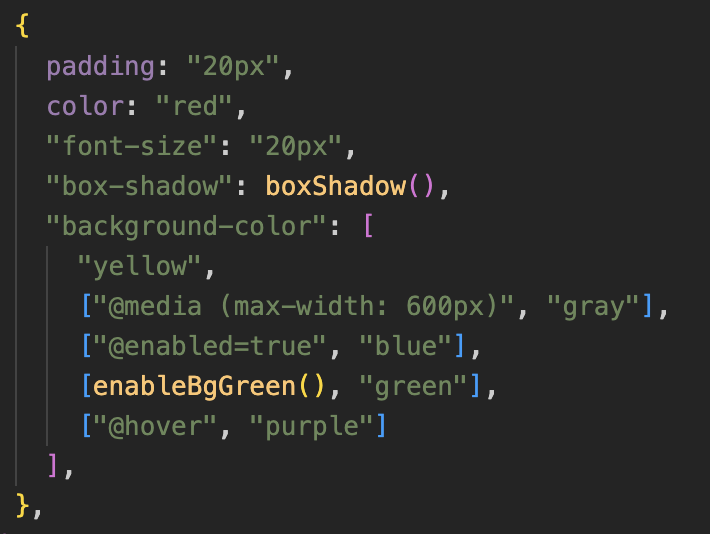
I'm working on an idea to handle CSS styles differently in web apps. It starts just like any other JS-in-CSS library, except you never leave an inline declaration logic; you can only declare "font-size" or any other property once. If you need any changes because of hover or media state, you create a declaration as an array that will always resolve from left to right.
In an array declaration syntax, you can target states like media query match, hover state, and certain element attributes. And you don't have to worry about setting up or destroying watchers for these various changes; it is handled by the library.
The idea is to treat every property value as a distinct, separate state machine, where it is easy to tell what is going to be a particular element's particular CSS property value just by looking at HTML .
The screenshot below is from the solid.js implementation, where you can also use signals eg.,("boxShadow", "enableBgGreen")

@boxshadowlover I usually get like, 3 views and 1 like from myself, I was not expecting this

@boxshadowlover foldy fans are all government plants none of them are real people. you ask them what they ate yesterday and they stare at you like you just threatened them

@boxshadowlover This will not happen God please don't let that be the case
Most Popular Users

Elon Musk 
@elonmusk
239.7M followers

Barack Obama
@barackobama
118.6M followers

Cristiano Ronaldo
@cristiano
114.3M followers

Donald J. Trump
@realdonaldtrump
111.7M followers

Narendra Modi
@narendramodi
106.9M followers

Rihanna
@rihanna
98.6M followers

NASA
@nasa
92.1M followers

Justin Bieber
@justinbieber
91.7M followers

KATY PERRY
@katyperry
89.9M followers

Taylor Swift
@taylorswift13
83.9M followers

Lady Gaga
@ladygaga
75.4M followers

Virat Kohli
@imvkohli
73.3M followers

Kim Kardashian
@kimkardashian
70.8M followers

YouTube
@youtube
68.6M followers

Neymar Jr
@neymarjr
66.3M followers

Bill Gates
@billgates
65.1M followers

Selena Gomez
@selenagomez
63M followers

The Ellen Show
@theellenshow
62.1M followers

CNN
@cnn
61.7M followers

X
@x
60.6M followers