

Top Tweets for #entitygraph

Great point and agree JOIN FETCH with pagination can cause duplicate rows and incorrect pageable counts because of cartesian multiplication.
Also DTO projections are often the safest choice for APIs and @EntityGraph gives nice flexibility.
And yes N+1 is fundamentally a query design issue not just a JPA issue. JPA just makes it easier to fall into it 😄

One small addition: be careful using JOIN FETCH with pagination — it can duplicate rows and break Pageable counts. In real systems, I usually prefer DTO projections for APIs, @EntityGraph for flexibility, and batch fetching as a fallback.
N+1 isn’t a JPA problem — it’s a query design problem.
Lazy vs Eager Loading in JPA
Same relationship. Different fetch strategy. Huge performance impact.
Let’s understand this with a simple restaurant example 🍽️
Imagine you ordered ONE tea.
🔴 FetchType.EAGER
You ordered one tea.
But the waiter brought tea + snacks + dessert together.
That’s EAGER loading.
When the parent entity is fetched,
all related entities are loaded immediately —
Even if they are not required.
Good for small relationships.
Risky for large collections.
🟢 FetchType.LAZY
You ordered one tea.
The waiter brought only tea.
That’s LAZY loading.
Related entities are loaded only when accessed.
More controlled.
Usually better for performance.
⚠️ The N + 1 Query Problem
Suppose you fetch 4 users.
Query 1 → Fetch users
Query 2 → Orders for User 1
Query 3 → Orders for User 2
Query 4 → Orders for User 3
Query 5 → Orders for User 4
Total = 1 + N queries
1 query loads parent entities.
N additional queries load child data.
More database round trips.
Lower performance.
🛠 How to Fix It
✔ Use JOIN FETCH
✔ Use @EntityGraph
✔ Use DTO projection
Fetch associations explicitly
to avoid excessive queries.
Golden Rule 🧠
EAGER loads immediately.
LAZY loads on demand.
Performance depends on *when* you fetch,
not just *what* you fetch.
Interview Questions I Was Asked:
Q1. Why is @ManyToOne EAGER by default?
A. Because it typically references a single small entity.
Q2. What causes the N + 1 problem?
A. Lazy loading inside loops without proper join fetching.
Q3. Why is LAZY usually preferred?
A. It prevents unnecessary joins and reduces memory usage.


Custom JPA Queries and Optimization with Spring Data JPA:
This Java example demonstrates Spring Data JPA's advanced features for database operations. It uses @Query for a custom JPQL query to fetch users by status, @EntityGraph to optimize fetching of related entities, and @CreatedDate/@LastModifiedDate for automatic auditing of entity creation and modification timestamps. These features enhance query flexibility, performance, and maintainability in a Spring-based application.

Spring Data JPA Features:
Spring Data JPA enhances database operations with @Query for custom JPQL, @EntityGraph for fetch optimization, and auditing via @CreatedDate and @LastModifiedDate.
-> Executes custom JPQL to fetch users by status using @Param.
-> Eagerly fetches department to optimize data retrieval.
-> Auto-tracks creation/update timestamps with @CreatedDate and @LastModifiedDate.
-> Simplifies custom queries, fetching, and auditing for efficient JPA usage.


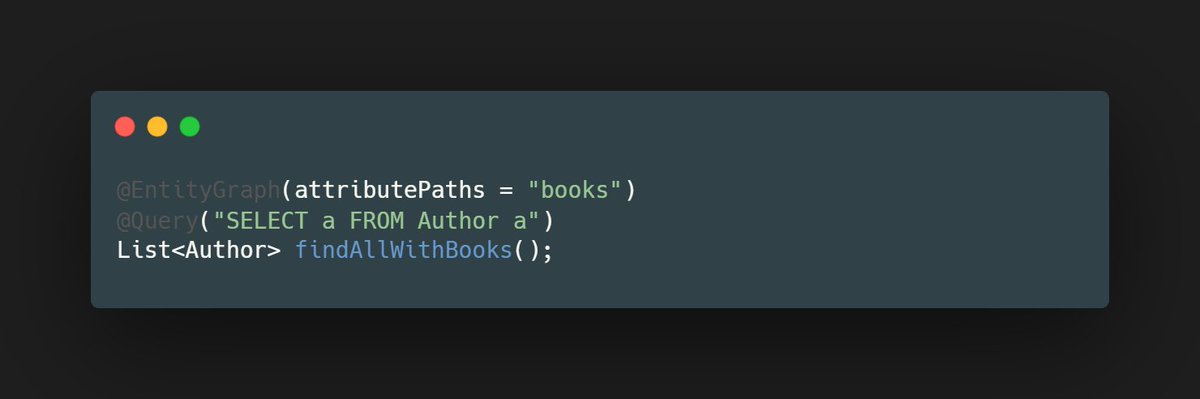
2. [@EntityGraph to Fix N+1]
This loads authors and their books in a single query. Bye-bye N+1!
#ayshriv #java #springboot
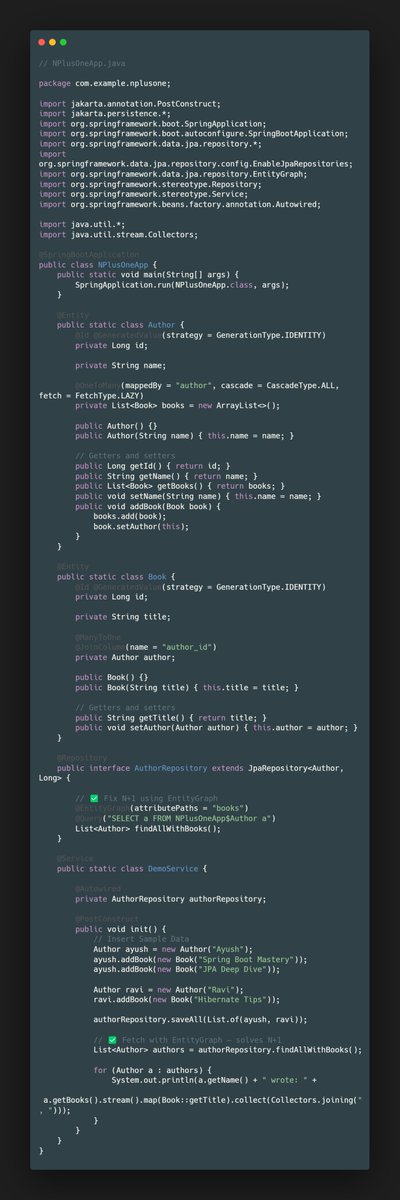
1. [@OneToMany LAZY Load Warning]
Accessing books without a fetch strategy in a loop causes N+1 problem. Fix it using JOIN FETCH or @EntityGraph.


Advanced Database Tuning ✅
Databases are often the biggest bottleneck in improving API performance.
Even if you have indexes set, inefficient data fetching strategies and queries can lead to bad performance.
What techniques can help here?
- Using a single query, we can use JPA’s @ EntityGraph or JPQL JOIN FETCH to load the related entities eagerly. We can also use DTO projections to fetch only the required fields.
- Using Batching for bulk inserts and updates. This saves network trips by combining multiple SQL statements at a time.
- Use Read Replicas if your use case is read-heavy.
N+1 Query Problem?
Use @EntityGraph to fetch related entities efficiently instead of multiple queries.
#ayshriv #java #springboot

Avoid LazyInitializationException in Spring Data JPA by using @Transactional or fetching relationships eagerly with @EntityGraph.
#SpringJPA #Hibernate #ayshriv #java
Most Popular Users

Elon Musk 
@elonmusk
240.1M followers

Barack Obama
@barackobama
118.6M followers

Cristiano Ronaldo
@cristiano
114.4M followers

Donald J. Trump
@realdonaldtrump
111.8M followers

Narendra Modi
@narendramodi
106.9M followers

Rihanna
@rihanna
98.6M followers

NASA
@nasa
92.1M followers

Justin Bieber
@justinbieber
91.7M followers

KATY PERRY
@katyperry
89.9M followers

Taylor Swift
@taylorswift13
83.9M followers

Lady Gaga
@ladygaga
75.4M followers

Virat Kohli
@imvkohli
73.3M followers

Kim Kardashian
@kimkardashian
70.8M followers

YouTube
@youtube
68.6M followers

Neymar Jr
@neymarjr
66.3M followers

Bill Gates
@billgates
65.2M followers

Selena Gomez
@selenagomez
63M followers

The Ellen Show
@theellenshow
62.1M followers

CNN
@cnn
61.7M followers

X
@x
60.6M followers