

Top Tweets for #macpoweruser

Most of the triggers are manual, such as punching a hot key, typing a string trigger, clicking an open application, plugging or unplugging an external hard drive or other device.
Read more 👉 https://t.co/CVEpXs3R6O
#Macuser #Macpoweruser #Macautomation
I couldn't agree more, noting that AudioPen provides the best results among the AI tools I use for voice dictation.
Read more 👉 https://t.co/9dvTsNKkZg
#Macuser #Macpoweruser #Macautomation #macautomation

My Conversation with Louis Pereira: Insights Into AudioPen
▸ https://t.co/Kbi0coGSsh
#Macuser #Macpoweruser #Macautomation #macautomation

In addition, it can function as a project management tool, assisting me in tracking progress and pending tasks for larger projects
Read the full article: My Favorite Raycast Extensions
▸ https://t.co/tWjM2XgaOM
#Macuser #Macpoweruser #Macautomation #macpoweruser

Thus when it comes to deleting files and other items on my Mac, thankfully I'm not limited to punching the Delete key or dragging items to the trashcan.
Read the full article: 7 Different Ways To Delete Items On Your Mac
▸ https://t.co/tIzwSsJgVH
#Macuser #Macpoweruser
Reminders: I create floating screenshots of information, how-tos, and instructions I need to review later.
Read more 👉 https://t.co/vqaP1gEeib
#Macuser #Macpoweruser #Macautomation #macautomation

Harnessing the Power of AI: FixKey and AudioPen for Faster, Better Writing: https://t.co/6Ad0r69AhJ
#Macpoweruser #Macautomation

SmartWrite is a feature of Mem that can generate written content, such as summaries or explanations, based on your saved knowledge.
Read more 👉 https://t.co/V9Han4Ias5
#Macuser #Macpoweruser #Macautomation
I regularly use several Raycast extensions for daily tasks, including retrieving clipboard items, performing file searches, generating passwords, opening saved URLs, and accessing my latest Raidrop bookmarks.
Read more 👉 https://t.co/8AehB4YFNr
#Macuser #Macpoweruser
If you're a Keyboard Maestro user, share your trigger-less macros and actions in the comment section below.
Read more 👉 https://t.co/H2iytN3zZh
#Macuser #Macpoweruser #Macautomation
"As a long-time Mac user, I think online and desktop applications have significantly improved in the last several years, providing users with time-saving workflows, strategies, and approaches to getting things done." https://t.co/aw5mTsk6IA
#Macuser #Macpoweruser #Macautomation
Is this article helpful?
Read the full article: How to Use Keyboard Maestro to Automate ScreenFlow and Other Applications
▸ https://t.co/RxwdK94Sby
#Macuser #Macpoweruser #Macautomation #AutomateTasks #macautomation

12 Mac Apps For Skyrocketing Your Productivity
▸ https://t.co/UeridLssST
#Macuser #Macpoweruser #Macautomation #SignificantLearningCurve
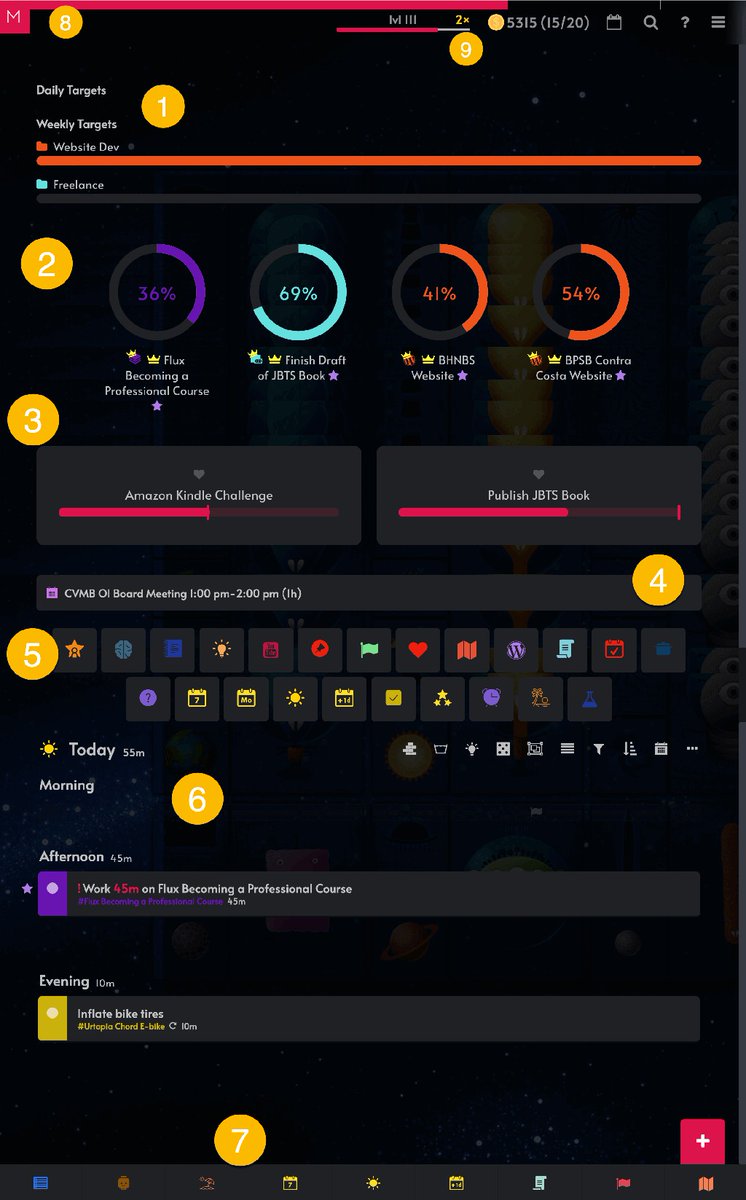
Day Progress Bar: This feature indicates the progress made on completing the current day's task.
Read the full article: My Amazing Marvin Setup for the Desktop App
▸ https://t.co/Y46dhXo7Of
#Macautomation #macuser #macpoweruser #macautomation
If you have trouble building this macro, get in touch with me and I’ll help you out.
Read the full article: How to Use Keyboard Maestro to Automate ScreenFlow and Other Applications
▸ https://t.co/v5rUbuiiuq
#Macuser #Macpoweruser #Macautomation #AutomateTasks

All I have to do is type my stringer trigger and the Alfred window will appear and automatically open in Clipboard History view.
Read more 👉 https://t.co/erG1FbGWrf
#Macuser #Macpoweruser #Macautomation #macautomation

If you have any questions, please don’t hesitate to ask in the comment section below.
Read the full article: How to Use Keyboard Maestro to Automate ScreenFlow and Other Applications
▸ https://t.co/7NZENDIc1M
#Macuser #Macpoweruser #Macautomation #AutomateTasks
But it when it comes to Mac automation programs, there some truly automated tasks that can be performed without a required trigger
Read the full article: 7 Trigger-less Keyboard Maestro Automations You Should Know About
▸ https://t.co/o8bCBt5L71
#Macuser #Macpoweruser

The beauty of using both applications is that you can for example assign a hotkey to a KM macro, and then assign that same hotkey in BTT and trigger it with a finger gesture.
Read more 👉 https://t.co/8NajYVLz5f
#Macuser #Macpoweruser #Macautomation
BetterTouchTool, Keyboard Maestro, and Hazel can trigger one or more menu items and move saves clicking or punching keyboard shortcuts.
Read more 👉 https://t.co/vPErIS73jb
#Macuser #Macpoweruser #Macautomation #ExternalHardDrive #AutomaticallyPerformSearch
Last Seen Hashtags on Sotwe
adanatravesti
Seen from Turkey
Olympic_City
Seen from United States
BuildingsDepreciate
Seen from United States
hotwifevn
Seen from Argentina
Momsonn (*filter:videos)
Seen from Poland
snowbunny
Seen from India
กางเกงในใส่แล้ว
Seen from Thailand
nolimit()* filter:Native_video
Seen from Australia
shevenom
Seen from India
tranny
Seen from United Kingdom
Most Popular Users

Elon Musk 
@elonmusk
241.5M followers

Barack Obama
@barackobama
119.1M followers

Cristiano Ronaldo
@cristiano
113.6M followers

Donald J. Trump
@realdonaldtrump
111.8M followers

Narendra Modi
@narendramodi
107.2M followers

Rihanna
@rihanna
98.5M followers

NASA
@nasa
92.4M followers

Justin Bieber
@justinbieber
91.7M followers

KATY PERRY
@katyperry
89.5M followers

Taylor Swift
@taylorswift13
83.4M followers

Lady Gaga
@ladygaga
74.9M followers

Virat Kohli
@imvkohli
72.6M followers

Kim Kardashian
@kimkardashian
70.7M followers

YouTube
@youtube
68.8M followers

Neymar Jr
@neymarjr
65.6M followers

Bill Gates
@billgates
64.9M followers

Selena Gomez
@selenagomez
62.6M followers

The Ellen Show
@theellenshow
62.3M followers

CNN
@cnn
61.8M followers

X
@x
60.8M followers