

Top Tweets for #powershelltips

Why did the XML node apply for witness protection in PowerShell? Can you help find its alias—IDREF?"
Source: https://t.co/XT2Ob0GV5G
#ScriptingLife #PowerShellCommunity #XML #PowerShellTips #xml #node


🎯 PowerShell Tip: Understanding Arrays
Arrays are key to organizing data in PowerShell. 🖥️ In part 1 of the series, MVP Aleksandar Nikolić & Dr. Tobias Weltner explain how to master them.
🔗 Read here: https://t.co/Cpqm910mMX
#PowerShell #ITAutomation #PowerShellTips
🔧 New PowerShell Tip is Live! 🔧
Want to write cleaner, more efficient PowerShell code? Check out the latest PowerShell tip by MVP @alexandair and Dr. @TobiasPSP on "Assigning Results Correctly for Better Code".
👉 https://t.co/PXXVPjJ7df
#ITAutomation #PowerShellTips

Can I bribe the Powershell localhost with cookies to give me its name?
Source: https://t.co/lFqL96EhAX
#powershellscript #powershelltips #softwaredevelopment #development #synonyms #scripting
🚀PowerShell Tip #13 is Live!🚀
Today, Dr. @TobiasPSP & MVP @alexandair are back with another must-know tip: Hidden configuration variables in #PowerShell.
Don't miss out on this last tip of the series 💡
🔗 Read here: https://t.co/XvJPwqyyq7
#Scriptember #PowerShellTips

Stuck on "Could not load file or assembly S" in PnP.PowerShell? Verify your file paths and dependencies – troubleshooting is part of the game
https://t.co/KpaNINEdTO
@CsharpCorner #PowerShell #CodingErrors #CodingProblems #PowerShellTips #thursdayvibes #programming

🔥 Did you know that you can list all keyboard combinations available in the PowerShell prompt the following cmdlet ? 👇
❓ Get-PSReadLineKeyHandler
#PowerShell #PS1Tips #PowerShellTips
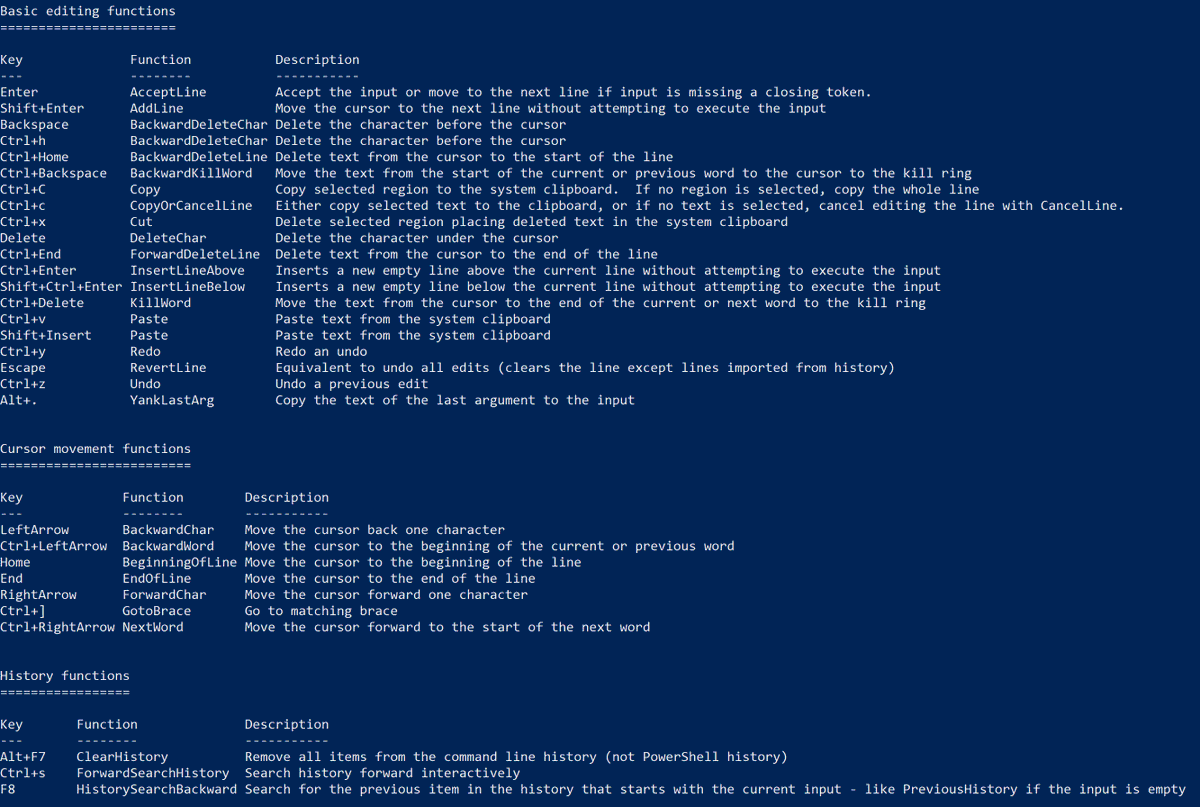
🔥 Did you know that you can list all keyboard combinations available in the PowerShell prompt the following cmdlet ? 👇
❓ Get-PSReadLineKeyHandler
#PowerShell #PS1Tips #PowerShellTips
👇 Quick way to find pending reboot after update 👇
(New-Object -ComObject "Microsoft.Update.SystemInfo").RebootRequired
#PS1Tips #PowerShellTips
A quick way to prevent Windows session to lock, go into standby or hibernate:
#PowerShellTips #PS1Tips #PowerShell
Start-Process cmd -ArgumentList "/c PresentationSettings /start" -NoNewWindow
Start-Process cmd -ArgumentList "/c PresentationSettings /stop" -NoNewWindow

A quick way to convert a PS1 file to EXE using IExpress (installed by default on Windows)
#powershell #powershelltips #PS1Tips #PS1WPF
You can convert a PS1 file to EXE with iexpress which is installed by default on Windows
#powershell #powershelltips #PS1Tips #PS1WPF @Hoorge

#DYK that you can have a kinda *grep* in #Powershell?
If you prefer a *unix syntax or have to switch between a lot of machines, this a little bit balm on the soul. 😂
#powershelltips

Block or unblock keyboard combinations on your devices with PowerShell
#powershell #PS1Tips #powershelltips
https://t.co/3CMzVnHDY8

PowerShell and Azure Key Vault: Store password on Azure Key Vault and retrieve them with PowerShell
#powershell #powershelltips #PS1Tips #azure #keyvault
https://t.co/KiSbTzKb8N

Send a mail using the current outlook user account without to provide credentials with PowerShell
#powershell #PS1Tips #powershelltips @Hoorge
https://t.co/81EZ7HbpR1

You can enable or disable device location as below or with Intune:
#powershell #PS1Tips #powershelltips #MSIntune #Intune #MEMpowered

You can quickly open Windows 10 settings part like storage, display, printers... with #PowerShell
#powershelltips #PS1Tips
start-process ms-settings: Setting name
All settings: https://t.co/SkJDRivmuO

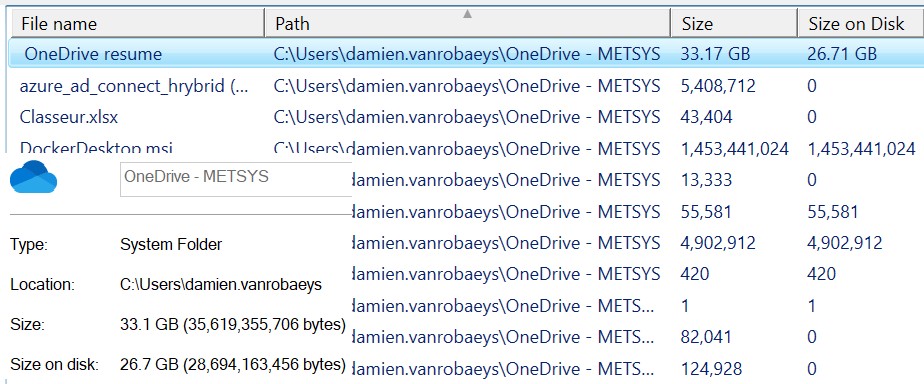
OneDrive and PowerShell: Get size and size on disk
#powershell #PS1Tips #powershelltips #onedrive
@Hoorge @DeploymentMX @KelvinTegelaar
https://t.co/BiLNduvM8I
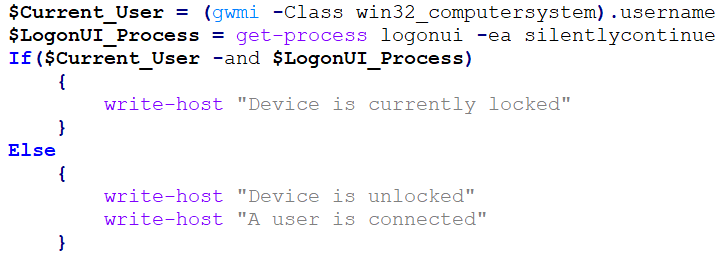
You can easily check if a device is locked or not, if a user is logged in or not with PowerShell
#powershell #powershelltips #PS1Tips
Working on a quick systray user tool:
- Display device infos
- Open Quick assist
- Open Company portal
- Sync device (Intune + MECM)
- Send devices logs to support (Upload a ZIP on a sharepoint)
#powershell #powershelltips #PS1Tips #XAML #WPF #PS1WPF
Most Popular Users

Elon Musk 
@elonmusk
240.2M followers

Barack Obama
@barackobama
119.3M followers

Donald J. Trump
@realdonaldtrump
111.6M followers

Cristiano Ronaldo
@cristiano
109M followers

Narendra Modi
@narendramodi
107M followers

Rihanna
@rihanna
97.3M followers

NASA
@nasa
92.1M followers

Justin Bieber
@justinbieber
90.6M followers

KATY PERRY
@katyperry
86.8M followers

Taylor Swift
@taylorswift13
80.6M followers

Lady Gaga
@ladygaga
72.2M followers

Kim Kardashian
@kimkardashian
69.4M followers

YouTube
@youtube
68.6M followers

Virat Kohli
@imvkohli
68.6M followers

Bill Gates
@billgates
63.4M followers

The Ellen Show
@theellenshow
62.5M followers

CNN
@cnn
61.9M followers

Neymar Jr
@neymarjr
61.1M followers

X
@x
60.9M followers

Selena Gomez
@selenagomez
59.9M followers