

Top Tweets for #pswritehtml

The new version of #PSWriteHTML for #PowerShell fixes a long-standing issue where conditional highlighting wasn’t visible in responsive view. Update-Module PSWriteHTML for a fix

Did you know that new version of #PSWriteHTML offers automatic switching between Responsive and ScrollX modes allowing for better data management and accessibility. New version also fixed long outstanding issue with ScrollX column misalignment 🚀 It was bugging me a lot 😁😆

For those using #PSWriteHTML, here's a short blog post about New-HTMLInfoCard and updates to New-HTMLSection in so you can enhance your HTML reports in #PowerShell
👉https://t.co/XwR23TXaBy - Enhanced Dashboards with PSWriteHTML – Introducing InfoCards and Density Options
Here's a little sneak-peak what I'm working on. Had to create new features for #PSWriteHTML to make this happen, but looking very nice :-) The sections are now more dynamic as well!
Full assessment for Enterprise Apps in #office365 #powershell

I've been playing with the #dotnet library the last few days, which is a helper library to write HTML reports/pages/emails in C# without knowing HTML syntax. It's #PSWriteHTML, but for NET. Does the "design" on the right make it easy to understand what is going to happen?


Here's a demo of my #PowerShell module called TheDashboard. It's a work in progress. Its goal is to integrate HTML reports produced by #PSWriteHTML, #Testimo, and #GPOZaurr into a single page that's stored on #SharePoint or IIS. Let me know what you think https://t.co/m70dgTrjBy
ColumnVisibility button coming to #PSWriteHTML soon. A small addition, but it may be useful if you've too many columns in your table. #PowerShell #HTML #JavaScript
I've released new version of #PSWriteHTML https://t.co/tx66sLXJZt - it has couple of fixes, but the most important one is for sorting in "offline" mode. Should now provide icons properly.
If you ever played with advanced #PowerShell objects you already know that exporting them to CSV or HTML table can be a pain. Here's a blog post about the ConvertTo-FlatObject function that makes it very easy https://t.co/g9bFCidc0A As usual #PSWriteHTML was also updated.
25 lines of #PowerShell to get that displayed in HTML, coming to #PSWriteHTML, just after I incorporate it into Testimo somehow for the summary page.


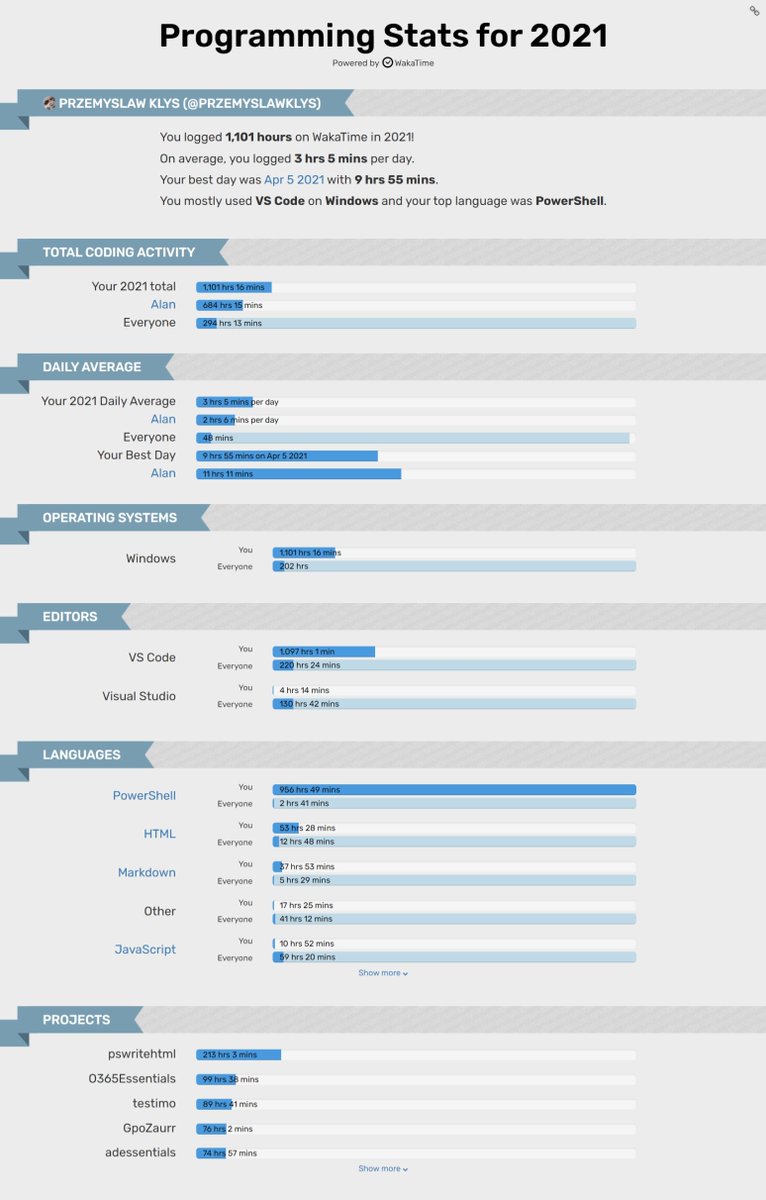
My year in numbers - I spent 950 hours doing #PowerShell in 2021 and investing over 200 hours in #PSWriteHTML, 99 hours in O365Essentials, and just 70 hours for #Testimo, #GPOZaurr, and ADEssenials. In comparison, I spent 1165 hours in 2020 - 291h PSWriteHTML, 527h GPOZaurr.
Added FuzzySearch to #PSWriteHTML Will be available in the next version. No more typos being an issue. One switch away :D #powershell https://t.co/sEZnNDFNiq


Advanced navigation where each link is a separate page is coming to #PSWriteHTML. Should help people with advanced dashboards. Not great for portability, as it creates a separate file per page but advanced dashboards will get some new cool features #PowerShell 🔥

1.5 year, 1231 commits to getting #PSWriteHTML to where it is now. Today achieved 300 stars. Hope to get it even better in the future. I never imagined it would be that easy to create advanced HTML reports/pages/outputs as it is now. #PowerShell is great! https://t.co/sEZnNDFNiq
I'm so lazy that I have to resort to 350 lines of #PowerShell including all the texts to provide a plan for #Office365 migration. Shamelessly, I love what I created and what #PSWriteHTML can do! 🥰😇
@it_tinuwalther @adbertram @Stephanevg Did you see #PSWriteHTML? It makes it even easier https://t.co/sEZnNDFNiq - It's mature, and simplifies reporting heavily. 0 HTML, 0 CSS, 0 JS knowledge is required to generate something like attached code. Just PowerShell. And what you see there is just around 150 lines of code.

I had big plans for the weekend. Unfortunately got sidetracked with #PSWriteHTML and added a new way to build tabs, vertical tabs, wizard, inline tabs... oh well maybe next weekend will be better and force once I'll do what I've planned. #PowerShell #CommingSoon
Adding Organization Charts to #PSWriteHTML. Not a huge deal but maybe will help to visualize the business structure with few lines of code. #PowerShell
Last Seen Hashtags on Sotwe
Most Popular Users

Elon Musk 
@elonmusk
240.2M followers

Barack Obama
@barackobama
119.3M followers

Donald J. Trump
@realdonaldtrump
111.6M followers

Cristiano Ronaldo
@cristiano
108.9M followers

Narendra Modi
@narendramodi
107M followers

Rihanna
@rihanna
97.3M followers

NASA
@nasa
92.1M followers

Justin Bieber
@justinbieber
90.6M followers

KATY PERRY
@katyperry
86.8M followers

Taylor Swift
@taylorswift13
80.6M followers

Lady Gaga
@ladygaga
72.2M followers

Kim Kardashian
@kimkardashian
69.4M followers

YouTube
@youtube
68.6M followers

Virat Kohli
@imvkohli
68.5M followers

Bill Gates
@billgates
63.4M followers

The Ellen Show
@theellenshow
62.5M followers

CNN
@cnn
61.9M followers

Neymar Jr
@neymarjr
61.1M followers

X
@x
60.9M followers

Selena Gomez
@selenagomez
59.9M followers