I am creating a set of reusable progress indicators and charts for #PowerApps#CanvasApps using #SVG for those of us that can't use PCF. Will post the code soon.
I am creating a #finance#android#mobileapp to track expense/ income. I think i am 40% done, the MVP is there. It has parent categories, budget by month/quarter/year and transaction scheduling.
What features would you like to see? #BuildingInPublic
Finished my first unattended #PowerAutomateDesktop wf that search invoices in #SAP and downloads then from another web app (PDF is saved in the second app). I did a Power App to upload a list of documents to search and start/stop the process. Very cool!
@victorhg My native is pt, but I am learning French using English. I did not like the duolingo pt-fr, and now I am trying another app that only has en-fr. Some things I need to associate/translate in pt, some things in en, but overall it works. I don't think it makes it harder.
@giovannibassi@1cadumagalhaes Ele tem poucas features mais avançadas na versão paga (uns $295 lifetime). Da pra fazer muita coisa com a versão gratuita e eu acho fácil de usar.
4 New #PowerApps Functions are now available 😲
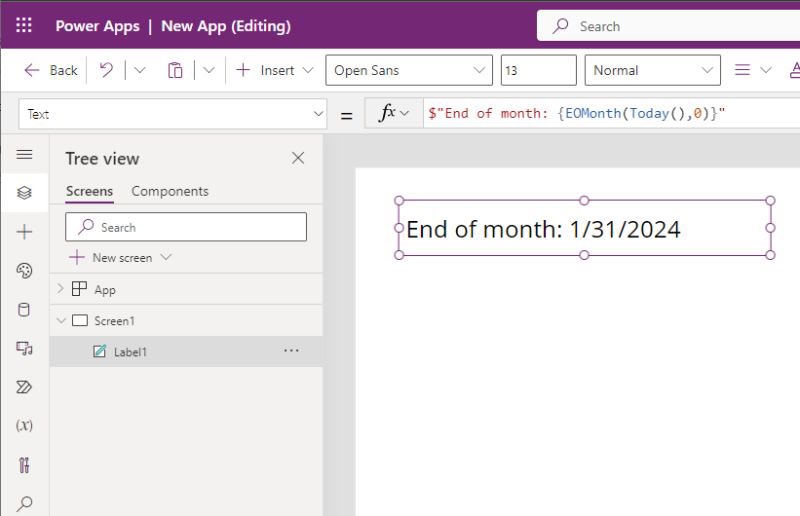
EOMonth is my favourite 📆
It returns the end of the month for a given date
Example: EOMonth( Date(2024, 1, 5), 0) = 1/31/2024
Other new functions are: EDate, Dec2Hex, Hex2Dec
#PowerAppsTip 🔥🔥
You can make a time-picker⏰
with only 1 line of code😲
Get the code here 👇
Items property of a dropdown:
👉 ForAll(Sequence(96), Time(0,Value*15-15,0))
@devkeydet The documentation doesn't mention how to return/use the approval outcome. Example of usage would be to export the item as CSV if approved, send an email to notify the requestor of the outcome or call other workflows.
Is this supported or do I need to query the approvals table?
You're wrong if you think #PowerApps only has 10 fonts
Here's my canvas app that uses 177 custom fonts 😲
Want to know how I did this? It's dead simple 👇
...
Go to the Font property of any label then type in a font name like this:
"Times New Roman"
If the font is supported by your browser the text will appear in the new font. But if it's not supported, the label will default to Open Sans.
To define the fallback fonts yourself do this:
"Franklin Gothic, Helvetica, Arial"
📢 We're thrilled to announce that #PowerAutomate Work Queues are now Generally Available! 🤖✨ Read the announcement here https://t.co/Jk8fIUWdqz and start deploying work queue-based #hyperautomations to production today! 🌐Learn more https://t.co/Qw0KWbMnHR