a Hermes Agent community member built a context engine plugin for long conversations:
it keeps every message of a session in a local SQLite store, folds the older turns into layered summaries, and builds the live prompt from those summaries plus the most recent messages.
the agent gets its own recall tools, so when it needs an exact line from a while ago it pulls that page back.
it plugs into the context engine slot Hermes exposes in config. for anyone who runs Hermes on long jobs and wants the earlier detail within reach.
https://t.co/2hrVqDBLJV
Okay, everyone wants us to give the unbiased facts.
Jev compaction here has a lot of problems. The biggest problems:
- When I ran it on our public compaction eval (that you can run too), it resulted in a programmatic rule, that you dont need any Jev or other model for - it simply removed all tool calls from the chat history
- This means you could do it for free, first of all, but second of all, it means you run into a viscious cycle.
Every compaction, there are less and less tool calls to remove from the chat history, meaning it compacts less and less tokens, until there is no room for compaction, and you hit a hard stop, and can't compact anymore.
- And, if you are cycling like this, every compaction breaks your cache, so you're paying 10x the price on input tokens, and keeping more input tokens each round means a higher baseline cost after compaction as well.
Here's the full reproducible eval that you can run against Hermes Agent between the two (Hermes' vs Jev's):
https://t.co/0vJV5u10Cn
a Hermes Agent community member built a read-only web page for everything a Hermes install keeps:
your skills and where each one lives, past conversations with search, the cron schedule, what each session cost, memory, plugins and health, read straight from the files and databases Hermes keeps.
it only reads them, so you can leave it open while the agent is working.
https://t.co/6AbOCeRhWr
I'm trying to get a read on how people run Hermes Agent for more than one person today, at home or at work.
- one profile per person on the same box
- one gateway serving several people
- a hosted agent each on a team balance with Hermes Business
- something else?
tell me what you run and for how many people.
several sessions open side by side and one place to type: the session under your cursor is the one that hears you.
this is the Hermes Desktop I want to work in, a few agents busy at once and me steering whichever one I am looking at.
this is the one a lot of you have been asking for: a plugin catalog inside Hermes Agent!
one place to find plugins, and a Nous review on every entry before they are listed.
want your agent on another chat platform, a new pane in Hermes Desktop, a browser tool, an integration for your niche? open the Plugins page, pick it, add it to your agent.
and if you have been building on Hermes Agent, this is your moment: a plugin you publish today can be a feature everyone installs tomorrow. the checklist is here:
https://t.co/WFEw6tRGp7
your Hermes Agent can brief itself on your project before every session. this prompt writes the file that does it.
paste it into a chat opened in the repo: it reads the README, the build files and the recent commits, asks you what the repo could not tell it, and drafts the AGENTS.md that Hermes loads at the start of every session in that folder.
copy / paste prompt in the first comment.
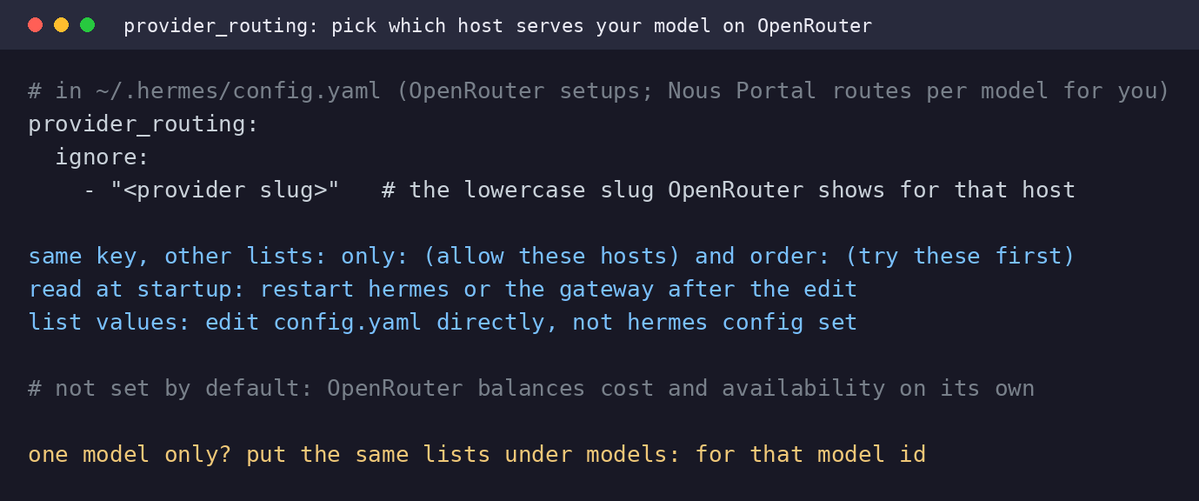
Hermes Wingtips #74: `provider_routing`
on OpenRouter, one model name is served by several hosts, and OpenRouter picks the host for each request.
but what if one of those hosts is rate-limiting you today?
`provider_routing` in config.yaml lets you choose.
list a host under `ignore` and your requests for that model stop going there, even when it is the cheapest one. the other hosts keep serving as before.
on Nous Portal you can skip this step: the Portal picks the host for every model on your behalf, so there is nothing to set.
one thing to keep from that: nothing in that run is special to Teknium's setup.
`/goal` kept the objective alive when the agent would otherwise stop and wait.
the workers came from one tool, `delegate_task`, each in its own git worktree so they never wrote over each other.
and the standards they followed came from a skill his agent had written for itself, one correction at a time.
all of it is in the Hermes Agent you install today.
go read the blog it is super interesting :)
I put every Hermes Autopilot prompt on one page.
https://t.co/ulCgaImY0r
an Autopilot is a prompt you paste into a fresh Hermes Agent chat, and it only works inside an agent: it reads your memory, your past sessions or your own config, things a chat window cannot see
four so far:
- one interviews you and saves how you work to memory
- one turns the task you just finished into a reusable skill
- one audits your own setup with hermes doctor and hands you the three changes worth making
- one writes your Monday review from last week's sessions and schedules itself
each one ran on a real Hermes Agent box before it was posted. copy the text, paste it, answer what it asks.
here are the answers to the questions you asked most under yesterday's Hermes Business announcement:
(1) where your data lives
in an isolated tenant per team on Nous infrastructure. Enterprise deployments keep it on infrastructure you control.
(2) your own machines
Hermes Enterprise is the same stack on-prem or in your private cloud, with SSO, SLAs and white-glove onboarding. Business is the self-serve version on Nous infrastructure.
(3) the team skill library
a skill any member builds is published to the team library and becomes available to everyone's agent.
(4) one balance, one hosted agent per person
the team has its own balance, separate from your personal one. you invite colleagues by email from the Team page, each member gets their own hosted Hermes Agent and draws from the team balance under a spend cap you set.
(5) roles and channels
owners and admins manage roles, caps and API keys; members sign in and use their agent, on Discord, Telegram, Slack and WhatsApp through the Team Gateway, plus the terminal, the Desktop app and the Cloud.
(6) models
every model on the Nous inference API, plus your own provider keys.
Hermes Wingtips #73: `gateway[.]message_timestamps`
your agent reads your messages through Telegram or Discord, but it does not see when you sent them.
`message_timestamps` under `gateway` in config.yaml changes that.
with `enabled:true`, every message you send carries its send time in front, for the model only. the chat you read does not change and the transcripts on disk stay clean. the agent can tell this morning from last week, notice a long gap, and answer with the right day in mind.
your messages only. the agent's replies and the system prompt are untouched.
Tonbi recorded a tour of the MCP Command Center in Hermes Desktop!
a few things about MCP in Hermes Agent that come up a lot in the community, and how the current release handles them:
(1) per profile
each profile keeps its own MCP servers and its own logins, and the Capabilities tab has a scope selector so you see the set for the profile you are working in.
(2) signing in from your laptop to a remote Hermes
when your agent runs on another machine, the Desktop app hosts the OAuth callback on your machine and hands the authorisation to the gateway.
(3) tokens
once you sign in, the token is cached and reused until it can no longer be refreshed. when that happens the server is parked and the app tells you once a day, with a Sign in and a Disable button.
(4) the catalog
every entry was reviewed by Nous Research and merged by PR. at install you get a checklist of the server's tools and untick the ones you do not want your agent to see.
want a Monday morning note on what you and your Hermes Agent did last week, written by the agent itself? paste this prompt into a fresh chat.
it searches your sessions from the last seven days, writes a ten-line review, and shows you the scheduled job: the day, the hour, the prompt it will run and where it lands.
copy / paste prompt in the first comment.
I read the 150+ replies under this question, here is what you said:
- a mobile app, iOS and Android, is the number one thing
- tokens came up a lot. an agent that reads your files, runs tools and keeps memory does more work per turn than a chat window, and you want to see where that work goes
- an easier first hour: which surface for what, how to run several agents
- a pairing guide for local models, which model for which card. it is now done on Hermes Desktop!
- Chrome profiles in browser use: pick which Chrome account the built-in browser opens with. it is also now integrated in Hermes Agent :)
- and a few asks are things that are already live: fallback providers for rate limits, hermes backup and hermes import to move an install, hermes sessions import to bring conversations in, /handoff to move a session between Telegram, Discord and CLI. I am sending every linked documentation in the first comment
your feedback is clear and the team has the full list. thank you @HermesWatcher for asking it.
Hermes Agent community for the win🪽
a few of you asked which Hermes Agent surface to use. there is no rule, it is one agent behind all of them.
here is what I do:
terminal when I am in a repo and want to watch the tool calls.
Hermes Desktop the rest of the day: several chats open, settings without touching yaml, the built-in browser, bots in Bot Mode.
Discord from the phone: nudge a task, read the result, say yes to a step. /handoff discord from the terminal moves a running conversation over.
Hermes Cloud underneath, so the gateway and the cron jobs keep running when the laptop is closed. Desktop talks to it as its backend.
and when I want a second agent that does not share memory with the first, hermes profile create.
https://t.co/5cIOWqT8tR
Hermes Business is live on Nous Portal, and it answers the question I got most from teams this month:
"how do we run this for several people without giving everyone their own account?"
one team, one balance. you invite colleagues by email from the Team page, set a spend cap per member, and every one of them gets their agent on the channels they use. any skill one person builds lands in the team library and every other agent on the team can use it.
self-serve on Nous infrastructure today. and for the companies that need it on their own machines, Hermes Enterprise runs the same stack on-prem or in your cloud, with SSO and SLAs.
the Microduck is open source down to the daemons. the simulator runs the same robotd, tofd and robotctl binaries the real one boots, against a MuJoCo body. so I can start to train it before receiving it IRL :)
what ran on my RTX 5090 box today, all sim:
- standing: control loop 50.0 of 50.0 Hz, 302 ticks, 0 missed, trunk at 0.116 m
- walking: 8 s forward on a single intent, still standing after
- their whole test suite: 57 suites, 1381 passed, 0 failed
- first training probe on the GPU: 1024 environments, 0.65 s per iteration, 1.9 GB of VRAM
what I want to build next: a Hermes Agent tool that talks to robotd, then our own walking policy trained.







![witcheer's tweet photo. Hermes Wingtips #73: `gateway[.]message_timestamps`
your agent reads your messages through Telegram or Discord, but it does not see when you sent them.
`message_timestamps` under `gateway` in config.yaml changes that.
with `enabled:true`, every message you send carries its send time in front, for the model only. the chat you read does not change and the transcripts on disk stay clean. the agent can tell this morning from last week, notice a long gap, and answer with the right day in mind.
your messages only. the agent's replies and the system prompt are untouched.](https://pbs.twimg.com/media/HSPuyX4WkAAhdkg.jpg)


