How to access Polymarket in India without a VPN.
Indian ISPs (Jio, Airtel, Vi, BSNL) have blocked @Polymarket at the DNS level.
Steps to fix it ⬇️
━━━━━━━━━━━━━
ANDROID
1. Settings → Network & Internet (or Connections)
2. Tap Private DNS
3. Select "Private DNS provider hostname"
4. Enter: https://t.co/vGTkSv7Un9
5. Save
Alternative hostname: https://t.co/uozbWpgpS7
Works on both Wi-Fi AND mobile data. Encrypted by default. Easiest method of all.
━━━━━━━━━━━━━
iPHONE / iPAD
Wi-Fi only (iOS limitation):
1. Settings → Wi-Fi → tap (i) next to your network
2. Configure DNS → Manual
3. Remove existing entries
4. Add 1.1.1.1 and 1.0.0.1
5. Save
For mobile data: install the "1.1.1.1: Faster Internet" app by Cloudflare from App Store. It sets up a system-wide profile.
The app uses iOS's VPN framework but is NOT a real VPN. It doesn't hide your IP or change location. It just reroutes DNS queries system-wide. Free, no signup, made by Cloudflare.
━━━━━━━━━━━━━
WINDOWS 11 / 10
1. Settings → Network & Internet → Wi-Fi (or Ethernet)
2. Click your active connection
3. Scroll to "DNS server assignment" → Edit
4. Change to Manual → toggle IPv4 on
5. Preferred: 1.1.1.1 | Alternate: 1.0.0.1
6. Save
Press Windows key → type "cmd" → right-click "Command Prompt" → Run as administrator → Yes. Black window opens. Type ipconfig /flushdns, press Enter.
━━━━━━━━━━━━━
macOS
1. System Settings → Network
2. Click your active connection → Details
3. Click DNS in sidebar
4. Click + and add 1.1.1.1, then 1.0.0.1
5. Remove existing ISP entries (select, click −)
6. OK → Apply
Open Terminal: press Cmd + Space → type "Terminal" → Enter. Copy-paste sudo dscacheutil -flushcache; sudo killall -HUP mDNSResponder, press Enter, type your Mac password (invisible while typing, that's normal), press Enter.
━━━━━━━━━━━━━
ROUTER (covers every device on Wi-Fi)
1. Open 192.168.1.1 or 192.168.0.1 in browser
2. Login (credentials usually on router sticker)
3. Find DNS settings (under WAN, Internet, or DHCP)
4. Primary: 1.1.1.1 | Secondary: 1.0.0.1
5. Save and reboot router
Best option if you want laptop + phone + smart TV + everything to work without per-device setup.
━━━━━━━━━━━━━
VERIFY IT WORKED
Open browser: visit https://1.1.1.1/help
It'll confirm you're using Cloudflare DNS + whether DNS-over-HTTPS is active. Then try polymarket(dot)com
━━━━━━━━━━━━━
IF DNS ALONE DOESN'T WORK
Some ISPs use Deep Packet Inspection (DPI) or SNI-based blocking. In that case:
• Use Firefox or Brave → enable DNS-over-HTTPS in settings (encrypts the DNS query so ISP can't see it)
• Android Private DNS method above already does this by default
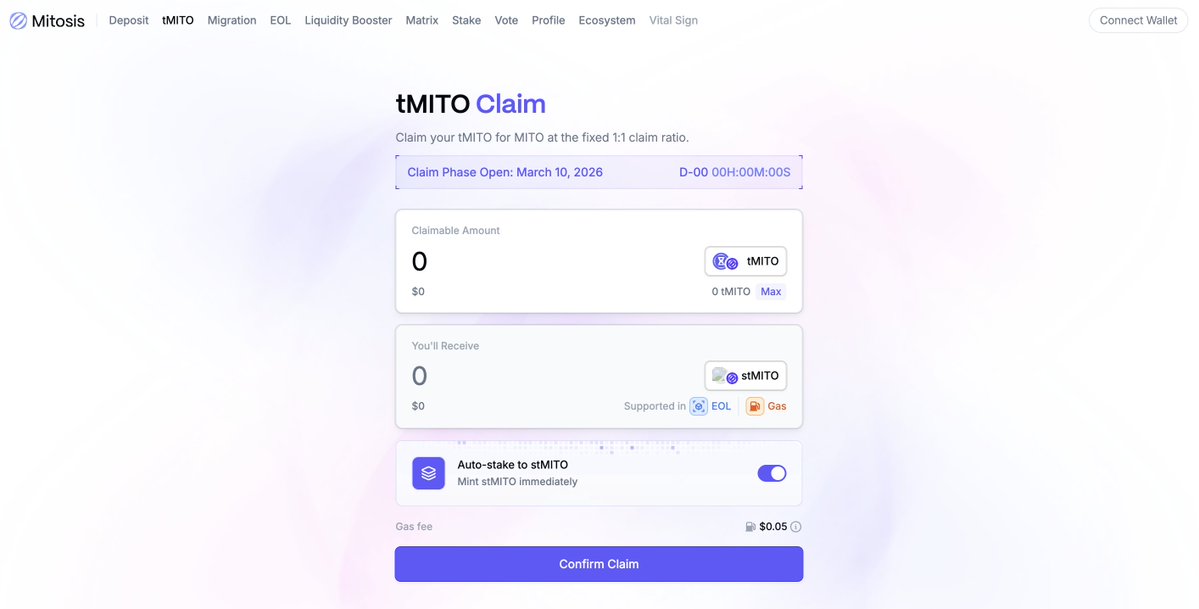
Big News on @MitosisOrg tmito conversion
While digging into mitosis sub-domains, I saw a testnet page which had an option for tmito conversion.
Looks like the team is still cooking up…
And I guess we’re all going to convert our tmito to mito soon.