Got the chance to catch up with some fellow solution enginners and talk out biggest takeways and perspectivies on Microsoft Build 2026! You can view the full video here: https://t.co/sNeNP1Vdrb
A few things we talked about
One customer had 1,400 agents running with no clear owner or governance on any of them. Agent 365 is a direct answer to that problem.
Scout already changing how I do things. I had it reach out to one of my co-hosts, monitor his reply, and book the meeting automatically. That's a different category of tool than what I've ever had!
The Purview SDK changes in Foundry move security configuration out of the developer's lap and back to the governance team.
I wanted to share something that I'm quickly learning as I build things with AI and try to use those amazing things I'm building and sharing with others. I'm realizing that AI can help us build some amazing things and share that with others, but sometimes it can be too much. I have to realize that there is a human on the other side. If I'm sending something, say, as an email, there's a human that has to digest all of that stuff that I created with AI. Sometimes it's just way too much. Understanding your audience is super important when you're creating this stuff. A thousand-word email can be easily glazed over versus helping our audience understand what they need to pull out of it and be more in sync with how we're communicating the stuff that we're building with AI.
There's a story behind this video.
A lot of you have seen my meta prompt for the weekly manager 1:1 update. I was proud of that build, and honestly I still use a lot of it. But something came out of it that I wanted to share.
I added a full briefing package to the workflow. Executive summary PowerPoint, an HTML web app covering four key sections, the whole thing emailed out an hour before the meeting. I thought my manager would love it.
His reaction? "This is cool, but honestly those four bullet points you sent me in Teams earlier — that's all I needed for this conversation."
That's the thing about building with AI. Tools like Copilot Cowork make it easy to spin up impressive outputs fast. So we do. And sometimes we overbuild without realizing it.
What I learned through this is to know your audience before you ship. Because as AI moves toward a consumption model, every output costs something. If you're generating things nobody reads, you're burning tokens you don't need to burn. That's not just a workflow problem, it's a cost problem.
Build for the person. Not the output.
Full story in the video
I wanted to go old school with how I consume my morning news. Instead of scrolling through feeds and tabs, I thought about using Copilot Cowork to build out a daily newsfeed, but style it like an old school newspaper. I am really loving it, so I wanted to share it with you.
It's called The Copilot Chronicle and I built it as a Copilot Cowork prompt.
Here's what it generates every morning:
External AI news covering Microsoft Copilot, Anthropic, Google Gemini, and OpenAI from the last 24 hours, plus internal field updates pulled directly from your Outlook and Teams via Microsoft Graph signals. Everything is hyperlinked back to the source. No fabricated content, no filler.
The output is a full newspaper-styled HTML email with a masthead, two-column layout, lead story, section banners, and a ticker. Sized for a 5-minute coffee read.
Pro tip: The best way to use this prompt is to drop it into Copilot Cowork and ask Copilot to create a skill from it. Once it's a skill you never have to paste the prompt again. Just schedule it to run at whatever days and times work for you and it shows up automatically.
That's the real power of Cowork. Build it once, schedule it, and let it run.
The full prompt is in my Copilot Playground on GitHub if you want to grab it and adapt it for your own role and internal sources.
👉 https://t.co/qDw6dgiifk
May the 4th Be With Your Productivity.
A long time ago, in a meeting far, far away… someone said AI would change everything. Turns out they were right.
Governance isn't a barrier, it's a maturity accelerator! Before enabling new features, complete 5 checkpoints: compliance assessment, define scope, establish communication, set feedback cadence, and plan feature lifecycle. Prepare your organization for smooth transitions.
Watch full video here: https://t.co/A3LDLRHTpY
#TechGovernance #ITManagement #Compliance
Before diving into AI Frontier, ask these 5 questions: Do you have AI governance? Stable M365 deployments? Compliance assessment? IT bandwidth/champion? Clear business outcome? Answering 'yes' to most means you're ready. If not, focus on building those foundations first.
Watch full video here: https://t.co/A3LDLRHTpY
#AIGovernance #TechStrategy
Microsoft's Frontier program offers early access to new M365 Copilot AI features before general availability. It's a strategic advantage for competitive velocity and direct product influence, but requires careful governance to avoid security and compliance headaches.
Watch full video here: https://t.co/A3LDLRHTpY
#AICopilot #TechLeaders
Lately I've been having a lot of conversations about the Microsoft Frontier Program.
Alot of it started with the Anthropic models rolling into Copilot and Cowork getting a lot of attention, business leaders are starting to ask their IT teams why they don't have access to these capabilities yet. That question almost always leads to Frontier.
So I made a video breaking it all down.
Here's what I keep having to explain in these conversations:
Frontier is Microsoft's early access program for Copilot features that are real and working in your production tenant, but not yet at general availability. That distinction matters more than people realize. Preview features do not carry the same SLA commitments as GA. If you're in a regulated industry, that also means your BAA coverage conversation looks different. These are not reasons to avoid Frontier, but they are reasons to go in with your eyes open.
The other thing I always get asked is when should we actually turn this on?
My honest answer: it depends on how mature your governance is, not how excited your business leaders are. I've seen organizations enable Frontier before they have a feedback loop, a compliance review, or even a security group scoped properly, and it creates more headaches than value. I've also seen organizations use Frontier the right way and completely accelerate their Copilot adoption maturity because it forced them to build the right governance foundation first.
In the video I cover:
- What Frontier actually is and how it fits into the private preview to GA lifecycle
- Why the SLA and BAA conversation matters before you enable it
- The five governance checkpoints your compliance team needs before you flip the switch
- A live admin center walkthrough showing how to scope access and assign Frontier agents like Cowork to specific users
- A phased rollout model and a decision framework you can take straight to your leadership team
- If you're an IT leader, enterprise architect, or anyone getting these questions from your business side right now, this one is for you.
Link in the comments...and here
Blog link: https://t.co/KGDXV5z2zm
Youtube link: https://t.co/CvfuJrJVLF
Here are two more prompts I have been using with Copilot Cowork lately, and both run on a schedule so the outputs just show up in my inbox automatically.
Daily Executive Field Readout:
Runs every weekday at 8:00 AM. Reviews the past 24 hours across my calendar, email, Teams chats, and tasks and surfaces customer commitments I need to deliver on, internal follow-ups I owe my account team, pending responses that could affect deals, risks and blockers, meeting recaps, inbox highlights, and team availability. It also drops a practical AI tip at the end to start the day sharp. Every morning I get an executive summary, a PowerPoint briefing, and an HTML presentation saved straight to my OneDrive.
Monthly Account Review:
Runs on the first business day of every month. Acts as my personal account analyst and digs through emails, Teams chats, meetings, OneDrive files, and CRM data to build a full portfolio review across my healthcare accounts. It surfaces activities completed, active opportunities, revenue signals, key stakeholders, wins with evidence, blockers, and a concrete action plan. Output is an executive summary, a PowerPoint, and an HTML presentation delivered to my inbox.
Both prompts are in my Copilot Playground on GitHub if you want to grab them and adapt them for your own territory and role.
https://t.co/Anoi3jXqfP
Spent some time in Copilot Cowork this week working on my baseball card (it's a Microsoft thing, basically a highlight reel of your wins from the past year).
Cowork started hallucinating a bit. At one point it literally said "I made this up." Honestly, had to laugh. At least it's self-aware.
I get it, it does not have access to certain systems and tried to reason, and figure it out, and fill in the gaps. However, this really shows how important the human element is with AI. Yes, AI is helping us produce more than ever before, but the flip side is we're also making more decisions than ever. Every piece of AI-generated content is a decision point. With the rapid increase in content generated by AI, human review and human judgment are not soft skills anymore, they are core competencies for validating AI output.
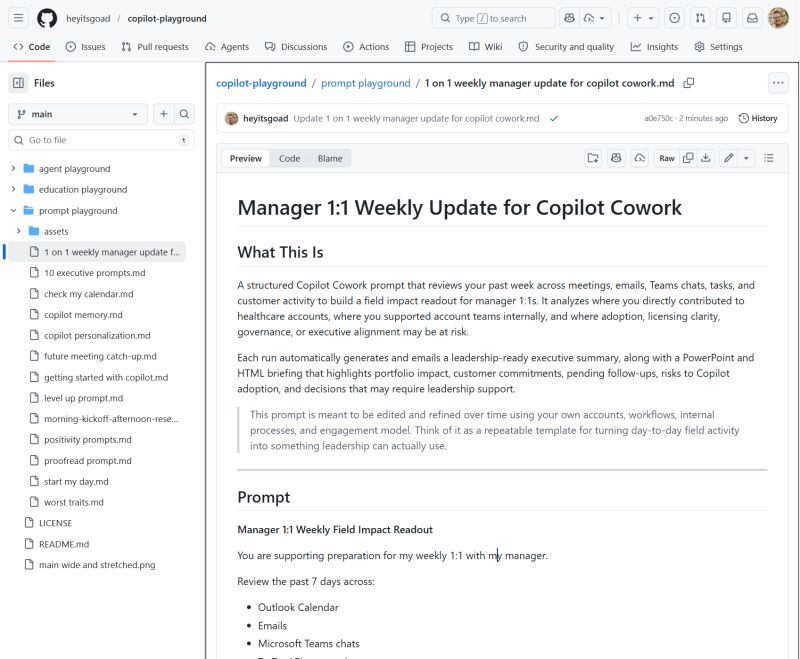
Been using Copilot Cowork and found a new way to automate my 1-on-1 Weekly Manager updates! I now have Copilot automatically look back across my week, meetings, emails, Teams chats, tasks, and customer activity, and turns it into a field impact readout I can actually use in my manager 1:1. It highlights where I directly drove progress and impact, where I supported opportunities behind the scenes, and where things like adoption, licensing clarity, governance, or exec alignment might be starting to slip.
I have this scheduled to run every Tuesday at 1pm (before my manager 1 on 1) and each run auto‑generates and emails an executive summary, plus a PowerPoint and HTML briefing that surfaces portfolio impact, customer commitments, Copilot risks, follow‑ups, and leadership decisions.
I treat it as a repeatable template that turns day‑to‑day field noise into something leadership can act on, and refine it over time based on how I actually work.
The best part of this for me is it auto emails my manager and myself the readout before our connect so we both have a foundation and immediate talking points with PowerPoint and HTML web app!
If you wanna try it, you can view the prompts on my Github: https://t.co/53swwWSxJi
Been digging into where Microsoft is taking M365 Copilot, comparing where we were last year to where things actually stand today. Used Copilot as my thinking partner through a lot of it. Here's how I'm seeing it play out...
Last year, most of us thought about Copilot as a productivity layer.
Write the email. Summarize the meeting. Build the slides. Give me the formula.
Helpful? No question. But honestly, it still felt like an in-app assistant. A really good one, but still. You were always the one driving.
This year feels different.
What's emerging now is Copilot as an execution layer, powered by agents that can actually plan and carry out multi-step work across Microsoft 365. Not just help you do the thing. Actually do the thing.
So instead of helping you draft a follow-up after a meeting, Copilot can now look at the meeting, pull the action items, spin up the tasks, update the doc, draft the comms, and flag the calendar impacts, and keep that work moving over time without you babysitting every step.
That's a different category.
Capabilities like Copilot Cowork are built for exactly this. Long-running, multi-step work, planned, reasoned across tools and files, and executed inside the boundaries of your tenant. This isn't a chat window. It's closer to a work coordinator that knows your environment.
What makes it possible is something called Work IQ, which connects signals across your emails, meetings, files, chats, and business systems so agents actually understand how work gets done across your org. Not just what's in a single doc. The full context.
And that context is what lets agents go from answering questions to running business processes.
Think of it this way, Wave 2 helped individuals move faster inside apps. Wave 3 is starting to coordinate work across apps, with agents that take action, collaborate with people, and operate inside enterprise governance through things like the Agent 365 control plane.
The shift looks like this,
Productivity AI to Execution
AI Prompt-and-response to agent-driven workflows "Help me write this" to "help me move this forward"
That's the trajectory I'm tracking. And for anyone selling into or deploying M365 Copilot right now, this framing matters. Because the conversation is no longer about saving time on tasks. It's about what happens when AI starts owning the workflow.
Here are a few upcoming sessions going deep on Microsoft Agent 365.
Yes, it is a control plane for managing agents. But that’s only part of it.
What often gets missed:
- How Microsoft Defender and Purview plug directly into the Agent 365 experience for security and compliance
- How Entra handles agent identity, permissions, and trust
- Why this architecture matters once agents move beyond simple prompts and start touching real data and workflows, organizations start integrating external 3rd party agents, expanding agents at scale
If you’re building, deploying, or governing agents in M365, this is worth understanding. There’s a lot more happening under the hood than most people realize.
Session lineup (all times in Pacific Standard Time):
Thu, Jan 15 (9:00–10:00 AM PT) — Agent 365: Powering modern work with discoverable, governed and secure agents
Get full visibility into every agent (including shadow agents), reduce agent sprawl with a centralized registry, and see how governance fits into everyday M365 workflows.
Register: https://t.co/hmcvFQWwxu
Tue, Jan 20 (9:00–10:00 AM PT) — Agent 365: Access Control for Agents
Learn how to secure agent access with unique agent IDs, least-privilege permissions, and lifecycle guardrails for who can create, onboard, and manage agents.
Register: https://t.co/lYkR8qpmJP
Tue, Jan 27 (9:00–10:00 AM PT) — Agent 365: Identity, Observability & Interoperability for Enterprise Agents
Walk through the Agent 365 tooling framework, onboarding/managing MCP servers, and the admin observability controls that help enforce policy and trace activity.
Register: https://t.co/9yETf5R0Xd
Thu, Jan 29 (9:00–10:30 AM PT) — Unlocking Agent 365 Security and Governance
See practical demos for unified security and governance: visibility into agent activity, data protection with Purview, threat detection/response with Defender, and identity policy with Entra.
Register: https://t.co/2MfPy9VFra
Need your input!! I’d love to pick the community brains on something! One of the most frequent questions I get is: 'How do I actually keep up with all the Microsoft 365 updates without it becoming a full-time job?'
The Message Center is the source of truth for whats coming and what's changing, but it can be a lot of noise. I usually point people toward custom filters or the MS Planner integration, and I’ve seen some teams build full-on Power Apps or assign dedicated 'triage' leads just to manage the flow.
I’m curious to hear from those of you in the trenches: How are you cutting through the noise? What’s your workflow for spotting the changes that actually matter to your environment?"
The new AI Disclaimer feature in MS Apps admin center (cloud policy), the feature is now configurable in MS Admin Center now under Copilot>Settings>Copilot Actions. This feature allows you to add a disclaimer notice in the Chat UI and allows admins to also add a link to AI policy
I’ve been at Microsoft for a year and finally built a GitHub repo to share what I’m learning, building, and teaching across Copilot and Agent 365. Goal: share the work and spark ideas.
Go easy, just started learning GitHub coding, but welcome feedback!
https://t.co/L1wWlD8pUO