Helping startup founders hire better talent using AI systems
Hiring • Talent • AI Systems
Founder @Nxthiring
Linkedin: 56K+ Followers
Instagram: 31K+ Follower
People think learning AI takes months.
It's really just a couple of hours.
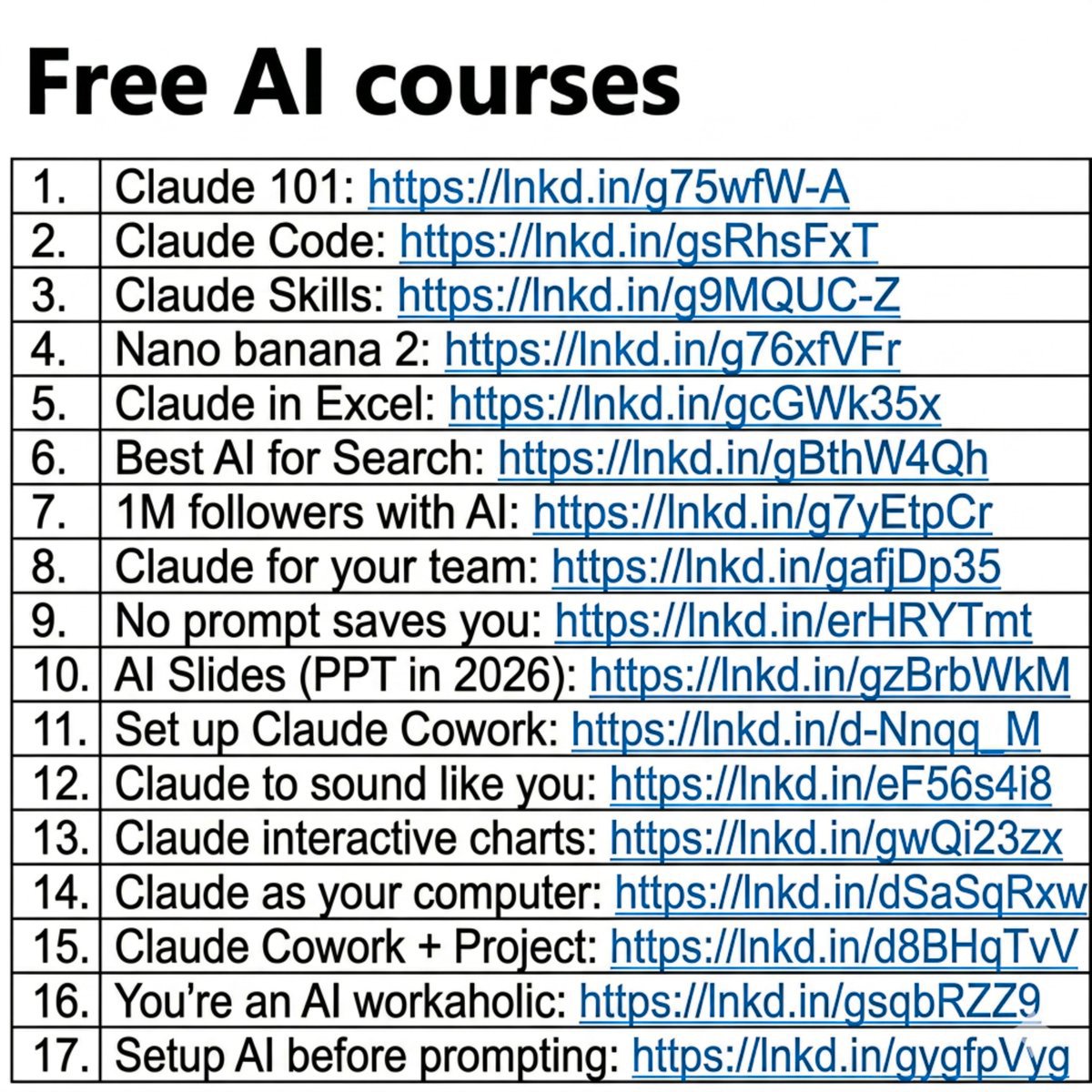
And I wrote 17 free guides to start right away:
Claude 101: https://t.co/1NinCyzCTW
Claude Code: https://t.co/IjipIuHgWs
Claude Skills: https://t.co/DsDGtnxPQu
Nano banana 2: https://t.co/NRAGdRJrn3
Claude in Excel: https://t.co/H9Ay886k3U…
Best AI for Search: https://t.co/TegupBAVUC
1M followers with AI: https://t.co/9JHEb7jdQ3
Claude for your team: https://t.co/XPHLb7Adkm…
No prompt saves you: https://t.co/B8TQ7Gx4R1
AI Slides (PPT in 2026): https://t.co/abQxrGp4gA
Set up Claude Cowork: https://t.co/ooZids3tgG…
Claude to sound like you: https://t.co/C9K42JCeXj…
Claude interactive charts: https://t.co/JV4F9MOrOj
Claude as your computer: https://t.co/6TKwVMuQqo…
Claude Cowork + Project: https://t.co/ooZids3tgG…
You're an AI workaholic: https://t.co/gdw0yZhofM
Setup AI before prompting: https://t.co/64ibzAxsyM…
___
1. Save this list for later (three dots, top right).
2. Share it with a friend by ♻️ reposting this image.
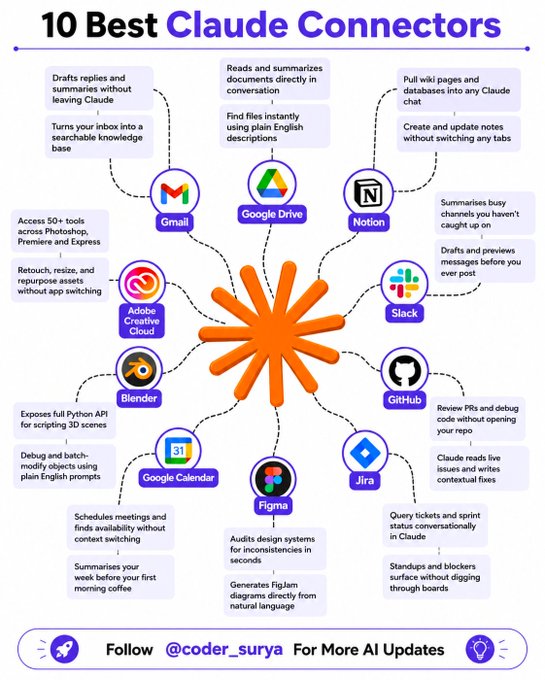
🚀 10 Powerful Claude Connectors to Supercharge Your Workflow
Want to get more done without switching tabs? These Claude connectors have you covered 👇
📌 Gmail
📌 Google Drive
📌 Notion
📌 Slack
📌 GitHub
📌 Jira
📌 Figma
📌 Google Calendar
📌 Blender
📌 Adobe Creative Cloud
From emails and files to projects, designs, and code—manage everything seamlessly inside Claude.
⚡ Work smarter. Move faster.
🔖 Save this for later!
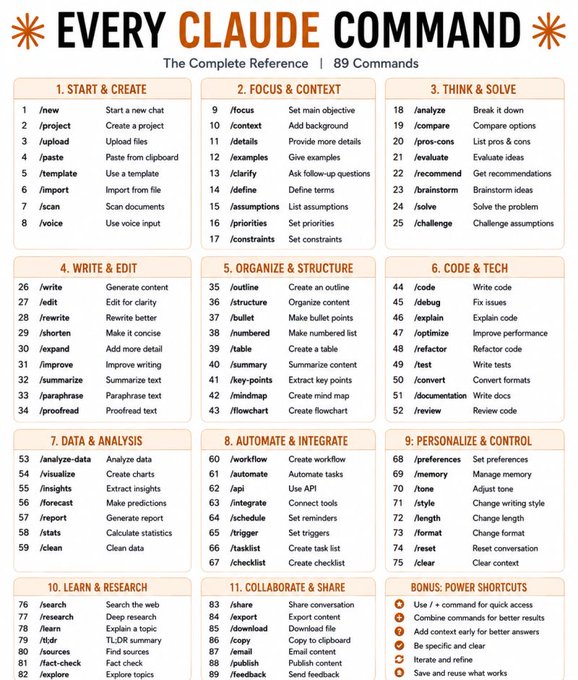
"Most people use Claude at 10% of its capability. Here are 89 commands that can completely change how you work with AI."
Most people type a question into Claude and call it a day.
Power users treat it like a command center.
Here's the complete cheat sheet 👇
1. START & CREATE
→ /new → Start a fresh conversation
→ /upload → Attach files for Claude to read
→ /template → Use a pre-built prompt structure
2. FOCUS & CONTEXT
→ /focus → Tell Claude exactly what you want
→ /context → Add background so answers are sharper
→ /clarify → Let Claude ask the right questions first
3. THINK & SOLVE
→ /analyze → Break any problem into parts
→ /compare → Put two options head to head
→ /brainstorm → Generate ideas fast, no filter
4. WRITE & EDIT
→ /write → Generate content from scratch
→ /edit → Clean up what you already have
→ /rewrite → Same message, better delivery
→ /shorten → Cut the fluff, keep the punch
5. ORGANIZE & STRUCTURE
→ /outline → Build a skeleton before you write
→ /bullet → Turn walls of text into scannable points
→ /table → Organize comparisons visually
→ /mindmap → Map out connected ideas
6. CODE & TECH
→ /code → Write code in any language
→ /debug → Find and fix what's broken
→ /optimize → Make it faster and cleaner
7. DATA & ANALYSIS
→ /analyze-data → Find patterns in raw data
→ /visualize → Turn numbers into charts
→ /insights → Pull the "so what" from the data
8. AUTOMATE & INTEGRATE
→ /workflow → Design a repeatable process
→ /automate → Remove manual steps entirely
→ /api → Connect Claude to other tools
9. PERSONALIZE & CONTROL
→ /tone → Formal, casual, bold — your call
→ /style → Match a writing voice or persona
→ /memory → Tell Claude what to always remember
10. LEARN & RESEARCH
→ /search → Pull current info from the web
→ /research → Go deep on any topic
→ /fact-check → Verify before you trust it
11. COLLABORATE & SHARE
→ /export → Save the output in your format
→ /download → Get the file instantly
→ /email → Draft and send directly
1. Follow @heyitsurya
2. Save the post.
3. Repost to your network.
4. Join AI Community: https://t.co/ioQEJKhR1q
____________________________
#ArtificialIntelligence #AI #GenerativeAI #MachineLearning #Technology #Innovation #FutureOfWork #DigitalTransformation
You've scrolled past AI content
at least 10 times today.
You didn't run a detector.
You didn't analyze the vocabulary.
You just felt it and kept moving.
That same instinct is hitting
your posts right now.
Here's what your reader notices
in the first 3 seconds:
The opening sounds like a template.
In today's fast-paced landscape
tells your reader that nobody
is actually behind this post.
The rhythm feels flat.
Every sentence running
the same length and weight
creates a drone your brain
tunes out automatically.
The claims feel hollow.
When a post says experts agree
and your reader can't find
a single named expert,
trust drops immediately.
The ending commits to nothing.
Both sides have their merits
is the sentence your reader
forgets before finishing it.
Your reader isn't judging grammar.
They're looking for a person.
Someone with a specific experience.
Someone who picked a side.
Someone willing to be wrong.
AI gives you structure.
You give it a pulse.
The posts that get saved
aren't the cleanest ones.
They're the ones where someone
clearly showed up and meant it.
What makes you stop scrolling
on someone else's post?
1. Follow @heyitsurya
2. Save the post
3. Repost to your network
4. Join AI Community: https://t.co/ioQEJKhR1q
____________________________
Claude Prompt vs Skills vs Projects
________
Are you using the right Claude feature?
Most people are not.
The most common way to use Claude is to open it and just start typing.
That works for simple tasks.
But for anything you do more than once, there are better ways.
Here's how 3 of them work:
1/ Claude Prompt:
For 90% of users, 90% of the time.
Use it when you just need a fast answer like draft an email, summarize a PDF, brainstorm ideas, etc. Or weird tasks like matching socks with your outfits like I did (ONCE).
Every chat starts from scratch. It's perfect when you need Claude quickly for a one off task.
2/ Claude Project:
For tasks you repeat at least 2x a week.
Use it when you keep giving Claude the same background again and again. Like working with different clients, analyzing customer calls, tracking expenses, etc.
A Project is basically a workspace - you upload files once, write the instructions and Claude uses that context every time. You can also update the files and instructions with time.
3/ Claude Skills:
For tasks that need strict standardized results.
Use it when you want Claude to follow a particular process the same way every time. This is best for automating workflows, brand guidelines, tool integrations, etc.
I recently created an Anti AI Slop skill that automatically detects AI tones, mistakes, and styles in anything that my team creates.
Before your next Claude session, ask one question, "Will I need to do this exact thing again?"
If no, prompt it.
If yes, build a dedicated project or a skill.
📌 If you want a high-res PDF of this guide:
1. Follow: @heyitsurya
2. Save the post.
3. Repost to your network.
4. Join AI Community: https://t.co/ioQEJKhjbS
Credit to Will McTighe. Follow him for more.
𝗟𝗟𝗠 𝘃𝘀 𝗔𝗴𝗲𝗻𝘁 𝘃𝘀 𝗔𝗴𝗲𝗻𝘁𝗶𝗰 𝗪𝗼𝗿𝗸𝗳𝗹𝗼𝘄 𝘃𝘀 𝗠𝘂𝗹𝘁𝗶-𝗔𝗴𝗲𝗻𝘁 𝗦𝘆𝘀𝘁𝗲𝗺
People use these four terms interchangeably.
They shouldn't.
The difference isn't academic. It decides your latency, your cost, your failure modes, and whether your system is debuggable at 2am.
Here's how I separate them.
𝟭. 𝗟𝗟𝗠 → 𝗚𝗲𝗻𝗲𝗿𝗮𝘁𝗲
A language model that produces text from the context it's given.
→ Single-step response
→ No real autonomy
→ Limited to current context
→ Calls tools only if an app wraps it
Best for: chat, summarization, drafting, Q&A.
Autonomy: Low.
𝟮. 𝗔𝗴𝗲𝗻𝘁 → 𝗔𝗰𝘁
An AI system that can reason, choose actions, use tools, and iterate toward a goal.
→ Goal-driven
→ Uses tools
→ Can plan and retry
→ Maintains working memory and state
Best for: task execution, research, troubleshooting.
Autonomy: Medium.
𝟯. 𝗔𝗴𝗲𝗻𝘁𝗶𝗰 𝗪𝗼𝗿𝗸𝗳𝗹𝗼𝘄 → 𝗢𝗿𝗰𝗵𝗲𝘀𝘁𝗿𝗮𝘁𝗲
A structured process where AI participates in predefined steps inside an orchestrated flow.
→ Predefined flow
→ Deterministic structure
→ Human approvals optional
→ Far more controllable than a free-form agent
Best for: business processes, document pipelines, repeatable tasks.
Autonomy: Medium–High.
𝟰. 𝗠𝘂𝗹𝘁𝗶-𝗔𝗴𝗲𝗻𝘁 𝗦𝘆𝘀𝘁𝗲𝗺 → 𝗖𝗼𝗹𝗹𝗮𝗯𝗼𝗿𝗮𝘁𝗲
Multiple specialized agents that collaborate to solve a broader problem.
→ Specialized roles
→ Parallel collaboration
→ Needs coordination
→ Higher complexity and overhead
Best for: complex projects, large workflows, multi-step problem solving.
Autonomy: High.
𝗧𝗵𝗲 𝗼𝗻𝗲-𝗹𝗶𝗻𝗲 𝗺𝗲𝗻𝘁𝗮𝗹 𝗺𝗼𝗱𝗲𝗹
→ Need one answer? Use an LLM.
→ Need one system to take action? Use an Agent.
→ Need repeatable, controlled steps? Use an Agentic Workflow.
→ Need many specialized workers? Use a Multi-Agent System.
The mistake I see most often isn't picking the wrong tool — it's reaching for the most autonomous one because it sounds impressive. A multi-agent system to do a job a single prompt could handle. You inherit all the coordination cost and none of the benefit.
Production AI is not one thing. It ranges from simple generation to coordinated autonomous systems — and the engineering discipline is matching the architecture to the actual problem, not the hype.
Where do you draw the line between an "agentic workflow" and a true "agent" — is it the absence of a predefined flow, or something else?
1. Follow @heyitsurya
2. Save the post.
3. Repost to your network.
4. Join AI Community: https://t.co/ioQEJKhjbS
____________________________
Top 9 Free Courses to Learn AI.
This is the fastest way to scale your AI skills for free.
It's easy to get lost in all the technology.
These courses will help show you what's valuable.
Each one offers a unique viewpoint on how to adopt, scale, and lead with AI.
Here are the top 9 free courses I'd recommend to learn AI in 2025:
1️⃣ -Microsoft - Career Essentials in Generative AI
Develop an understanding of generative AI models
Learn the ethical considerations of using generative AI
Explore the impact of generative AI tools
👉: https://t.co/v5prX0rWDz
--
2️⃣ - Amazon - Generative AI Learning Plan
Duration: 11 Hours | Courses: 5
Introduction to Generative AI
Planning a Generative AI Project
Amazon Bedrock Getting Started
Foundations of Prompt Engineering
Building Generative AI Applications
👉: https://t.co/C5Pz77tali
--
3️⃣ - Google - Introduction to Generative AI
Introduction to Generative AI
Introduction to Large Language Models
Introduction to Responsible AI
👉: https://t.co/f1j5nfGB0W
--
4️⃣ - Harvard - Introduction to AI with Python
Learn AI basics for real-world tech
Build projects with Python and ML
Design intelligent systems
👉: https://t.co/zGQuHCqyoi
--
5️⃣ - IBM - AI for Everyone: Master the Basics
Understand AI and its impact
Learn ML, deep learning, and neural networks
Get career advice from AI experts
👉: https://t.co/S1mCa5nIhJ
--
6️⃣ - Linux Foundation - Data and AI Fundamentals
Differentiate various kinds of AI technologies
Enumerate typical AI use cases for a variety of industries
Identify potential AI career opportunities
👉: https://t.co/fdmVNmOiBu
--
7️⃣ - Google - Machine learning and AI
Gain ML experience with Google Cloud
Learn to build and optimize ML systems
Master hands-on productionizing and maintenance
👉: https://t.co/7jWpjiiqvd
--
8️⃣ - ChatGPT Prompt Engineering for Developers
Master prompt engineering for apps.
Build custom chatbots with LLMs.
Practice prompts using OpenAI API.
👉: https://t.co/uTDgfSnHke
--
9️⃣ - Artificial Intelligence for Beginners
12-week, 24-lesson curriculum
Covers Symbolic AI, Neural Networks, Computer Vision, NLP, etc.
Includes hands-on lessons, quizzes, labs
👉:https://t.co/iA5ZqIrjeo
These are battle-tested courses from some of the best firms.
Save this list.
Share it with your team.
1. Follow Suryakant Chaurasiya
2. Save the post.
3. Repost to your network.
4. Join My AI Community: https://t.co/h4tQovLN8S
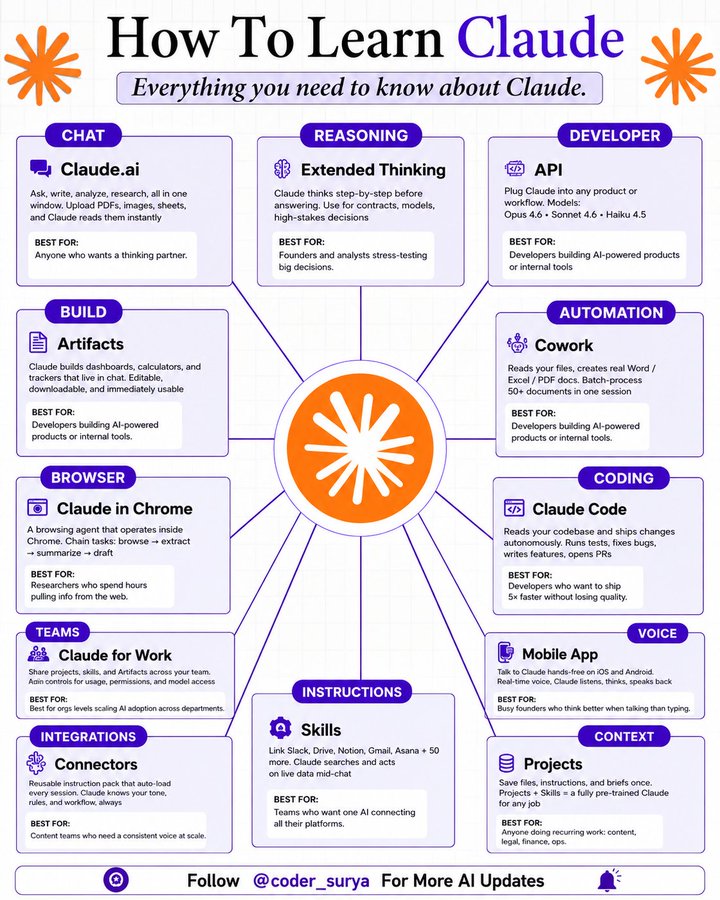
How to Learn Claude
__________
90% of people using Claude are only using 10% of what it can do.
You might be one of them if you don't know this....
Here's everything Claude can actually do:
1. Chat → Claude. ai
✦ Ask, write, analyze, and research all in one window.
✦ Upload PDFs, images, and sheets, and Claude reads them instantly.
✦ Best for: anyone who wants a real thinking partner.
2. Reasoning → Extended Thinking
✦ Claude thinks step-by-step before answering.
✦ Use it for contracts, financial models, and high-stakes decisions.
✦ Best for: founders and analysts who need stress-tested answers.
3. Developer → API
✦ Plug Claude into any product or internal workflow.
✦ Models available: Opus 4.6, Sonnet 4.6, Haiku 4.5.
✦ Best for: developers shipping AI-powered products.
4. Build → Artifacts
✦ Claude builds dashboards, calculators, and trackers that live inside chat.
✦ Everything it builds is editable, downloadable, and immediately usable.
✦ Best for: developers and ops teams who need tools fast.
5. Automation → Cowork
✦ Reads your files and creates real Word, Excel, and PDF documents.
✦ Batch-process 50+ documents in a single session.
✦ Best for: anyone drowning in manual document work.
6. Browser → Claude in Chrome
✦ A browsing agent that operates inside Chrome.
✦ Chain tasks: browse, extract, summarize, and draft in one flow.
✦ Best for: researchers who spend hours pulling information from the web.
7. Coding → Claude Code
✦ Reads your entire codebase and ships changes autonomously.
✦ Runs tests, fixes bugs, writes features, and opens PRs.
✦ Best for: developers who want to ship 5x faster without losing quality.
8. Teams → Claude for Work
✦ Share Projects, Skills, and Artifacts across your entire team.
✦ Admin controls for usage, permissions, and model access.
✦ Best for: ops leads scaling AI adoption across departments.
9. Voice → Mobile App
✦ Talk to Claude hands-free on iOS and Android.
✦ Real-time voice: Claude listens, thinks, and speaks back.
✦ Best for: busy founders who think better out loud than by typing.
10. Instructions → Skills
✦ Reusable instruction packs that auto-load every session.
✦ Claude knows your tone, rules, and workflow.
✦ Best for: content teams who need a consistent Claude voice at scale.
11. Context → Projects
✦ Save files, instructions, and briefs inside a Project once.
✦ Projects + Skills = a fully pre-trained Claude for any recurring job.
✦ Best for: anyone doing recurring work in content, legal, finance, or ops.
That's literally the full Claude ecosystem in one cheatsheet.
1. Follow
@coder_surya
2. Save the post.
3. Repost to your network.
4. Join AI Community: https://t.co/ioQEJKhjbS
____________________________
I tested every major AI research tool.
Perplexity won. And it wasn't close.
Here's the full breakdown (save this):
1. Real-Time Search
↳ Pulls from the live web on every answer
↳ I was still opening Google for current news
2. Cited Answers
↳ Every fact gets a numbered source [1][2][3]
↳ Click any number to verify in one tap
3. Pro Search
↳ Multi-step web research before answering
↳ Replaces 30 mins manually across 10 tabs
4. Deep Research
↳ Autonomous agent, researches 15-30 mins
↳ I stopped building briefings by hand after this
5. Focus Modes
↳ Academic, Reddit, YouTube, Math source filters
↳ Switch source types with one click
6. Model Selection
↳ Claude Opus 4.6, GPT-5.5, Sonar Pro in one tab
↳ Replaces jumping between 3 separate platforms
7. Model Council
↳ One query to multiple frontier models at once
↳ I've reversed decisions based on what came back
8. Spaces
↳ Persistent workspaces, files and context saved
↳ No re-uploading anything every session
9. Pages
↳ Any research thread becomes a shareable doc
↳ I used to copy everything into Notion by hand
10. File Analysis
↳ Upload PDFs, ask questions against your doc
↳ Answers from your file and the live web at once
11. Comet Browser
↳ AI-native browser, free on iOS, Mac, Windows
↳ Replaces pasting page content into ChatGPT
12. Computer Agent
↳ Books flights, fills forms, manages email
↳ Full browser workflows, completely on autopilot
13. Personal Computer
↳ Always-on AI living on your Mac
↳ Accesses local files and runs 24/7 tasks
14. Slash Commands
↳ /claude or /gpt switches models mid-search
↳ Build custom shortcuts for repeated workflows
15. Voice Search
↳ Search by speaking on iOS and Android
↳ 3x faster than typing every query
16. Conversation Threads
↳ Follow-ups build context from every prior turn
↳ No history lost across a full research session
17. Image Upload
↳ Upload screenshots, ask what Perplexity sees
↳ Combines your image with live web data
18. Sonar API
↳ OpenAI-compatible, real-time cited search
↳ Swap the base URL from OpenAI to Perplexity
19. Collections
↳ Save top results into named folders
↳ Replaces browser bookmarks with zero structure
20. Enterprise Controls
↳ SSO, audit logs, CrowdStrike-secured
↳ Zero model training on your company data
I thought this was a search engine.
It's a research operating system.
And I was barely using it.
Which feature are you starting with?
1. Follow
@coder_surya
2. Save the post.
3. Repost to your network.
4. Join AI Community: https://t.co/ioQEJKhjbS
____________________________
⏩ 12 𝐄𝐬𝐬𝐞𝐧𝐭𝐢𝐚𝐥 𝐆𝐞𝐧𝐞𝐫𝐚𝐭𝐢𝐯𝐞 𝐀𝐈 𝐂𝐨𝐧𝐜𝐞𝐩𝐭𝐬
🔷 Applications of Generative AI
▸ Text & Code – Used in chatbots, content writing, and code automation
▸ Media – Allows creation of AI-generated visuals, audio, and videos
🔷 Ethical & Responsible AI
▸ Ensures fairness, transparency, and addresses bias
▸ Prioritizes deploying AI systems safely
🔷 Hallucination
▸ Occurs when AI outputs factual errors or misleading data
▸ Remains a significant challenge for trustworthiness in Gen AI
🔷 RLHF (Reinforcement Learning from Human Feedback)
▸ Adapts models to align with human values
▸ Raises the standard for answer quality and system safety
🔷 Multimodal Models
▸ Processes and produces content in text, images, and sound
▸ Notable examples: CLIP, DALL-E
🔷 Generative Adversarial Networks (GANs)
▸ Pair of models: one generates, the other evaluates
▸ Capable of synthesizing lifelike media
🔷 Loss Function
▸ Measures how far predictions deviate from actual values
▸ Guides the learning process during training
🔷 Prompt Engineering
▸ Refines the way prompts are written to shape AI responses
▸ Applies methods like zero-shot and few-shot prompting
🔷 Fine-Tuning
▸ Tailors general pre-trained models for specialized jobs
▸ Enhances precision for focused applications
🔷 Latent Space
▸ Compact internal mapping of learned features
▸ Enables nuanced content modification or interpolation
🔷 Diffusion Models
▸ Create outputs by transforming noise into clear data
▸ Popular in image synthesis, such as in Stable Diffusion
🔷 Activation Function
▸ Determines the signal each network node transmits
▸ Supports the model in learning complicated, non-linear patterns
1. Follow @coder_surya
2. Save the post.
3. Repost to your network.
4. Join AI Community: https://t.co/ioQEJKhR1q
____________________________
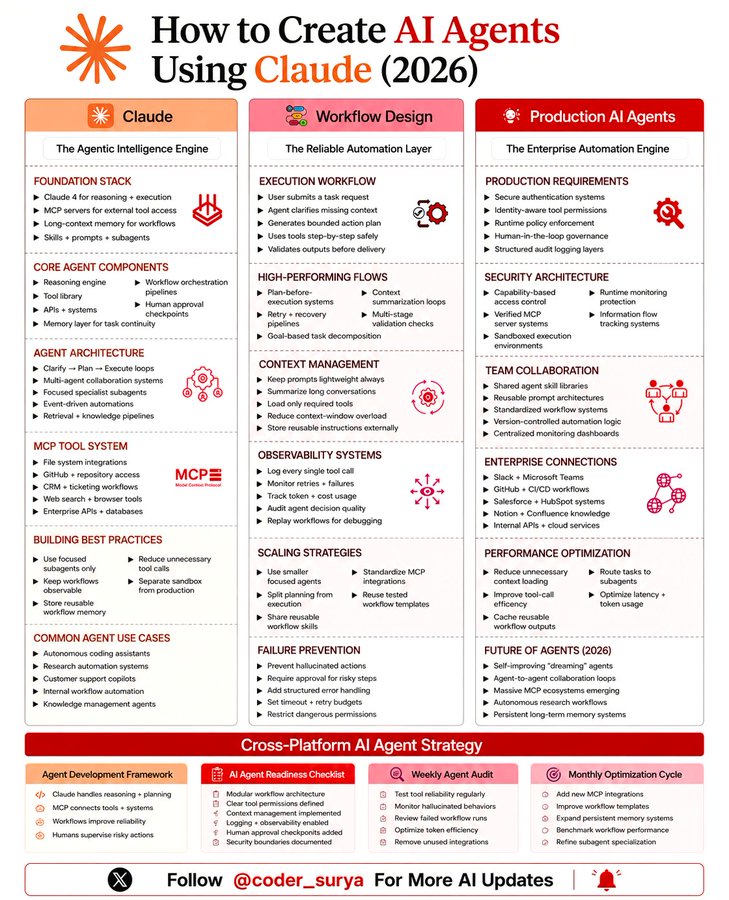
Here is how u can create AI Agents using Claude (2026)
And no… this isn’t just “prompt → output” anymore.
We’ve officially moved past that.
If you’re still thinking AI agents are just fancy chatbots,
you’re already behind.
This is how it actually works now 👇
First, you need the foundation right.
→ Claude handles reasoning + execution
→ MCP connects your tools and systems
→ Memory keeps your workflows consistent
→ Prompts + subagents handle specific tasks
This is your base.
Without this, nothing scales.
Then comes workflow design.
This is where most people mess up.
→ Don’t just execute, plan first
→ Break tasks into steps
→ Validate outputs before moving forward
→ Add retries + recovery systems
Basically… stop letting AI “wing it.”
Now production.
This is where things get serious.
→ Secure access and permissions
→ Add human approvals where needed
→ Track everything with logs
→ Monitor performance constantly
Because once agents touch real systems…
mistakes are expensive.
Here’s the part people skip 👇
Context management.
→ Keep prompts clean
→ Summarize long conversations
→ Load only what’s needed
→ Store reusable instructions
Less noise = better output.
Scaling comes after that.
→ Use smaller focused agents
→ Reuse workflows
→ Standardize integrations
→ Optimize token usage
Don’t build one giant agent.
Build systems.
And finally… failure prevention.
→ Set limits
→ Add approval steps
→ Handle errors properly
→ Restrict risky actions
Because AI is powerful.
But uncontrolled AI is chaos.
If you get this right…
You’re not just “using AI.”
You’re building systems that work for you.
And that’s the real shift happening right now.
P.S. Which part are you still struggling with… building, scaling, or making agents reliable?
1. Follow @coder_surya
2. Save the post.
3. Repost to your network.
4. Join AI Community: https://t.co/ioQEJKhR1q
____________________________
6 PROMPTS TO LEARN ANYTHING USING CLAUDE
Most people use Claude to get answers.
The smart ones use it to build understanding.
Big difference.
One makes you dependent.
The other makes you dangerous.
Here are 6 Claude prompts that turn any topic into mastery👇
🎯 LEARN ANYTHING IN 20 HOURS
"I need to learn [topic] in 20 hours. Identify the 20% of concepts that drive 80% of real-world results. Build me a 10-session plan — 2 hours each — with the best resource for each session and a 5-question review at the end."
→ Most subjects have 3–4 ideas that unlock everything else.
→ Finding those early saves you weeks of wandering.
🎯 CREATE A ONE-PAGE CHEAT SHEET
"Summarize [topic] on a single page. Use bullet points, labeled diagrams, and concrete examples. Optimize it for a 5-minute review the night before I need to use it."
→ Your brain remembers structure better than sentences.
→ Give it a map, not a wall of text.
🎯 QUIZ ME UNTIL I BREAK
"I just studied [topic]. Give me 10 progressively harder questions — start easy, end expert-level. After each answer: grade me, identify the gap, and re-explain only what I missed."
→ Passive reading feels like learning.
→ Active retrieval actually is.
🎯 BUILD A LEARNING LADDER
"Break [topic] into 5 difficulty levels. Define what mastery looks like at each level. Give me one milestone and one hands-on exercise per level — from complete beginner to confident practitioner."
→ Most people skip levels and wonder why nothing sticks.
→ The ladder fixes that.
🎯 FIND THE SIGNAL IN THE NOISE
"List the 5 highest-leverage resources for learning [topic] fast — books, videos, courses, or people. For each: explain what makes it worth my time and what type of learner it's best for."
→ There are 1,000 ways to learn anything.
→ Most of them are a waste.
🎯 USE THE FEYNMAN LOOP
"Explain [topic] to me like I'm 12. Then ask me to explain it back in my own words. Find every gap in my explanation. Re-teach only what I got wrong. Repeat until my explanation is clean."
→ If you can't explain it simply, you don't know it yet.
→ This prompt exposes that — fast.
This isn't a list of prompts.
It's a learning operating system.
Use it today.
1. Follow
@coder_surya
2. Save the post.
3. Repost to your network.
4. Join AI Community: https://t.co/ioQEJKhR1q
____________________________
Every message has a hidden cost — paid before you type a single word.
We call it the Mental Drafting Toll.
Before a message, an email, or a document leaves your mind, you first draft it internally.
You organize your thoughts.
Find the right words.
Structure the message.
Rewrite it until it sounds right.
It happens every time you communicate.
And we've accepted it as "just thinking."
But it's not thinking.
Thinking is the fast, messy, creative part.
Mental drafting is the invisible work of making those thoughts presentable.
And traditional dictation never removed it.
Voice typing only freed your fingers.
You still had to draft it in your head first — then say it out loud.
That's the problem we set out to solve with Typeless 2.0.
For the first time, you can skip the mental draft — and just think out loud:
Speak in whatever order thoughts come.
Add context as it comes to you.
Change your mind halfway through.
Forget a name? Describe it — Typeless fills in the exact one.
It never makes things up.
Typeless doesn't just understand your words. It understands your thoughts before they become words — and turns them into clear writing.
You think it once.
Typeless writes what you meant.
Available today on Mac, Windows, iOS & Android.
Messy thoughts in. Clear writing out.
Prompting gets all the attention. It is the least powerful of 8 Claude features.
The other 7 are where the real leverage is.
Here is the full breakdown:
1. Setup:
➣ Customize your profile and define your default writing style
➣ Save system instructions you use repeatedly
➣ Enable memory so Claude learns your preferences over time
➣ Organize chats and pin your most-used workflows
2. Models
➣ Pick the right model for each job — not just the default
➣ Use lighter models for simple tasks to save time and cost
➣ Use reasoning models when depth matters
➣ Switch models mid-task to compare outputs
3. Prompting
➣ State your goal in the first line, every time
➣ Define constraints, tone, and format upfront
➣ Break complex tasks into steps
➣ Include examples of good output so Claude knows the bar
4. Ask User Tool
➣ Claude can ask you clarifying questions before it starts
➣ This eliminates guesswork and cuts revision rounds in half
➣ Confirm assumptions early, not after three bad drafts
5. Connectors
➣ Link Google Drive, Slack, Notion, and GitHub directly
➣ Import docs and spreadsheets Claude can reference live
➣ Combine multiple data sources in one conversation
6. Projects
➣ Create separate projects for different workflows
➣ Upload key docs, templates, and instructions per project
➣ Reuse assets across chats without starting over
➣Track decisions and keep knowledge centralized
7. Artifacts
➣ Generate drafts, spreadsheets, charts, and code in one place
➣ Prototype apps and design slides without switching tools
➣ Iterate outputs collaboratively inside the same window
8. Pro Level
➣ Chain prompts for complex multi-step work
➣ Build reusable prompt libraries you can deploy anytime
➣ Automate with integrations and create repeatable AI systems
➣ Combine all 8 features for compound leverage
Most people are still typing one question at a time.
The ones pulling real value from Claude treat it like a system, not a search bar.
P.S. My team has put together a list of 200+ Claude Code hacks to make you a pro Techie
1. Follow
@coder_surya
2. Save the post.
3. Repost to your network.
4. Join AI Community: https://t.co/ioQEJKhR1q
____________________________
FORGET PowerPoint.
Claude can build an entire presentation in minutes!
No templates.
No design skills.
No all-nighters before the big meeting.
Just 6 prompts that do the work for you.
👇
📌 Prompt 1. The Blueprint
"Act as a senior presentation strategist. Build a blueprint for [topic].
Give me:
- The ONE message they must remember
- Who the audience is + what they care about
- 3 angles that hook them emotionally
- The slide-by-slide flow
- Ideal slide count
Keep it tight. No filler."
📌 Prompt 2. The Structure
"Create a slide-by-slide outline for [topic].
For each slide:
- Title
- One-line purpose
- What the audience should feel
Make the sequence build like a story — tension, then payoff."
📌 Prompt 3. The Story Frame
"Turn [topic] into a presentation built on narrative.
Hook → grab attention in 5 seconds
Problem → the pain they feel
Insight → the part they didn't expect
Solution → what to do about it
Proof → one stat or example
Takeaway → a single clear action
Cut anything that doesn't move the story forward."
📌 Prompt 4. The Visual Direction
"Act as a presentation designer. For each slide on [topic], recommend:
- A visual that carries the emotion (image, not clipart)
- The right format for any data (chart type, not a table dump)
- An icon or grid layout for lists
Suggest a clean 3-color palette and one font pairing."
📌 Prompt 5. The Content
"Write the full slide content for a [number]-slide deck on [topic].
Per slide:
- A punchy title (6 words max)
- 3–5 bullets, under 10 words each
- One speaker note for delivery
Audience: [describe]. Tone: [professional/casual]."
📌 Prompt 6. The Build
"Now build it.
Create the full presentation on [topic] as a downloadable file.
[number] slides with bold titles, tight bullets, and speaker notes on every slide.
Clean layout, logical flow from open to close, ready to present."
Most people still build slides line by line.
Manually. Slowly. Painfully.
The shift isn't about saving time.
It's about showing up sharper than everyone in the room.
While they format bullet points, you're already prepping the meeting.
Do this:
1. Save this post (you'll come back to it)
2. Pick 1 prompt → build your next deck with it
3. Send it to someone still fighting with templates
📌 Fast. Clean. No excuses.
1. Follow
@coder_surya
2. Save the post.
3. Repost to your network.
4. Join AI Community: https://t.co/ioQEJKhR1q
____________________________
The Right AI Model for Every Type of User
__________
I used to ask one question:
Which AI model is the best?
Now I ask a better one:
Which AI model is best for this job?
Because the "best" model changes based on what you need.
For example:
Perplexity works well for research.
Claude is strong for long documents and coding.
Gemini is useful if your work lives inside Google.
Llama is better when control and privacy matter.
ChatGPT is still the easiest daily all-rounder.
The mistake most people make is simple:
They use one model for every task.
That is like using one app for writing, design, research, meetings, and code.
Possible, but not always smart.
You do not need every AI tool.
You need the right one for the right moment.
That is how AI becomes a real advantage, not another tab open on your browser.
What AI model do you use the most right now?
P.S. Save this cheat sheet before your next AI task.
AI Plays Worth Stealing
Your fastest coworker does not use AI.
They run it.
The difference is four levels deep.
This chart shows 12 specific Claude plays.
It is also a map of four levels of how professionals actually use Claude.
Level 1. Prompt user.
You type. You get answers. You copy and paste into a doc.
If you cannot rerun your best prompt without rewriting it, you are here.
None of the 12 plays on this chart live at this level.
This is where most professionals are still operating today.
Level 2. Workflow builder.
You teach Claude repeatable patterns it can run on command.
If you can trigger a whole workflow with one slash command, you are here.
This is where /commands, custom skills, and AskUserQuestion live.
You stop rewriting the same prompt every Monday morning.
Level 3. Integrated operator.
Claude works inside the tools and files you already use.
If Claude has access to the apps where your real work happens, you are here.
Slides, Excel, Slack, Gmail, Drive, Notion, role-specific plugins, design outputs.
You stop switching tabs. The work happens where the work lives.
Level 4. Delegated owner.
Claude runs work for you with memory, schedule, or autonomy.
If Claude does work while you sleep, you are here.
Claude Code, computer use, scheduled tasks, Cowork as an AI employee, projects that remember.
You stop doing the work. You direct it.
The leverage compounds at every level.
Level 2 saves you minutes.
Level 3 saves you hours.
Level 4 changes the kind of work you can take on at all.
Level 1 is conversation. Level 4 is operation.
The gap between them is the difference between using AI and running AI.
The professionals pulling ahead right now are not working harder.
They moved up two or three levels while everyone else kept refining prompts.
You do not need to be smarter than the people pulling ahead. You need to operate where they operate.
I describe this as the AI Execution Gap at an individual scale. The fix is not more effort. It is moving up one level at a time.
If you lead a team that is still typing prompts and copying outputs, you are paying for AI you are not deploying. The license is the easy part. The leverage starts at level two.
Start with one question this week.
Which of these 12 plays would replace something you did manually yesterday?
Pick that one. Move up one level. Compound from there.
💾 Save this for your next AI skill review.
1. Follow
@coder_surya
2. Save the post.
3. Repost to your network.
4. Join AI Community: https://t.co/ioQEJKhR1q
____________________________
The Best AI Tools for Marketing in 2026
__________
The Best AI Tools For Marketing In 2026 🚀
A few days ago, I was constantly testing random AI tools…
Trying everything.
Saving hundreds of “must-have” tools.
And honestly? Most of them never became part of my workflow.
That’s when I realized:
The goal isn’t to use MORE AI tools.
It’s to find the few that actually make your work faster and better.
Here’s a simple breakdown of some of the best AI tools marketers are using in 2026 👇
🔹 General Assistants
• ChatGPT
• Claude
• Perplexity
🔹 Research & Writing
• Gemini
• NotebookLM
• Grammarly
🔹 Productivity
• Notion
• Wispr
• Manus
🔹 Dev & No-code
• Cursor
• Replit
• Base44
• Lovable
🔹 Content Creation
• HeyGen
• Synthesia
• Descript
• Opus Clip
• Gamma
🔹 Visuals & Audio
• Midjourney
• Runway
• Kling
• Veo
• ElevenLabs
• Suno
🔹 Automation
• Zapier
• Make
• n8n
• Clay
• Apollo
Personally, a few tools I use almost daily are:
ChatGPT, Canva, Perplexity, Gamma, and Zapier.
They save hours every single week.
The biggest advantage in 2026 won’t be just “using AI.”
It’ll be:
Using the right AI tools together to save time, create faster, and market smarter.
Which AI tool are you using the most right now? 👇
1. Follow
@coder_surya
2. Save the post.
3. Repost to your network.
4. Join AI Community: https://t.co/ioQEJKhjbS
____________________________
12 of the Major Consulting Reports on Agentic AI
__________
Your board is reading these reports.
Your strategy team is summarizing them.
Your execution team needs something they do not contain.
This curation lists 12 of the major consulting reports on agentic AI from the last six months. Read them all and you will hear the same story told in different vocabularies.
The wave is here. Data and governance are the foundation. Org design is the bottleneck. The opportunity is real.
Eight major firms reaching the same conclusion in different vocabularies is not market noise. It is the strongest signal you will get this year.
None of these reports will tell you what to do on Monday.
The reports are excellent at the what. They are silent on the how. The companies that read these as strategy will build decks. The companies that read them as a brief will build agents.
I have watched Fortune 500 leadership teams read all twelve and still produce the same pattern. A great strategy deck. A confident board update. A pilot that quietly never scales.
The reports keep arriving. The architecture is still missing. That gap is the AI Execution Gap at enterprise scale.
The reading list, in the order I would walk it.
The current state
1/ The State of AI in 2025 (McKinsey) → https://t.co/fX1c8TOuSh
2/ AI Radar 2026 (BCG) → https://t.co/3G4ghQfiWO
3/ State of AI in the Enterprise 2026 (Deloitte) → https://t.co/fYzVaVlxBO
The opportunity scale
4/ Seizing the Agentic AI Advantage (McKinsey) → https://t.co/2VuYe4KS4i
5/ 2026 AI Business Predictions (PwC) → https://t.co/2shSAEntha
The foundation
6/ Technology Report 2025 (Bain) → https://t.co/SfjaiKQY2N
7/ Global AI Pulse Q1 2026 (KPMG) → https://t.co/ERIT7Hw4ry
The oversight gap
8/ AI Pulse Survey Wave 3 (EY) → https://t.co/57UICZTmhh
9/ AI Agents in Action (WEF x Capgemini) → https://t.co/XhMkFvciO7
The org rewire
10/ The AI Transformation Manifesto (McKinsey) → https://t.co/pTibHm7AjS
The 2028 horizon
11/ Agentic Enterprise 2028 (Deloitte) → https://t.co/nn0YhPwPMr
12/ The $200B Agentic AI Opportunity (BCG) → https://t.co/mLvmPuDtuv
Pick the report that names the gap inside your company most directly. The one that makes you wince when you reach the conclusion. That is your diagnostic. Start there.
💾 Save this as your agentic AI reading list for the quarter.
1. Follow @coder_surya
2. Save the post.
3. Repost to your network.
4. Join AI Community: https://t.co/ioQEJKhjbS
____________________________
#ai #future #innovation #education #Creativity
New Free AI Agents Course from Google. Worth more than $10,000 bootcamps
__________
Google released Free AI Agents Course.
Worth more than $10,000 bootcamps.
Includes:
→ Whitepapers
→ Code samples
→ Hands-on projects
→ MCP
→ Memory systems
→ Production deployment
-----
Day 1 - Introduction to AI Agents
Learn how AI agents:
→ Plan
→ Reason
→ Take actions autonomously
🔗 https://t.co/zW5IJw06PR
Build Tutorial 1: https://t.co/QmJdHDPzcH
Build Tutorial 2: https://t.co/Qnulitq9ta
Day 2 - Tools & MCP
Connect agents with:
→ APIs
→ Software tools
→ External systems using MCP
🔗 https://t.co/UYQZXhwVS8
Build Tutorial 1: https://t.co/XNFjRKvFfD
Build Tutorial 2: https://t.co/fmYHVDwHaM
Day 3 - Context Engineering & Memory
Teach agents to:
→ Remember conversations
→ Maintain long-term context
→ Learn across interactions
🔗 https://t.co/LduKn1UUkY
Build Tutorial 1: https://t.co/t44paFh2Kq
Build Tutorial 2: https://t.co/gjYEQUMFYx
Day 4 - Evaluation & Observability
Learn how to:
→ Debug agents
→ Trace failures
→ Evaluate outputs
→ Improve reliability
🔗 https://t.co/JywpNPePOi
Build Tutorial 1: https://t.co/o0FENKdLNs
Build Tutorial 2: https://t.co/VAttlxnj4Z
Day 5 - Production-Ready Deployment
Move from demos to production systems:
→ Vertex AI deployment
→ Multi-agent workflows
→ Safety systems
→ Scaling infrastructure
🔗 https://t.co/oZefZy49z8
Build Tutorial 1: https://t.co/1tqnveAHLA
Build Tutorial 2: https://t.co/jWTmGqijdm
Most people think AI agents are just prompts.
Real AI agents are systems.
This course explains the full stack properly.
1. Follow @coder_surya
2. Save the post.
3. Repost to your network.
4. Join AI Community: https://t.co/ioQEJKhR1q
.
.
.
____________________________
#ai #future #innovation #education #Creativity
9 Free AI Courses to Learn AI
__________
The best AI education in 2026 is free.
These nine courses prove it.
Google, Microsoft, Amazon, OpenAI, AWS, Vanderbilt, and the Linux Foundation all have free AI courses live right now.
The barrier to learning AI has never been lower.
Here are all nine with links:
1. Google AI Essentials - practical AI skills for everyday workflows and tool usage.
https://t.co/XwbbzEkefM
2. Google - Introduction to Generative AI - how LLMs generate text, images, and ideas under the hood.
https://t.co/XwbbzEkefM
3. Google - Responsible AI - AI ethics, bias prevention, and building systems people trust.
https://t.co/XwbbzEkefM
4. Microsoft - Career Essentials in Generative AI - GenAI fundamentals and how to apply AI tools in your work.
https://t.co/uin1UwOkO5
5. Vanderbilt - Prompt Engineering Masterclass - how to write prompts that get consistent, reliable outputs every time.
https://t.co/HNggw0l3Rl
6. AWS - Foundations of Prompt Engineering - prompt design strategies you apply to any AI tool.
https://t.co/ISU2pONX9B
7. Amazon - Generative AI for Decision Makers - how businesses are using generative AI for productivity and growth.
https://t.co/EYnD53NfFb
8. OpenAI - Practical Guide to Building Agents - how AI agents use tools and workflows to complete real tasks.
https://t.co/ardL6KKBxK
9. Linux Foundation - Data and AI Fundamentals - core concepts of data, AI systems, and modern digital infrastructure.
https://t.co/weLrsuPA4B
Save this and start with whichever one fills the biggest gap in what you know right now.
1. Follow
@coder_surya
2. Save the post.
3. Repost to your network.
4. Join AI Community: https://t.co/ioQEJKhR1q
____________________________





![heyitsurya's tweet photo. I tested every major AI research tool.
Perplexity won. And it wasn't close.
Here's the full breakdown (save this):
1. Real-Time Search
↳ Pulls from the live web on every answer
↳ I was still opening Google for current news
2. Cited Answers
↳ Every fact gets a numbered source [1][2][3]
↳ Click any number to verify in one tap
3. Pro Search
↳ Multi-step web research before answering
↳ Replaces 30 mins manually across 10 tabs
4. Deep Research
↳ Autonomous agent, researches 15-30 mins
↳ I stopped building briefings by hand after this
5. Focus Modes
↳ Academic, Reddit, YouTube, Math source filters
↳ Switch source types with one click
6. Model Selection
↳ Claude Opus 4.6, GPT-5.5, Sonar Pro in one tab
↳ Replaces jumping between 3 separate platforms
7. Model Council
↳ One query to multiple frontier models at once
↳ I've reversed decisions based on what came back
8. Spaces
↳ Persistent workspaces, files and context saved
↳ No re-uploading anything every session
9. Pages
↳ Any research thread becomes a shareable doc
↳ I used to copy everything into Notion by hand
10. File Analysis
↳ Upload PDFs, ask questions against your doc
↳ Answers from your file and the live web at once
11. Comet Browser
↳ AI-native browser, free on iOS, Mac, Windows
↳ Replaces pasting page content into ChatGPT
12. Computer Agent
↳ Books flights, fills forms, manages email
↳ Full browser workflows, completely on autopilot
13. Personal Computer
↳ Always-on AI living on your Mac
↳ Accesses local files and runs 24/7 tasks
14. Slash Commands
↳ /claude or /gpt switches models mid-search
↳ Build custom shortcuts for repeated workflows
15. Voice Search
↳ Search by speaking on iOS and Android
↳ 3x faster than typing every query
16. Conversation Threads
↳ Follow-ups build context from every prior turn
↳ No history lost across a full research session
17. Image Upload
↳ Upload screenshots, ask what Perplexity sees
↳ Combines your image with live web data
18. Sonar API
↳ OpenAI-compatible, real-time cited search
↳ Swap the base URL from OpenAI to Perplexity
19. Collections
↳ Save top results into named folders
↳ Replaces browser bookmarks with zero structure
20. Enterprise Controls
↳ SSO, audit logs, CrowdStrike-secured
↳ Zero model training on your company data
I thought this was a search engine.
It's a research operating system.
And I was barely using it.
Which feature are you starting with?
1. Follow
@coder_surya
2. Save the post.
3. Repost to your network.
4. Join AI Community: https://t.co/ioQEJKhjbS
____________________________](https://pbs.twimg.com/media/HMUnjIUaoAApAzU.jpg)

![heyitsurya's tweet photo. 6 PROMPTS TO LEARN ANYTHING USING CLAUDE
Most people use Claude to get answers.
The smart ones use it to build understanding.
Big difference.
One makes you dependent.
The other makes you dangerous.
Here are 6 Claude prompts that turn any topic into mastery👇
🎯 LEARN ANYTHING IN 20 HOURS
"I need to learn [topic] in 20 hours. Identify the 20% of concepts that drive 80% of real-world results. Build me a 10-session plan — 2 hours each — with the best resource for each session and a 5-question review at the end."
→ Most subjects have 3–4 ideas that unlock everything else.
→ Finding those early saves you weeks of wandering.
🎯 CREATE A ONE-PAGE CHEAT SHEET
"Summarize [topic] on a single page. Use bullet points, labeled diagrams, and concrete examples. Optimize it for a 5-minute review the night before I need to use it."
→ Your brain remembers structure better than sentences.
→ Give it a map, not a wall of text.
🎯 QUIZ ME UNTIL I BREAK
"I just studied [topic]. Give me 10 progressively harder questions — start easy, end expert-level. After each answer: grade me, identify the gap, and re-explain only what I missed."
→ Passive reading feels like learning.
→ Active retrieval actually is.
🎯 BUILD A LEARNING LADDER
"Break [topic] into 5 difficulty levels. Define what mastery looks like at each level. Give me one milestone and one hands-on exercise per level — from complete beginner to confident practitioner."
→ Most people skip levels and wonder why nothing sticks.
→ The ladder fixes that.
🎯 FIND THE SIGNAL IN THE NOISE
"List the 5 highest-leverage resources for learning [topic] fast — books, videos, courses, or people. For each: explain what makes it worth my time and what type of learner it's best for."
→ There are 1,000 ways to learn anything.
→ Most of them are a waste.
🎯 USE THE FEYNMAN LOOP
"Explain [topic] to me like I'm 12. Then ask me to explain it back in my own words. Find every gap in my explanation. Re-teach only what I got wrong. Repeat until my explanation is clean."
→ If you can't explain it simply, you don't know it yet.
→ This prompt exposes that — fast.
This isn't a list of prompts.
It's a learning operating system.
Use it today.
1. Follow
@coder_surya
2. Save the post.
3. Repost to your network.
4. Join AI Community: https://t.co/ioQEJKhR1q
____________________________](https://pbs.twimg.com/media/HMUl4sabEAARRZO.jpg)

![heyitsurya's tweet photo. FORGET PowerPoint.
Claude can build an entire presentation in minutes!
No templates.
No design skills.
No all-nighters before the big meeting.
Just 6 prompts that do the work for you.
👇
📌 Prompt 1. The Blueprint
"Act as a senior presentation strategist. Build a blueprint for [topic].
Give me:
- The ONE message they must remember
- Who the audience is + what they care about
- 3 angles that hook them emotionally
- The slide-by-slide flow
- Ideal slide count
Keep it tight. No filler."
📌 Prompt 2. The Structure
"Create a slide-by-slide outline for [topic].
For each slide:
- Title
- One-line purpose
- What the audience should feel
Make the sequence build like a story — tension, then payoff."
📌 Prompt 3. The Story Frame
"Turn [topic] into a presentation built on narrative.
Hook → grab attention in 5 seconds
Problem → the pain they feel
Insight → the part they didn't expect
Solution → what to do about it
Proof → one stat or example
Takeaway → a single clear action
Cut anything that doesn't move the story forward."
📌 Prompt 4. The Visual Direction
"Act as a presentation designer. For each slide on [topic], recommend:
- A visual that carries the emotion (image, not clipart)
- The right format for any data (chart type, not a table dump)
- An icon or grid layout for lists
Suggest a clean 3-color palette and one font pairing."
📌 Prompt 5. The Content
"Write the full slide content for a [number]-slide deck on [topic].
Per slide:
- A punchy title (6 words max)
- 3–5 bullets, under 10 words each
- One speaker note for delivery
Audience: [describe]. Tone: [professional/casual]."
📌 Prompt 6. The Build
"Now build it.
Create the full presentation on [topic] as a downloadable file.
[number] slides with bold titles, tight bullets, and speaker notes on every slide.
Clean layout, logical flow from open to close, ready to present."
Most people still build slides line by line.
Manually. Slowly. Painfully.
The shift isn't about saving time.
It's about showing up sharper than everyone in the room.
While they format bullet points, you're already prepping the meeting.
Do this:
1. Save this post (you'll come back to it)
2. Pick 1 prompt → build your next deck with it
3. Send it to someone still fighting with templates
📌 Fast. Clean. No excuses.
1. Follow
@coder_surya
2. Save the post.
3. Repost to your network.
4. Join AI Community: https://t.co/ioQEJKhR1q
____________________________](https://pbs.twimg.com/media/HMUkVOsakAA9nYg.jpg)





