ANTHROPIC JUST LOST 20,000 CLAUDE CODE USERS TO ONE GITHUB REPO
25,000 developers.
41k GitHub stars.
6,700 forks.
25 free models.
COMPLETELY FREE.
bookmark this before everyone finds it.
your Claude Code bill is about to look very different.
it reroutes Claude Code to DeepSeek, Kimi and 8 other models.
same CLI.
same workflow.
different model underneath.
5-minute setup.
hundreds of dollars saved every month.
no noticeable downgrade on everyday coding.
swap the endpoint once.
your wallet will notice.
Link to repo: https://t.co/avYbVpYwsQ
I built a free tool to see what keywords any site ranks for:
https://t.co/oOYHfeERhG
You can even see what keywords a specific PAGE on a site ranks for.
For example, the subreddit /r/BuyItForLife
Click Advanced, and add "/r/buyitforlife" to the URL Contains field.
Very powerful.
Go give it a try! 100% free, but limited to 5 searches per hour.
$7 per month. Unlimited page lookups. That is the cost of competitor research most people overpay for.
FeedSpy gives you results comparable to Apify but at a fraction of the price. The interface is manual, and that is fine. The workflow is simple:
1. Paste any Facebook page URL.
2. Filter posts by content type (links, photos, videos), sort by likes, comments, shares, or time, set minimum and maximum engagement thresholds, and search by keyword.
3. Download the full dataset as an Excel file.
4. Upload that file to AI for analysis.
Under a minute, start to finish.
The filter panel alone does most of the heavy lifting. You can isolate only photo posts, hide content you have already reviewed, separate shares from original posts, and narrow results to a specific date range. Seven filters total. That is enough to reverse-engineer what is working on any page in your niche before you publish a single post.
Curation starts with data. Most people skip this step because they think the tools cost hundreds. They do not. $7 gets you in the door.
2026 is the year of the content creator
if you have a computer and 1 to 3 hours a day, you have everything you need to build a facebook page that makes $5,000 to $8,000+/month
here’s exactly how you do it in 2026:
step 1: select a niche with "Viral Velocity" (High RPM).
step 2: create a Facebook page.
step 3: shortcut your way with $100 or $200 to get 10k to 15k+ followers
step 4: maintain a consistent, data-driven posting schedule.
step 5: monetize with facebook payouts, display ads, affiliates, and merch
those who started a few months ago when i first started talking about Facebook are now making $5,000 to $8,000+ a month from content monetization alone.
when are you going to start?
Create Pinterest content for the Boomer moms.
And I mean that in the smartest way possible.
Because “Boomer moms” (50–70+) are lowkey one of the most underrated audiences on Pinterest.
They:
- click more
- stay longer
- actually read
- and spend money
If you want to target them intentionally, here’s what works:
1️⃣ Practical > trendy
Less “aesthetic morning routine.”
More “easy meal prep for empty nesters” or “low-maintenance garden ideas.”
2️⃣ Clear text overlays
They respond extremely well to Pins that are easy to read and straight to the point.
Without tiny fonts and no chaotic layouts.
3️⃣ Solution-driven topic
Like:
- Organizing after 50
- Retirement planning basics
- Home refresh ideas on a budget
- Health & mobility-friendly workouts
- Hosting family gatherings
- Grandkid-friendly recipes
4️⃣ Comfort + aspiration combo
They love:
- Cozy home ideas
- Entertaining tips
- Classic recipes
- Travel inspiration (but practical)
- Lifestyle upgrades
5️⃣ Use age modifiers intentionally
“Over 50”
“For retirees”
“Empty nest ideas”
“Low-maintenance”
“Easy”
Those small shifts change the entire audience you attract.
And from an RPM perspective it’s often night and day compared to younger audiences.
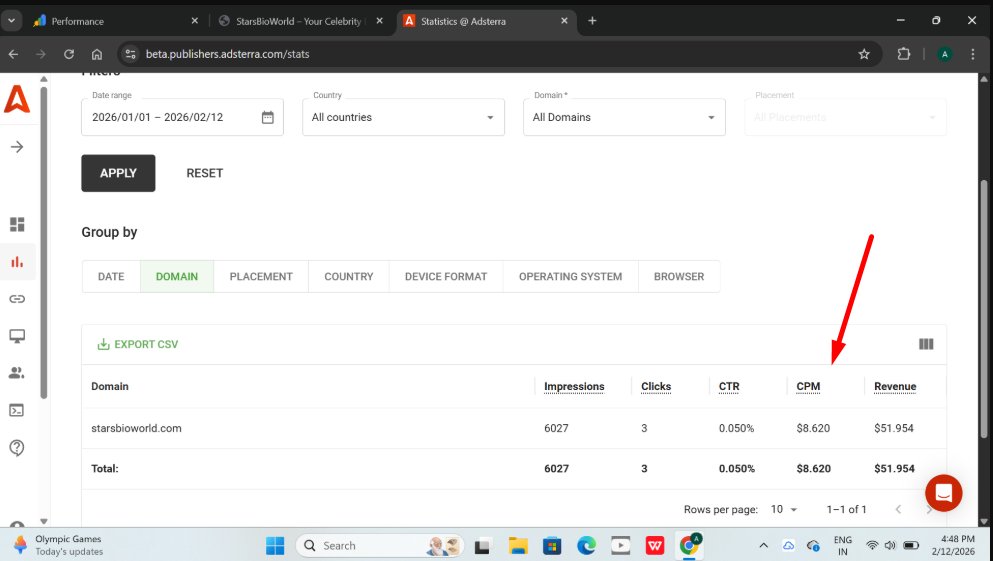
Anyone with Adsterra experience around here?
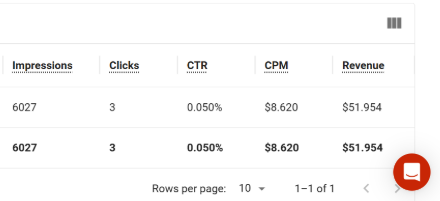
Found a Flippa listing that runs AdSterra ads and has 8.6 RPM. Is this real or something fishy? If true, this is on par with Adsense/Ezoic/Journey.
I thought they have like under $1 RPM.
If this is true, it is a big opportunity as if I'm not mistaken they approve almost all publisher applications.
The site is a celebrity bio site so it is not the niche that makes it high RPM.
All My Pinterest Pins Disappeared Overnight - What Should I Do?
Q: A few days ago I noticed that ALL my pins disappeared from the keywords they were ranking for. Completely invisible. It’s devastating.
It almost looks like a spam filter.
A: First thing I'd always do is check whether it might be shadow-banned.
You can use a tool like https://t.co/KxUALFYsbC to quickly verify if your account is affected.
If it turns out to be a shadow ban, reach out to support and clearly explain your situation. In many cases, they can review your account and help resolve it.
Before changing your entire strategy, always make sure it’s not an account-level issue first.
How much YouTube pays you to start a faceless YouTube channel
1,000 views = $6
10,000 views = $60
100,000 views = $600
1,000,000 views = $6,000
10,000,000 views = $60,000
100,000,000 views = $600,000
Like & Repost & Comment 'Send'
Follow+bookmark (so I can DM you)📤
Infinity Scroll (the highest-impact RPM upgrade you can make)
I tested a ton of 'infinite scroll' plugins lately...
Only one method worked consistently with all theme + plugin setups I tried:
Ajax Load More + the Single Posts add-on.
it’s $49/year.
but it’s the only setup that didn’t break, glitch, or randomly stop loading.
(if you found a free option that actually works, hmu. always open to a better stack.)
1️⃣ What infinity scroll actually does
When readers hit the end of your article…
the next article loads instantly underneath it.
title
featured image
categories
url updates
page title updates
analytics stay correct
everything just flows.
your readers scroll more → stay longer → view more ads.
we usually see a 30–60% RPM increase from this one-time setup alone.
yes, it’s that good.
2️⃣ The tools you need
• Ajax Load More (free)
• Single Posts add-on (paid)
You only need the Single Posts add-on for the auto-load effect.
the Next Page add-on is only for paginated posts.
3️⃣ My 10-minute setup
Step 1 - Install the plugins
dashboard → plugins → add new → install Ajax Load More
upload + activate the Single Posts add-on
go to Ajax Load More → Licenses → paste your key → it should turn green
Step 2 - tell ALM what to target
open Shortcode Builder
switch to Single Posts mode
keep it simple:
Target: article
(if your theme hides the title/hero, switch to #main)
other backups:
.site-main, main.site-main, .entry-content
core settings:
Single Posts: on
Pause Override: on
Order: leave default
Step 3 - use it without touching templates
You have 2 options:
A) Automatic
Ajax Load More → Settings → Single Posts → enable for “post”
it injects itself automatically.
sometimes this toggle bugs out → then use option B.
B) Manual
add a PHP snippet (via WP Code)
paste:
add_filter('the_content', function ($content) {
if (is_singular('post') && in_the_loop() && is_main_query()) {
$shortcode = '[ajax_load_more single_post="true"
single_post_target="article"
post_type="post"
pause_override="true"
single_post_progress_bar="top:8:#a89777"]';
return '<div id="alm-post-wrap">' . $content . '</div>' . do_shortcode($shortcode);
}
return $content;
}, 20);
if your loaded posts don’t show title/featured image → change the target to #main.
your shortcode is fully editable. remove the last line if you don’t want the progress bar.
Step 4 - Test it
open any post
scroll to the bottom
the next post should auto-load
url + title update
progress bar fills (if enabled)
4️⃣ Quick troubleshooting:
bar doesn’t fill → wrong hex code or wrong target wrapper
nothing loads → caching plugins delaying JS (turn off delay/defer temporarily)
security plugin blocking requests → allowlist the REST calls in your firewall
and depending on your ad network, let them know you’ve enabled infinite scroll so they can ensure ads render properly on new loads.
Most people fail on Pinterest because they pick the wrong niche.
How I like to think about niches the smart way 👇
1) Biggest niches (maximum reach):
Home & Interior
Food & Recipes
Fashion
Beauty
Health & Fitness
Lifestyle
Travel
Huge demand.
Also huge competition.
2) Most passionate niches (highest engagement - based on our own data):
Parenting
Weddings
Fitness transformations
Home makeovers
Faith & spirituality
Personal growth
Pets
Fewer users - but way more saves & clicks.
3) Underrated niches (easy wins - also for expanding your existing niche):
Minimalism & decluttering
Budget living
Small-space living
Seasonal routines
40+ life stages
Hobby-based niches
Niche diets & lifestyles
Smaller audiences.
Clear intent.
Much easier to dominate.
And often crazy high RPMs.
Here are 3 ways to increase your average 3% Amazon affiliate commission rate up to 8%:
1. Accept the Creator Rewards and hit either of the top 2 shipped revenue targets (the higher targets give you 4 extra %, the lower 3%)
2. Accept all available Creator Connection campaigns on the day you 'sold' a product. (you can make 30-40% from the same number of conversions - see my post from a couple of days ago for proof.
3. Set up OneLink and get credited for international conversion. (it will make you around 10% more, zero extra work)
Do I miss anything?
Any questions? Let me know.
How to quickly find high buying-intent keywords in any niche:
> Go to ClearSERP > Research > Competitor Research
> Enter reddit .com
> In the Advanced filter, set Contains to "review, best" and URL Filter to any subreddit in your niche, for example "/r/Appliances"
> Set result limit and click Research
> [Optional] click Show Filters and check "One keyword per URL"
You now have a list of high buying-intent keywords to target with your site (or, if you're into parasite stuff, reddit threads to respond to with an affiliate link...)
How to instantly boost your affiliate CTR with Pinterest traffic
Most people build affiliate articles for Google readers.
Pinterest readers behave nothing like that.
WHAT ACTUALLY WORKS:
1) Buttons beat text. Every. Single. Time.
Pinterest users don’t “read”.
They tap whatever looks clickable.
Use big, wide buttons with short CTAs:
→ “Check Price”
→ “View Deal”
→ “See Details”
No long sentences.
No vague wording.
Just clean, punchy commands.
2) Product boxes outperform plain text by a mile
People come from a visual platform.
They want to see something before they click.
The winning structure:
• Clear product image
• One short benefit (no paragraphs)
• Optional price range
• 1–2 buttons underneath
Use boxes after every item or every second item.
3) Text links inside paragraphs = ignored
Nobody taps those.
Nobody even sees them.
If you need to use a text link:
→ make it bold
→ make it colored
→ place it at the end
→ keep it tiny: “→ Check here”
Otherwise skip it.
4) Best placement for listicle articles
Pinterest users scan the top heavily.
That means:
Your first product box or button should appear within the first 1–2 paragraphs.
Not above the fold.
But definitely early.
It shifts your CTR instantly.
5) Top 3 CTR boosters (from what we tested over and over again)
#1 Mini-collage above the product
Two or three images together = higher interaction.
#2 Number tags (#1 pick, #2 pick)
Pinterest loves list structure.
Numbers trigger clicks.
#3 Button colors that match your pin
Sharper match = stronger trust.
Best button performers in our tests:
Pink • Red • Purple
6) BPinterest traffic needs visual selling, not text selling
• Images
• Boxes
• Buttons
• Collages
• Icons
The more visual → the higher the CTR.
Words alone barely convert.
What you should focus on at every traffic stage if you actually want to scale further.
What actually matters at each stage:
1️⃣ 0 → 10,000 monthly pageviews
Goal: teach the platform who you are + get your first reach.
Focus on: structure, keywords, volume.
Step 1: build your board structure (exact Interests only)
10–12 boards.
Step 2: find 20–30 evergreen keywords you can use within your boards
Simple. Stable. Long-term demand.
Step 3: publish 5 articles/week
List-posts, roundups, entertaining formats.
Step 4: create 20–25 Pins per article
Upload consistently (1/day or small batches).
Step 5: post 8–12 Pins/day
2️⃣ 10,000 → 50,000 monthly pageviews
Goal: duplication + clustering.
This is where your growth starts compounding.
Step 1: check analytics
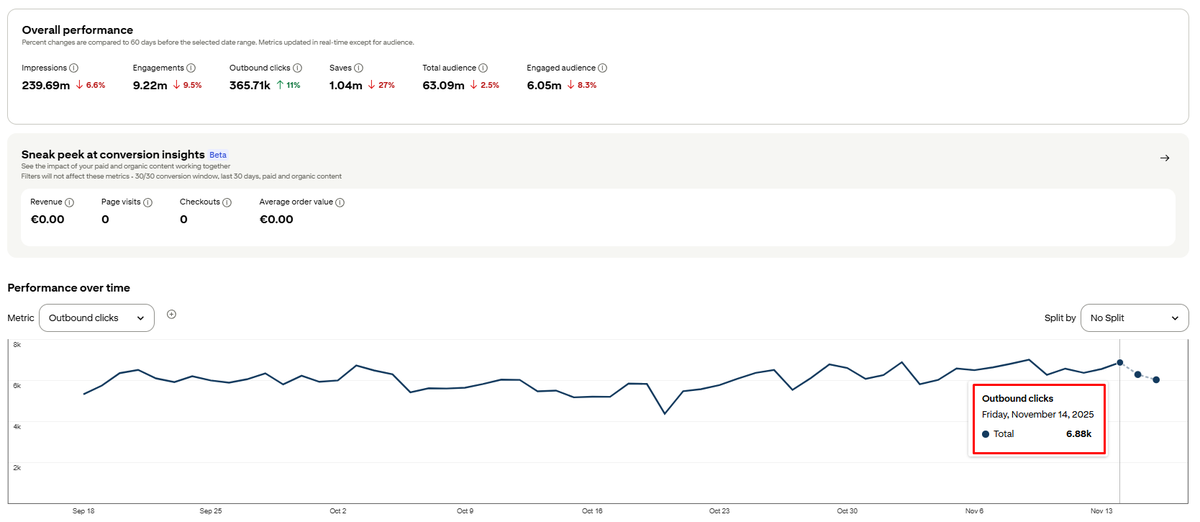
Find the URLs with high RPM + high outbound clicks.
Step 2: for every winner:
→ create 5–10 keyword variants
→ add 3–5 new Interests for new boards (go one level broader if needed)
Step 3: Create new winning articles 2–3×
New URL. New headline. New content angle.
Step 4: Add 10-20 Pins for each new variant
Step 5: clean your boards every 3 months
Delete underperformers.
This is when your signals get clear (Interest → Pixie → PinSage).
Your reach starts to really compound.
3️⃣ 50,000 → 100,000+ monthly pageviews
Goal: scale like a system - not like a creator.
Step 1: turn on the keyword machine
30–40 new keywords a month.
All evergreen. All low competition.
Step 2: increase Pins/day
When your base is solid →
go from 12 to 20–30 Pins/day.
More pins = more seeds = exponential growth.
Step 3: expand your clusters
Use related Interests to “widen” your niche.
Step 4: duplicate your top boards
Same Interests, different subtopics → stronger signals
The 10 highest-performing Pinterest title formats
(based on our testing data)
After testing thousands of pins, these are the formats that repeatedly pull the HIGHEST CTR + saves 👇
1. number + keyword + “ideas” (the king format)
this one wins every single time.
examples:
• 25 Small Patio Ideas
• 30 Easy Dinner Ideas
• 20 Cozy Bedroom Ideas
Why it works:
People come to Pinterest for inspiration - “ideas” is the strongest trigger on the platform.
2. number + adjective + keyword + ideas
same format - but more emotional.
examples:
• 25 Stunning Porch Ideas
• 20 Cozy Living Room Ideas
• 18 Quick Prep Ideas
power words:
cozy, easy, modern, genius, budget, quick, cute.
3. “for + demographic” (ctr booster)
hyper-specific = hyper-relevant.
examples:
• 25 Gift Ideas for Busy Moms
• 20 Small Bathroom Ideas for Renters
• 15 Easy Hairstyles for Long Hair
best demo triggers:
for beginners, for moms, for small spaces, for teens.
4. how to + outcome
perfect for actionable content.
examples:
• How to Organize a Pantry Fast
• How to Style a Small Entryway
• How to Meal Prep for the Week
short, clear, benefit-first = high CTR.
5. x vs y
comparison posts get saved like crazy.
examples:
• Tiles vs Wallpaper for Tiny Bathrooms
• LED vs Fluorescent Lighting
people love formats that reduce decision stress.
6. before + after
this format explodes on Pinterest (but is not easy to create)
examples:
• Small Patio Makeover Before + After
• Cabinet Paint Before/After
visual dopamine. instant clicks.
7. cheap / budget / under $25
budget keywords hit hardest for women 25–54.
examples:
• 20 Cheap Patio Ideas
• 15 Budget Bathroom Upgrades
• 20 Gifts Under $25
the more specific the number → the better the CTR.
8. quick / easy / 5-minute / no-skill
“low effort” is one of the strongest Pinterest triggers.
examples:
• 10 Easy Weeknight Dinners
• 20 Quick Decluttering Tips
• 15 5-Minute Hairstyles
9. mistakes to avoid
massive CTR due to loss-aversion.
examples:
• 10 Gardening Mistakes to Avoid
• 7 Decorating Mistakes You’re Probably Making
people hate missing something important.
10. “things nobody tells you…”
super high save rate.
examples:
• 12 Things Nobody Tells You About RV Life
• 10 Things No One Warned Me About Having Boys
Pinterest loves emotional, personal titles.
nobody will believe this pinterest hack:
you've been doing pinterest BACKWARDS
everyone's trying to build ONE mega blog
grinding 8 hours a day
perfecting every post
praying it hits $10k/month
dies after 3 months
i cracked the code by being LAZY:
20 shitty blogs > 1 perfect blog
here's the autistic math:
one $10k blog = all your eggs in one basket
twenty $500 blogs = algorithm can't kill you
tested this with 47 blogs over 14 months
the results are INSANE:
12 blogs flopped completely (dead)
8 blogs make $200-400/month (mid)
15 blogs make $500-800/month (fire)
5 blogs make $1k+/month (wtf)
total: $12,400/month
and i spend 30 minutes per day TOTAL
here's why everyone fails at pinterest:
they treat it like social media
"post 5 times a day"
"engage with followers"
"build a community"
WRONG
pinterest is a SEARCH ENGINE with a 6-year lifespan
your pin from 2019 still gets clicks in 2025
compare that to X where your banger dies in 18 hours lmfao
the system that prints money:
1. hosting exploit
everyone pays $30/month for ONE blog
i pay $3/month for FIFTY blogs
hostinger shared hosting
unlimited sites
unlimited traffic
one payment, infinite leverage
you will pay $600/month in hosting
i'm paying $3
2. keyword warfare
this is where 90% of people fuck up:
they target "home decor" (4M competing posts)
i target "small apartment bedroom decor on a budget under $200" (400 competing posts)
specificity = money
i built a system:
- 100+ long-tail keywords per blog
- each keyword = 1 article = 4 pins
- infinite content pipeline
while you're writing one "perfect" post about home decor
i've published 100 "mid" posts about hyper-specific shit
and mine rank #1
3. content automation (the controversial part)
i generate 90 articles in 15 minutes
yes with AI
yes it's "cheating"
yes it makes $10k/month
here's what the "purists" don't understand:
pinterest users don't want shakespeare
they want:
- clear answer
- good images
- affiliate link
my AI articles do ALL of that
3 articles per day × 20 blogs = 60 new articles daily
on AUTOPILOT
4. pin automation is cracked
each article gets 4 pins (different designs)
that's 360 pins per month PER BLOG
7,200 pins per month TOTAL
all automated
all branded
all scheduled
your are in canva for 6 hours making one pin design
i'm generating 240 pins while taking a shit
5. monetization stack
don't rely on ONE income source (that's broke behavior)
per blog breakdown:
ads: $300-500/month (ezoic/mediavine at 50k+ views)
affiliates: $50-150/month (amazon associates/clickbank)
digital products: $50-200/month (printables, guides or etsy products)
stack them = $400-850 per blog
multiply by 20 blogs = financial freedom
6. the portfolio effect
this is the MOAT:
if blog #7 dies tomorrow, i still have 19 earning
you can't kill me
one blog = fragile
twenty blogs = antifragile
real numbers from last month:
- blog 3: $47 (basically dead)
- blog 8: $340 (mid)
- blog 12: $890 (fire)
- blog 15: $1,240 (wtf how)
total: $12,180
time invested: 45 min per month per blog
the psychology everyone misses:
pinterest users are 78% women, age 25-45
they have MONEY
they have INTENT
they're ready to BUY
these aren't broke teenagers scrolling tiktok
these are moms searching "nursery ideas under $500"
CREDIT CARD IN HAND
why this works when everything else fails:
compound effect:
X: post dies in 24h
pinterest: post lives for YEARS
i have pins from 2022 still driving traffic TODAY
that's passive income on STEROIDS
the truth nobody wants to hear:
you don't need:
- graphic design skills
- massive following
- viral content
- perfect writing
you need:
- systematized repetition
- long-tail keywords
- bulk automation
- portfolio approach
quality is a TRAP
quantity with "good enough" beats perfection every time
while you're perfecting blog post #1
i've launched blogs #1-20 and 8 are profitable
this is how you make $10k/month working less than 1 hour per day
this is how you win while everyone else burns out
the bar is underground and we're playing limbo
comment "PINS" and i'll send you my full pinterest automation playbook that generated me $140k in the last 12 months





![nichegrownerd's tweet photo. Infinity Scroll (the highest-impact RPM upgrade you can make)
I tested a ton of 'infinite scroll' plugins lately...
Only one method worked consistently with all theme + plugin setups I tried:
Ajax Load More + the Single Posts add-on.
it’s $49/year.
but it’s the only setup that didn’t break, glitch, or randomly stop loading.
(if you found a free option that actually works, hmu. always open to a better stack.)
1️⃣ What infinity scroll actually does
When readers hit the end of your article…
the next article loads instantly underneath it.
title
featured image
categories
url updates
page title updates
analytics stay correct
everything just flows.
your readers scroll more → stay longer → view more ads.
we usually see a 30–60% RPM increase from this one-time setup alone.
yes, it’s that good.
2️⃣ The tools you need
• Ajax Load More (free)
• Single Posts add-on (paid)
You only need the Single Posts add-on for the auto-load effect.
the Next Page add-on is only for paginated posts.
3️⃣ My 10-minute setup
Step 1 - Install the plugins
dashboard → plugins → add new → install Ajax Load More
upload + activate the Single Posts add-on
go to Ajax Load More → Licenses → paste your key → it should turn green
Step 2 - tell ALM what to target
open Shortcode Builder
switch to Single Posts mode
keep it simple:
Target: article
(if your theme hides the title/hero, switch to #main)
other backups:
.site-main, main.site-main, .entry-content
core settings:
Single Posts: on
Pause Override: on
Order: leave default
Step 3 - use it without touching templates
You have 2 options:
A) Automatic
Ajax Load More → Settings → Single Posts → enable for “post”
it injects itself automatically.
sometimes this toggle bugs out → then use option B.
B) Manual
add a PHP snippet (via WP Code)
paste:
add_filter('the_content', function ($content) {
if (is_singular('post') && in_the_loop() && is_main_query()) {
$shortcode = '[ajax_load_more single_post="true"
single_post_target="article"
post_type="post"
pause_override="true"
single_post_progress_bar="top:8:#a89777"]';
return '<div id="alm-post-wrap">' . $content . '</div>' . do_shortcode($shortcode);
}
return $content;
}, 20);
if your loaded posts don’t show title/featured image → change the target to #main.
your shortcode is fully editable. remove the last line if you don’t want the progress bar.
Step 4 - Test it
open any post
scroll to the bottom
the next post should auto-load
url + title update
progress bar fills (if enabled)
4️⃣ Quick troubleshooting:
bar doesn’t fill → wrong hex code or wrong target wrapper
nothing loads → caching plugins delaying JS (turn off delay/defer temporarily)
security plugin blocking requests → allowlist the REST calls in your firewall
and depending on your ad network, let them know you’ve enabled infinite scroll so they can ensure ads render properly on new loads.](https://pbs.twimg.com/media/G9h4pElaMAMbTg-.png)

![keywordian's tweet photo. How to quickly find high buying-intent keywords in any niche:
> Go to ClearSERP > Research > Competitor Research
> Enter reddit .com
> In the Advanced filter, set Contains to "review, best" and URL Filter to any subreddit in your niche, for example "/r/Appliances"
> Set result limit and click Research
> [Optional] click Show Filters and check "One keyword per URL"
You now have a list of high buying-intent keywords to target with your site (or, if you're into parasite stuff, reddit threads to respond to with an affiliate link...)](https://pbs.twimg.com/media/G8D5RKmXsAQOtwH.jpg)