📉 El fin de "leer el código": La herramienta Open Source que destruye los SaaS de documentación?
Llegas a un nuevo equipo. El código tiene 200,000 líneas. Tu Tech Lead te dice: "ve leyéndolo para entenderlo". Abres 400 archivos, te abrumas y cierras la laptop. Pierdes tres días leyendo código que no te enseña nada sobre el sistema real.
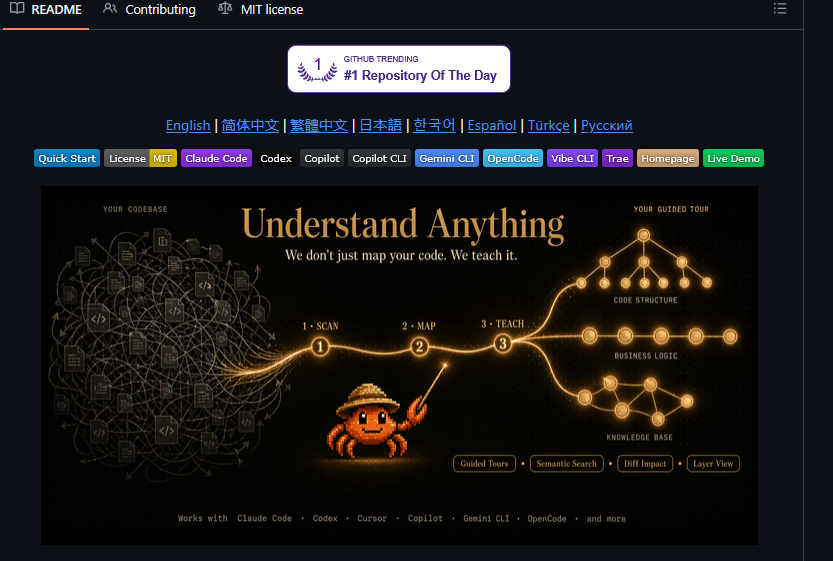
Understand-Anything (44.4k estrellas) acaba de solucionar esto para siempre. Es un pipeline multi-agente que analiza todo tu repositorio y lo transforma en un mapa de conocimiento interactivo donde puedes clicar, hacer zoom y preguntar lo que quieras.
Lo que cambia las reglas del juego:
🧠 Pipeline Multi-Agente: Lee cada archivo, función y dependencia para entregarte un dashboard visual donde cada nodo te da un resumen en texto plano.
🎯 Domain View: No te muestra carpetas aburridas; mapea tu código según la lógica de negocio y los flujos reales del producto.
💬 Preguntas con Contexto: Puedes escribir directamente: "¿Dónde ocurre la autenticación?" o "¿Qué llama a esta función?" y te lleva al punto exacto.
🔌 Integración Total: Funciona de forma nativa como plugin para Claude Code, Cursor, Copilot y Gemini CLI.
La gran diferencia con el resto: La mayoría de las herramientas generan diagramas complejos que solo sirven para impresionar en una presentación, pero no te ayudan a resolver un bug el lunes por la mañana. Este mapa está diseñado exclusivamente para enseñarte cómo encaja cada pieza.
SaaS como Swimm o Mintlify te cobran cientos de dólares al mes y obligan a subir tu código a sus servidores.
Understand-Anything: $0. Cualquier tamaño. En tu máquina local. Privado y libre para siempre (Licencia MIT).
El Siguiente Nivel (Idea para Builders):
CI/CD Auto-Docs: Un GitHub Action que regenere el mapa visual en cada Pull Request para ver el impacto del cambio antes de mergear.
Onboarding Vectorial: Conectar el grafo a un bot de Slack para que los nuevos devs pregunten dudas de la arquitectura y el bot les devuelva la ruta visual exacta.
Enlace al repositorio en los comentarios. Guarda este post en marcadores antes de que se pierda en el feed 🔖
el ingeniero que construyó Claude Code acaba de publicar un video de 28 minutos sobre cómo escribir prompts que realmente funcionan
he visto cursos de 300$ que no cubren lo que él muestra en los primeros 10 minutos
archivos CLAUDE.md, atajos de memoria, sesiones paralelas, patrones de prompting
todo en un video y completamente gratis
funciona seas desarrollador, principiante o alguien que lleva meses usando Claude
a partir de esto preparé 18 cosas que puedes copiar y usar en Claude hoy mismo
guía completa en el artículo de abajo
En lugar de perder una hora viendo una película, mira esto.
En solo 14 minutos, un ingeniero de Anthropic, autor de Building Effective Agents, te enseñará más sobre cómo construir agentes de IA correctamente que lo que muchos desarrolladores descubren por su cuenta en meses.
Posiblemente la parte más compleja de toda la IA.
(Guárdalo, te será muy útil)
Anthropic acaba de mostrar un taller de 24 minutos sobre cómo realmente hacer prompts a Claude.
Impartido por las personas que lo construyeron.
Gratis. Sin registro. Sin muro de pago.
He visto cursos de $300 que no cubren lo que enseñan en los primeros 8 minutos.
La mayoría de la gente trata CLAUDE.md como si fuera un archivo de prompt.
Ese es el error.
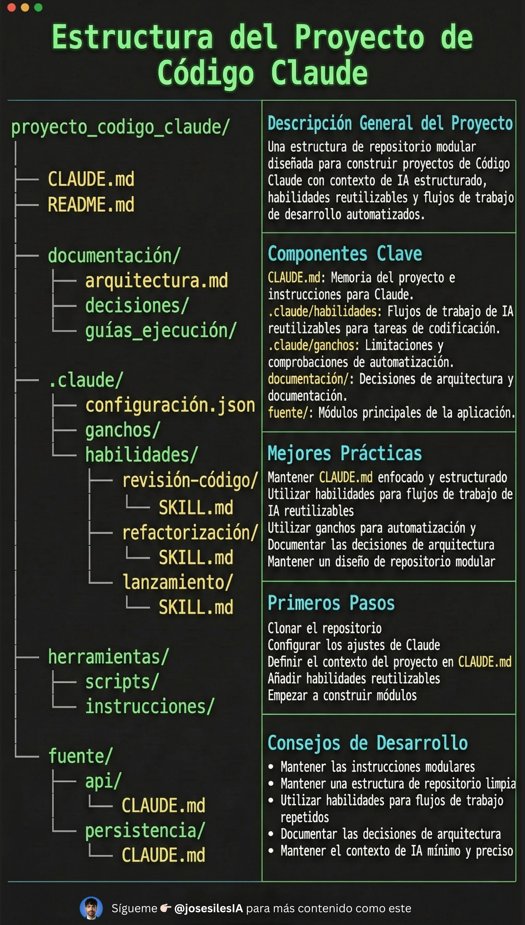
Si quieres que Claude Code se sienta como un ingeniero senior viviendo dentro de tu repositorio, tu proyecto necesita estructura.
Claude necesita 4 cosas en todo momento:
• el por qué → qué hace el sistema
• el mapa → dónde están las cosas
• las reglas → qué está permitido / qué no
• los workflows → cómo se hace el trabajo
Yo a esto lo llamo:
La anatomía de un proyecto de Claude Code 👇
Steal these 15 claude code habits (to go from $400 per week to $15...)
1. use haiku for 80% of your work: set haiku as default...it costs 5x less than sonnet and handles bug fixes, file reads, and simple edits just as fast. save $0.80 per session.
2. search first, read second: type "search for x in file" instead of "read file"—searching a 50mb log costs $0.05 vs $5 to read it all. that's 100x cheaper.
3. read files in chunks: say "read lines 1-100" instead of "read entire file"—reading 100 lines costs $0.10 vs $10 for the whole 10mb file.
4. run tasks in parallel: say "run these in parallel" when giving multiple independent tasks—3 files read at once = same cost as 1, but 3x faster.
5. use the explore agent for unfamiliar code: say "explore this codebase for x" instead of random searches...trial-and-error costs $20-30, explore agent finds it first try for $5.
6. plan major changes first (most skip this): say "create a plan for refactoring x" before touching code...costs $0.50 to plan, saves $50 in wasted rework when changing 5+ files.
7. turn on budget alerts: I created a setup script to get automatic warnings at 70% and 90% of your monthly budget. never overspend again.
8. limit search results: ask for "find first 50 matches" instead of "find all matches"...10,000 results cost $5, top 50 cost $0.50, and you only need the first few anyway.
9. be specific in requests: say "fix the login bug in auth.ts line 45" instead of "help me fix this"...vague requests = multiple back-and-forth rounds = 3x cost.
10. use path shortcuts: setup script creates shortcuts automatically so you type utils instead of /src/lib/utilities/helpers/index.ts every single time. faster = cheaper.
11. create task checklists at the start: say "create a todo list for x" at the beginning of multi-step work...prevents forgotten steps and re-reading files, finish 40% faster.
12. read smart: load only what you need: say "read lines 100-200 from database.ts" instead of "read database.ts"...reading 50 lines you need costs pennies vs dollars for all 5,000 lines.
13. don't ask the same question twice: say "use the errors we found earlier" instead of re-running the same search. session memory is free, re-running costs money.
14. let the system filter first: say "show only x from y data" instead of "show all data" get 5 rows with errors instead of loading all 10,000 rows. 95% cheaper.
15. make these habits automatic: I use a setup script to build these into my workflow automatically. install once, save forever.
(real data in the screenshot!)
ESTA VAINA ES EN SERIO, so son usuarios PRO o MAX de Claude vayan YA a https://t.co/ERvoWbMpYm y van a ver 250 o 1000 USD de créditos disponibles en su cuenta para probar Claude Code en la web y mobile disponibles hasta el 18 de Noviembre. https://t.co/8AOjSI5aDr
Share Claude Code sessions with this command 👇
Just shipped v1.26.1 of claude-code-templates because I kept needing to hand off work mid-session.
Run:
npx claude-code-templates@latest --chats
- All your sessions grouped by chat
- Download any conversation
To share a session:
- Share the file, and add it to your project
- Then run:
claude "read @ chat-file .md and continue"
Or if you are in the same account click on "Resume" and you will see the command: claude --resume session_id
Built this to keep context flowing across the team without losing momentum.
Official Launch: Claude Code for PMs!
100% free! No "comment for access"! 👇
Claude Code is NOT just for code.
It's the most powerful way to use LLMs today.
Unlike browser-based tools, Claude Code runs locally and can read, write, and organize files directly on your computer.
No more copy-pasting between your browser and your documents. Build your own OS over time.
This course is built IN Claude Code, so everything is DIRECTLY usable from day one.
Here's what's covered:
Module 1: Fundamentals
• Setting up your workflow with Claude Code + Obsidian
• Task management and file organization at scale
• Working with company context and project documentation
• Creating reusable agents for repetitive tasks
Module 2: Advanced Techniques
• Building custom slash commands for instant workflows
• Multi-agent systems for complex projects
• Prompt engineering for PM-specific tasks
• Real-world case studies with a fictional company (TaskFlow)
The entire course runs through interactive lessons delivered BY Claude Code itself. You learn the tool by using the tool.
👉🔗 https://t.co/QrU0bspGur
If you already have Claude Code installed, running this command will launch you DIRECTLY into the course! 👇
cd ~/Documents && \
curl -L https://t.co/mGit8pcbfI -o https://t.co/OBo3SlZgMT && \
unzip https://t.co/OBo3SlZgMT -d claude-code-course && \
cd claude-code-course && \
claude "/start-1-1"
Lots more to come! Let me know what you'd like me to add.
Esta guía está buenísima. Obviamente escrito por el gran @addyosmani
"Gemini CLI Tips & Tricks. 30 tips pro para usar Gemini CLI para agentic coding"
Joya de artículo
https://t.co/01nk0tDE9e
I'm giving away Claude Code for FREE.
Yes, you read that right -- the world's best AI, now completely FREE.
My mission is to get the next billion people to write great software. I believe EVERYONE should have access to the best AI, but so many are constrained by costs.
I'm solving this by:
disrupting the world's fastest growing industry = AI
+ with the most proven business model = Ads
You can actually try it out now -- just one line of code, and you unlock all the powers of Claude Code, for free.
how it works:
1. sign up on Giga AI Free
2. change Claude Code env variables to use our inference endpoint
2. to support the free usage, we'll add ads inside the AI responses (only contextual and relevant ads, no spam)
Since we get too many signups, there's a waitlist, but we'll be rolling it out to the maximum people as we can.
Watch the video to get started & comment and retweet to get access first.
Claude Code changed my life
It helped me build an app without writing a single line of code
That app is now making me over $300,000 a year
Here is step by step how you can do the exact same thing, even if you've never coded in your life:
🤔 Ayer probé cloudflared de @Cloudflare para exponer una API que tenía corriendo en local para probar una integración con GitHub y la verdad que 10/10.
No necesitas ni cuenta de Cloudflare.
Instale el paquete y ejecute:
cloudflared tunnel --url http://localhost:8000
Y listo.
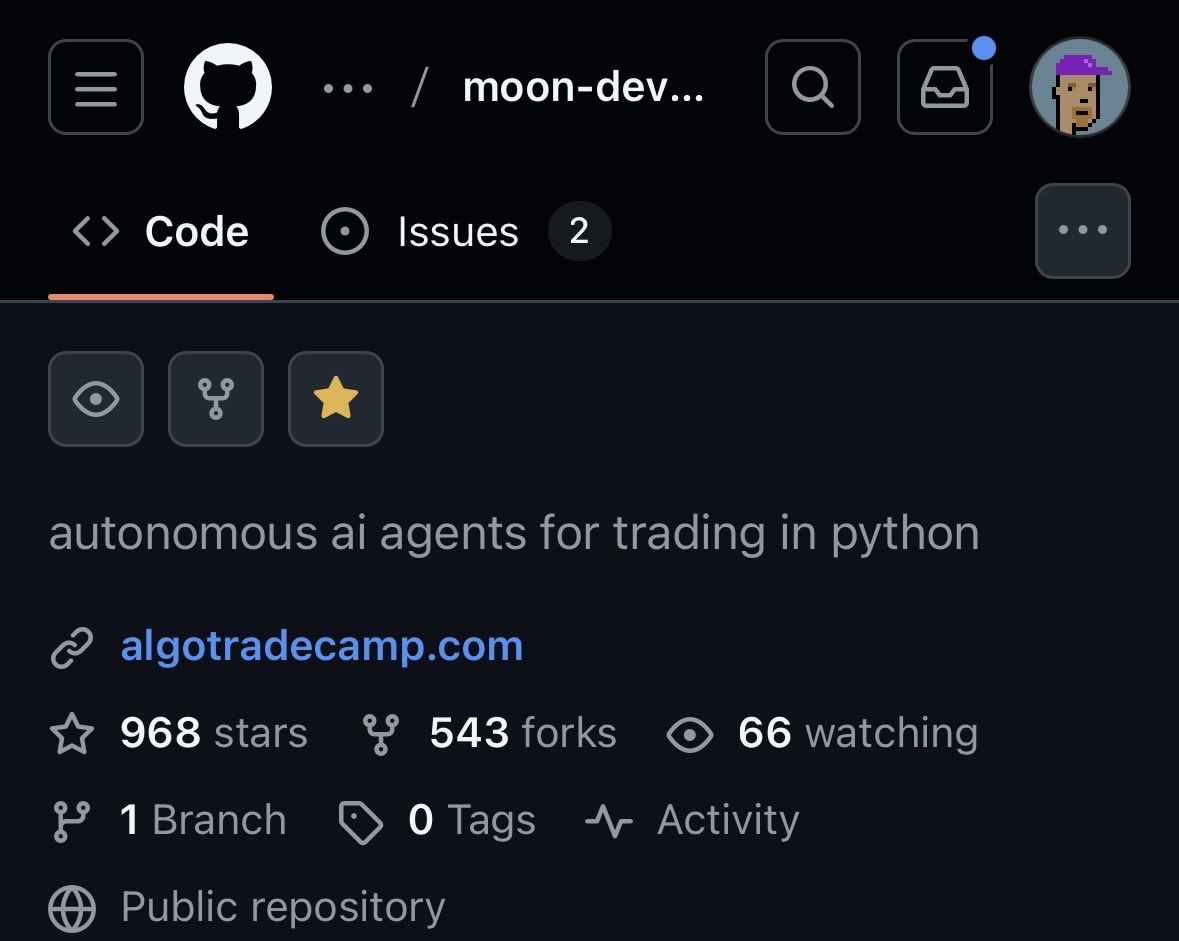
almost 1000 stars and over 500 forks in less than 3 days is crazy
ai agents for trading 100% open sourced are here to stay
and we are just getting started