Build your own personal assistant with @openclaw
and Ollama using your models!
ollama launch clawdbot
Thank you for building something amazing @steipete!
How CI/CD pipelines work
(explained in 2 mins or less):
A CI/CD pipeline is an automated workflow that facilitates continuous integration (CI) and continuous delivery or deployment (CD) by managing code building, testing, and release processes.
It integrates the various stages of the software development lifecycle (SDLC) into a seamless, repeatable process.
These stages include source code management, automated testing, artifact creation, and deployment orchestration.
Continuous ‘delivery’ and ‘deployment’ are sometimes used synonymously.
But there is a clear and important distinction between the two.
Delivery is about ensuring the software can be released at any time.
It requires manual intervention to deploy to production.
Deployment, on the other hand, does the release through automated workflows.
Learn more here: https://t.co/pPPVI1DEfC
--
👋 PS: Want our Architecture Patterns Playbook for free?
Join our system design newsletter with 25,000+ software engineers: https://t.co/cDQzYT03Pt
--
🔖 Save this for later, repost it to help others learn system design.
🙋🏻♀️ Follow Nikki Siapno, turn on notifications 🔔
Many DevOps Engineers don’t fully understand how DevOps and GitOps CI/CD pipelines differ.
In a DevOps CI/CD pipeline, everything runs in one flow from code commit, tests, build, image creation, to direct deployment into the Kubernetes cluster.
It is fast and centralized but tightly couples deployment with the CI process, leaving little room for separation or control.
In GitOps pipeline, CI handles tests and builds, but deployment happens through Git commits. A controller syncs changes from the repo to the cluster.
Here, I’ve made this to help you better understand.
56K+ read my DevOps and Cloud newsletter: https://t.co/WBucLdwLhJ
What do we cover:
DevOps, Cloud, Kubernetes, IaC, GitOps, MLOps
🔁 Consider a Repost if this is helpful
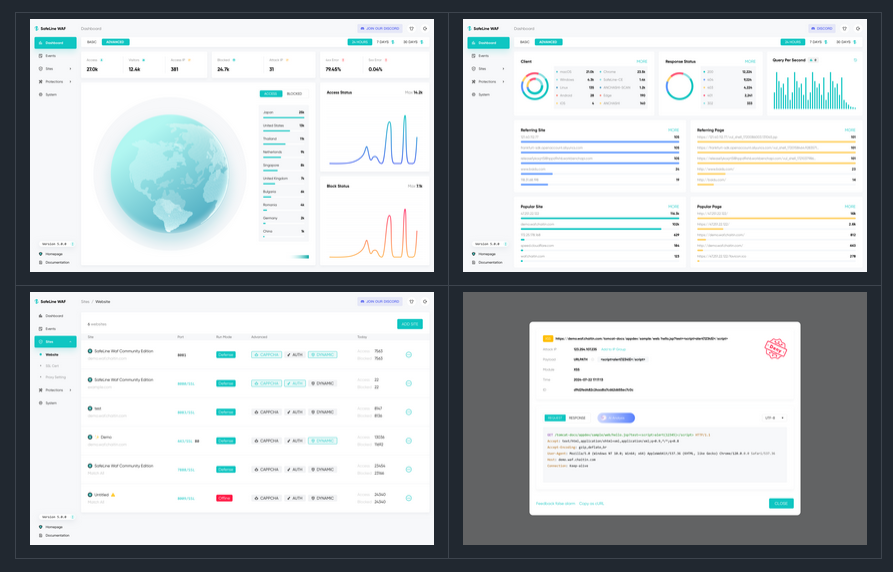
A Go-based self-hosted WAF(Web Application Firewall) / reverse proxy to protect your web apps from attacks and exploits.
#golang
https://t.co/pZ2g2GucVq
Docker explained in 2 minutes!
Most developers use Docker daily without understanding what happens under the hood. Here's everything you need to know.
Docker has 3 main components:
1️⃣ Docker Client: Where you type commands that talk to the Docker daemon via API.
2️⃣ Docker Host: The daemon runs here, handling all the heavy lifting (building images, running containers, and managing resources)
3️⃣ Docker Registry: Stores Docker images. Docker Hub is public, but companies run private registries.
Here's what happens when you run "docker run":
• Docker pulls the image from the registry (if not available locally)
• Docker creates a new container from that image
• Docker allocates a read-write filesystem to the container
• Docker creates a network interface to connect the container
• Docker starts the container
That's it.
The client, host, and registry can live on different machines. This is why Docker scales so well.
Understanding this architecture makes debugging container issues much easier. You'll know exactly where to look when something breaks.
____
If you found it insightful, reshare with your network.
Find me → @akshay_pachaar ✔️
For more insights and tutorials on ML and AI Engineering!