20 NotebookLM Prompts
To Learn Faster, Think Deeper & Research Smarter
01. Instant Summary
Turn long documents into digestible insights.
Prompt: “Summarize this source into the 10 most important ideas, key arguments, and practical takeaways in plain English.”
02. Beginner Explanation
Make complex topics easy to understand.
Prompt: “Explain this material as if I am a complete beginner. Use simple analogies, step-by-step logic, and avoid jargon.”
03. Deep Dive Breakdown
Understand the topic layer by layer.
Prompt: “Break this source into core concepts, hidden assumptions, expert-level nuances, and what most readers usually miss.”
04. Compare Sources
Spot agreements and contradictions.
Prompt: “Compare all uploaded sources. Show where they agree, where they conflict, and what unique insights each source contributes.”
05. Study Notes Builder
Create clean notes instantly.
Prompt: “Turn this content into structured study notes with headings, bullet points, definitions, and memorable examples.”
06. Flashcards Generator
Convert information into active recall.
Prompt: “Generate 25 high-quality flashcards from this material with question on front and concise answer on back.”
07. Quiz Me
Test your understanding.
Prompt: “Create a progressive quiz from easy to difficult based only on this source. Wait for my answers and grade me.”
08. Memory Hooks
Make information stick.
Prompt: “Create mnemonics, analogies, and memory anchors that help me retain the most important parts of this content.”
09. Timeline Extraction
Organize events chronologically.
Prompt: “Extract every important event, milestone, or development from these sources and arrange them into a clean timeline.”
10. Key Quotes Finder
Find the strongest supporting evidence.
Prompt: “Pull out the most impactful quotes, data points, and evidence from these sources that I can cite in writing or presentations.”
11. Research Gaps
See what’s missing.
Prompt: “Identify unanswered questions, weak arguments, missing evidence, and research gaps across these materials.”
12. Debate Both Sides
Sharpen critical thinking.
Prompt: “Present the strongest arguments for and against the main thesis of these sources as if two experts were debating.”
13. Turn Into Framework
Extract repeatable systems.
Prompt: “Convert the ideas in these sources into a practical framework, checklist, or repeatable system I can apply.”
14. Content Repurposing
Turn research into publishable content.
Prompt: “Use these sources to generate a LinkedIn post, article outline, tweet thread, and newsletter idea.”
15. Expert Interview Mode
Ask the notebook questions.
Prompt: “Act as the world’s top expert on these uploaded materials. I will ask questions answer only from the sources.”
16. Executive Briefing
Condense for busy decision making.
Prompt: “Create a 5-minute executive briefing with only the most strategic insights, implications, and action points.”
17. Lesson Plan Creator
Transform notes into a curriculum.
Prompt: “Turn this notebook into a 7-day learning plan with daily lessons, exercises, and checkpoints.”
18. Idea Generator
Use sources for new thinking.
Prompt: “Generate 20 original ideas, opportunities, or applications inspired by the uploaded materials.”
19. Simplify for Teaching
Prepare to explain to others.
Prompt: “Rewrite the key ideas from these sources into a teaching script that I can explain to someone in 5 minutes.”
20. Action Plan
Move from knowledge to execution.
Prompt: “Based on everything in these sources, create a practical action plan with first steps, priorities, and deadlines.”
❤️ Like
🔁 Retweet
🔖 Bookmark
Followv Nadia -with-Ai for more such posts
🚨 خبر عاجل: NotebookLM يمكنه الآن أن يدرّسك مثل مدرس خصوصي من أي جامعة مرموقة!! مجاناً تماماً🤯
إليك 8 برومبتات (أوامر) تستبدل ساعات من الدروس المدفوعة:
(احفظ هذا قبل ما يفوتك) ⭐️
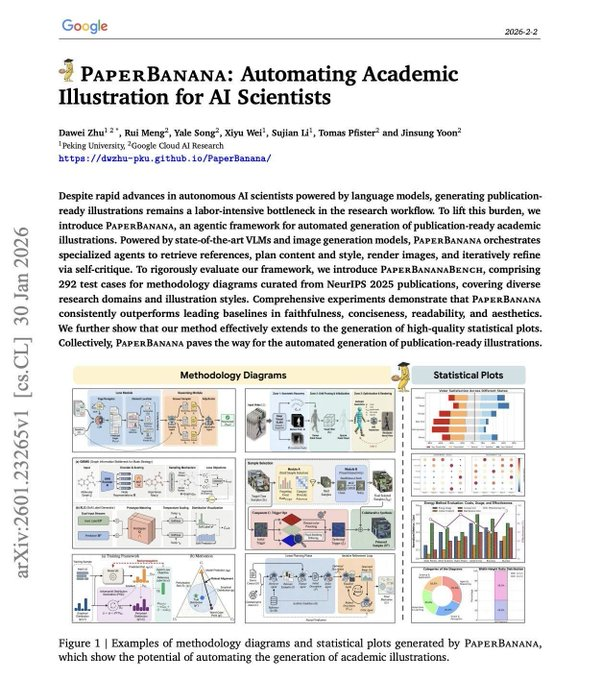
جوجل أطلقت ضربة جديدة اسمها PaperBanana، وهي أداة جديدة تُنشئ رسومات وأشكالًا أكاديمية جاهزة مباشرةً من نص قسم المنهجية الخاص بك. مجانية 100% الرابط
👇👇
https://t.co/wAGL4nYp3H #الذكاء_الاصطناعي
حنا نعيش بزمن رهيب حتى قراءة الابحاث بلغات اخرى صار سهل ومتناول اليد
هذي اداة اعتقد مسويها صيني اسمها GitHub: BabelDOC تترجم حتى صيغة PDF لحظيًا وميزتها انها تنقل حتى المعادلات الرياضية والرسوم البيانية بالصيغ الصحيحة
الاجمل من ذلك انها مجانية
الفجوة الحقيقية ليست في امتلاك Claude — بل في طريقة استخدامه
--
معظم الناس تفتح Claude، تطرح سؤالاً، ثم تُغلقه.
هذه خسارة حقيقية.
تطبيق Claude تجاوز مرحلة "المحادثة" منذ زمن بعيد،
وتحوّل إلى منصة عمل متكاملة — بأدوات، وذاكرة، وقدرة على التنفيذ الفعلي داخل حواسيبنا وتطبيقاتنا.
السؤال الذي يجب أن تطرحه على نفسك اليوم:
ما الذي تفعله به فعلاً؟
فيما يلي اثنتا عشرة قدرة داخل Claude، معظم المستخدمين لا يعرفون بوجودها — وكل واحدة منها تستحق وحدها إعادة النظر في طريقة عملك اليومي.
--
١. بناء المواقع دون كتابة سطر برمجي
عبر Claude Code، تربط حسابك على GitHub، تصف ما تريد باللغة العادية دون كود،
فيكتب الكود وينشره مباشرة.
المطوّر المبتدئ أصبح قادراً على تسليم مشاريع إنتاجية كاملة.
--
٢. استخدام حاسوبك بدلاً عنك
فعّل Browser Use و Computer Use من الإعدادات، واتركه يعمل.
يتصفح، يضغط، ينفّذ المهام على جهاز Mac أثناء غيابك.
ويمكنك التحكم به من هاتفك عبر Dispatch — وكيل رقمي بالمعنى الحرفي.
--
٣. صناعة المهارات بأمر واحد
مع skill-creator يتيح لك تعليم Claude مهمّات متكررة.
يُجري معك مقابلة قصيرة، ثم يولّد Skill جاهزة للاستخدام.
اكتب /skill ليبدأ العمل، وشارك المهارة مع فريقك. كأنك بنيت موظفاً رقمياً جديداً.
--
٤. توليد عروض تقديمية بمصادر بحثية
نظام Claude يبحث في الويب، يبني Brief مهيكل، ثم يُمرره إلى Gamma لإنتاج عرض احترافي بالبيانات والرسوم. Prompt واحد — والنتيجة عرض متكامل جاهز للعرض.
--
٥. أتمتة المهام المجدولة
خاصية Scheduled Tasks تسمح لك بجدولة أي Prompt ليعمل أسبوعياً أو يومياً.
كل يوم اثنين الساعة السابعة صباحاً، يُرسل لك Claude تقريراً عن المنافسين أو ملخصاً إخبارياً دون أن تطلب منه شيئاً.
الأتمتة في أبسط صورها.
--
٦. إنشاء ملفات Excel من وصف نصي
اطلب "خطة مالية لثلاث سنوات بمعادلات" — يُنتج لك نموذجاً مالياً كاملاً.
إدخالات بالأزرق، ومعادلات بالأسود. Financial Modeling بسرعة لم تكن واردة قبل عامين.
--
٧. الاتصال بأدواتك
Settings → Connectors → Add.
أكثر من ٥٠ تطبيقاً — Slack، Gmail، Google Drive، Notion.
نموذج Claude يقرأ، ويكتب، وينفّذ داخلها بدلاً عنك. مكتبك الرقمي أصبح موحّداً تحت سقف واحد.
--
٨. Cowork كموظف ذكي
وجّه Claude إلى مجلد مستنداتك — يقرأ الملفات، يطرح أسئلة، ثم يُسلّم مخرجات حقيقية بصيغة docx، xlsx، pptx.
ملف .md منظّم واحد يُغني عن خمسين ملفاً عشوائياً.
--
٩. مشاريع بذاكرة
Cowork Projects تحفظ سياق كل محادثة. اطلب منه "ابنِ على تقرير الأسبوع الماضي" — يفهم تماماً ما تقصد. ذاكرة محدودة النطاق، لكنها دقيقة ومفيدة.
--
١٠. Plugins حسب دورك الوظيفي
Marketing، Legal، Finance، Sales — لكل قطاع Plugin جاهز. /draft-content للتسويق، مراجعة العقود للقانون. تخصيص كامل حسب طبيعة شركتك.
--
١١. AskUserQuestion — اجعل Claude يسألك
أضف "use AskUserQuestion" إلى أي Prompt. يولّد لك نموذجاً بأزرار قابلة للنقر، ويُجبرك على الوضوح فيما تطلبه. أقصر طريق للحصول على نتائج دقيقة.
--
١٢. Claude Design — صمّم أي شيء
Landing Page، Pitch Deck، تطبيق — اوصف ما تريد، وسيبنيه مباشرة أمامك.
تعديلات تفاعلية بالنقاط والملاحظات، ثم تصدير إلى Canva، PDF، أو Claude Code.
أسهم Figma هبطت ٧٪ في يوم واحد بعد إطلاقه — السوق فهم الرسالة.
-
الفجوة الحقيقية اليوم ليست بين من يملك Claude ومن لا يملكه.
الفجوة في طريقة الاستخدام.
هناك من يفتحه ليطرح سؤالاً، وهناك من يبني به شركته.
كل قدرة من هذه الاثنتي عشرة تمثّل رافعة إنتاجية.
ومجتمعةً — تُعيد تعريف ما يعنيه "العمل الفردي" في زمن الذكاء الاصطناعي.
السؤال الذي يستحق أن تتوقف عنده:
كم من ساعات عملك اليومية تستهلكها مهام يمكن لـ Claude تنفيذها بدلاً عنك؟
تابعوني على @mhmd7sn
لمزيد من التحليلات حول الأسواق، الاقتصاد، والتكنولوجيا.
أفضل مكان تبدأ منه:
مكتبة برومبتات مجانية من الشركة اللي صنعت Claude .. مو محتوى سوشال ميديا، مصدر أصلي. 🎯
الرابط في التغريدة الثانية 👇
ماراح تحتاج لتعلّم البرمجة بعد الآن !!
إليك الطريقة لاستخدام Claude Code بدون أي خبرة برمجية (Zero Coding):
الإعداد خطوة بخطوة:
1.افتح تطبيق Claude على الكمبيوتر
2.اضغط على Code (وليس Chat أو Cowork)
3.اختر مجلدًا من جهازك
4.اربط حساب GitHub مجاني من الإعدادات
5.انتقل إلى Connectors
6.استخدم دليل الإعداد:
https://t.co/n8hUhfSWOC
ماذا يفعل Claude؟
يمكنه الآن بناء أي شيء تصفه باللغة الإنجليزية… حرفيًا!
لكن هنا السر الحقيقي (قبل كتابة الطلب):
غيّر هذين الإعدادين:
1. اختر نموذج “Opus 4.6”
أذكى نموذج للتعامل مع المشاريع المعقّدة
2. فعّل “Auto accept edits”
حتى لا يتوقف Claude بعد كل خطوة ويكمل العمل تلقائيًا
لا تشرح الكود… استخدم هذا النموذج الجاهز:
انسخ والصق:
“أنشئ مستودع GitHub باسم [NAME].
أنا لا أعرف البرمجة. قم بكتابة كل شيء لي.
أريد أن أبني [GOAL] لتحقيق [SUCCESS CRITERIA].
هذا مثال [أرفق صورة].”
النتيجة:
•Claude يفهم الصورة
•يبني الموقع أو المشروع كامل
•بدون أي خبرة برمجية منك
الخلاصة:
لم يعد السر هو تعلّم البرمجة…
بل أصبح السر هو كيف تكتب Prompt صحيح
وللتعمّق أكثر:
الدليل الكامل: https://t.co/n8hUhfSWOC
🚨 BREAKING: Research just got 10x faster.
Claude can now break down dozens of academic papers into structured insights like a Stanford-level researcher.
Use these 9 prompts to skip the overwhelm and get straight to clarity 👇
(Bookmark this)
🚨 عاجل: البحث العلمي أصبح أسرع بـ 10 مرات!
يمكن لـ Claude الآن تحليل عشرات الأوراق العلمية وتحويلها إلى رؤى منظمة بمستوى باحث في ستانفورد.
استخدم هذه الـ 9 أوامر (Prompts) لتتجاوز التشتت وتصل مباشرة للفهم الواضح 👇
If you're an academic researcher, you should stop using ChatGPT, Gemini, and even Claude (in the browser).
Download Claude desktop app and use only Claude Code. Don't be intimidated by the word "code."
Do everything in Claude Code. Help it build a memory of your work.
أغلب الناس يستخدمون Claude عشان يطلع لهم إجابات.
بس وارن بافيت بيستخدمه عشان ياخذ قرارات أذكى.
والناس تدور معلومات أكثر،
هو بيخلي Claude يفرّق له المهم من الزحمة، يقيّم المخاطر، ويفكّر بنَفَس طويل.
هذي 7 برومبتات على طريقة وارن بافيت تخلي Claude ماكينة قرارات — مو بس شات بوت.
احفظها… بتحتاجها كل يوم. 📈
🚨اهم مواقع الذكاء الاصطناعي
-Tome للعروض التقديمية
-midjourney يصمم لك اي صورة
-chatgpt يجاوب على اي سوال
- Looka يصمملك اي شعار
-Tabnine يبرمجلك
-durable يبني لك موقع
-murf.ai يحول النص الى صورة
-copy.ai يكتبلك النص الاعلاني
The only Claude skills guide you need:
(Save this. Send it to your team. Thank me later)
1. Get the paid plan + the desktop app (Cowork).
2. Once done, select Opus 4.6 + Extended Thinking.
3. Then type: "Use the skill-creator to help me build a skill for [your task]."
4. Answer the interview extensively.
5. Review the SKILL .md. Install it.
If you want a free tutorial with screenshots, go here:
↳ https://t.co/jT4uB5Bdjw
Here are my favorite Skills to build first:
✦ The LinkedIn Post Skill.
Prompt: "Use the skill-creator to help me build a skill for writing LinkedIn posts. My posts always start with a punchy first line under 10 words, 3 paragraphs max, 1,300 characters or less, never using hashtags in the body."
✦ The Weekly Report Skill.
Prompt: "Use the skill-creator to help me build a skill for weekly reports. They always start with the headline metric, use 3 sections max, and end with next steps as bullet points."
✦ The Client Contract Skill.
This one will probably save your legal team hours...
Prompt: "Use the skill-creator to help me build a skill for drafting client contracts. It must follow [your template], include [your standard clauses], and always flag non-standard requests before finalizing."
The part most people skip (don't):
After it builds your Skill, Claude runs an evaluation.
It tests your Skill before you install it.
It's the most important step.
Take the 5 minutes.
I made over 100+ infographics like this.
If you want to download all of them, just:
1. Go to https://t.co/psB7XxB2Y4.
2. Then enter your work email.
3. It will ask you to pay or not. Don't pay.
4. Wait 2 min. Then open the welcoming email.
5. Click on my Notion library with everything in it.
Disclaimer: you will be subscribed to my newsletter. It's free, and always will be. Some people pay only to join my community & get answers faster.
400,000 readers enjoy it twice a week.
To always stay ahead of the AI curve.
To master AI, before it masters you.
♻️ Help others get better at Claude. Repost this image.
خبر عاجل: وداعاً باوربوينت. 🚨
كلود يستطيع الآن إنشاء عرض تقديمي كامل في (120 ثانية فقط).
لا شرائح يدوية. لا إجهاد.
استخدم هذه الـ prompts وشاهد العظمة يحدث😍










![dr2alshehri's tweet photo. ماراح تحتاج لتعلّم البرمجة بعد الآن !!
إليك الطريقة لاستخدام Claude Code بدون أي خبرة برمجية (Zero Coding):
الإعداد خطوة بخطوة:
1.افتح تطبيق Claude على الكمبيوتر
2.اضغط على Code (وليس Chat أو Cowork)
3.اختر مجلدًا من جهازك
4.اربط حساب GitHub مجاني من الإعدادات
5.انتقل إلى Connectors
6.استخدم دليل الإعداد:
https://t.co/n8hUhfSWOC
ماذا يفعل Claude؟
يمكنه الآن بناء أي شيء تصفه باللغة الإنجليزية… حرفيًا!
لكن هنا السر الحقيقي (قبل كتابة الطلب):
غيّر هذين الإعدادين:
1. اختر نموذج “Opus 4.6”
أذكى نموذج للتعامل مع المشاريع المعقّدة
2. فعّل “Auto accept edits”
حتى لا يتوقف Claude بعد كل خطوة ويكمل العمل تلقائيًا
لا تشرح الكود… استخدم هذا النموذج الجاهز:
انسخ والصق:
“أنشئ مستودع GitHub باسم [NAME].
أنا لا أعرف البرمجة. قم بكتابة كل شيء لي.
أريد أن أبني [GOAL] لتحقيق [SUCCESS CRITERIA].
هذا مثال [أرفق صورة].”
النتيجة:
•Claude يفهم الصورة
•يبني الموقع أو المشروع كامل
•بدون أي خبرة برمجية منك
الخلاصة:
لم يعد السر هو تعلّم البرمجة…
بل أصبح السر هو كيف تكتب Prompt صحيح
وللتعمّق أكثر:
الدليل الكامل: https://t.co/n8hUhfSWOC](https://pbs.twimg.com/media/HFl__shWgAA1Jwn.jpg)


![rubenhassid's tweet photo. The only Claude skills guide you need:
(Save this. Send it to your team. Thank me later)
1. Get the paid plan + the desktop app (Cowork).
2. Once done, select Opus 4.6 + Extended Thinking.
3. Then type: "Use the skill-creator to help me build a skill for [your task]."
4. Answer the interview extensively.
5. Review the SKILL .md. Install it.
If you want a free tutorial with screenshots, go here:
↳ https://t.co/jT4uB5Bdjw
Here are my favorite Skills to build first:
✦ The LinkedIn Post Skill.
Prompt: "Use the skill-creator to help me build a skill for writing LinkedIn posts. My posts always start with a punchy first line under 10 words, 3 paragraphs max, 1,300 characters or less, never using hashtags in the body."
✦ The Weekly Report Skill.
Prompt: "Use the skill-creator to help me build a skill for weekly reports. They always start with the headline metric, use 3 sections max, and end with next steps as bullet points."
✦ The Client Contract Skill.
This one will probably save your legal team hours...
Prompt: "Use the skill-creator to help me build a skill for drafting client contracts. It must follow [your template], include [your standard clauses], and always flag non-standard requests before finalizing."
The part most people skip (don't):
After it builds your Skill, Claude runs an evaluation.
It tests your Skill before you install it.
It's the most important step.
Take the 5 minutes.
I made over 100+ infographics like this.
If you want to download all of them, just:
1. Go to https://t.co/psB7XxB2Y4.
2. Then enter your work email.
3. It will ask you to pay or not. Don't pay.
4. Wait 2 min. Then open the welcoming email.
5. Click on my Notion library with everything in it.
Disclaimer: you will be subscribed to my newsletter. It's free, and always will be. Some people pay only to join my community & get answers faster.
400,000 readers enjoy it twice a week.
To always stay ahead of the AI curve.
To master AI, before it masters you.
♻️ Help others get better at Claude. Repost this image.](https://pbs.twimg.com/media/HE4Qi3EasAA3EJP.jpg)


