The driving force that unites governance, projects, and collaboration. Fostering innovation, connectivity, and decentralized growth on the Internet Computer.
At @ic_toolkit , the development doesn't stop - the infrastructure is built, and we're ahead of schedule!
So we think it's time to share our 2025 Roadmap! 👇 #ICP
How Do I Connect My IC Backend to Web2 APIs?
Your Internet Computer $ICP backend can call Web2 services using HTTPS outcalls. Your canister sends a secure request, the network performs the HTTPS call, and the response comes back on-chain.
🧠 How it works
Your canister calls the system method http_request. The Internet Computer performs the HTTPS request and returns the response.
It works just like a normal backend, but fully decentralized.
⚙️ Consensus vs. Non-Consensus Calls
There are two modes of HTTPS outcalls on the IC:
Consensus calls
• All nodes perform the request
• The network agrees on the same response
• Fully trustless, fully decentralized
• Ideal for public APIs and deterministic data
Non-consensus calls
• Only one node performs the request
• Faster and cheaper
• Good when full decentralization isn’t required
• Useful for real-time data or less predictable APIs
💡 Most developers use consensus calls for reliability and integrity,
and non-consensus calls when performance or flexibility is more important.
🧹 Transform function
Some Web2 APIs include unstable headers like timestamps. A small transform step cleans the response so nodes can agree on one result.
💸 Who pays?
The canister pays in cycles, so users never need tokens or gas.
✨ You can fetch Web2 data, call external APIs, or trigger workflows.
Directly from your on-chain backend, no oracle needed.
How do URLs work on the Internet Computer?
On the Internet Computer, websites and apps don’t live on corporate servers but directly on the network itself.
So, how do you reach them?
Every app or website on the IC runs inside a canister: a smart container that gets its own unique URL. When you visit that URL, your browser connects through a boundary node, which securely routes your request to the right canister running on the network.
Example:
A website hosted on the Internet Computer can be reached at:
https://t.co/btJnpWx2GK
Or, even better, you can link your own custom domain like:
https://t.co/El8gOG5wTX, while it still runs fully on the Internet Computer.
Your URL becomes a direct gateway to decentralized apps on the open internet. $ICP
It’s like a microservice on the blockchain. It handles your logic, stores your data, and can even serve your frontend.
You can build, among other things:
🌐 Websites
🔗 APIs
📊 Dashboards
⚙️ Connected services
Basically, anything you’d host in a Web2 stack, but on a system that’s open, verifiable, and runs without any middleman.
That’s the power of canisters on the Internet Computer. $ICP
The Internet Computer is an open platform where developers can run complete applications, not just smart contracts, directly on the network.
Frontends, backends, and storage all live on-chain, providing a secure, decentralized alternative to traditional cloud hosting.
💡 Build social apps, tools, or games
🔗 Integrate with other blockchains
🌍 Host directly from the internet itself
It’s the next step for open, trustless infrastructure where software truly runs on the web, not just on someone else’s server. $ICP
The https://t.co/lnrEBpkODH Developer Series is coming !
It will be fully dedicated to hands-on tutorials for building on the Internet Computer Protocol (ICP).
Exciting things are on the way 👇
🎥 https://t.co/IbZTM7OokE
📸 https://t.co/3fba9qAhBk
Have you ever wanted to create an SNS, but been bogged down by the process, $ICP?
With Toolkit Launchpad, SNS Creation is as simple as inputting parameters, sharing a link, and clicking propose!
Want to do more with your Neuron Hotkey, $ICP?
With Toolkit, Enhanced Hotkey Permissions enable a full range of customization!
Split your Neuron, Disburse, Stake Maturity, and more!
Tired of watching your favourite SNS from the sidelines, $ICP?
Toolkit SNS Management puts the power back in your hands, with no code proposal creation!
With Toolkit SNS Management,
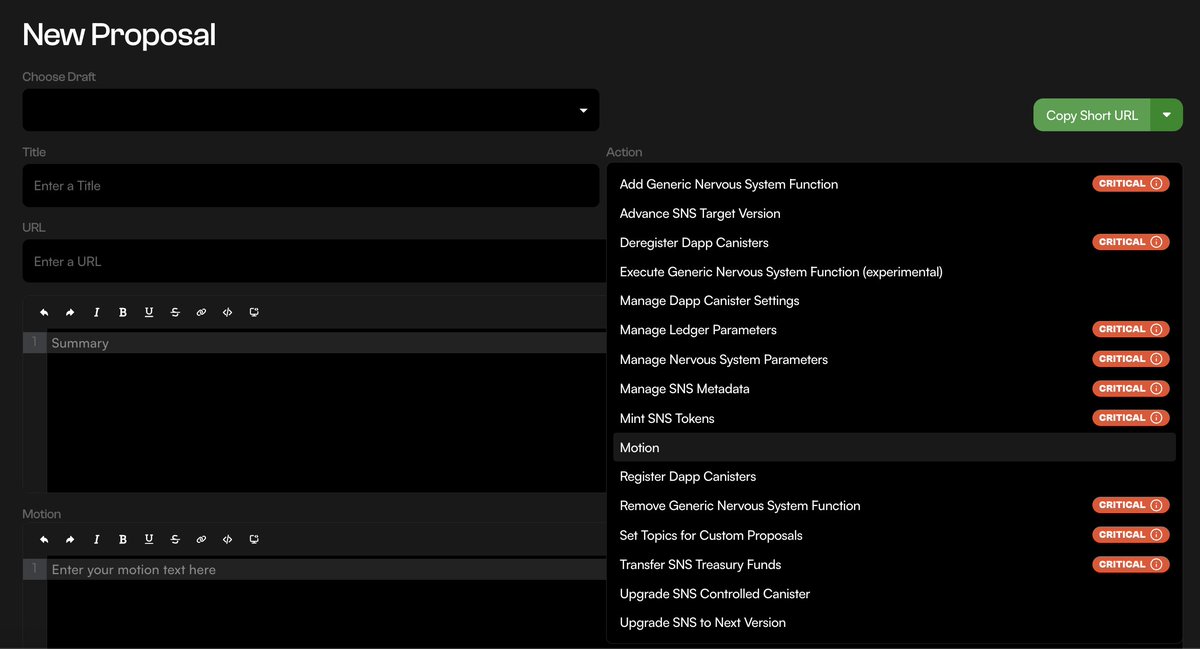
Proposal Creation has been reduced from a tedious task to a quick no-code endeavour, $ICP!
Define an Action & Proposal Parameters, and propose!
Want to send the proposal for review? Just copy the URL!
With Toolkit SNS Management, DAO Treasury Management is made easy, $ICP!
- Import Tokens
- Create Funding Requests
- View Performance of DAO Positions
- View Transaction History
It’s now possible to create an SNS via toolkit. Please check out the forum post for more information, note that this is a first version and any feedback is appreciated!
@dfinity@DFINITYDev
https://t.co/SPjedt7H2Y
With Toolkit SNS Management, DAO Controlled Neurons are just a few clicks away, $ICP!
Grow your SNS Treasury with a secure APY,
While controlling DAO Neurons in a decentralized manner!
With Toolkit SNS Management, understanding SNS Statistics is more convenient than ever, $ICP!
- View Dissolving & Non Dissolving Neuron Ratios
- Observe Total Voting Power of an SNS
- Review Individual & Followee Voting Power of Neurons
From one dashboard!
With Toolkit Explorer, Canister Navigation is made easy, $ICP!
Search for a canister, call functions, perform top ups with minimal effort!
Looking for canisters controlled by a principal?
Just search the controller, and find a full list of controlled canisters with ease!
With Toolkit Launchpad, reviewing the history of an SNS is made easy, $ICP!
Easily reference;
- Token Supply
- Commitments to SNS
- Participant Allocation
- Conversion Rates
- Historical Valuations
- Vesting Periods
- Commitments of Principals
& more useful information!
With Toolkit Asset Hub, the capabilities of your Neuron Management has been magnified, $ICP!
NNS Hotkey Configurations include functions like Vote & Submit Proposal,
With Toolkit, you can assign a full range of Hotkey permissions, including Disbursing or Splitting Neurons!