If you are a streamer who also uploads to YouTube, here is my biggest piece of advice:
Download the Source Record plugin for OBS. TRUST.
What this does is enables OBS to record individual video sources, simultaneously, when you’re streaming.
But Choc, why the fuck would I want to do that?
Because now you have more flexibility with video and audio when making a video from your stream VOD. This will result in a more polished finished product.
The way I have it configured is, as soon as I start streaming, gameplay and webcam record (and sometimes Discord for multiplayer or collabs) as separate .mkvs, with separate audio tracks, so I can turn them into videos without alerts or other stream overlays being in the way.
Also, .mkv > .mp4 because you have a much better chance to recover the file if anything crashes.
I also have the files auto-split at 20 minutes, this way, if stream or my PC dies, I don’t lose the entire session.
This setup allows me to triple dip on one stream with stream VOD, an edited video and short-form content for clips.
Hope this helps.
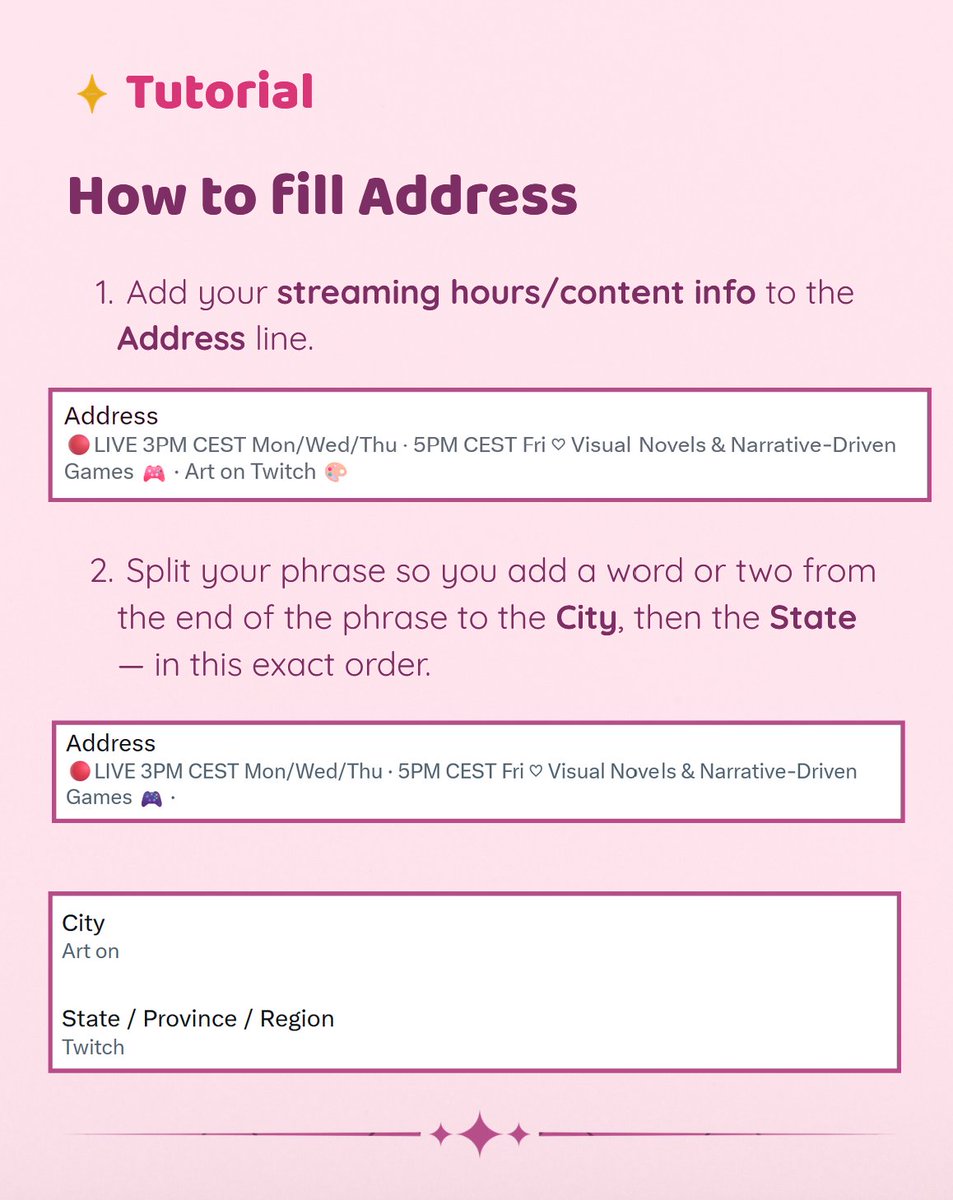
Saw someone asking how to fill in the address part of X Spotlight, so I made a little tut! 🦊🩷
Here's how I set mine up with my streaming hours/content info without putting my actual address out there ♡
Hope it helps! Stay safe! ( ˶ˆᗜˆ˵ )