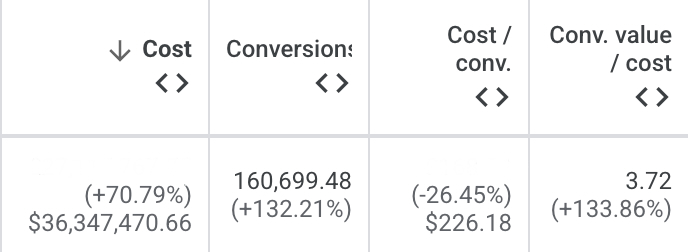
We took a Google account from $22M to $37M in ad spend this year, all while lowering CAC and improving ROAS.
That's 68% growth, an extra $15M in efficiently scaled spend, and it's only accelerating from here.
Most agencies call an account this size maxed out. Nine times out of ten it's the agency that ran out of ideas.
The challenge with large accounts is simplicity becomes the enemy. The automated systems are not designed to squeeze every last ounce out of the available inventory. They're not creative about finding new inventory either.
If you want to scale well past a certain size, you need an incredible depth of platform expertise. You need to understand how everything runs under the hood. That means knowing how the auction, delivery, and inventory systems actually interact across the whole ecosystem, not how Google tells you they work.
Each small inefficiency is worth hundreds of thousands of dollars. 99.9% of Google Ads practitioners lack the depth of knowledge to know where these inefficiencies are and fix them.
I've been running Google Ads for 16 years. There are probably only a handful of people on the planet who know the platform this in-depth, inside and out.
If your Google account has plateaued, DM me. We'll tell you if it's actually saturation or just a knowledge gap nobody's closed yet
ChatGPT ads have a negative selection bias issue.
In general, the people who can will pay for ChatGPT. It's cheap. It's useful. So the people who are going to be served ads on ChatGPT are in general significantly lower income than those who will not.
This differs greatly from Google where the product is free for everyone, and everyone gets ads.
I'm actually going to take the L on this because I was incredibly bullish on ChatGPT ads, but I didn't think about this behavior structure.
If you have a product or service that primarily targets lower income people, you're far more likely to see success on ChatGPT ads than if you have a product that targets higher income consumers.
You can have Audience Segments set up correctly and still be flying blind.
Here's what most people miss.
→ Match your Exclusions to your Segments
Setting up your Existing Customers segment without matching exclusions misses the point.
The audiences inside your Existing Customers segment need to be the same audiences you're excluding from prospecting campaigns.
Most accounts have random exclusions that don't match their Existing Customer segment, this means your breakdown will show spend going to this segment even when you're using exclusions.
The validation: if your Existing Customer segment spend is $0, your exclusions are working. If it's not $0, your exclusions don't match your Existing Customer segment.
Example attached below showing our account with correctly matched Exclusions and Existing Customer segment.
→ Check your lookback window
Meta extended the pixel lookback to 730 days in May 2026.
If your exclusion audiences are still at 180 days, you're running prospecting ads to customers who bought your product over 6 months ago.
→ Label your audiences now
Meta's Audiences UI now lets you label your custom audiences - Customers, Engaged, High Value, Low Value.
Labels don't affect delivery yet. But Value Bids do - and they use these labels to let you bid differently per audience type rather than excluding entirely.
Example: down-bidding on existing customers, this can be used to create an old school ASC campaign that mixes New and Existing customers. Getting your audiences labelled correctly means you're ready to use it.
More on this here → https://t.co/AY4Acj3ciK
→ New Audience isn't always new
Facebook and Instagram page engagers are always classified as New Audience regardless of your segment settings.
For brands with large organic followings or active Partnership Ads, New Audience frequency will look inflated. Those people aren't as new as the data suggests.