Some extremely smart ideas in here around:
1. Using /wayfinder as an orchestrator of custom skills
2. Using a multi-phase prototyping approach which zooms in on one part of the UI at a time - but in context
Give Will a follow, this is good shit
A junior just asked me "what do I do if I'm being grilled about something I don't understand?"
Try this:
1. In a grilling session
2. "I don't understand this"
3. "/handoff to a teaching agent to understand this"
4. Pick up the handoff doc with the /teach skill, in your teaching workspace
5. Learn it
6. Go back to the grilling session and pick up where you left off
Keeps the grilling session clean, records progress in your /teach skill, and helps you learn
One clarification for folks using /wayfinder:
The flow for big work should be:
/wayfinder -> /to-spec -> /to-tickets -> /implement
Once the /wayfinder map is complete, you turn it into a spec.
Some folks are using /wayfinder as the ENTIRE flow - from grilling to prototyping to shipped work
It certainly can be used that way - I've been doing that for non-coding stuff like course creation.
But for coding I much prefer creating a spec and handing off implementation to an AFK agent. Means I can focus on other things for a bit while it churns away.
I'll be putting all of this in an upcoming tutorial. Thanks for all the great feedback on v1.1. v1.2 is in the works and looking good.
for those who are wondering how to create this effect,
its basically a simple trick using `view transitions api`. i am also new to know about this
i built a little website to showcase it
link in the thread
inspired from: the goat @jh3yy
@VibeCoderOfek@AndrewYNg the most underrated comment I read today. Like any layer of your application it needs a contract or agreement of implementation
@AndrewYNg The loops accelerate iteration but they still collapse without an explicit contract on what success looks like before the agent starts. Most teams discover the missing spec layer only after the first three failed runs.
The 3 main 'prep' activities in software development are:
- Discuss: figure out what to build
- Research: summarize world knowledge to aid discussion
- Prototype: build something to aid discussion
First question: did I miss any?
Second question: how was it not obvious that AI would be really fucking helpful here
Today we're releasing a new set of components for building chat interfaces.
We've taken the patterns we build every day, rethought the abstractions behind them, and turned them into components you can compose and customize.
We're starting with the conversation layer: streaming, scrolling, messages, bubbles, attachments, and markers.
@midascabal those three had an amazing bull run this month, acutally when I saw this post added WYFI to my portfolio. TE is getting interesting now, HIVE IMO is the worst of those 3 stocks
You have Claude Fable for only a few days. Here's how to make the most of it.
Introducing /improve: use your most capable model to audit your codebase and write plans for cheaper models to execute later.
Studies your code, figures out bugs, perf, tech debt, missing tests, what to build and writes plans any agent can run.
Steps to become a senior programmer:
1. Install my /teach skill
npx skills add mattpocock/skills --skill teach
2. Create a new working directory on your laptop
mkdir junior-to-senior
cd junior-to-senior
3. Kick off your coding agent in the directory
claude
4. Copy this prompt
/teach me how to be a great strategic programmer. My opinion is that AI is eating 'tactical, on-the-ground' programming. The day-to-day work of a developer involves not only coding, but also planning, QA, codebase design, and much more. I'm interested in learning the strategic skills - that, in a previous era, would take me from junior to senior - but in this era are table stakes.
5. Paste it into the coding agent
Below is an example of what the first output will look like. I used Opus 4.8, medium effort.
6. Continue working with the agent until you're a senior
Experimenting today with:
- /to-prd to create a PRD
- /goal to implement
- "autoCompactWindow": 180000 to stay approximately in the smart zone
Let's see how it goes.
Anthropic engineer:
"You're not supposed to prompt Claude. You're supposed to build a system that prompts itself."
this is one of the best workflows I've seen in a long time
in this video she breaks down exactly how most people are using Claude:
- the 14% you lose to CLAUDE.md before typing a word
- the architecture that spawns 300 agents from a single prompt
- the server-side loop that stops agents from dying on refresh
- the daily workflows Anthropic's own engineers automated first
if you've been using Claude for months and still start every session from scratch, you have at least 28 untouched features. probably 30
instead of another show tonight, watch this
make sure to bookmark it before it gets lost in your feed
full guide in the article below
a prompt I've been using a lot recently:
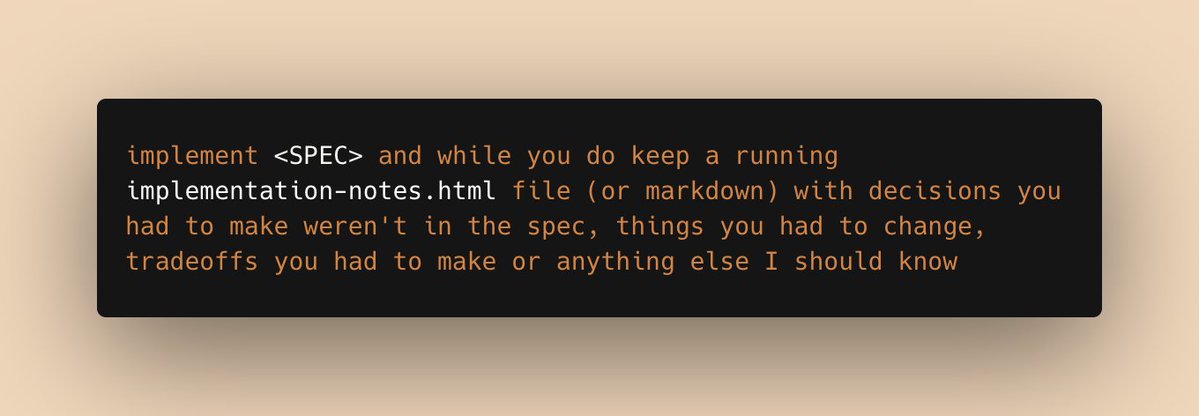
implement <SPEC> and while you do, keep a running implementation-notes.html file (or markdown) with decisions you had to make weren't in the spec, things you had to change, tradeoffs you had to make or anything else I should know
okay this is going kinda viral and tbh my original text was kind of messy, so here's a second pass with the help of Claude:
--
Implement <SPEC>. As you work maintain a running implementation-notes.html file that captures anything I should know about how the implementation diverges from or interprets the spec, including:
- Design decisions: choices you made where the spec was ambiguous
- Deviations: places where you intentionally departed from the spec, and why
- Tradeoffs: alternatives you considered and why you picked what you did
- Open questions: anything you'd want me to confirm or revise
To get good animations from an AI you need to get good at telling it what you want:
- "stagger this list of items"
- "make this animation direction-aware"
- "spacial consistency", "crossfade", "layout animation",
I made a motion vocabulary for this:
https://t.co/ExAxpr31no