@ThorCommerce Good point—no content hash yet. Retries are idempotent: same key/body replays the original result; a changed body conflicts. Confirm is retry-safe. We separate pending from confirmed presentation IDs, so you can see what was sent vs what’s on glass. Hash is a useful next step.
Turn a script, feed, or workflow into a quiet e-ink display—and follow it from source material to a frame confirmed in the room. Here's inklet SDK. https://t.co/ExfLyUSZYC
We’re opening the doors to the official inklet Discord community ✨
inklet is our attempt to build a calmer way for information to live in our spaces: e-ink displays that bring your notes, tasks, schedules, PDFs, and other useful context out of apps and into the rooms where you need them.
The Discord is where you can:
→ Follow the build in public
→ Share what you’d put on an inklet display
→ Suggest features and shape the product
→ Get product and developer support
→ Explore SDKs, APIs, and custom integrations
→ Meet other people interested in e-ink, ambient computing, and calmer technology
Whether you’ve been following us since Kickstarter, want to build with inklet, or are simply curious about what we’re creating—you’re invited.
Join us: https://t.co/LXAFSJEazQ
We launched inklet on Uneed, and we are happy to announce that by the end of the launch, inklet had reached #1 Product of the Day with more than 100 upvotes.
For a small team building a new kind of hardware, this means more than a badge. It tells us that the idea resonates: the information we save should not stay buried inside apps and distracting screens.
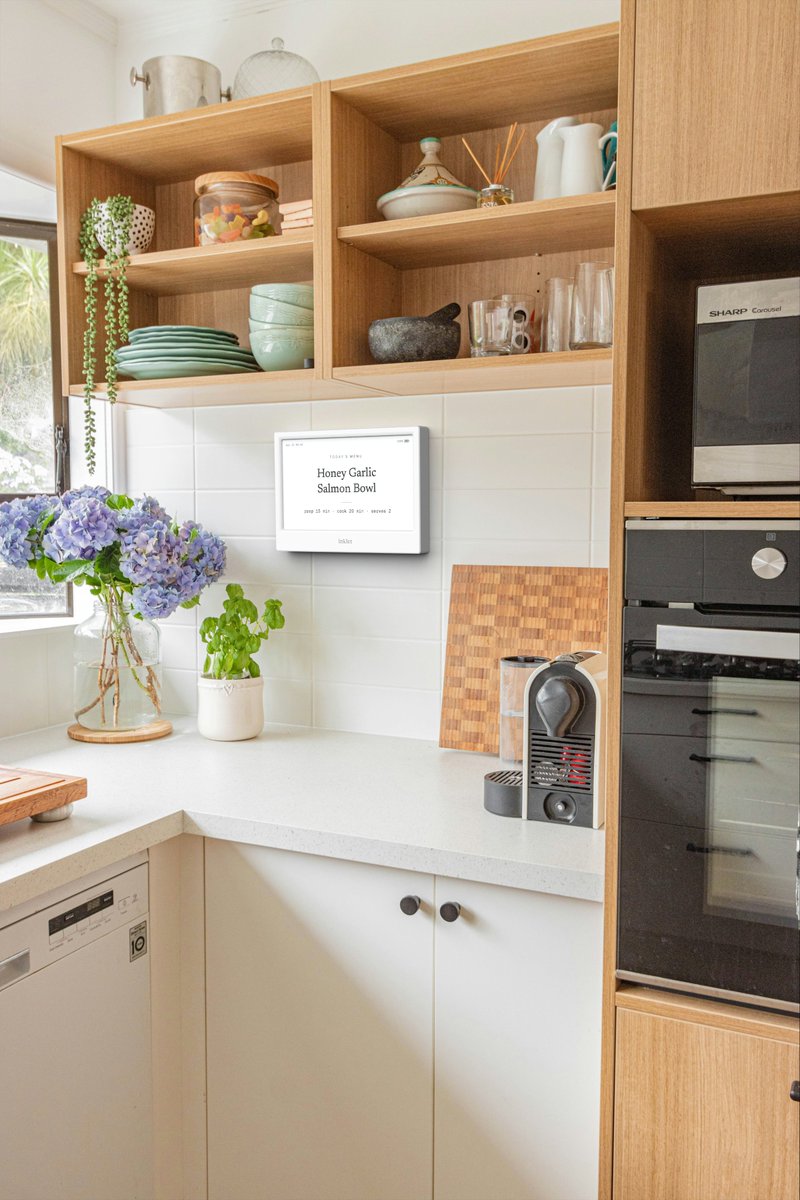
inklet brings notes, tasks, recipes, schedules, and other useful information into the physical space where they belong—on quiet, connected e-ink displays.
> A recipe in the kitchen.
> A focus list on your desk.
> A family schedule by the door.
This is only the beginning.
We’re now exploring how we can bring the inklet SDK forward, so developers can build integrations, automations, and new experiences around the platform sooner.
Thank you to everyone who supported our launch.
Discover inklet: https://t.co/wYu1E1xscT
Get to know first when our displays are available for purchase: https://t.co/f7CzD6ecjt
inklet is launching on Uneed soon ✨
We’re building connected e-ink displays that bring the right information from your digital tools into the room where it belongs.
Your second brain, out of the screen and into your space.
Follow our launch:
https://t.co/TXq4CE8Orb
Big step for inklet: our Kickstarter prelaunch page is live.
We're building an e-ink display for your second brain. The idea is simple — the information you've already captured (notes, tasks, ideas) should come to you quietly, without another glowing screen fighting for your attention.
What we've cared about from day one:
• E-ink, distraction-free by design — no glow, no feeds, no notifications
• Your data stays yours, with fully local processing as an option
• A battery that lasts months, not a day
• Works with the tools you already use
Following the prelaunch page is the single most helpful thing you can do right now — it tells Kickstarter there's real demand, and you'll be first in line (with early-bird pricing) when we launch. Stay tuned!
👉 https://t.co/f7CzD6ecjt
It’s finally here — our first ever official reveal of inklet.
inklet is a family of calm e-ink displays that let you send digital content from your phone or the web directly to a low-power, glanceable screen.
No glow, no notifications. AI-sorted, runs fully local if you want.
Watch: https://t.co/OF3y6a5aEQ
#eink #secondbrain
A screen you glance at should not feel like another device to manage.
Inklet is built for weeks of battery, about a month on a single charge, with an e-ink display that stays easy to read at a glance.
See what we are building: https://t.co/aYGw5QYwhB
Your screen should feel like it belongs in your space.
Inklet supports custom widgets and retro, pixel game-inspired themes, so a useful display can still have personality.
Calm does not have to mean plain.
Follow inklet: https://t.co/ef6b8FOmwA
#calmtech
A desk screen should change with your context, not pull you into a feed.
Swipe from daily tasks to a saved highlight, and inklet keeps the right view visible in front of you.
Quiet utility, in the room where you work.
Learn more: https://t.co/ef6b8FOmwA
Before: unlock your phone to check one tiny thing.
After: the thing is already waiting on a quiet screen in the room.
inklet is for the moments when opening your phone is the trap.
Follow the build: https://t.co/ef6b8FOmwA
Your notes are useful only when they show up where life happens.
Highlight a paragraph on your Mac, push it to Inklet, and let the desk display keep it visible.
One note, routed to the right room.
Get notified: https://t.co/ef6b8FOmwA
#eink#secondbrain#ai#llm#compute