إذا شغلك UI أو تطور واجهات… احفظ هالتغريدة 🔖
10 مواقع بتوفر عليك ساعات من البحث والتنفيذ:
1. https://t.co/mS48UnxNC3 — مكونات متحركة + Prompts جاهزة للبناء
2. https://t.co/gOvVkcV8PI — من أقوى مكتبات React الجاهزة
3. https://t.co/BgLgcNERUf — واجهات وحركات React رهيبة
4. https://t.co/nbrswD4l5I — مكونات Animated جاهزة للإضافة
5. https://t.co/imiSFG7ajP — تفاعلات وحركات UI متقدمة
6. https://t.co/xdkBeDki9p — آلاف العناصر مفتوحة المصدر
7. https://t.co/mNsYTYu7W4 — مكتبة Components ممتازة للـ AI Agents
8. https://t.co/eik8gAKJkF — تصميم ودمج 3D داخل المواقع
9. https://t.co/b9PRTs3EZU — مؤثرات وتجارب ويب تفاعلية
10. https://t.co/AIu4iFGRq5 — آلاف الأمثلة لنفس عناصر الواجهات
إذا أنت مصمم + مطور أو تستخدم Claude / Cursor، القائمة ذي كنز.
احفظها، بتحتاجها 👌
CSS Tip 🤙
You can create this header effect using position: sticky, clip-path, and custom properties 🔥 (Video 👀)
header { position: sticky; top: var(--margin); }
main { clip-path: inset(var(--header) 0 0 0);) }
No mix-blend-mode or animations required ✨
What's the trick then? 🧐
Duplicate the header element first. Then fix the positioning of one behind the content.
header[aria-hidden] {
position: fixed;
top: 0;
margin-top: var(--margin);
}
Clip the top of the content to reveal the fixed header and put a sticky-positioned header inside it that matches up in position and size ✂️
:root {
--header: calc(var(--margin) + var(--font-size));
}
main {
clip-path: inset(var(--header) 0 0 0);
}
header {
position: sticky;
top: var(--margin);
}
Make your life easier with custom properties 🙌
As the body scrolls, the fixed header gets covered by the clipped content and creates the effect ✨ And because the sticky header is "stuck" it reveals itself as the content goes out of view 😍
This one's pretty cool. You can set the font color to whatever you want. At first glance, it looked like it was a mix-blend-mode thing. It doesn't have to be! Think about it and lean into z-indexing 🫶
Watch the video to get an idea of things with the exploding view 🤯
Any questions, etc. let me know! Will likely do a YouTube video on this one too! 🙏
@CodePen link below! 👇
CSS Tip! 🤙
You can use mask-composite and some JavaScript to create this pointer proximity following glow border ✨
.glow {
mask-composite: intersect;
mask-clip: padding-box, border-box;
mask:
linear-gradient(#0000, #0000),
conic-gradient(#0000 0deg, #fff, #0000 45deg);
}
The trick is to mask a background-image with a combination of mask layers. mask-composite: intersect; means the mask used will be the intersection of the layers 🔥 use source-in, xor; in browsers that don't support intersect;
In this demo, you can use pseudoelements and rely on scoped custom properties to do a lot of the heavy lifting for you 🙌
Once you've masked the background, you need to update the starting angle of the conic-gradient on pointermove 👆
You can work that out by getting the center point of each card and then calculating the angle between that and the pointer with Math.atan2 🤓
let ANGLE = Math.atan2(
event?.y - CARD_CENTER[1],
event?.x - CARD_CENTER[0]
) * 180 / Math.PI
ANGLE = ANGLE < 0 ? ANGLE + 360 : ANGLE;
CARD.style.setProperty('--start', ANGLE + 90)
You plug that into your conic-gradient mask as a custom property accounting for --spread ⚡️
conic-gradient(from calc((var(--angle) - (var(--spread) * 0.5)) * 1deg), #000 0deg, #fff, #0000 calc(var(--spread) * 1deg));
To get the blur, you apply a blur to the glow container on each card 🤙
.glows {
filter: blur(calc(var(--blur) * 1px);
}
That's it! Layers of masks that are clipped and composited before being blurred 😎 The added trick is to fade each one in when the pointer is in the defined proximity of the card. For example, don't show unless within 100px of a card. You can see that in the video. Check out the JavaScript code for that 🫶
Couldn't resist making this one 😁
@CodePen link below! 👇
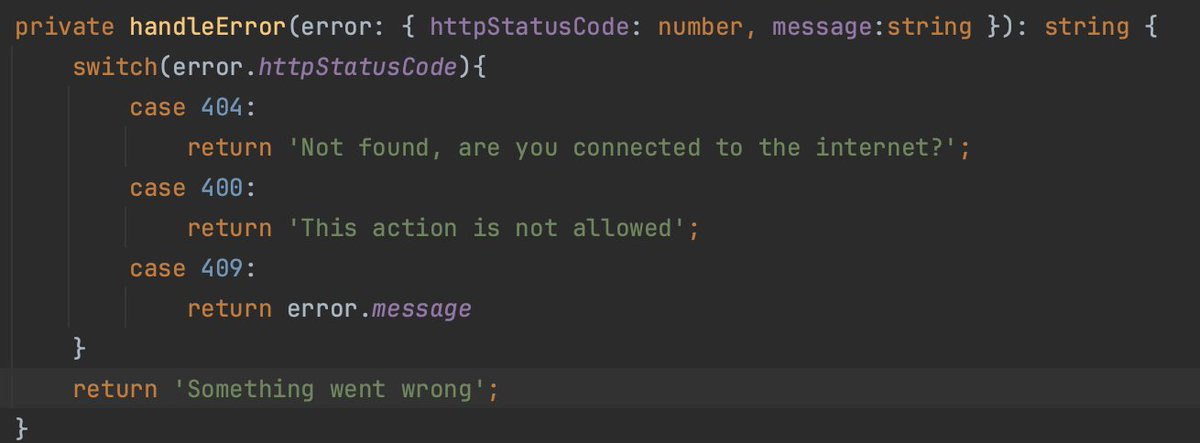
In #Angular, or any other web tech:
When you have decent client-side validation and solid testing, this error handling should be enough.
Keep it simple!🚀
Change my mind🤓
🤯 DataCamp is now FREE (until Nov 12).
No strings, no obligations. #FreeAccessWeek is officially underway, granting all free DataCamp users access to:
📚 All 450+ data and AI courses for every level.
🧠 Unlimited learning across the world's most in-demand skills, including ChatGPT and Generative AI, Python, SQL, Power BI, and more.
🚀 Our library of Data Analyst, Scientist, and Engineer career tracks.
🎓 Forbes' #1 ranked data certification.
And much more. For free.
Closes Nov 12, 11.59 PM EST. ⏰ Start now 👉https://t.co/2UTWYIdH2s
https://t.co/dzqPDRlPN2 (Formerly https://t.co/i1gn8ezGuE) is your AI copilot for the web, powered by ChatGPT, Bard, Bing AI, and Claude.
One click lets you compose, improve writing, summarize, explain, fix spelling & grammar, translate, or reply to any text on any website.