ChatGPT 5.6 is LIVE
Key highlights:
• Three models: Sol, Terra, and Luna
• More useful work per token and stronger performance per dollar
• Major gains in coding, design, computer use, and knowledge work
• New Ultra mode coordinates multiple agents in parallel
• Available now in ChatGPT, Codex, and the API
The bigger shift: AI is moving from answering questions to completing end-to-end work.
Introducing Dashboard MCP ⚡
Now, third-party AI agents (Claude, OpenClaw, etc.) can work directly with your live FuseBase databases and organization dashboards.
What connected agents can do:
✅ Add new leads to your sales database after a form submission
✅ Clean up inconsistent statuses, labels, or fields
✅ Create and maintain records automatically
... and more.
Connect AI tools to FuseBase databases with our guide: https://t.co/MmnVmyAX2P
🔥 FuseBase MCP is here!
Have external agents in Claude, Codex, or Cursor? With FuseBase MCP, you can connect the agents you already use to FuseBase and let them take action across your organization.
Here's what FuseBase MCP also makes possible:
🛠️ Build solutions on top of FuseBase
🔌 Integrate your favorite services with FuseBase data
🖥️ Manage your organization without logging into FuseBase directly through Claude Code or Codex
Try it now with our guide: https://t.co/8JuFCBJxxy
🆕 #FuseBaseUpdate
Favorites are back ❤️
Keep your key pages just one click away with the Favorites section.
📌 Save your most important pages for quick access
📄 Find them anytime in a dedicated sidebar category
📍 Just open the page menu and click "Add to Favorites"
Try it now!
🆕 #FuseBaseUpdate!
You asked, we delivered – now you can organize pages and folders exactly the way you want!
📂 Manually sort your folders and pages in the sidebar
📂 Sort by name, date updated, or date created in the Folders List
📂 Reset everything back to alphabetical order anytime from the Folders menu
Try it now!
Off topic to our European friends: can someone explain to me why Europeans visiting the U.S. for the first time during the World Cup are so amazed by American size of gas stations and Walmart?
No offense, but after the tenth video I'm starting to wonder...
Do you guys live in Hobbiton? :)
🆕 #FuseBaseUpdate!
Still setting up portals manually? Now your apps and the FuseBase CLI can do it for you.
With simple prompts and CLI commands, you can:
✅ Create, duplicate, and manage portals
✅ Invite clients and managers to portals
✅ Build an app that automatically creates a dedicated onboarding portal for every new client
...and more.
Try it now!
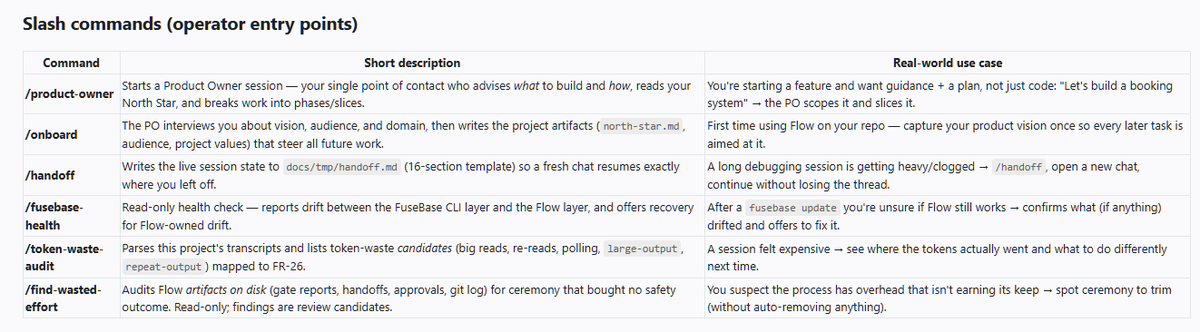
New large update for FuseBase Flow - SLASH COMMANDS
Main upgrades: increase your token efficiency and build process
1) Ask your LLM to upgrade FuseBase Flow https://t.co/H2VwcvjlJJ
2) Ask to "run FuseBase Flow Health Check" and agree to apply fixes if needed
3) Besides slash commands we added additional skills for speed and token efficiency
Enjoy!
🆕 #FuseBaseUpdate!
Give your clients and team faster access to private apps with Magic Links!
🔗 Invite users directly to a private app
They'll receive an email with a Magic Link → clicking the link will automatically sign them in to their account and the app.
🔗 Let users request access on their own
If a client opens the app with restricted access, they can enter their email in the login form and receive a Magic Link instantly.
🔗 Set up the workflow with a prompt
Just describe how you want clients to be added, and the agent will implement the right flow for you.
Try it now!
Claude Code 5 Fable is here, but it looks like access will be removed from major subscriptions after June 22. ⏳ What should you do:
Run comprehensive security scans. 🔒
Review your codebase for hidden risks. 🧪
Stress-test your architecture before issues reach production. 🚀
Even better, combine it with the OpenAI Codex plugin for Claude Code and run:
/codex:adversarial-review
Using Fable together with Codex adversarial review gives you a powerful second-opinion workflow: one model builds deeper context, while the other challenges assumptions, looks for vulnerabilities, and reviews the implementation from an attacker’s perspective.
For teams building AI apps, client portals, internal tools, or production workflows, this is probably one of the strongest review combinations available right now. ⚡
Don’t wait until access disappears. Run the scans while you can.
🆕 #FuseBaseUpdate!
Launch your AI Apps under your own brand.
FuseBase AI Apps now support custom domains, so your apps can be published at your own URL.
✔️ Add a domain whenever you need – before or after creating the app
✔️ Choose an exact domain/subdomain option for a few apps
✔️ Connect by Wildcard option if you manage many apps and want a scalable setup
Try it now with our guide: https://t.co/qCitOqPYz9
Did you know that LLM might generate about 45% unnecessary comments because it thinks that Human Operator will read that?
That impacts your speed of AI Dev and usage.
Example in one of the projects:
~45% cleanly removable, ~30% must-keep, ~25% shrinkable. So roughly 2 of every 3 comments
Pretty easy fix, good outcome (CLAUDE.md and AGENTS.md):
The fix was one rule: comment only two things.
A tripwire — a warning an editor could trip over ("don't lower this, it breaks X").
A pointer — one line saying where the real "why" lives (the ticket/decision doc).
P.S. for client facing Apps we fixed that out of the box inside our framework: FuseBase Flow
AI coding is easy to start, but hard to finish.
Especially when building client-facing apps
That's why we created FuseBase Flow: a structured development process for AI App development with phases, slices, reviews, and clearer handoffs
Feedback welcome: https://t.co/kh33Xg4pgU
🆕 #FuseBaseUpdate!
One app is helpful. A connected system of apps is where things get powerful.
With API for Apps in FuseBase, your apps can now work together – so you can:
✅ Build focused apps for different jobs and connect them into a single flow
✅ Use apps as integration points for external tools, platforms, and custom systems
✅ Create multi-step flows like this:
A Request App collects files → a Document Parser App reads them → an Approval App sends the result to your team → a Notification App updates the client
Try it now with our guide: https://t.co/CVjk39KrXc
Since releasing FuseBase AI Apps, we've been focused on one thing:
Helping you build scalable apps that are ready for real workflows – with built-in backend support, Postgres databases, payments, and more.
We collected everything we've built for FuseBase AI Apps so far in one article + how it connects to our AI-Native Work OS vision.
⚡ Read the article here → https://t.co/6PR8XNrBn4
See what you can do with AI Coding today and where FuseBase AI Apps are heading next.
Have you tried building with FuseBase AI Coding yet? I’d love to see what you're working on.
🆕 #FuseBaseUpdate!
Creating data-heavy apps, but your current dashboards aren't enough? Good news – FuseBase AI Apps now come with Postgres by default!
That means you can:
📌 Store large volumes of data – hundreds of thousands of rows without sacrificing performance
📌 Use app storage for different workflows – save form submissions, request details, tickets, and app-specific settings
📌 Build even more capable apps – like ticketing systems, parser apps, AI processing apps, or document intake flows
You can still work with your existing dashboards inside apps too – both system dashboards (Clients, Meetings, Deals, etc.) and custom dashboards.
→ Try it now with our guide: https://t.co/9rMBzpCtL6
🆕 #FuseBaseUpdate!
Handle payments and subscriptions right in your apps! Yes, Stripe integration is live for FuseBase AI Apps 🚀
With it, you can:
✅ Sell services, products, or access to paid features/templates
✅ Build apps that generate, manage, and track invoices
✅ Launch subscription-based AI tools or paid membership apps
Skip building the payment logic from scratch – just connect your Stripe account in FuseBase.
Try it now with our guide: https://t.co/NkpbrTtZLg
Update in FuseBase AI Apps! 🔥
Your Apps can now work with files in 3 different ways, giving you more flexibility to build the exact app you need.
✔️ Upload files into dashboards
When you need to track files together with status, owner, deadline, client, or category.
✔️ Create notes/pages with attached files
When the result should be easy to read and share – like bug reports, meeting summaries, client review notes, or project updates.
✔️ Upload files into app storage
When files are part of the app's internal workflow – think file transfer, document processing, proposal generation, reporting, or parser apps.
Don't forget to update the CLI and skills using the command "fusebase update"
Try it now with our guide: https://t.co/LxORxQZMFC