Hack Wi-Fi with one command!
Wi-Fi (802.11) Hacking: Automating Wi-Fi Hacking Across Multiple AP's and Security Protocols with wifite #wifihacking#wifite#cyberwarrior
https://t.co/KOTnC3ZRS3
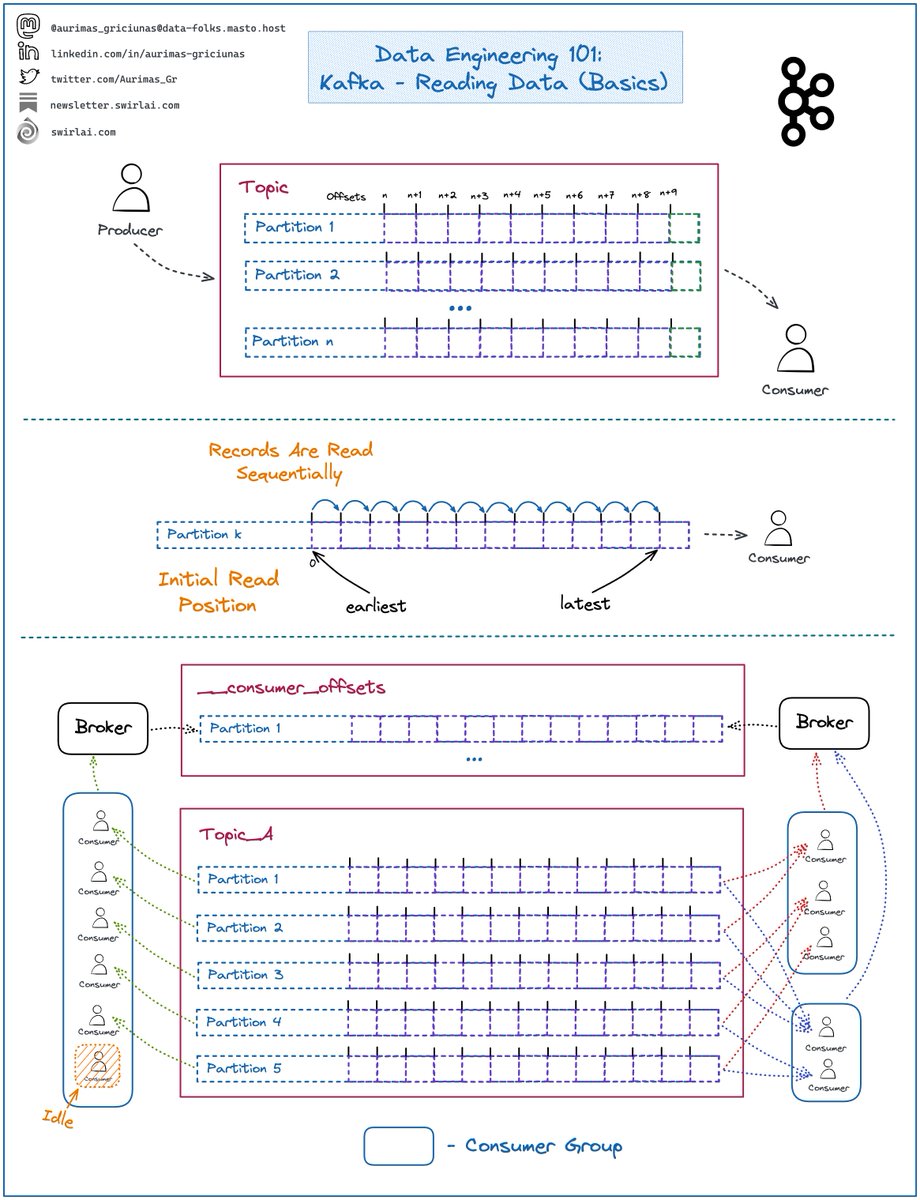
Some thoughts on 𝗥𝗲𝗮𝗱𝗶𝗻𝗴 𝗗𝗮𝘁𝗮 from 𝗞𝗮𝗳𝗸𝗮.
Kafka is an extremely important 𝗗𝗶𝘀𝘁𝗿𝗶𝗯𝘂𝘁𝗲𝗱 𝗠𝗲𝘀𝘀𝗮𝗴𝗶𝗻𝗴 𝗦𝘆𝘀𝘁𝗲𝗺 to understand, last time we covered Writing Data.
𝗦𝗼𝗺𝗲 𝗿𝗲𝗳𝗿𝗲𝘀𝗵𝗲𝗿𝘀:
➡️ Clients writing to Kafka are called 𝗣𝗿𝗼𝗱𝘂𝗰𝗲𝗿𝘀.
➡️ Clients reading the Data are called 𝗖𝗼𝗻𝘀𝘂𝗺𝗲𝗿𝘀.
➡️ Data is written into 𝗧𝗼𝗽𝗶𝗰𝘀 that can be compared to tables in Databases.
➡️ Messages sent to 𝗧𝗼𝗽𝗶𝗰𝘀 are called 𝗥𝗲𝗰𝗼𝗿𝗱𝘀.
➡️ 𝗧𝗼𝗽𝗶𝗰𝘀 are composed of 𝗣𝗮𝗿𝘁𝗶𝘁𝗶𝗼𝗻𝘀.
➡️ Each 𝗣𝗮𝗿𝘁𝗶𝘁𝗶𝗼𝗻 is a combination of and behaves as a write ahead log.
➡️ Data is written to the end of the 𝗣𝗮𝗿𝘁𝗶𝘁𝗶𝗼𝗻.
➡️ Each 𝗥𝗲𝗰𝗼𝗿𝗱 has an 𝗢𝗳𝗳𝘀𝗲𝘁 assigned to it which denotes its order in the 𝗣𝗮𝗿𝘁𝗶𝘁𝗶𝗼𝗻.
➡️ 𝗢𝗳𝗳𝘀𝗲𝘁𝘀 start at 0 and increment by 1 sequentially.
𝗥𝗲𝗮𝗱𝗶𝗻𝗴 𝗗𝗮𝘁𝗮:
➡️ Data is read sequentially per partition.
➡️ 𝗜𝗻𝗶𝘁𝗶𝗮𝗹 𝗥𝗲𝗮𝗱 𝗣𝗼𝘀𝗶𝘁𝗶𝗼𝗻 can be set either to earliest or latest.
➡️ Earliest position initiates the consumer at offset 0 or the earliest available due to retention rules of the 𝗧𝗼𝗽𝗶𝗰 (more about this in later episodes).
➡️ Latest position initiates the consumer at the end of a 𝗣𝗮𝗿𝘁𝗶𝘁𝗶𝗼𝗻 - no 𝗥𝗲𝗰𝗼𝗿𝗱𝘀 will be read initially and the 𝗖𝗼𝗻𝘀𝘂𝗺𝗲𝗿 will wait for new data to be written.
➡️ You could codify your consumers independently, but almost always the preferred way is to use 𝗖𝗼𝗻𝘀𝘂𝗺𝗲𝗿 𝗚𝗿𝗼𝘂𝗽𝘀.
𝗖𝗼𝗻𝘀𝘂𝗺𝗲𝗿 𝗚𝗿𝗼𝘂𝗽𝘀:
➡️ 𝗖𝗼𝗻𝘀𝘂𝗺𝗲𝗿 𝗚𝗿𝗼𝘂𝗽 is a logical collection of clients that read a 𝗞𝗮𝗳𝗸𝗮 𝗧𝗼𝗽𝗶𝗰 and share the state.
➡️ Groups of consumers are identified by the 𝗴𝗿𝗼𝘂𝗽_𝗶𝗱 parameter.
➡️ 𝗦𝘁𝗮𝘁𝗲 is defined by the offsets that every 𝗣𝗮𝗿𝘁𝗶𝘁𝗶𝗼𝗻 𝗶𝗻 𝘁𝗵𝗲 𝗧𝗼𝗽𝗶𝗰 is being consumed at.
➡️ 𝗦𝘁𝗮𝘁𝗲 of 𝗖𝗼𝗻𝘀𝘂𝗺𝗲𝗿 𝗚𝗿𝗼𝘂𝗽𝘀 is written by the 𝗕𝗿𝗼𝗸𝗲𝗿 (more about this in later episodes) to an internal 𝗞𝗮𝗳𝗸𝗮 𝗧𝗼𝗽𝗶𝗰 named __𝗰𝗼𝗻𝘀𝘂𝗺𝗲𝗿_𝗼𝗳𝗳𝘀𝗲𝘁𝘀.
➡️ There can be multiple 𝗖𝗼𝗻𝘀𝘂𝗺𝗲𝗿 𝗚𝗿𝗼𝘂𝗽𝘀 reading the same 𝗞𝗮𝗳𝗸𝗮 𝗧𝗼𝗽𝗶𝗰 having their own independent 𝗦𝘁𝗮𝘁𝗲𝘀.
➡️ Only one 𝗖𝗼𝗻𝘀𝘂𝗺𝗲𝗿 per 𝗖𝗼𝗻𝘀𝘂𝗺𝗲𝗿 𝗚𝗿𝗼𝘂𝗽 can be reading a 𝗣𝗮𝗿𝘁𝗶𝘁𝗶𝗼𝗻 at a single point in time.
𝗖𝗼𝗻𝘀𝘂𝗺𝗲𝗿 𝗚𝗿𝗼𝘂𝗽 𝗧𝗶𝗽𝘀:
❗️ If you have a prime number of 𝗣𝗮𝗿𝘁𝗶𝘁𝗶𝗼𝗻𝘀 in the 𝗧𝗼𝗽𝗶𝗰 - you will always have at least one 𝗖𝗼𝗻𝘀𝘂𝗺𝗲𝗿 per 𝗖𝗼𝗻𝘀𝘂𝗺𝗲𝗿 𝗚𝗿𝗼𝘂𝗽 consuming less 𝗣𝗮𝗿𝘁𝗶𝘁𝗶𝗼𝗻𝘀 than others unless number of 𝗖𝗼𝗻𝘀𝘂𝗺𝗲𝗿𝘀 equals number of 𝗣𝗮𝗿𝘁𝗶𝘁𝗶𝗼𝗻𝘀.
✅ If you want an odd number of 𝗣𝗮𝗿𝘁𝗶𝘁𝗶𝗼𝗻𝘀 - set it to a 𝗺𝘂𝗹𝘁𝗶𝗽𝗹𝗲 𝗼𝗳 𝗣𝗿𝗶𝗺𝗲 𝗡𝘂𝗺𝗯𝗲𝗿.
❗️ If you have more 𝗖𝗼𝗻𝘀𝘂𝗺𝗲𝗿𝘀 in the 𝗖𝗼𝗻𝘀𝘂𝗺𝗲𝗿 𝗚𝗿𝗼𝘂𝗽 then there are 𝗣𝗮𝗿𝘁𝗶𝘁𝗶𝗼𝗻𝘀 in the 𝗧𝗼𝗽𝗶𝗰 - some of the 𝗖𝗼𝗻𝘀𝘂𝗺𝗲𝗿𝘀 will be 𝗜𝗱𝗹𝗲.
✅ Make your 𝗧𝗼𝗽𝗶𝗰𝘀 large enough or have less 𝗖𝗼𝗻𝘀𝘂𝗺𝗲𝗿𝘀 per 𝗖𝗼𝗻𝘀𝘂𝗺𝗲𝗿 𝗚𝗿𝗼𝘂𝗽.
--------
Follow me to upskill in #MLOps, #MachineLearning, #DataEngineering, #DataScience and overall #Data space.
Also hit 🔔to stay notified about new content.
𝗗𝗼𝗻’𝘁 𝗳𝗼𝗿𝗴𝗲𝘁 𝘁𝗼 𝗹𝗶𝗸𝗲 💙, 𝘀𝗵𝗮𝗿𝗲 𝗮𝗻𝗱 𝗰𝗼𝗺𝗺𝗲𝗻𝘁!
Join a growing community of Data Professionals by subscribing to my 𝗡𝗲𝘄𝘀𝗹𝗲𝘁𝘁𝗲𝗿.
这段时间参与了隔壁团队一个新项目,在方案评审时候花了不少时间来聊 API 设计规范。这促使我写了一篇文章: 实用 Web API 规范。
我剖析了四个 API 重要组成部份和各个细节决策点,并提供了三种风格(GitHub / Azure / 我的)可直接使用。 希望能给到大家帮助。
https://t.co/SXlI9PFioi