Best YouTube Channels To Learn AI in 2026 (No BS)
1. Fundamentals – 3Blue1Brown
2. Deep Learning – Andrej Karpathy
3. AI Research – Yannic Kilcher
4. Practical AI – AssemblyAI
5. LLMs – AI Explained
6. ML Theory – StatQuest
7. Papers Simplified – Two Minute Papers
8. GenAI – Matthew Berman
9. AI Agents – Nicholas Renotte
10. Applied ML – Krish Naik
11. PyTorch – Aladdin Persson
12. Math for ML – Serrano Academy
13. Industry Insights – Lex Fridman
14. Real-world AI – DeepLearningAI
In theory, consistency is about being disciplined, determined, and unwavering.
In practice, consistency is about being adaptable. Don't have much time? Scale it down. Don't have much energy? Do the easy version. Find different ways to show up depending on the circumstances. Let your habits change shape to meet the demands of the day.
Adaptability is the way of consistency.
Karpathy is running a 400,000-word brain he barely writes himself.
His own words: "the LLM writes and maintains all of the data of the wiki, I rarely touch it directly."
Most vaults die rich. A year of saved articles, papers, screenshots, none of it linked. The graph looks like genius and holds nothing.
So he moved the upkeep to the model. He drops raw sources into one folder and asks questions. The LLM compiles them into a wiki, writes the pages, links them all, files the answers back. He keeps judgment. It keeps the books.
raw belongs to him and never gets edited. wiki belongs to the model. He braced for fancy RAG and never needed it. Sources compile once, then compound with every new one.
He calls it room for an incredible new product. Most people hoard notes. He built a brain that maintains itself.
Elon Musk explains his 5-step algorithm for solving any problem:
"The most common mistake of smart engineers is to optimize a thing that should not exist."
"I have this very basic first principles algorithm that I run as a mantra."
Elon breaks it down:
Step 1: Question the requirements.
"Make the requirements less dumb. The requirements are always dumb to some degree, no matter how smart the person who gave you those requirements. You have to start there, because otherwise you could get the perfect answer to the wrong question."
Step 2: Try to delete it.
"Try to delete the part or the process step entirely. If you're not forced to put back at least 10% of what you delete, you're not deleting enough. Most people feel like they've succeeded if they haven't been forced to put things back in. But actually they haven't, they've been overly conservative and left things in that shouldn't be there."
Step 3: Optimize or simplify.
"The most common mistake of smart engineers is to optimize a thing that should not exist. So you don't optimize until after you've tried to delete."
Step 4: Speed it up.
"Any given thing can be done faster than you think. But you shouldn't speed things up until you've tried to delete it and optimize it otherwise, you're speeding up something that shouldn't exist."
Step 5: Automate.
"And then the fifth thing is to automate it."
Elon explains why the order matters:
"I've gone backwards so many times where I've automated something, sped it up, simplified it, and then deleted it. I got tired of doing that. So that's why I have this mantra."
Instead of another YouTube rabbit hole tonight.
Take these 11 courses to master Claude (for free):
→ Level 1 - 20 mins: The basics.
Claude certificates: https://t.co/Vn60ElPrcK
Claude For Dummies: https://t.co/HNa5MrCe6m
AI is (stupidly) simple: https://t.co/SVGd966GXi
Claude Roadmap: https://t.co/NG73kDCvth
→ Level 2 - 55 mins: Real workflows.
Claude Cowork: https://t.co/uWTpOI3oyE
Claude for teams: https://t.co/qxlcqheAme
Claude for slides: https://t.co/L0bPMgWEsy
Claude Skills: https://t.co/6cHYYfjpP2
→ Level 3 - 45 mins: The pro moves.
Claude Connectors: https://t.co/TSAQqOp5pn
Stop hitting Claude's limits: https://t.co/j5fEzSGxlT
Upload yourself in Claude: https://t.co/kDGBpSEA6J
Stop using Claude at work: https://t.co/c6X55Th0gV
Pro tip: Don't binge it. Do one level per sitting.
Actually apply each guide before moving to the next
Everyone’s posting “AI agents are the future.”
But most people still can’t explain how an agent actually works.
So I made the roadmap I wish I had when I started building them:
→ how agents reason
→ why memory matters
→ what tools actually do
→ how multi-agent systems work
→ what makes agents production-ready
→ and the exact skills you need to go from “prompting AI” to building autonomous systems
The biggest shift in AI right now isn’t better prompts.
It’s giving models:
• memory
• tools
• goals
• feedback loops
• and the ability to act
That’s where Agentic AI starts.
Most beginners jump straight into frameworks and get overwhelmed.
The better path is:
1. Learn how LLMs think
2. Understand the agent loop (Reason → Act → Observe → Repeat)
3. Connect APIs + tools
4. Add memory + retrieval
5. Build workflows
6. Ship real systems
The people who understand this stack early will have a massive advantage over the next 2–3 years.
Because soon, “using AI” won’t be impressive anymore.
Building systems that can think, execute, and improve on their own will be.
I spent hours breaking everything down visually so anyone can understand the ecosystem without getting lost in hype.
Bookmark this.
You’ll need it sooner than you think.
20 Claude Repos that can completely change your life:
(save this)
1. Terminal AI coding agent https://t.co/gkTwIb7T9s
2. Ready-to-use starter apps https://t.co/PtEclReNCv
3. Official agent skills https://t.co/1RZ7lpP3xB
4. Plugin marketplace https://t.co/GVeknTu56n
5. Full ecosystem https://t.co/HOkmGrvrvL
6. Master list https://t.co/BVrGRmcQdV
7. 1000+ plugins https://t.co/8lzXVbeps2
8. Huge skills library https://t.co/wnArbr7a7N
9. Curated skills https://t.co/apIhhs1UEG
10. Cross-platform skills https://t.co/7wcdPfFLSh
11. LLM pipelines https://t.co/iqzPWyUrXk
12. Agent workflows https://t.co/bXPebvjN4v
13. Multi-agent systems https://t.co/o6NGMPl9h7
14. Team-based agents https://t.co/Ay1jn8wFpZ
15. AI dev team https://t.co/IXZNK0ym7r
16. Code agents https://t.co/Uq0aHekO6Y
17. Auto PR fixes https://t.co/zbCEAnFHlD
18. AI coding assistant https://t.co/rAeiD6uphU
19. Code search https://t.co/gDIpT7KMs3
20. Agent standards https://t.co/S6YyQF6v8v
I hope you found this helpful
For more you can follow me @HeyZaraKhan
You don't need to read 50 PDFs.
You need to ingest them with NotebookLM, then think with Claude.
Here are 8 prompts that compress 200 hours of research into one Sunday afternoon:
Save this thread 🧵👇
Anthropic's Claude team just showed how to build an AI agent with real memory in under 30 minutes.
24-minutes. free. by the people who built Claude.
worth than $500 vibe-coding course.
Bookmark & replace one movie today with this course, then read the complete article below.
HOW TO KNOW PEOPLE ARE LAUGHING AT YOU ON INTERNATIONAL X
🇹🇷 Turkey: asdasdasd
🇯🇵 Japan: wwwwww
🇹🇭 Thailand: 55555
🇷🇺 Russians: ))))))))))
🇮🇩 Indonesia: wkwkwkwk
🇧🇷 Brazil: kkkkkkkkkk
🇰🇷 South Korea: ㅋㅋㅋㅋㅋ
🇵🇱 Poland: xD
🇪🇸 Spain: jajajajaja
🇫🇷 France: mdr
🇺🇸 USA: LOL LMAO ROFL
🇬🇷 Greece: χαχαχα
🇮🇱 Israel: חחחחח
🇨🇳 China: 哈哈哈
🇸🇦 Arab countries: ههههه
🇩🇪 Germany: no laughter detected
Stop bookmarking 50 guides you'll never read.
You can skip all of it with these 15 free guides:
Claude 101: https://t.co/jw2qdIcjnh
Claude Code: https://t.co/UgE9xBXVbE
Claude Skills: https://t.co/6cHYYfjXEA
Stop prompting: https://t.co/j1LATSJiat
Claude in Excel: https://t.co/mfcXYSACWR
1M followers with AI: https://t.co/jZwxZr4ZhU
Claude for your team: https://t.co/qxlcqhf8bM
No prompt saves you: https://t.co/SDKJWylftC
AI Slides (PPT in 2026): https://t.co/L0bPMgXci6
Set up Claude Cowork: https://t.co/uWTpOI3Woc
Claude to sound like you: https://t.co/99RzxXU3p0
Claude interactive charts: https://t.co/ebCHGZqOF1
Claude as your computer: https://t.co/TxYuHPjgbV
Claude Cowork + Project: https://t.co/Q7AN9CZAbO
Set up AI before prompting: https://t.co/pE3OF72A04
___
1. Save this list for later (three dots, top right).
2. Share it with a friend by ♻️ reposting this image.
3. Subscribe to my free newsletter: https://t.co/psB7XxB2Y4.
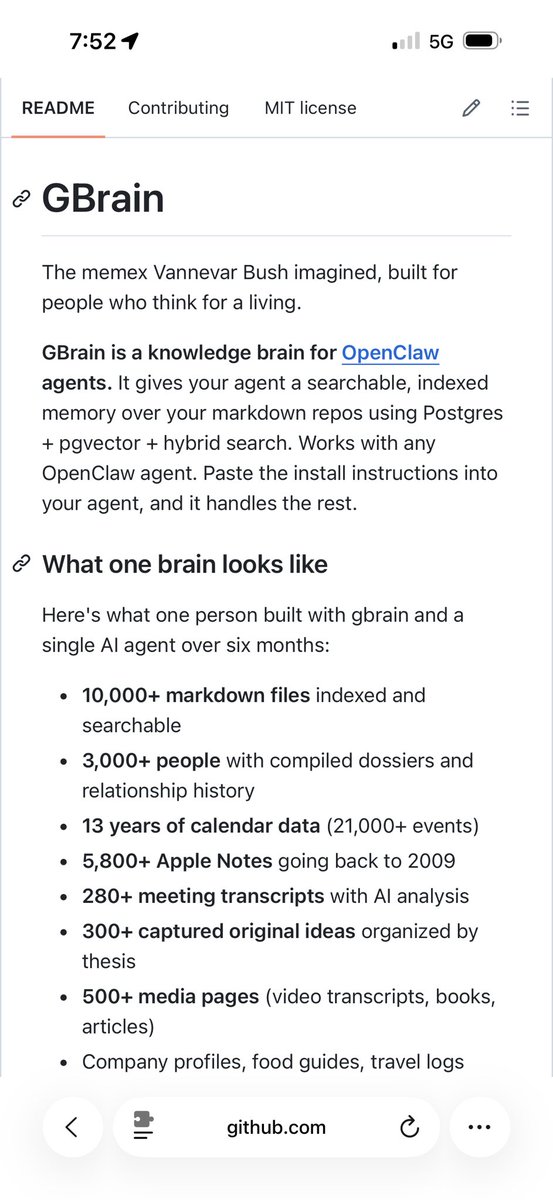
I got inspired by Karpathy’s LLM Wiki, implemented it in my OpenClaw and then extended it with my own skills and a full Postgres pgvector implementation.
Want to be one of the first to try GBrain?
This is my personal opinionated version of Karpathy’s LLM Wiki on OpenClaw
Stop buying expensive $500 courses to learn AI.
I’ve already done it for you. With one list:
Straight to the point. Zero confusion. And no fluff.
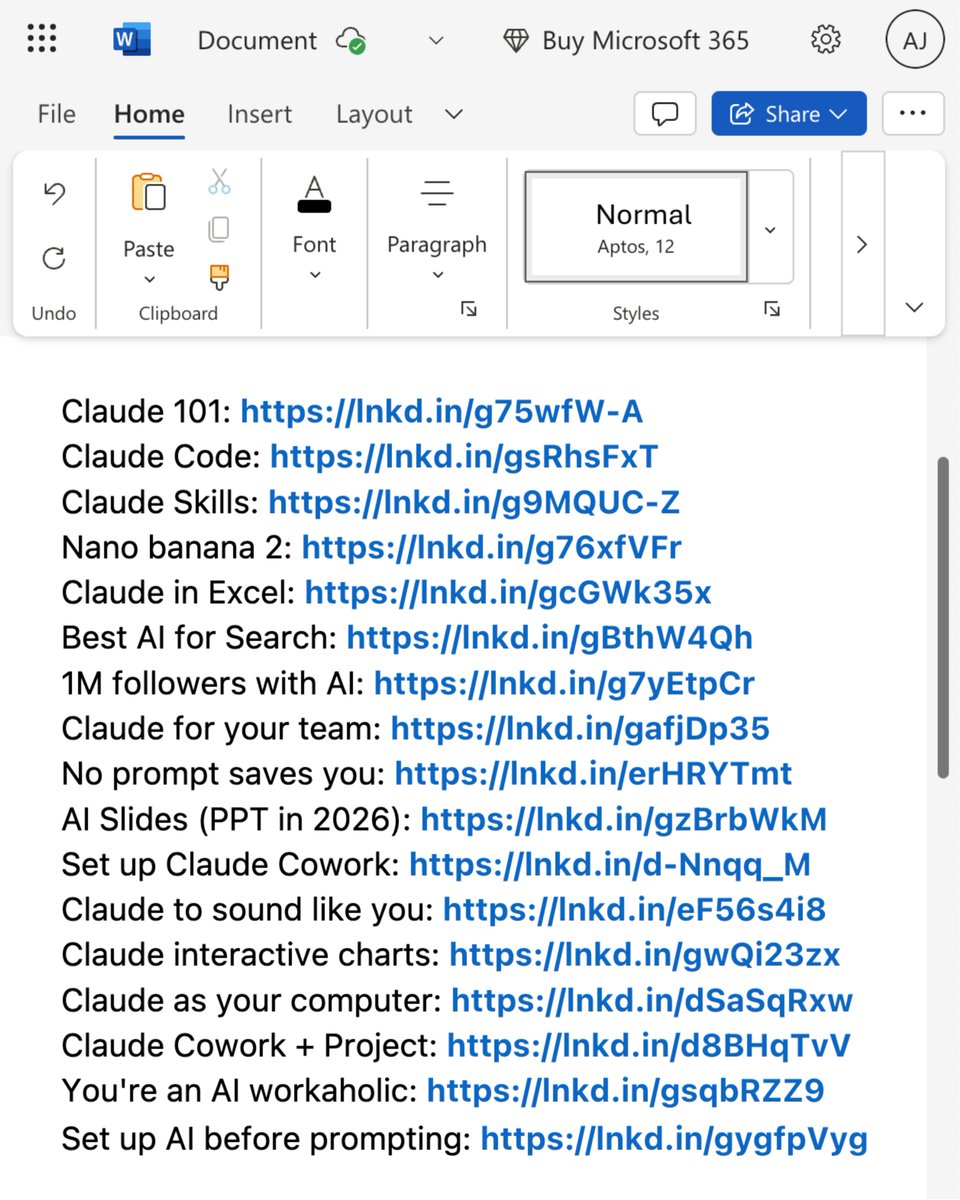
Claude 101: https://t.co/Jv1jsvFB7T
Claude Code: https://t.co/WYZd5ltnXo
Claude Skills: https://t.co/jT4uB5AFtY
Nano banana 2: https://t.co/qfHT594CCI
Claude in Excel: https://t.co/mfcXYSA57j
Best AI for Search: https://t.co/77BmjbJjP0
1M followers with AI: https://t.co/1TV9LYAptv
Claude for your team: https://t.co/U1JsBVC299
No prompt saves you: https://t.co/SDKJWykHE4
AI Slides (PPT in 2026): https://t.co/RfcyYRQ2Ad
Set up Claude Cowork: https://t.co/ZE0fKKrF3A
Claude to sound like you: https://t.co/99RzxXTvzs
Claude interactive charts: https://t.co/ebCHGZqgPt
Claude as your computer: https://t.co/TxYuHPiImn
Claude Cowork + Project: https://t.co/Q7AN9CZ2mg
You're an AI workaholic: https://t.co/mCIvB3ZPA5
Setup AI before prompting: https://t.co/pE3OF722aw
___
1. Save this list for later (three dots, top right).
2. Share it with a friend by ♻️ reposting this image.
3. Subscribe to my free newsletter: https://t.co/psB7XxAv8w.