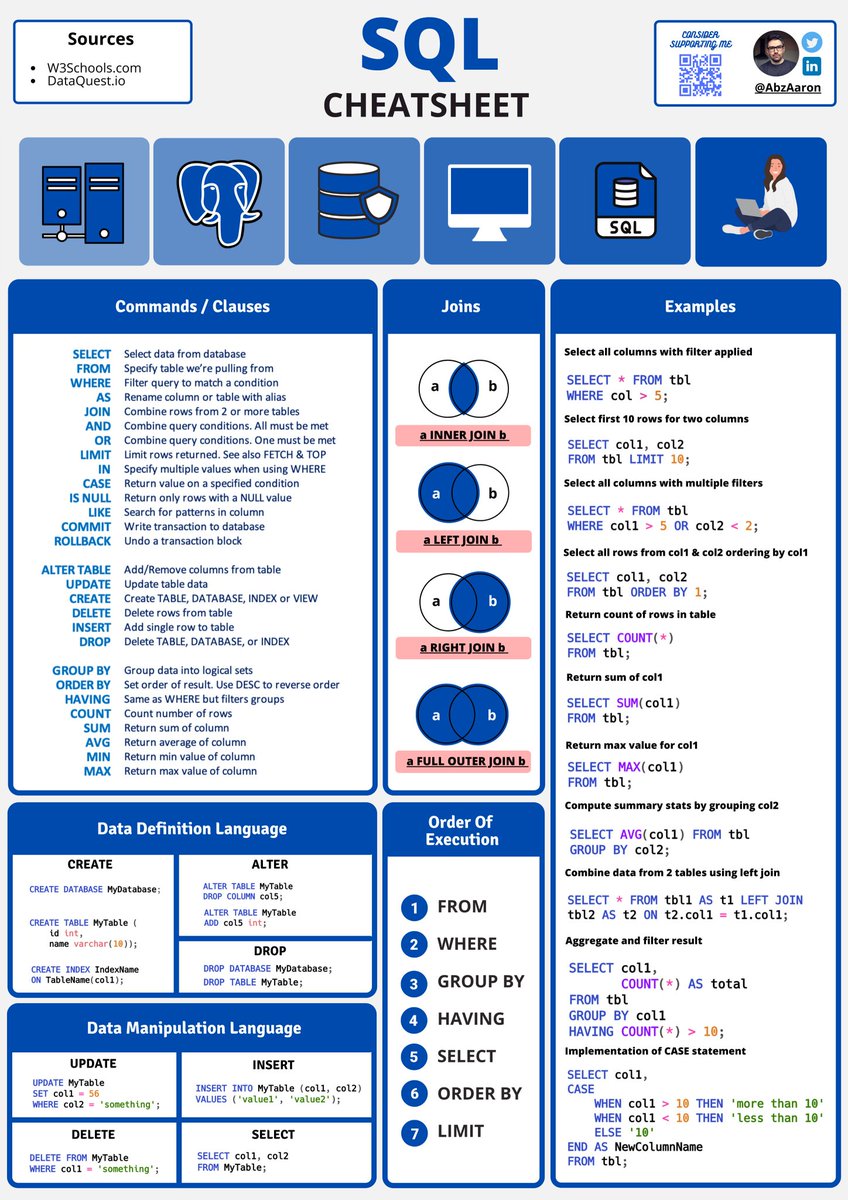
Want to get better at SQL fast?
Here are 4 courses that will help you level up:
1️⃣ SQL Basics for Data Science
https://t.co/R5OUqc9LEM
2️⃣ Google Data Analytics
https://t.co/whyq0XcpRg
3️⃣ IBM Data Science
https://t.co/sANbzLESzY
4️⃣ Google Business Intelligence
https://t.co/QH6K3eitJm
❤️ Like
🔁 Repost
🔖 Bookmark
Follow @SaurabhDub28465 for more of these free courses. productivity content.
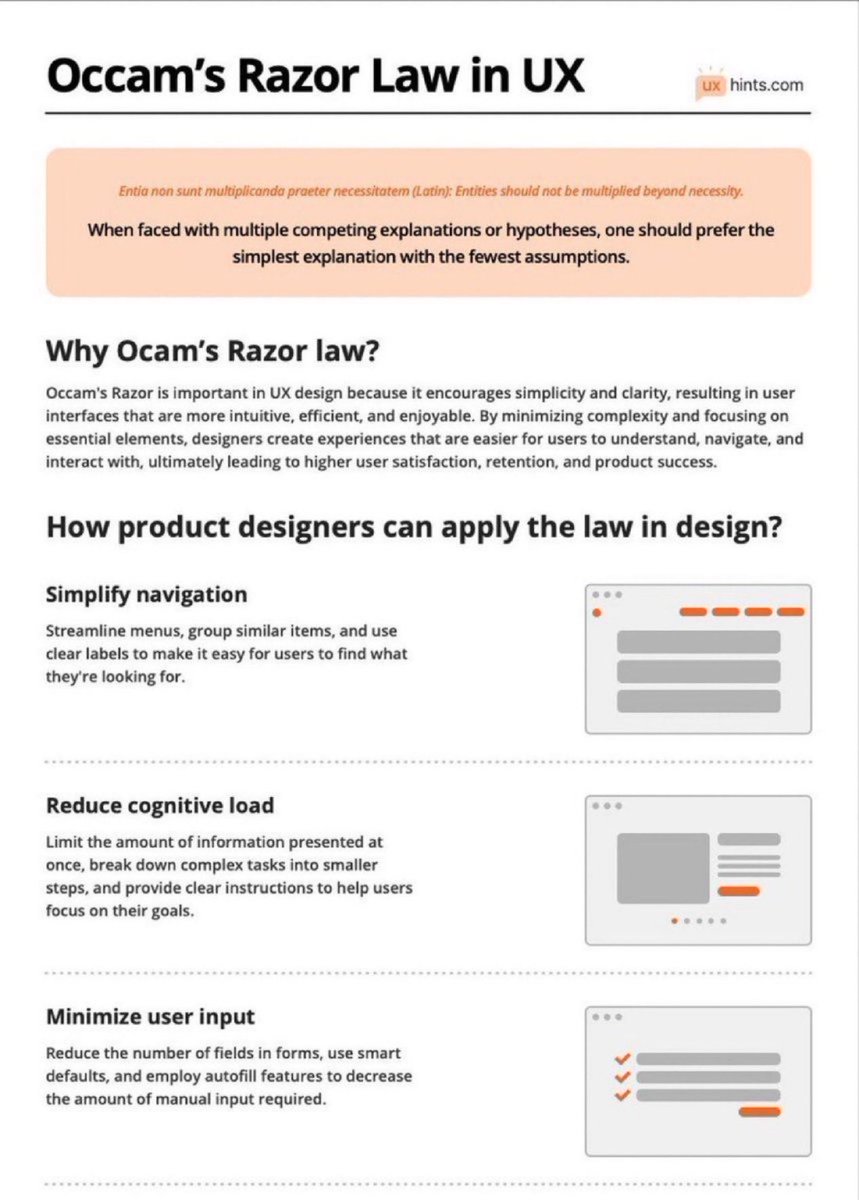
Learn How To Use Occam’s Razor Law to Boost Your Next Design Project! 🙌
FREE PDF Download 🔖
Occam’s Razor is a problem-solving principle stating that the simplest explanation or solution, with the fewest assumptions, is often the most likely to be correct.
Summary:
Why Ocam’s Razor law?
Occam's Razor is crucial in UX design for promoting simplicity and clarity. By focusing on essential elements and minimizing complexity, designers create intuitive and efficient user interfaces. This leads to higher user satisfaction, retention, and product success.
How product designers can apply the law in design?
Simplify navigation
Streamline menus, group similar items, and use clear labels to make it easy for users to find what they're looking for.
Reduce cognitive load
Limit the amount of information presented at once, break down complex tasks into smaller steps, and provide clear instructions to help users focus on their goals.
Minimize user input
Reduce the number of fields in forms, use smart defaults, and employ autofill features to decrease the amount of manual input required.
Emphasize clarity and consistency
Use consistent visual elements, typography, and color schemes throughout the design to help users build a mental model of the interface.
Remove unnecessary elements
Eliminate any extraneous features, buttons, or content that don't directly contribute to the user's goals or improve their experience.
Optimize for mobile
Design with mobile devices in mind, ensuring that interfaces are responsive, touch-friendly, and easily navigable on smaller screens.
Prioritize usability over aesthetics
While an attractive interface is important, prioritize functionality and ease of use over purely visual design elements.
Test and iterate
Conduct user testing to identify potential issues or areas for improvement, and continually refine the design based on user feedback.
#UX #UI #ProductDesign #UXDesign #UIDesign
Something I wish to see on every Site. The Design behind the Project. All the Iterations. The System if there is one.
Added the Figma Link of those stuff on my Portfolio, so potential Clients can directly see what they can expect of my work. The example is my Portfolio Website.
How does the system look?
How does the UI/UX Design look?
How many iterations are there behind the project? OK. Here it's a bit wild and way too much. But I tried many directions and like it is with Portfolios, pretty often you just erase everything and starting fresh after some time 😃
You can see here the Design System I'm using. I call it Graphical User Interface. In short GUI.
That one is pretty simple because it's just a Website, not any big product.
Mostly I'm using 5 to 8 different Text sizes. I try also to make always a big gap in size between them, but sometimes you just need one size a bit smaller.
I name it directly in the design like u-h1, u-p1, u-c1, u-f1 and so on. So, I can just use the same names in Webflow.
u → utility
h → heading
p → paragraph
c → control
f → footnote
I define the colors in the GUI. I don't use super many or thousands of shades, because it's mostly just a little Website.
Here I'm using them as variable and also call it already like I use them in Webflow as a CSS Variable.
color → text color
color-background → background color
color-accent → main accent color
Those three are mostly the ones I'm using. For dark modes I can just switch them. When using more colors like here, I add those to the color-accent-name.
I also show there the buttons and the different states. All icons. The spacing system I'm using across the site. Also the spacings between text & heading inside the rich text.
On the "UX/UI Design" Page I show the complete Design of the Portfolio on Desktop & Mobile. Didn't transfer everything there yet, the rest will be coming when I'm back!
But you can see how I work in Figma, how I structure the design parts. Showing a bit of the Animations. Sometimes also prototype videos of it (not here). Different states.
And also on "Behind the Scenes" every design I did along the way, every iteration. Sometimes completely changed the design.
It's also really cool for me to see where I started, which directions I did go and where I ended up.
Link to the Figma in the comments.
Learn about the Principles of Design with this excellent Cheatsheet! 🔥🔥
Overview:
EMPHASIS
Creating a Hierarchy or focal point to guide the eye to a specific element first. Utilising colour, contrast, proportion and rhythm.
BALANCE
Weighting or arranging the elements within the image to create visual, even distribution of shape and space.
UNITY
Aligning all separate elements to work together in Harmony through pattern, balance and rhythm.
CONTRAST
Contrast can highlight differences or add a focal point by using opposing colour, shade or textures.
RHYTHM
Direct the eye through form with the use of repetition of shape, lines or colour and helps create mood.
PROPORTION
Or Scale, to use a base for the viewer to compare single elements to through size, dimension and space.
VARIETY
Utilising different shapes, colours and textures to keep overall image interesting. Also aids with creating a focal point.
Bookmark or save the cheatsheet by Anita Green
#ux #ui #uxdesign #uidesign #productdesign #userexperience #visualdesign #graphicdesign #designprinciples #webdesign #appdesign #design #html #css #js #react #prototyping #ixd #ios #usability #color #figma #sketch #webdevelopment #business #startup
𝟭𝟱 𝗕𝗲𝘀𝘁 𝗙𝗥𝗘𝗘 𝗦𝗤𝗟 𝗖𝗼𝘂𝗿𝘀𝗲𝘀 𝘄𝗶𝘁𝗵 𝗖𝗲𝗿𝘁𝗶𝗳𝗶𝗰𝗮𝘁𝗶𝗼𝗻 𝗢𝗻𝗹𝗶𝗻𝗲 𝗶𝗻 𝟮𝟬𝟮𝟱:
1. SQL for Data Science
https://t.co/BxGEiQMd1X
2. Introduction to Structured Query Language (SQL)
https://t.co/AUbFhu3sXw
3. Databases and SQL for Data Science with Python
https://t.co/j5QT9WJooK
4. SQL for Data Analysis (Mode)
https://t.co/pstfbp8Vfe
5. Databases: Relational Databases and SQL
https://t.co/Ge4bFjars9
6. Oracle SQL Basics– Coursera
https://t.co/C4vd7PmNMs
7. Introduction to Databases and SQL Querying
https://t.co/vdHZfMlMFA
8. Advanced SQL
https://t.co/01NIxxuTu0
9. Oracle SQL - A Complete Introduction
https://t.co/QmqXnmvi7w
10. SQL Projects - Free Certificate
https://t.co/Fk6H2GJlwI
11. RDBMS - No Certificate
https://t.co/pstfbp8Vfe
12. SQL - Free Certificate
https://t.co/1kkUlbur2d
13. MySQL - Free Certificate
https://t.co/AsHQi79xII
14. Querying and managing data
https://t.co/JHi1PQ6dtJ
15. Implement a Relational Database with SQL
https://t.co/lCAvDg4LoY
16. Advanced Databases and SQL Querying
https://t.co/xF3R6tHnaa
17. Microsoft SQL Crash Course for Absolute Beginners
https://t.co/RODWiaz2QD
18. Oracle SQL - A Complete Introduction
https://t.co/QmqXnmvi7w
19. Databases and SQL for Data Science with Python
https://t.co/L0cf0lCP1l
20. SQL 101: A Beginners Guide to SQL
https://t.co/0UVCjmfigm
21. Learn SQL Basics for Data Science Specialization
https://t.co/FoHX0C1Fz5
22. PostgreSQL for Everybody Specialization
https://t.co/ZOS3qtY947
23. Google Data Analytics Professional Certificate
https://t.co/TxFYEosoA7
24. Meta Database Engineer Professional Certificate
https://t.co/8uCbLJCZga
25. IBM Data Analyst Professional Certificate
https://t.co/NfOxravdG3
26. Introduction to Relational Database and SQL
https://t.co/KNpI9zTxg0
27. IBM Data Science Professional Certificate
https://t.co/gFsFS3B6zu
In this link, you can learn the following for FREE:
UI/UX
SQL
Scrum Master
Product management
Project management
Microsoft excel
Data analytics
Big data Agile
Business analytics
Data visualization
Link: https://t.co/bdu2kbxECv
RT
Here are some *FREE UI/UX Courses*
HOW TO BECOME A UI/UX DESIGNER: FOR COMPLETE BEGINNERS (COMPLETE COURSE)
https://t.co/JxrpOf4CfP
UI/UX DESIGN (COMPLETE PACK)
https://t.co/jZo3YuK12g
UI/UX FREE COURSES
https://t.co/76hYD7f3sc
For the UI/UX guys in the house, do check them out.
The value in here is GOLDEN.
Happy learning.