MON 🤝 MEMELAND PARTNERSHIP ANNOUNCEMENT
We are proud to announce our partnership with @Memeland.
$MEME will be distributed to MON Stakers via our Staking Platform shortly after TGE.
MON Protocol will also participate in @Stakeland, broadening our reach to a wider audience!
CAP, BASE, SOLID, KISS, What do these acronyms mean?
The diagram below explains the common acronyms in system designs.
🔹 CAP
CAP theorem states that any distributed data store can only provide two of the following three guarantees:
1. Consistency - Every read receives the most recent write or an error.
2. Availability - Every request receives a response.
3. Partition tolerance - The system continues to operate in network faults.
However, this theorem was criticized for being too narrow for distributed systems, and we shouldn’t use it to categorize the databases. Network faults are guaranteed to happen in distributed systems, and we must deal with this in any distributed systems.
You can read more on this in “Please stop calling databases CP or AP” by Martin Kleppmann.
🔹 BASE
The ACID (Atomicity-Consistency-Isolation-Durability) model used in relational databases is too strict for NoSQL databases. The BASE principle offers more flexibility, choosing availability over consistency. It states that the states will eventually be consistent.
🔹 SOLID
SOLID principle is quite famous in OOP. There are 5 components to it.
1. SRP (Single Responsibility Principle)
Each unit of code should have one responsibility.
2. OCP (Open Close Principle)
Units of code should be open for extension but closed for modification.
3. LSP (Liskov Substitution Principle)
A subclass should be able to be substituted by its base class.
4. ISP (Interface Segregation Principle)
Expose multiple interfaces with specific responsibilities.
5. DIP (Dependency Inversion Principle)
Use abstractions to decouple dependencies in the system.
🔹 KISS
"Keep it simple, stupid!" is a design principle first noted by the U.S. Navy in 1960. It states that most systems work best if they are kept simple.
Over to you: Have you invented any acronyms in your career?
–
Subscribe to our weekly newsletter to get a Free System Design PDF (158 pages): https://t.co/uc5M7CdXXC
Our recommended materials to crack your next tech interview. You can find the link to watch a detailed video explanation at the end of the post.
Coding
- Leetcode
- Cracking the coding interview book
- Neetcode
System Design Interview
- System Design Interview book 1, 2 by Alex Xu
- Grokking the system design by Design Guru
- Design Data-intensive Application book
Behavioral interview
- Tech Interview Handbook (Github repo)
- A Life Engineered (YT)
- STAR method (general method)
OOD Interview
- Interviewready
- OOD by educative
- Head First Design Patterns Book
Mock interviews
- Interviewingio
- Pramp
- Meetapro
Apply for Jobs
- Linkedin
- Monster
- Indeed
Over to you: What is your favorite interview prep material?
Watch and subscribe here (YouTube video): https://t.co/P17rF0RemB
10 things about System design you should learn
1. Caching
2. Sharding
3. load-balancing
4. replication
5. fault-tolerance
6. high-avaibility
7. Performance
8. scalability
9. Performance
10. Indexing
learn more on Design Guru - https://t.co/1cnctTTdSY
Top 6 Load Balancing Algorithms
🔹 Static Algorithms
1. Round robin
The client requests are sent to different service instances in sequential order. The services are usually required to be stateless.
2. Sticky round-robin
This is an improvement of the round-robin algorithm. If Alice’s first request goes to service A, the following requests go to service A as well.
3. Weighted round-robin
The admin can specify the weight for each service. The ones with a higher weight handle more requests than others.
4. Hash
This algorithm applies a hash function on the incoming requests’ IP or URL. The requests are routed to relevant instances based on the hash function result.
🔹 Dynamic Algorithms
5. Least connections
A new request is sent to the service instance with the least concurrent connections.
6. Least response time
A new request is sent to the service instance with the fastest response time.
--
Subscribe to our weekly newsletter to get a Free System Design PDF (158 pages): https://t.co/FIzCeaWsZV
IP Address in a nutshell:
1. What is an IP Address?
IP stands for Internet Protocol. An IP address is a unique numerical label assigned to each device on a computer network.
2. Types of IP Addresses:
- IPv4:
The most common version with addresses like 192.168.1.1.
- IPv6:
A newer version with longer addresses like 2001:0db8:85a3:0000:0000:8a2e:0370:7334.
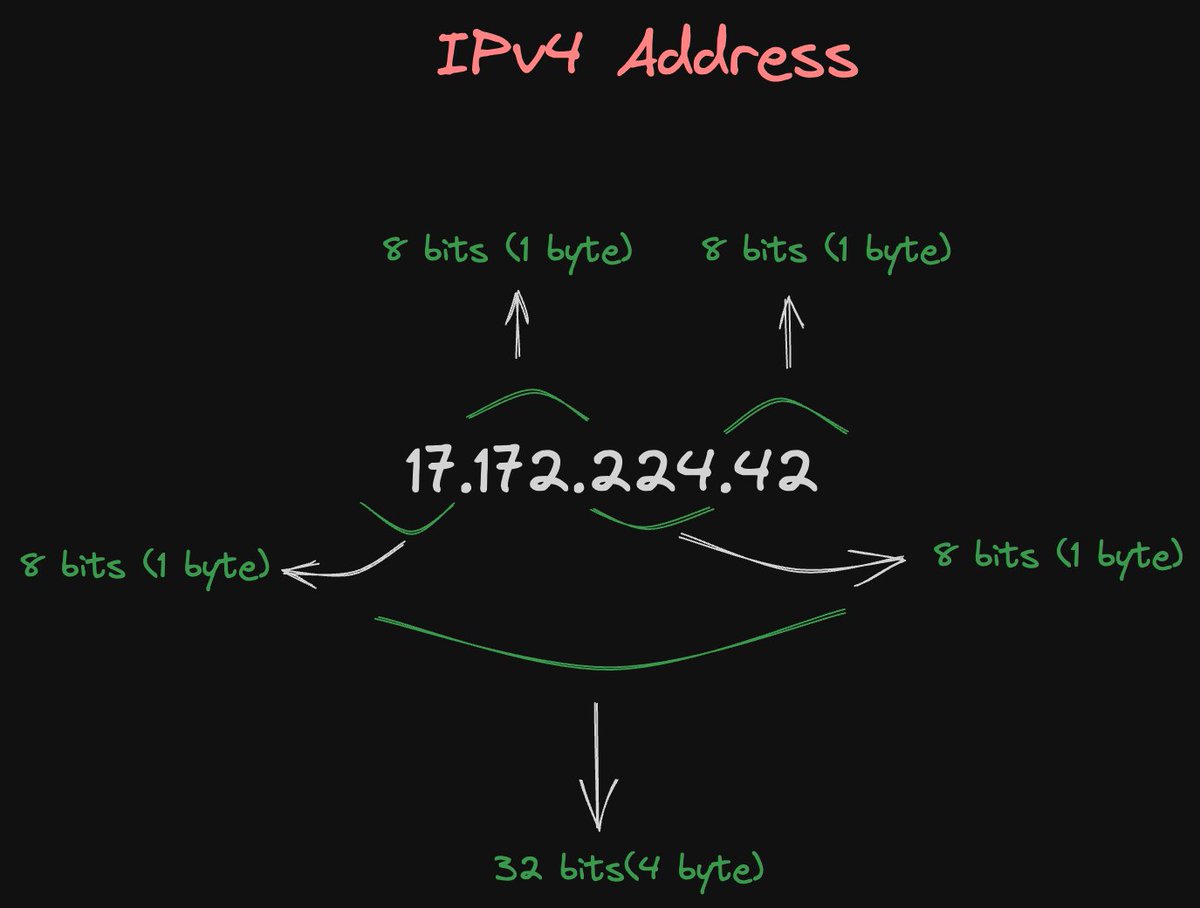
3. IPv4 Address Format:
Consists of four sets of numbers separated by dots (e.g., 192.168.1.1).
Each set can range from 0 to 255 (8 bits).
4. IPv4 Classes:
- Class A:
Used for large networks, with the first octet reserved for network identification.
Range: 1.0.0.0 to 126.0.0.0.
- Class B:
Suitable for medium-sized networks. First two octets for network ID.
Range: 128.0.0.0 to 191.255.0.0.
- Class C:
Used for small networks, with the first three octets for network ID.
Range: 192.0.0.0 to 223.255.255.0.
- Class D: Reserved for multicast groups.
- Class E: Reserved for experimental purposes.
5. IPv6 Address Format:
Composed of eight groups of four hexadecimal digits separated by colons (e.g., 2001:0db8:85a3:0000:0000:8a2e:0370:7334).
6. IP Address Types:
- Public IP Address:
Identifies a device on the internet.
Usually provided by your Internet Service Provider (ISP).
- Private IP Address:
Used within a local network (e.g., home or office).
Defined by RFC 1918, with common ranges like 192.168.x.x, 10.x.x.x, and 172.16.x.x.
7. Subnetting:
- Subnet Mask:
A subnet mask defines the network and host portions of an IP address.
Common subnet masks include 255.255.255.0 for a Class C network.
8. CIDR Notation:
Classless Inter-Domain Routing.
Allows specifying network prefixes using a slash notation (e.g., 192.168.1.0/24).
9. Special IP Addresses:
Loopback Address:
127.0.0.1 for IPv4 (localhost).
::1 for IPv6.
10. Broadcast Address:
Used to send data to all devices on a local network (e.g., 192.168.1.255).
11. Default Gateway:
The device that connects your local network to the internet.
Typically ends with .1 (e.g., 192.168.1.1).
12. Reserved Addresses:
Some IP addresses are reserved for special purposes (e.g., 0.0.0.0, 255.255.255.255).
13. IP Address Assignment:
- DHCP (Dynamic Host Configuration Protocol):
Automatically assigns IP addresses to devices on a network.
- Static IP Address:
Manually configured and doesn't change unless you modify it.
- NAT (Network Address Translation):
Allows multiple devices in a local network to share a single public IP address.
14. IP Version Transition:
Transition from IPv4 to IPv6:
Due to IPv4 address exhaustion, IPv6 adoption is increasing.
IPv6 provides a vastly larger address space.
15. Common Private IPv4 Address Ranges:
Class A: 10.0.0.0 to 10.255.255.255
Class B: 172.16.0.0 to 172.31.255.255
Class C: 192.168.0.0 to 192.168.255.255
How do companies ship code to production? The method to download the high-resolution PDF is available at the end.
The diagram below illustrates the typical workflow.
Step 1: The process starts with a product owner creating user stories based on requirements.
Step 2: The dev team picks up the user stories from the backlog and puts them into a sprint for a two-week dev cycle.
Step 3: The developers commit source code into the code repository Git.
Step 4: A build is triggered in Jenkins. The source code must pass unit tests, code coverage threshold, and gates in SonarQube.
Step 5: Once the build is successful, the build is stored in artifactory. Then the build is deployed into the dev environment.
Step 6: There might be multiple dev teams working on different features. The features need to be tested independently, so they are deployed to QA1 and QA2.
Step 7: The QA team picks up the new QA environments and performs QA testing, regression testing, and performance testing.
Steps 8: Once the QA builds pass the QA team’s verification, they are deployed to the UAT environment, where the QA team, dev team, and even the product owner perform UAT testing.
Step 9: If the UAT testing is successful, the builds become release candidates and will be deployed to the production environment on schedule. Here we might not want to deploy to all the users in one go to mitigate the change risks, so some techniques like feature toggle, canary deployment can be used.
Step 10: SRE (Site Reliability Engineering) team is responsible for prod monitoring. They leverage a bunch of log-analyzing tools and process-tracing tools like ELK stack, Prometheus, and Skywalking. They report production issues to QA and dev teams, and teams need to fix them based on defined priority.
–
Subscribe to our newsletter to download the 𝐡𝐢𝐠𝐡-𝐫𝐞𝐬𝐨𝐥𝐮𝐭𝐢𝐨𝐧 𝐏𝐃𝐅. After signing up, find the download link on the success page: https://t.co/0v29X0VLNt
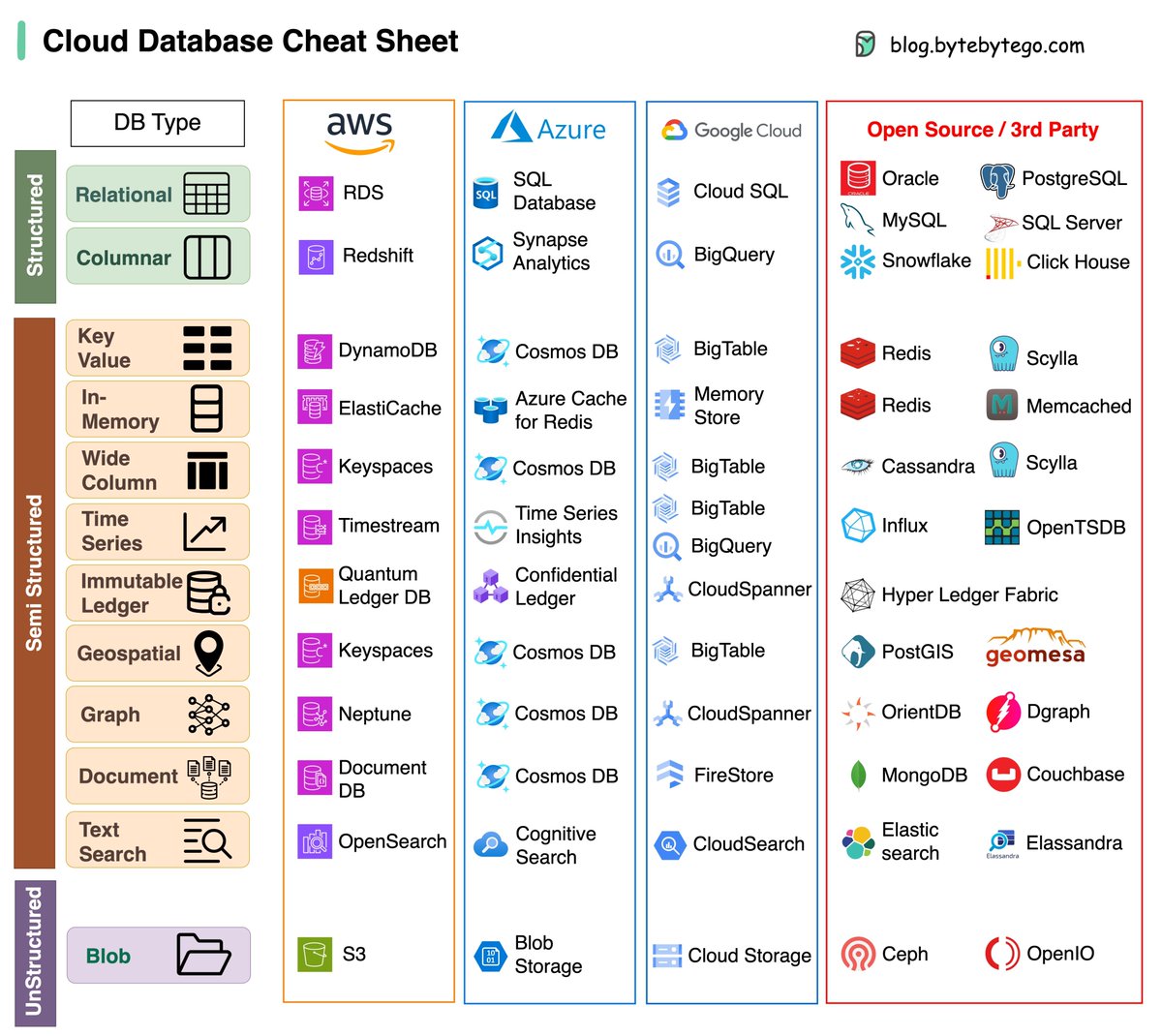
A cheat sheet of various databases in cloud services, along with their corresponding open-source/3rd-party options.
Choosing the right database for your project is a complex task. The multitude of database options, each suited to distinct use cases, can quickly lead to decision fatigue.
We hope this cheat sheet provides the high level direction to pinpoint the right service that aligns with your project's needs and avoid potential pitfalls.
Note: Google has limited documentation for their database use cases. Even though we did our best to look at what was available and arrived at the best option, some of the entries may be not accurate.
Over to you: Which database have you used in the past, and for what use cases?
–
Subscribe to our weekly newsletter to get a Free System Design PDF (158 pages): https://t.co/uc5M7CdXXC
What is a database? What are some common types of databases? The method to download the high-resolution PDF is available at the end.
First off, what's a database? Think of it as a digital playground where we organize and store loads of information in a structured manner. Now, let's shake things up and look at the main types of databases.
Relational DB: Imagine it's like organizing data in neat tables. Think of it as the well-behaved sibling, keeping everything in order.
OLAP DB: Online Analytical Processing (OLAP) is a technology optimized for reporting and analysis purposes.
NoSQL DBs: These rebels have their own cool club, saying "No" to traditional SQL ways. NoSQL databases come in four exciting flavors:
- Graph DB: Think of social networks, where relationships between people matter most. It's like mapping who's friends with whom.
- Key-value Store DB: It's like a treasure chest, with each item having its unique key. Finding what you need is a piece of cake.
- Document DB: A document database is a kind of database that stores information in a format similar to JSON. It's different from traditional databases and is made for working with documents instead of tables.
- Column DB: Imagine slicing and dicing your data like a chef prepping ingredients. It's efficient and speedy.
Over to you: So, the next time you hear about databases, remember, it's a wild world out there - from orderly tables to rebellious NoSQL variants! Which one is your favorite? Share your thoughts!
Subscribe to our newsletter to download the 𝐡𝐢𝐠𝐡-𝐫𝐞𝐬𝐨𝐥𝐮𝐭𝐢𝐨𝐧 𝐏𝐃𝐅 𝐨𝐟 𝐭𝐡𝐢𝐬 𝐝𝐢𝐚𝐠𝐫𝐚𝐦. After signing up, find the download link on the success page: https://t.co/1oA5yxu9Zy
HOW TO STRUCTURE YOUR BACKEND CODE IN NODE.JS(express.js).
[with explanation]
📁
├── 📄 app.js
├── 📁 bin
├── 📁 config
├── 📁 controllers
│ ├── 📄 customer.js
│ ├── 📄 product.js
│ └── ...
├── 📁 middleware
│ ├── 📄 auth.js
│ ├── 📄 logger.js
│ └── ...
├── 📁 models
│ ├── 📄 customer.js
│ ├── 📄 Product.js
│ └── ...
├── 📁 routes
│ ├── 📄 api.js
│ ├── 📄 auth.js
│ └── ...
├── 📁 public
│ ├── 📁 css
│ ├── 📁 js
│ ├── 📁 images
│ └── ...
├── 📁 views
│ ├── 📄 index.ejs
│ ├── 📄 product.ejs
│ └── ...
├── 📁 tests
│ ├── 📁 unit
│ ├── 📁 integration
│ ├── 📁 e2e
│ └── ...
├── 📁 utils
│ ├── 📄 validation.js
│ ├── 📄 helpers.js
│ └── ...
└── 📁 node_modules
Here's a brief explanation:
app.js
It's like the control centre of your web application. It's where you set up and manage everything.
bin
Think of this as a place for starting your web server. It's where you have scripts that make your website work.
config
These are like settings for your website, such as where your database is or how your website should behave.
controllers
This is where you put the brains of your website explains the name controllers. Each file here handles a different part of your site, like customer stuff or product stuff.
middleware
Imagine these as helpers that help your website do things like checking if you're logged in or keeping a record of what people do on your site.
models
This is where you describe what your data looks like. If your website is a store, this is where you say what a product is or what a customer is.
routes
These are like the paths to different parts of the website. If the website is a city, these are the streets and highways.
public
Think of this as your storage room for things everyone can see, like images, styles, and scripts.
views
If your website is like a book, these are the pages. This is where you put together what people see on the screen.
tests
These are like exams for your website to make sure it works correctly. You create different kinds of tests to check different parts of your site.
utils
These are like handy tools you use to make your website better, like checking if someone's email is valid or formatting dates nicely.
node_modules
This is like your toolbox filled with tools (libraries and code) that you use to build your website. It's automatically filled with things your project needs.
This organized structure helps you build and manage your website in a neat and organised way, making it easier to understand and work on, especially when your project gets bigger and more complex and you have to make changes very often.
I am not saying that this is the only or the best way, this is what I usually follow and thought about sharing it.
Top 4 Forms of Authentication Mechanisms
1. SSH Keys:
Cryptographic keys are used to access remote systems and servers securely
2. OAuth Tokens:
Tokens that provide limited access to user data on third-party applications
3. SSL Certificates:
Digital certificates ensure secure and encrypted communication between servers and clients
4. Credentials:
User authentication information is used to verify and grant access to various systems and services
Over to you: How do you manage those security keys? Is it a good idea to put them in a GitHub repository?
—
Subscribe to our weekly newsletter to get a Free System Design PDF (158 pages): https://t.co/FIzCeaWsZV
What is Event Sourcing? How is it different from normal CRUD design?
The diagram below shows a comparison of normal CRUD system design and event sourcing system design. We use an order service as an example.
The event sourcing paradigm is used to design a system with determinism. This changes the philosophy of normal system designs.
How does this work? Instead of recording the order states in the database, the event sourcing design persists the events that lead to the state changes in the event store. The event store is an append-only log. The events must be sequenced with incremental numbers to guarantee their ordering. The order states can be rebuilt from the events and maintained in OrderView. If the OrderView is down, we can always rely on the event store which is the source of truth to recover the order states.
Let's look at the detailed steps.
🔹Non-Event Sourcing
Steps 1 and 2: Bob wants to buy a product. The order is created and inserted into the database.
Steps 3 and 4: Bob wants to change the quantity from 5 to 6. The order is modified with a new state.
🔹Event Sourcing
Steps 1 and 2: Bob wants to buy a product. A NewOrderEvent is created, sequenced, and stored in the event store with eventID=321.
Steps 3 and 4: Bob wants to change the quantity from 5 to 6. A ModifyOrderEvent is created, sequenced, and persisted in the event store with eventID=322.
Step 5: The order view is rebuilt from the order events, showing the latest state of an order.
Over to you: Which type of system is suitable for event sourcing design? Have you used this paradigm in your work?
–
Subscribe to our weekly newsletter to get a Free System Design PDF (158 pages): https://t.co/uc5M7CdXXC
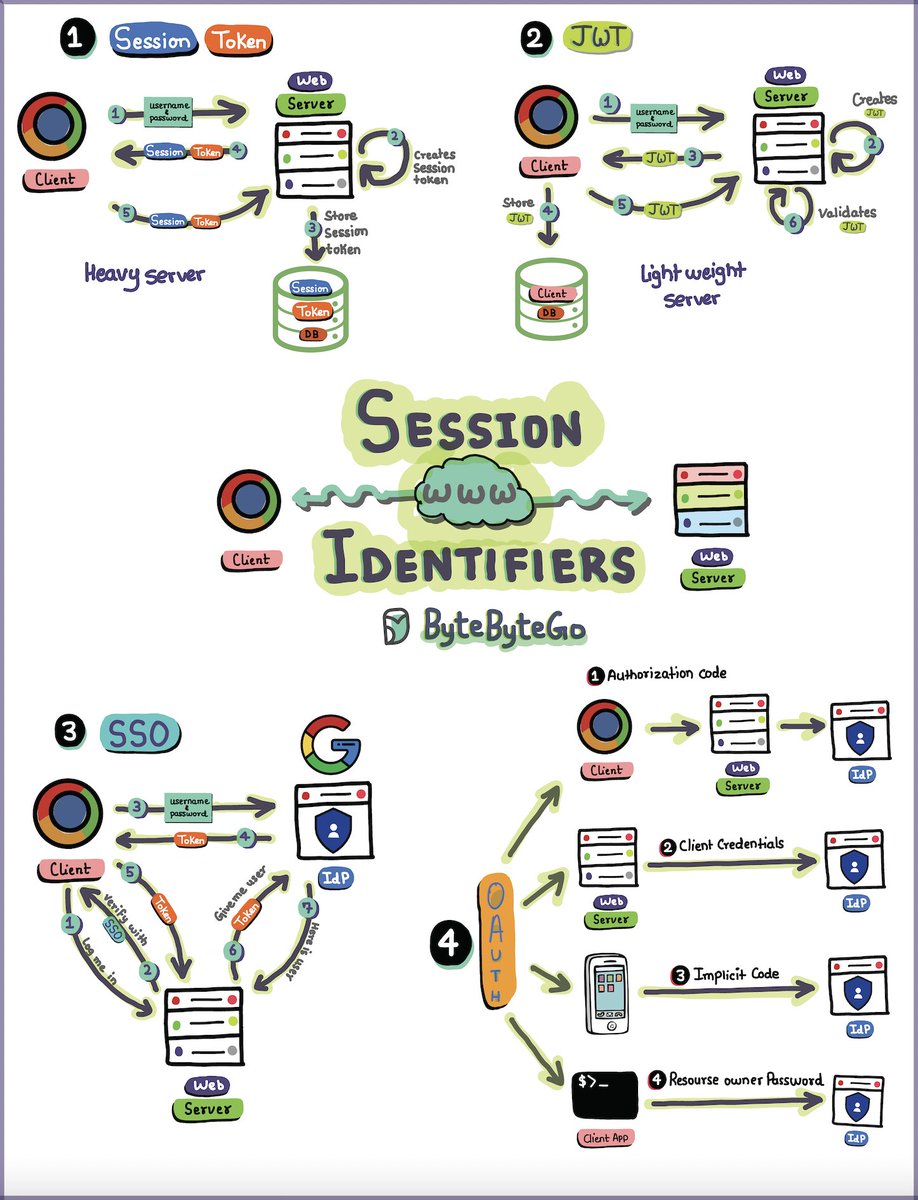
Explaining Sessions, Tokens, JWT, SSO, and OAuth in One Diagram. The method to download the high-resolution PDF is available at the end.
Understanding these backstage maneuvers helps us build secure, seamless experiences.
How do you see the evolution of web session management impacting the future of web applications and user experiences?
Subscribe to our newsletter to download the 𝐡𝐢𝐠𝐡-𝐫𝐞𝐬𝐨𝐥𝐮𝐭𝐢𝐨𝐧 𝐏𝐃𝐅 𝐨𝐟 𝐭𝐡𝐢𝐬 𝐝𝐢𝐚𝐠𝐫𝐚𝐦. After signing up, find the download link on the success page: https://t.co/65PhIVlGbS