Every Next.js dev eventually learns this : your app isn’t slow because of React, it’s slow because of how you fetch data.
→ Overusing client components
→ Fetching inside multiple nested components
→ Not caching responses
→ Forgetting to use revalidate or fetch cache: 'force-cache'
Master data fetching in Next.js, and you’ll feel like you unlocked a hidden level of performance.
@Chris_Batchel0r @amplifytheedge @eubankslastpen I always think that there can’t be that many factories each making copycat cereal, biscuits, butter, pasta, etc for each supermarket 😂 but no, apparently Waitrose cornflakes are better than Aldi ones with a different picture on the box.
Do AI models get "dumber" over time?
I can see why it might feel that way. But there's actually a simpler explanation: context!
Understanding what context is and how to manage it will help you get higher quality output from models.
And it's actually more approachable to understand than you might think!
You can think about working with AI like cooking. For example, let’s say we’re making a soup.
You have many inputs into the cooking process with all of the ingredients. You follow some path or recipe, keeping track of your progress along the way. And at the end, you have a tasty soup as a a result 🍲
Different chefs might add or modify the ingredients to their taste, and even if you follow the same recipe exactly, it might taste slightly different at the end. This is kind of like working with AI models!
Let’s look at a similar example for coding with AI:
1. You can have many inputs, like your current codebase and files, and a prompt to tell the AI model what you want to achieve
2. You follow a plan, sometimes human generated or suggested by the model itself, which can then create a todo list and check items off as it completes tasks
3. And the end, you get generated code you can apply to your project
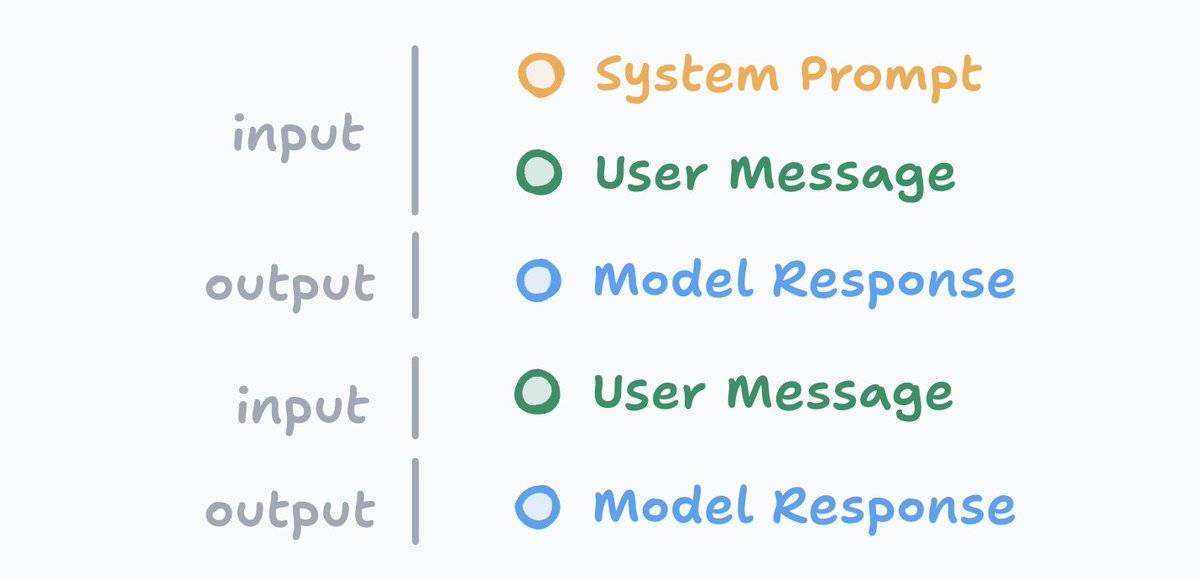
Your inputs, as well as the model outputs, all become part of the "context". Think of the context like a long list, where the AI model can keep a working memory for the conversation.
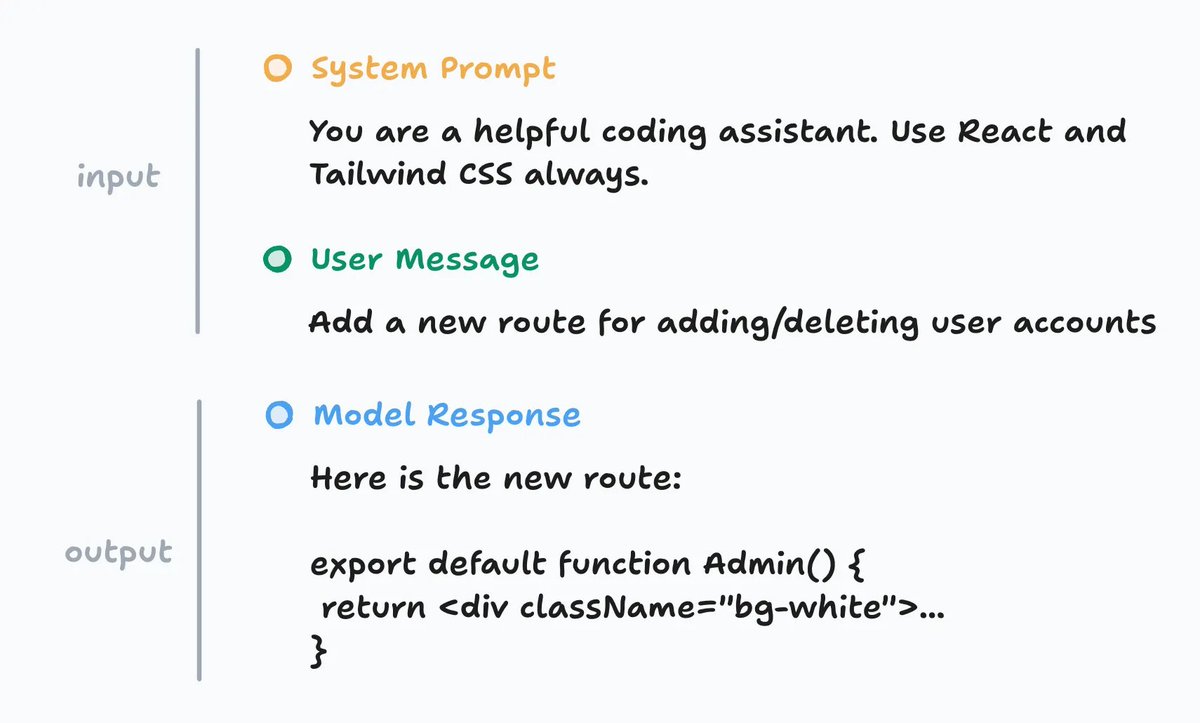
At the start of the list is a system prompt. This is how the tool creator can inject some instructions or style for the model to follow. It’s trying to help nudge the output in a certain direction, including defining specific rules to follow.
Then you have the user message or prompt. This could be any directions you want to give the model. For example, adding a new route to manage user accounts. You don’t have to use proper spelling or grammar, as AI models are surprisingly good at figuring out what you meant, but it still can’t hurt.
This prompt doesn’t have to be just text. Many AI products now support attaching images, where the underlying AI model can read and understand the contents of the image and include that result in the context.
For example, tools like Cursor can include other relevant information in the input context based on the state of your codebase. For example, your open files, the output from your terminal, linter errors, and more.
After sending the inputs to the model, it generates and returns back some output. For simple questions, this might just be text. For coding use cases, this could be snippets of code to apply to your codebase. Everything returned from the model is part of the output context.
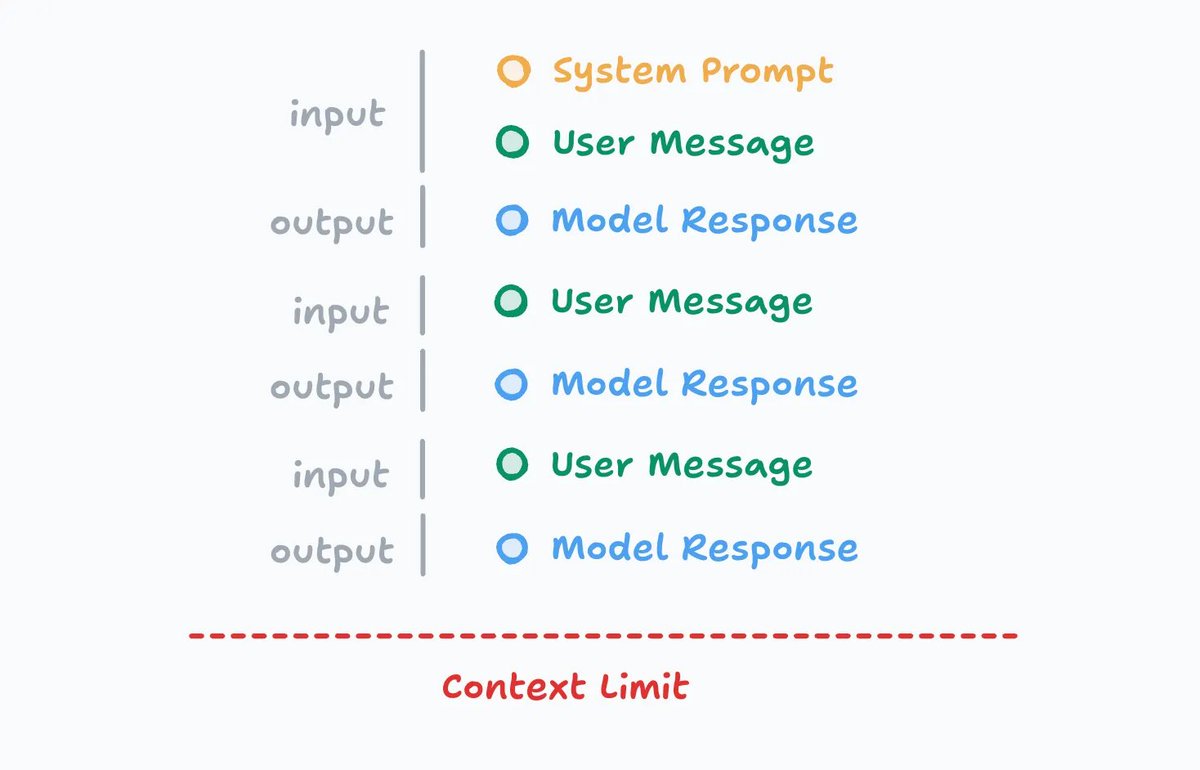
Your conversation may go on for many "turns" back and forth between you and the AI model. Every message in the conversation, including both inputs and outputs, is stored as part of the working memory in context.
The length of this list grows over time. This is important to note! Just like if you were having a conversation with a human, there’s only so much context you can keep in your brain at one time.
As the conversation goes on for a while, it gets harder to remember things people might have said 3 hours ago. This is why understanding and managing context will be an important skill to learn.
Every AI model also has a different context limit, where it will no longer accept further messages in the conversation, so many AI tools give the user feedback on how close they are to those limits or provide ways to compress and summarize the current conversation to stay under the limit.
Additionally, some models can "think" or reason for longer, which uses more output tokens and thus fills up the context window faster. Generally these models are more expensive and have better quality of responses for more complicated tasks.
Okay, that's all for now. I hope this better explains what context is and how it works. Anything missing you would add? Additional things you want me to cover? 👀
@Elainebks @Liesl_RW @garygilligan That’s part of the problem nowadays though, the banks let people borrow more and more which just inflates house prices - if it stayed at 1.5x salary things would be sweet
Some thoughts on Radix, component libraries, and shadcn/ui.
We’re at that point in the web dev cycle where we’re talking about component libraries again. That’s okay. With Radix receiving fewer updates, it’s a conversation worth having.
Let me start with this and I’ll bold it: The worst thing you can do right now for your production app is switch component libraries.
Don’t do it. That’s not where your time or resources should go. Whatever bug you’re seeing with Radix in your app, you’ll likely run into more, including new ones, with something else. (No shade to anyone. That’s just how code works.)
Yes, Radix is getting fewer updates. But Radix is still a mature, well-designed library, battle-tested and used in millions of production apps. Code doesn’t stop working just because maintainers move on. That’s the strength of open source. And what Radix does, it still does extremely well.
Here’s what I’d suggest:
- Already using Radix in prod? Stick with it.
- Starting a new project? Consider Radix, React Aria, or Ariakit. All great choices.
- Using Radix and thinking what's next? Keep an eye on Base UI (we are). It’s built by the same smart team that created Radix. They’ve done it once. Now they get to do it again and it’s looking really good (currently in beta).
- Hit a bug with Radix and can’t find a fix or patch? Try testing the equivalent from Base UI. The APIs are very similar.
- shadcn is built for this. Code you own. Code you can improve, rewrite or replaced.
The most important thing: Use something that works for you and that you understand. Your component library should be stable. This isn’t where you want to take risks in your tech stack.
Every new project (not just component libraries) goes through growing pains: bugs, API changes, missing features, incomplete docs. It’s okay to wait it out, especially for production apps.
Now, where does shadcn/ui fit into all of this?
shadcn (unfortunately named 😅) is not a component library. It’s an idea. It’s a combination of a few things: an open abstraction, great defaults, and a distribution system.
- An open abstraction built on top of several component libraries. Radix being one of them. It’s code you’d write yourself, structured in a way that’s easier to work with. Loved by LLMs.
- Carefully chosen defaults that handle the smaller things like focus states, animation styles, variants, and components that naturally fit with one another. Just enough to be a great starting point, and just enough to get out of the way when you’re ready to build your own design system.
- A distribution system that makes it easy to build, generate, and share code. Built for AI.
The component library is just one layer of shadcn. And if it ever comes to it, a swappable one.