We created a class neighborhood then took our @Ozobot Trick or treating this week! I loved seeing all the collaboration! Thanks @basdlibgirl and @estoverart for the help!
@SlidesManiaSM for the win again! It was fun creating this engineering project for my students. The clickable buttons made it so easy for them to navigate!
@Seesaw cheat sheets 🗂🌈
Today I collated all my Seesaw cheat sheets into one easy download!
Included are 20 cheat sheets:
💻blogs
💻folders
💻stickers
💻parent: how to comment
💻draw & record
Download it free!
https://t.co/dHRvWmlJuy
#seesaw#seesawchat#tech#techtips
Hey, Twitterverse! Help me reach @macklemore! 8th grade students at @BellefonteAMS have been analyzing the lyrics to his song Wing$ and they'd LOVE to hear his thoughts! Can you help us out with a retweet? We're hoping he could @zoom_us with us or create a video on @Flipgrid!
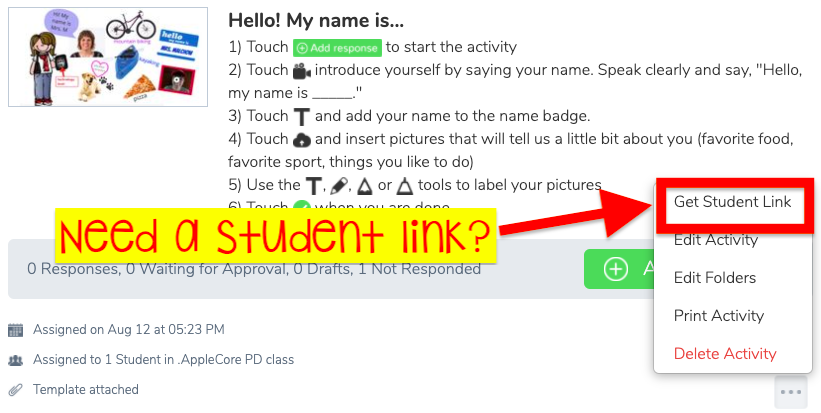
🎉Student links are now LIVE in @Seesaw!
🔗Need a direct link for Google Classroom? or Link an activity within an activity?
👉🏼Touch the 3 dots & experience the magic✨ for yourself!
How will YOU use this feature? Let's hear your ideas!
#BetterTogether#SeesawChat#RaiderStrong
🚨Classroomscreen is 🆕!! This amazing tool has some new AMAZING updates:
💾Save your screen and name lists
👩👩👧Group maker
↔️Resize widgets
💻Multiple active screens
⚙️Customize bar
Use it today - https://t.co/N85AF33UJB
#distancelearning#remotelearning
Thank you @KSzajner! I love the idea of a help form for our students who don’t have access to email! How to Embed a Help Form Button in an Activity https://t.co/AWOeF4ZORm via @YouTube
Later this year we’re rolling out these new teacher-requested features in #GoogleMeet:
✋Hand raising
🔇Mute all
🖍️Digital whiteboard
🏝️Custom backgrounds
😄Larger tiled-view
🔑New knocking and access controls
🔒Lock presentation screen & chat
➕more!
https://t.co/HcJp4sB2aa